



Harman Kardon ENCHANT SUB Wireless Subwoofer

Introduction
This manual includes information on the Harman Kardon Enchant Sub. We encourage you to take a few minutes to read this manual, which describes the product and includes step-by-step instructions to help you set up and get started. Read and understand all the safety instructions before using your product.
This product may have an important software update available. Please follow the instructions to connect the product to Wi-Fi to ensure that your product has the most recent software updates. Design and specifications are subject to change without notice. Some features require subscriptions or services not available in all countries.
What’s in the Box
Unpack the box carefully and ensure that the following parts are included. If any part is damaged or missing, do not use it and contact your retailer or customer service representative.
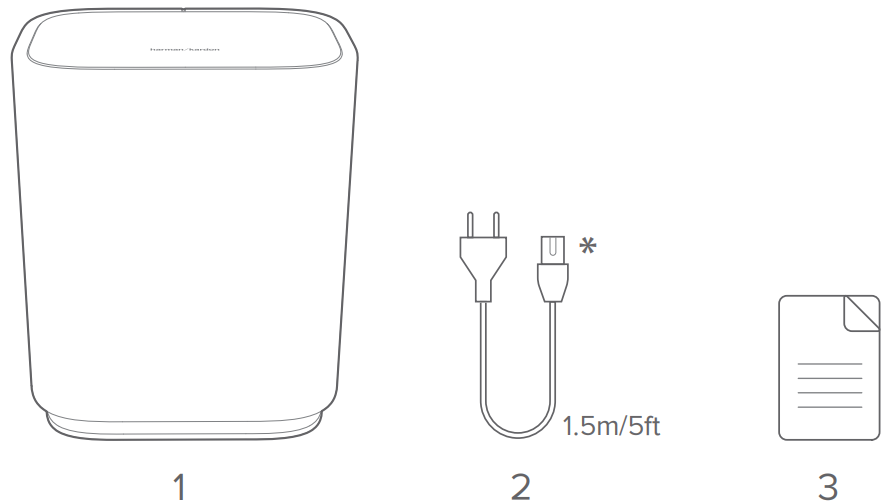
- Subwoofer
- Power cable*
- Product information
- Power cable quantity and plug type vary by region.
Overview
Back Panel
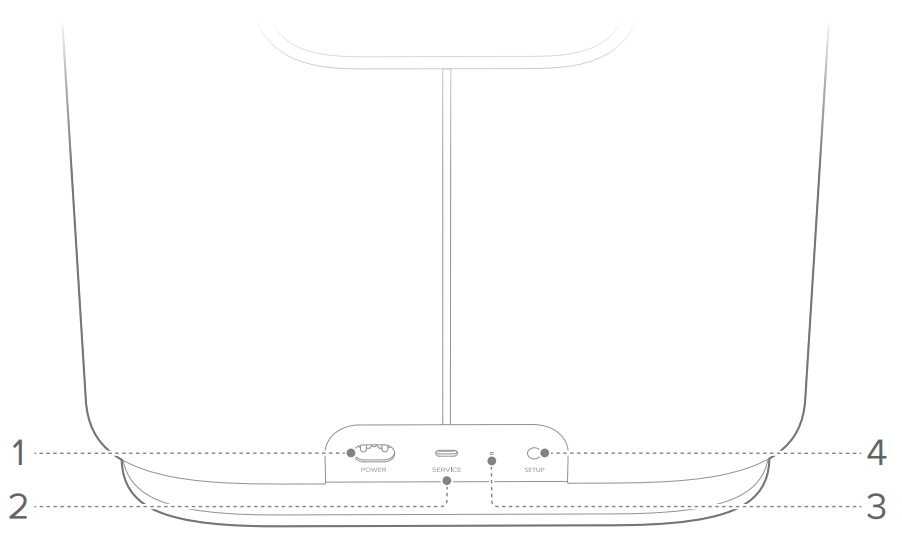
- POWER
- Connect to power (with the supplied power cord).
- SERVICE
- USB connector for software update (for service only).
- LED indicator

- SETUP
- Press twice to enter the setup mode.
- Hold for more than 10 seconds to restore factory settings.
Getting Started
Placement
Place the subwoofer on any flat and stable surface near an AC (mains) outlet. For a successful connection, keep a distance of 1 to 5 meters (3.3 to 16.4 feet) between the subwoofer and your Enchant soundbar.
Power on
 Plug one end of the power cord into the POWER connector on the back panel, and the other end into an AC (mains) outlet. The subwoofer will automatically power on.
Setup
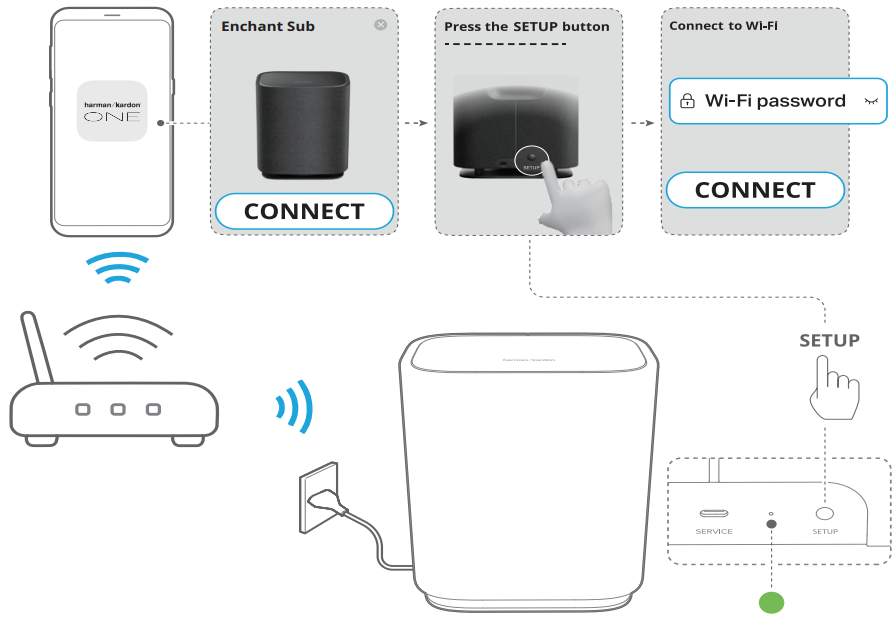
The subwoofer can only work with the Harman Kardon ENCHANT SUB Wireless Subwoofer Enchant soundbar. Follow the steps below to wirelessly connect with the soundbar.
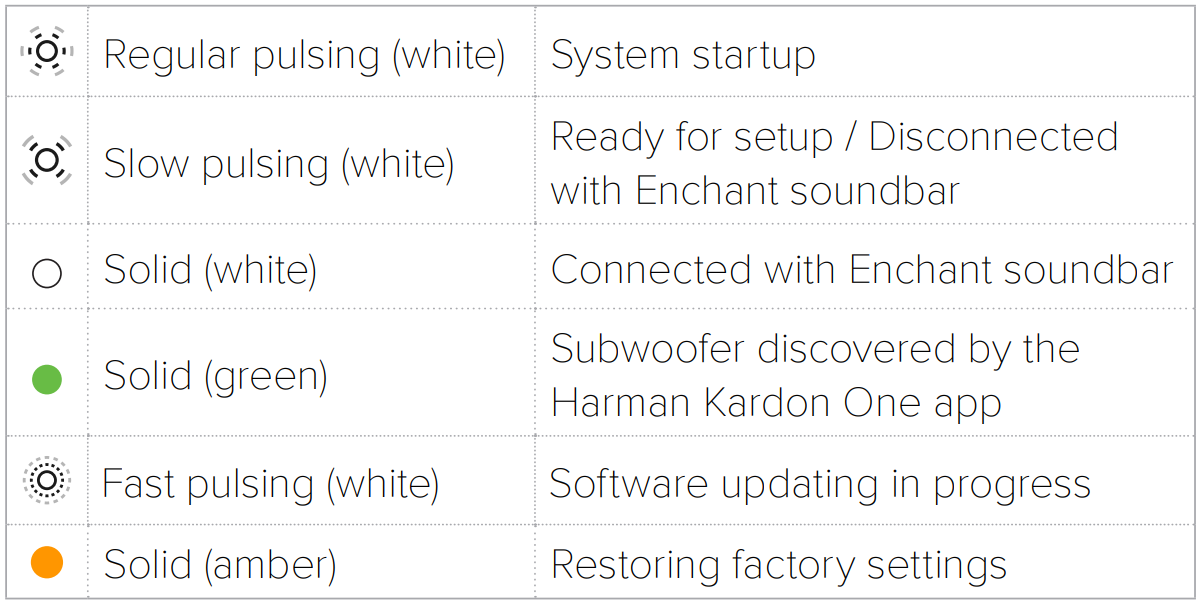
- Connect the subwoofer and your Enchant soundbar to power. (Slow pulsing white): ready for setup.

- Connect your Android or iOS device to your home network.
- Download and launch the Harman Kardon One app.
- Follow the app instructions to complete the setup.
- Connect your Enchant soundbar to your home network.
- Connect the subwoofer to the same network as your Enchant soundbar.


Restore Factory Settings
On the subwoofer, hold SETUP for more than 10 seconds to restore the factory default settings.
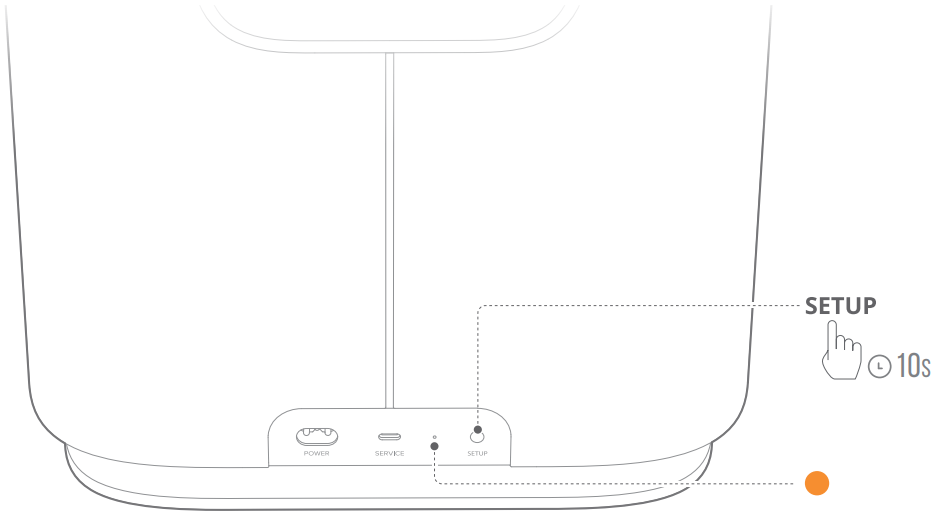
- (Solid amber): Restoring factory settings
- When the factory restore is complete, the subwoofer automatically restarts.
Specifications
General Specification
- Model: ENCHANT SUB
- Power supply: 100 – 240 V AC, ~50 / 60 Hz
- Output power (RMS @THD 1%): 100 W
- Transducer: 1x 6.5″ (164 mm) subwoofer
- Networked standby power: < 2.0 W
- Operating temperature: 0°C – 45°C
Wireless specification
- Wi-Fi network: IEEE 802.11 a/b/g/n/ac/ax (2.4 GHz / 5 GHz)
- 2.4G Wi-Fi transmitter frequency range: 2412 – 2472 MHz (2.4 GHz ISM Band, USA 11 Channels, Europe and others 13 Channels)
- 2.4G Wi-Fi transmitter power: < 20 dBm (EIRP)
- 5G Wi-Fi transmitter frequency range: 5.15 – 5.35 GHz, 5.470 – 5.725 GHz, 5.725 – 5.825 GHz
- 5G Wi-Fi transmitter power: 5.15 – 5.25 GHz < 23 dBm (EIRP), 5.25 – 5.35 GHz & 5.470 – 5.725 GHz < 20 dBm (EIRP), 5.725 – 5.825 GHz < 14 dBm (EIRP)
Dimensions
- Product dimensions (W x H x D): 305 x 378 x 225 mm / 12.0″ x 14.9″ x 8.9″
- Product weight: 6.7 kg / 14.7 lbs
- Packaging dimensions (W x H x D): 380 x 475 x 295 mm / 15.0″ x 18.7″ x 11.6″
- Packaging weight: 10.1 kg / 22.3 lbs
Troubleshooting
Never try to repair the product yourself. If you have problems using this product, check the following points before you request services.
No response to button presses
- Check if the power cord is plugged into the power outlet.
- Restore the subwoofer to factory settings (See “6 RESTORE FACTORY SETTINGS”).
No sound from the subwoofer
- Make sure that the subwoofer is connected to power.
- Make sure that the subwoofer is wirelessly connected to the Enchant soundbar (See “5 SETUP”).
Failed to connect to Wi-Fi
- Make sure that you have selected the right network and entered the correct password.
- Make sure that your router or modem is turned on and within range.
- Make sure that your subwoofer is connected to the same wireless network as your smartphone.
- If you have difficulties in setting up Wi-Fi, press SETUP twice to re-enter the setup mode (See “5 SETUP”).
One App
With the Harman Kardon One app on your Android™ or iOS device, you can set up a multi-channel sound system by wirelessly pairing your Enchant Sub with:
- Enchant 900 / 1100 (soundbar, sold separately): to enhance the bass performance.

- For more information, see “5 SETUP”.
Customer Service
- Address: Open Source, Gregor Krapf-Gunther, Parking 3, 85748 Garching bei Munchen, Germany.
- Website: www.harmankardon.com.
- Tel: (800) 422-8027
- Timings: Mon – Fri – 9:00 am 11:00 pm (ET) Sat – Sun – 9:00 am 5:00 pm
© 2013 HARMAN International Industries, Incorporated. All rights reserved.
1 Comment
Pingback: Harman Kardon ENCHANT Compact Wireless Speaker