



Bose AMU108 ArenaMatch Utility Loudspeakers
Safety Instructions
- Do not block any ventilation openings. Install in accordance with the manufacturer’s instructions.
- Only use attachments/accessories specified by the manufacturer.
- Do NOT make unauthorised alterations to this product.
- If you are not sure about installing the bracket, contact a qualified professional installer.
- The use of such hydrocarbon-based lubricants, solvents, or cleaning agents on or around the mounting anchors and screws can lead to degradation of the plastic material, possibly resulting in cracking and premature failure of the product.
- Keep the product away from fire and heat sources.
- Do NOT place naked flame sources, such as lighted candles, on or near the product.
- Consult the local authority having jurisdiction before installing this product.
- Only professional installers with the knowledge of proper hardware and safe mounting techniques should attempt to install any loudspeaker overhead.
ArenaMatch Utility Loudspeakers
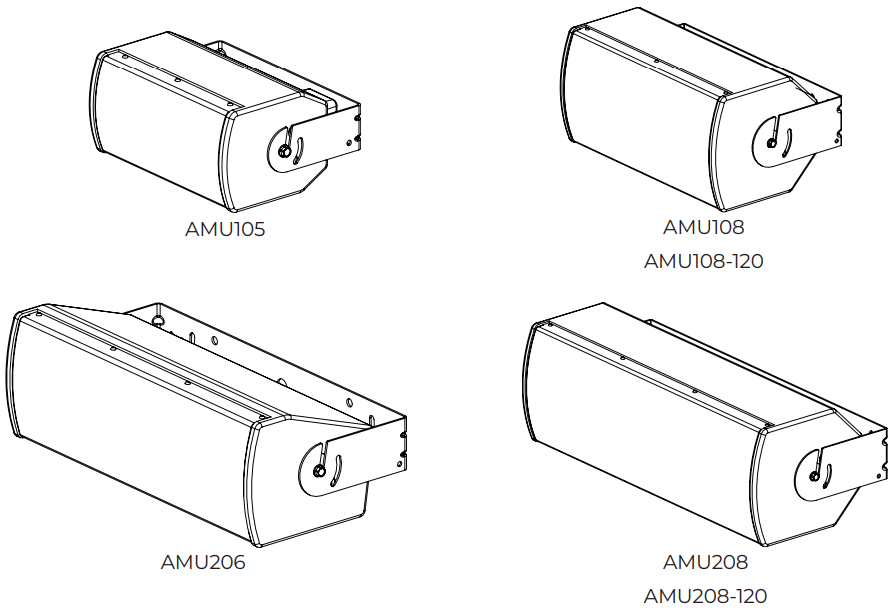
Package Contents
Each ArenaMatch Utility loudspeaker carton includes the following.g
| AMU105 | AMU108/ AMU108-120 | AMU206 | AMU208/ AMU208-120 | |
| Loudspeaker | 1 | 1 | 1 | 1 |
| U-bracket | 1 | 1 | 1 | 1 |
| M8 screws | 4 | 4 | 4 | 4 |
| M4 screws | 4 | 4 | 4 | 4 |
| Input cover | 1 | 1 | 1 | 1 |
| Rubber washers | 2 | 2 | 2 | 2 |
| T3 square drive | 1 | 1 | 1 | 1 |
Optional Accessories
The optional mounting accessories have not been assessed to EN 54-24.
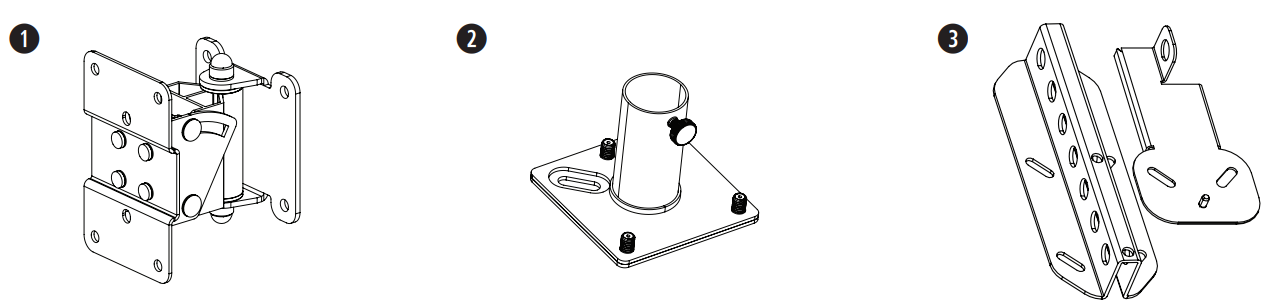
- Surface-Mount Pan and Tilt Bracket
- AMUPOLEAT Pole Adapter
- AMURAIL Suspension Rail
Maintaining Weather Resistance
ArenaMatch Utility loudspeakers are rated for direct-exposure outdoor installations. To maintain the weather Resistance, please observe the following precautions:
- During installation, angle the loudspeaker at least 5° downward to reduce the potential of rain compromising the performance of the loudspeaker.
- All mounting holes must be sealed off with steel screws or the included plastic plugs (pre-installed).
- The gland nut that secures the loudspeaker cable is factory sealed.
- Do not remove the gland nut of the other weather-resistant seal will be broken.
Recommended Tools
The following tools are recommended for assembly of an ArenaMatch Utility loudspeaker system:
- Flathead screwdriver
- 2 Phillips-head screwdriver
- 10-millimetre socket or wrench
- 5-millimetre hex key
- T3 square drive (included)
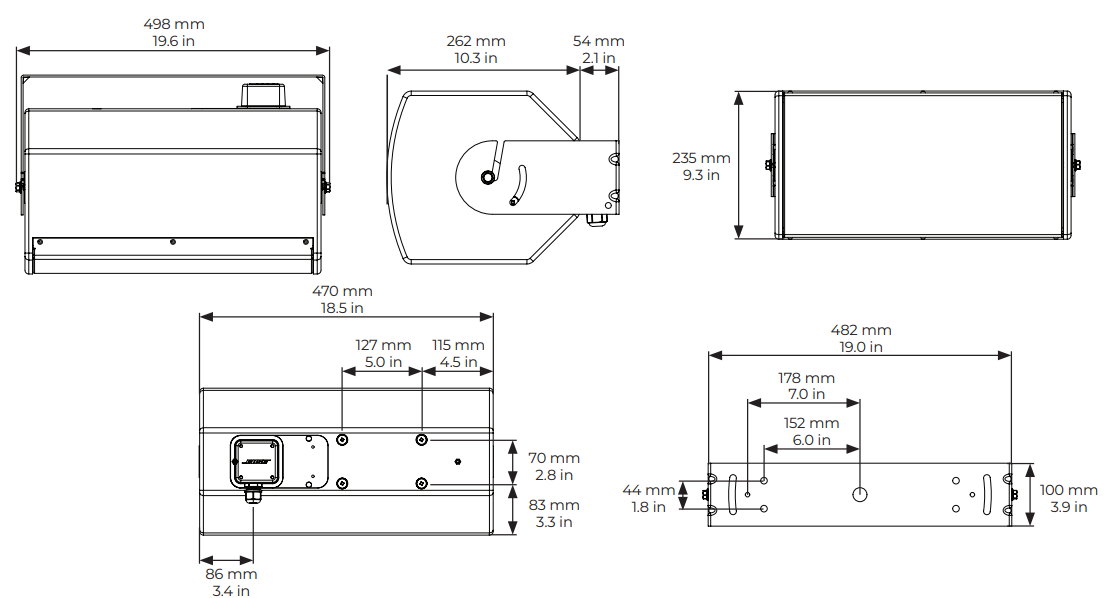
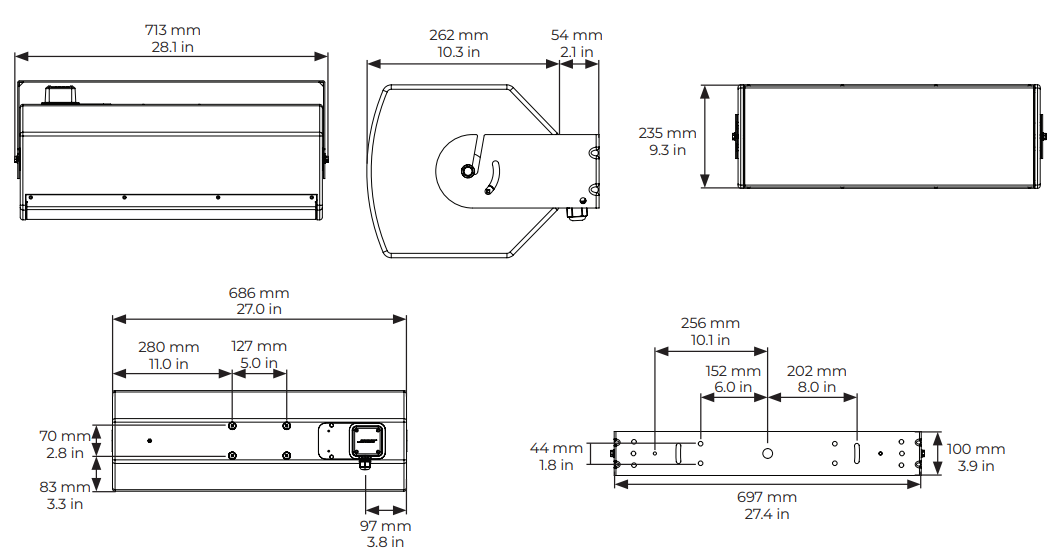
Dimensions
AMU105
Product net weight: 6.5 kg (14.4 lb) / 7.5 kg (16.5 lb) with U-bracket

AMU108 and AMU108-120
Product net weight: 10.6 kg (23.3 lb) / 12.6 kg (27.7 lb) with U-bracket.
AMU206
Product net weight: 12.2 kg (26.8 lb) / 13.8 kg (30.5 lb) with U-bracket
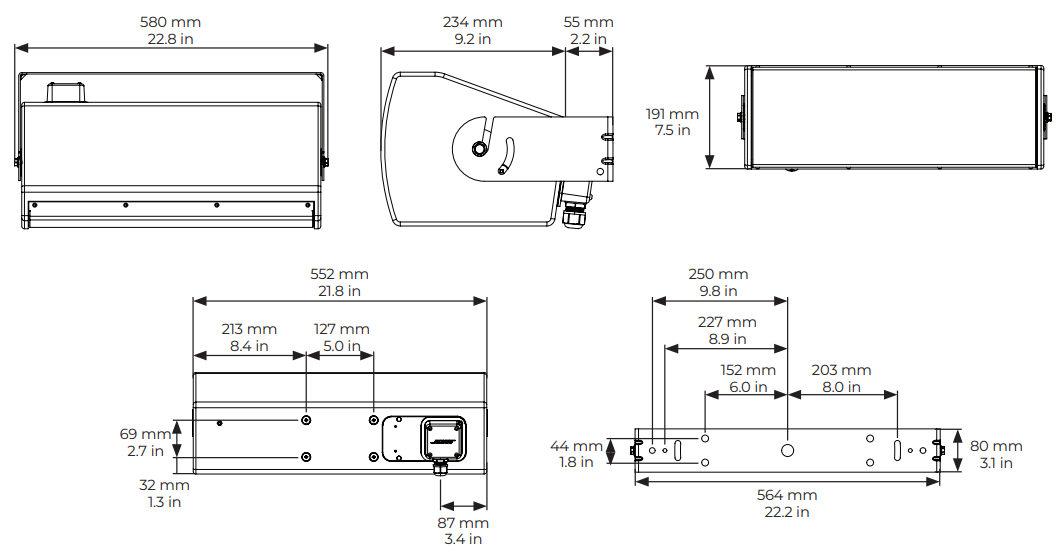
AMU208 and AMU208-120
Product net weight: 17.0 kg (37.5 lb) / 19.5 kg (43.0 lb) with U-bracket
Installation
Input Panel
The input panel for all models is identical. They include a single screw-terminal barrier strip. Each terminal accepts a wire gauge of 10 AWG (5.3 mm2) to 18 AWG (0.8 mm2).
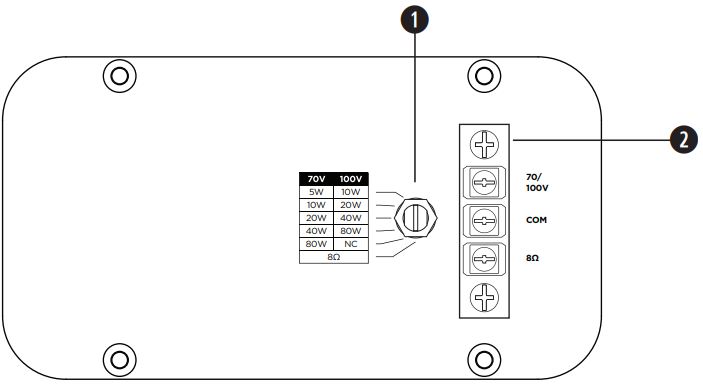
- Tap switch: Rotate to adjust tap setting. Use a flathead screwdriver.
- Barrier strip
Securing the Wiring
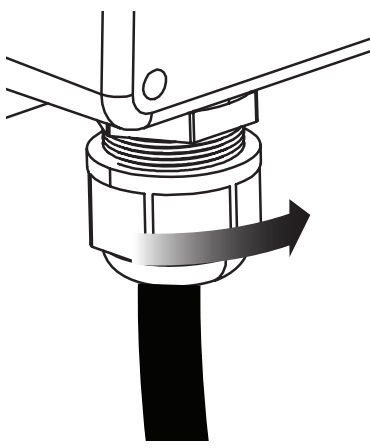
Feed the wiring through the gland nut on the bottom of the input panel. Do not over-tighten. Gland nut is rated IP68.
Attaching the Input Panel Cover
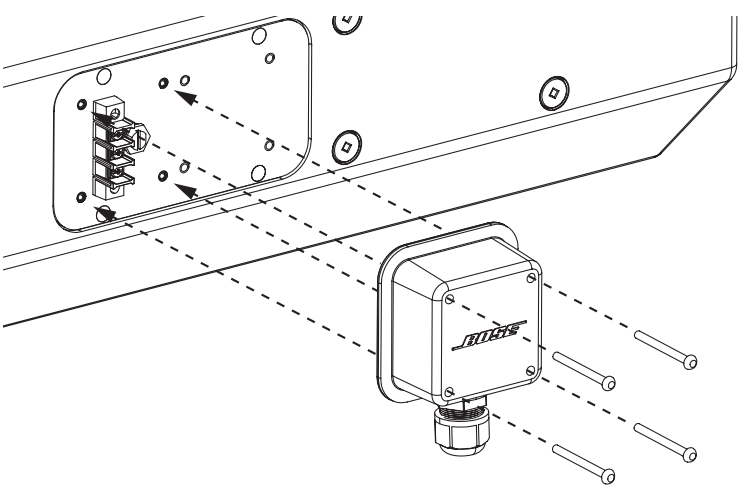
ArenaMatch Utility loudspeakers are shipped with the rear input panel cover not installed. Once you’ve made input wiring connections, secure the cover over the input panel with the included M4 screws.
Loudspeaker Pitch Angles
The maximum pitch angles for AMU loudspeakers when horizontally mounted with the included U-bracket are as follows
| Wall-mounted | Ceiling-mounted | |
| AMU105 | –110° | –110° |
| AMU108 | –110° | –110° |
| AMU108-120 | –110° | –110° |
| AMU206 | –110° | –110° |
| AMU208 | –110° | –110° |
| AMU208-120 | –110° | –110° |
The pitch angle is defined between the loudspeaker reference axis and the perpendicular axis to the mounting surface.
Mounting
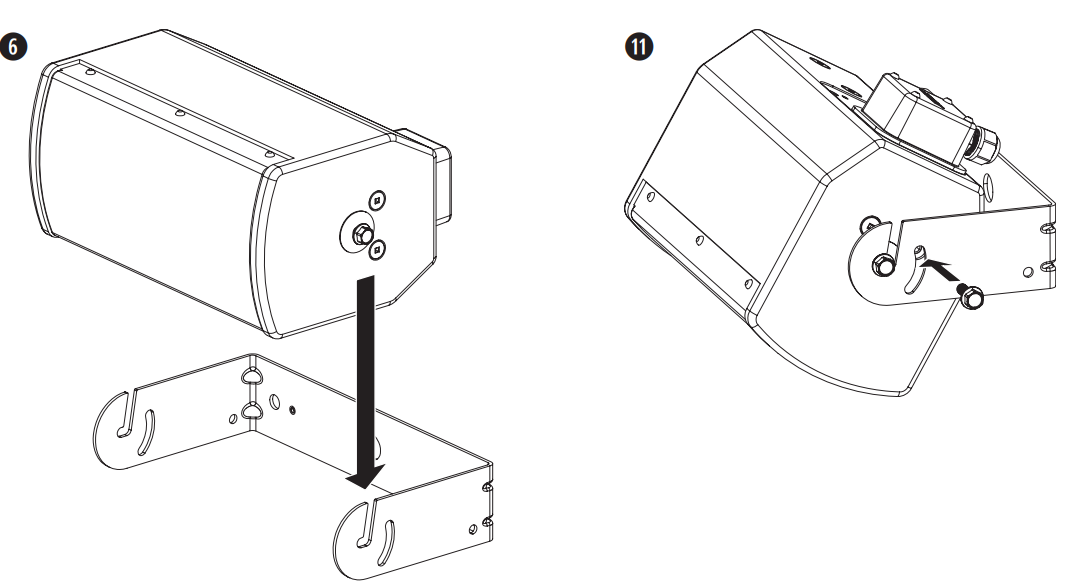
- Your loudspeaker installation design) on each side of the loudspeaker. loudspeaker. Do not tighten.
- Hold the U-bracket in the mounting location and mark the holes.
- Drill holes into the mounting surface using previously marked positions.
- Attach the U-bracket to the building surface using appropriate fasteners (not included)
- Hang the loudspeaker on the bracket by lowering the M8 screws into the bracket slots, keeping the rubber washers between the bracket and the speaker enclosure.
- Connect your wiring to your loudspeaker.
- Feed the wiring through the gland nut on the input panel cover and tighten the gland nut.
- Attach the input cover using the included M4 screws (see Attaching the Input Panel Cover on page 8).
- Position the loudspeaker in your desired pitch angle.
- Insert an M8 screw through the remaining open insert on each side of the loudspeaker.
- Tighten the four M8 screws with a 10-millimetre socket tool using a torque not to exceed 13.6 to 20.3 newton·meters (10 to 15 pound·feet).
Rotating the High-frequency Waveguides
To rotate the waveguide for vertical mounting, do the following.
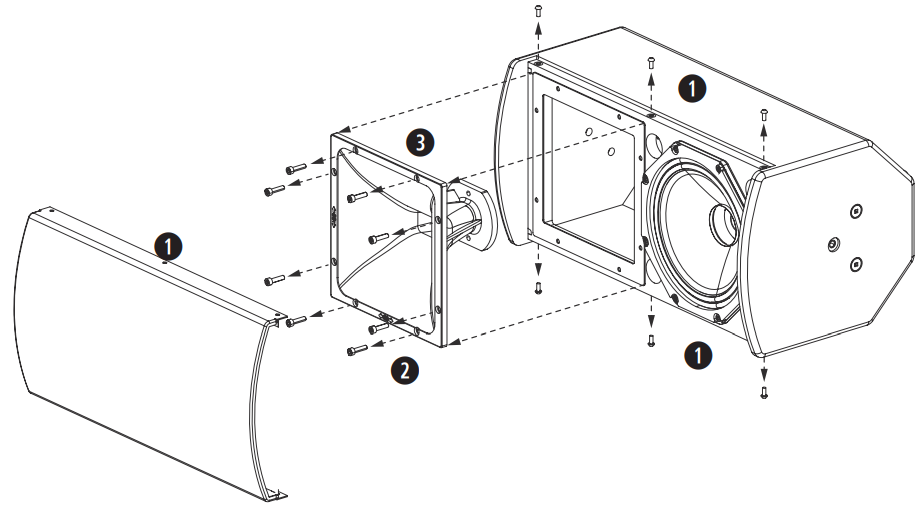
- Remove the screws (AMU108 and AMU108-120: 6 screws; AMU206, AMU208, and AMU208-120: 8 screws) from around the loudspeaker grille and remove the grille from the enclosure.
- Remove the eight waveguide screws.
- Pull the waveguide forward, rotate it 90°, and place it back into the enclosure.
- Secure the waveguide using the screws removed in Step 2.
- Reattach the grille using the screws removed in Step 1.
Amplifier Power
Selecting the proper amplifier size for a given loudspeaker requires analysis of the transducer’s long-term (or RMS) power rating, dynamic range of the input-source material (crest factor), desired sound pressure levels, and other factors.
| Loudspeaker | Nominal Impedance | Amp Power Rating |
| AMU105 | 8 Ω | 100 W to 400 W |
| AMU108 | 8 Ω | 200 W to 800 W |
| AMU108-120 | 8 Ω | 200 W to 800 W |
| AMU206 | 8 Ω | 250 W to 1000 W |
| AMU208 | 8 Ω | 300 W to 1200 W |
| AMU208-120 | 8 Ω | 300 W to 1200 W |
Technical Specifications
| EN 54-24 Certified Ratings1 | AMU105 | AMU108 | AMU108-120 | AMU206 | AMU208 | AMU208-120 | |
| Sensitivity (1W @ 4m) | |||||||
| 100V/80W | 75.3 dB | 77.3 dB | 76.8 dB | 77.0 dB | 81.0 dB | 79.8 dB | |
| Passive | 75.5 dB | 77.8 dB | 77.3 dB | 77.5 dB | 81.0 dB | 79.8 dB | |
| Measured max. SPL @ 4 m | |||||||
| 100V/80W | 93.1 dB | 96.7 dB | 96.2 dB | 96.3 dB | 99.3 dB | 98.1 dB | |
| Passive | 93.8 dB | 99.4 dB | 98.9 dB | 99.8 dB | 103.8 dB | 102.6 dB | |
| Coverage Angle Octave Band | |||||||
| 500Hz | Horizontal: | 299° | 196° | 272° | 138° | 110° | 122° |
| Vertical: | 278° | 186° | 186° | 216° | 189° | 193° | |
| 1000Hz | Horizontal: | 347° | 107° | 98° | 144° | 81° | 62° |
| Vertical: | 172° | 108° | 115° | 143° | 128° | 127° | |
| 2000Hz | Horizontal: | 67° | 105° | 145° | 93° | 113° | 146° |
| Vertical: | 121° | 86° | 108° | 97° | 80° | 115° | |
| 4000Hz | Horizontal: | 135° | 73° | 81° | 121° | 76° | 82° |
| Vertical: | 113° | 65° | 61° | 64° | 65° | 57° | |
| Passive Nominal Impedance | 8 Ω | 7.6 Ω | 7.6 Ω | 8 Ω | 8 Ω | 8 Ω | |
| Rated Noise Voltage/
Transformer Rated Noise Power |
100V / 80W | 100V / 80W | 100V / 80W | 100V / 80W | 100V / 80W | 100V / 80W | |
Footnotes
- The specifications data were measured in an anechoic chamber, free-field. The reference plane is on the grille surface. The reference axis is perpendicular to the centre of the grille surface. The horizontal plane contains the reference axis and is parallel to the horizontal axis defined by the longest baffle dimension.
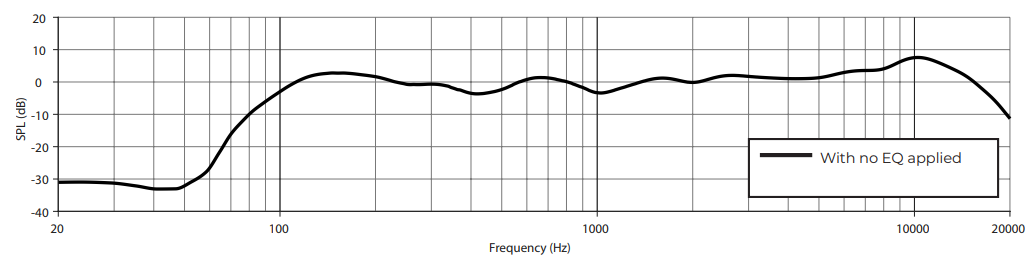
AMU105 Frequency Response
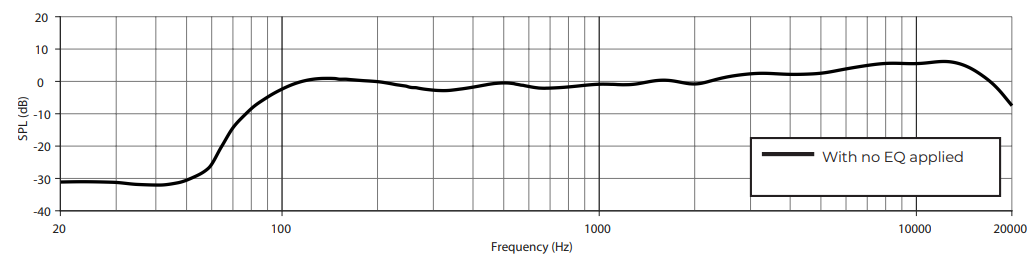
AMU108 Frequency Response
AMU108-120 Frequency Response
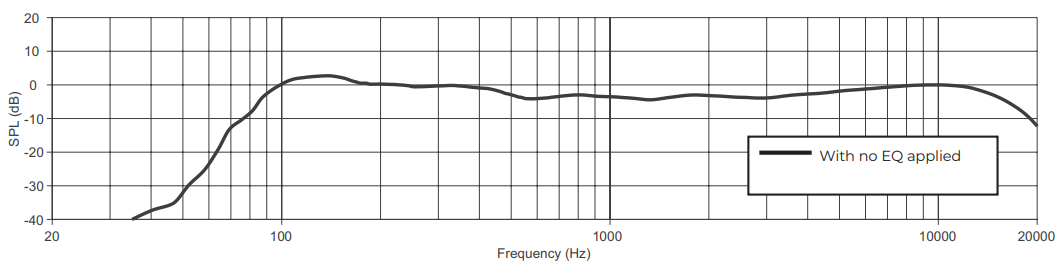
AMU206 Frequency Response
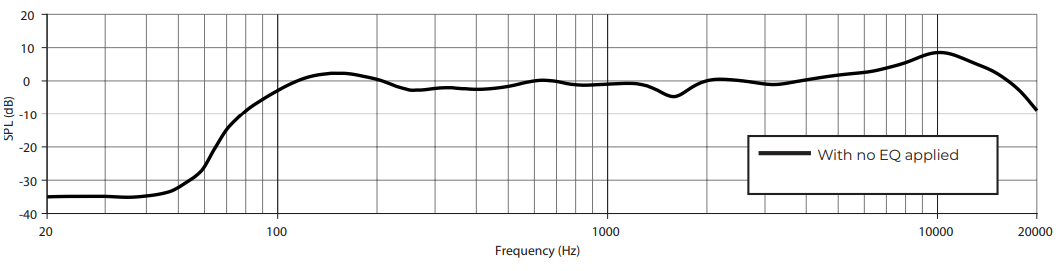
AMU208 Frequency Response
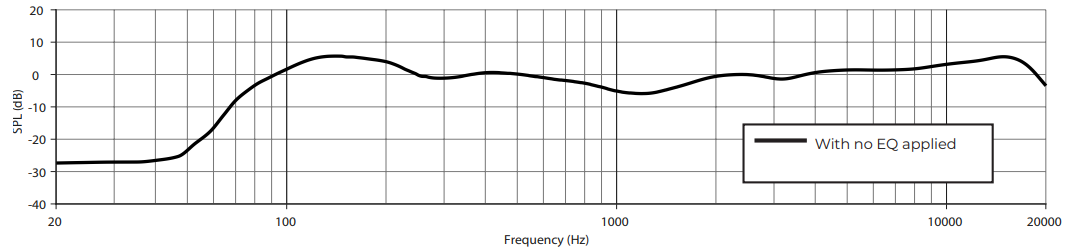
AMU208-120 Frequency Response
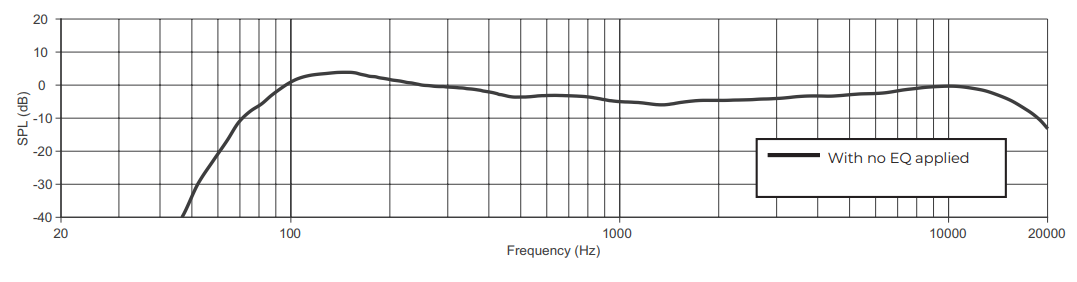
Regulatory Compliance
Environmentally rated to IP55
- This product conforms to all applicable EU directive requirements.
- Proper disposal and recycling help protect natural resources, human health, a nd the environment.
- For more information on the disposal and recycling of this product, contact your local municipality, disposal service, or the shop where you bought this product.
Warranty
- This product is covered by a limited warranty.
- For warranty details, visit BoseProfessional.com/warranty
Customer Support
- Tel: 1-800-278-1083
- Website: https://support.bose.com/
MA 01748 USA Bose is a trademark of Bose Corporation. ArenaMatch is a trademark of Transom Post OpCo LLC. ©2024 Transom Post OpCo LLC.
China Restriction of Hazardous Substances Table

Taiwan Restriction of Hazardous Substances Table

8 Comments
Your point of view caught my eye and was very interesting. Thanks. I have a question for you.
Thank you for your sharing. I am worried that I lack creative ideas. It is your article that makes me full of hope. Thank you. But, I have a question, can you help me?
Can you be more specific about the content of your article? After reading it, I still have some doubts. Hope you can help me.
Can you be more specific about the content of your article? After reading it, I still have some doubts. Hope you can help me.
Your article helped me a lot, is there any more related content? Thanks! https://www.binance.com/register?ref=IHJUI7TF
I don’t think the title of your article matches the content lol. Just kidding, mainly because I had some doubts after reading the article. https://accounts.binance.bh/register/person?ref=JW3W4Y3A
Thank you for your sharing. I am worried that I lack creative ideas. It is your article that makes me full of hope. Thank you. But, I have a question, can you help me?
I don’t think the title of your article matches the content lol. Just kidding, mainly because I had some doubts after reading the article.