

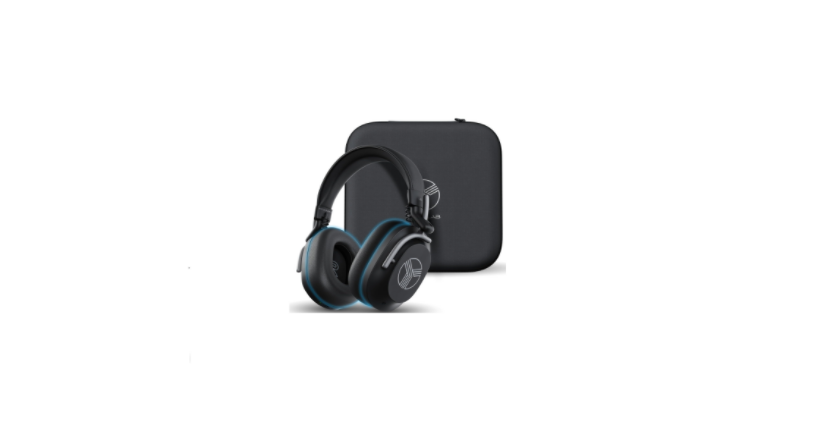

TREBLAB U5 Noise Cancellation Wireless Headphones
 Description
 Description
- TREBLAB U5 headphones
- User’s manual and quick start guide
- TREBLAB sticker
- Carrying case
- USB-C to USB-A charging cable
- USB-C to 3.5 mm AUX cable
Overview
The over-ear headphones with Hybrid Active Noise Cancellation technology provide superior sound quality and the convenience of hands-free operation.
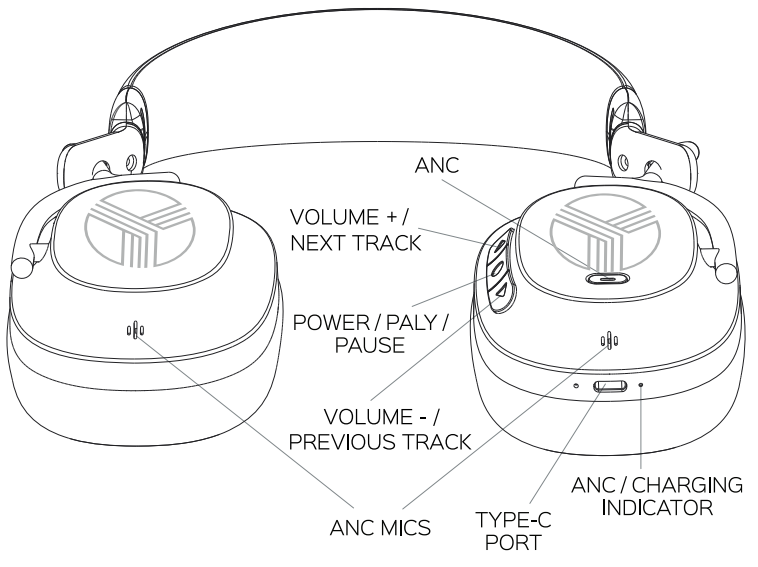
Function
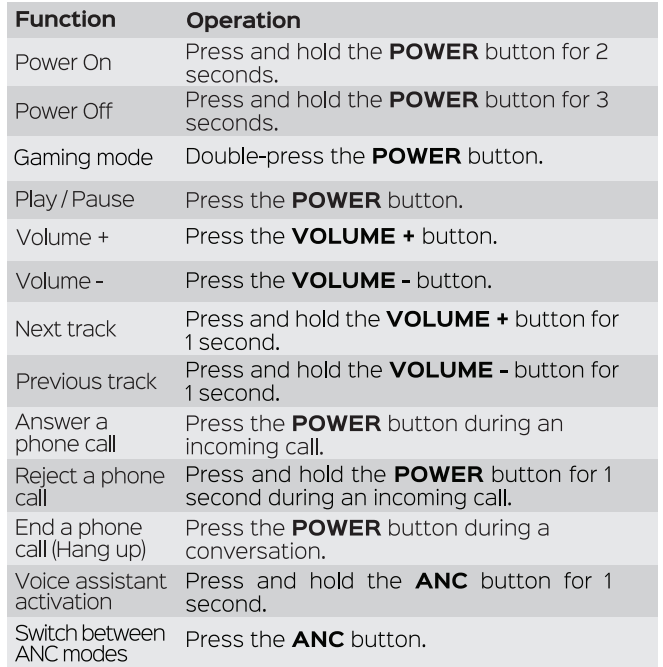
SETTING UP YOUR TREBLAB U5
Turn on
Press the POWER button for 2 seconds. You will hear severalsound prompts and the ANC button will start flashing white, indicating that the headphones are in the pairing mode.
Turn off
Press and hold the POWER button for 3 seconds. You will hear a sound prompt, and the white light on the ANC button will go off.
PAIRING
Make sure the TREBLAB U5 are charged, and the AuX cable is not plugged in.
- Press the POWER button for 2 seconds. You will hear severe-
All sound prompts, and the ANC button will start flashingwhite, indicating that the U5 headphones are in the pairing mode. - Activate the wireless communication function on your smart device and keep it within 3 feet / 1 meter from TREBLAB U5 while pairing.
- Scan/search for available devices in your smart device.
- Select TREBLAB U5 from the device list. If prompted for the password, enter “0000”.
- Once U5 are successfully paired and connected, you willhear the «beep» sound prompt, and the ANC button will have a steady white light.
MULTIPOINT CONNECTION
The TREBLAB U5 headphones have a multipoint connection. It allows two devices to be connected at the same time. While you won’t receive the input from both devices at the same time, you’ll be able to switchfrom one device to another seamlessly. To connect the U5 to the second device:
- Temporarily switch off the wireless mode on the first device the headphones are connected to.
- Repeat pairing steps 2-6 to connect the second device.
- Turn on the wireless communication function on the first device and connect the U5 again.
When you turn the headphones on, they will try to reconnect to the recently connected device/devices. If the connection does not happen automatically, the headphones will try to find the next device in the pairinglist. The headphones can save the last 6 devices.
GAMING MODE
TREBLAB U5 headphones support the gaming mode to reduce the audio latency up to 60 ms. This allows you to achievebetter video/audio synchronisation and improve your gaming and video-watching experience.
- To enable the gaming mode, double-press the POWER button. You will hear the one-tone sound prompt and feel the lower latency while gaming/watching videos.
- To disable the gaming mode, double-press the POWER button again. You will hear the two-tone sound prompt, and the latency will go back to the standard 200 ms.
AUDIO PLAYBACK
To pause and resume the playback when connected wirelessly, click the POWER button. To adjust the volume, click the VOLUME + button to turn the volume up and the VOLUME – button to turn the volume down. To change tracks on U5, press and hold the VOLUME + button for 1 second to play the next track and press and hold the VOLUME – button for 1 second to play the previous track.
AUX LINE-IN CONNECTION
You can connect TREBLAB U5 to compatible devices using the3.5 mm port on your device. Plug the Type-C end of the supplied AUX cable into the Type-C port on the right earcup, and plug the other end into the AUX.
ANC/AMBIENT SOUND MODES
The TREBLAB U5 headphones feature Hybrid Active Noise Cancellation technology. This technology provides the ability not only to decrease the surrounding noise in the ANC mode but also to amplify some frequencies in the Ambient Sound mode to hear voices when using the U5 headphones. When the U5 are turned on, the ANC mode is enabled automatically. To switch to the Ambient Sound mode, press the ANC button once. To disable both ANC and Ambient Sound modes, press the ANC button once again.
The sound prompts for the ANC modes are as follows:
ANC on – «Whap» sound prompt;
Ambient Sound – «ring-ring» sound prompt;
ANC off – «dong-dong» sound prompt.
PHONE CALLS
TREBLAB U5 can be used to make and receive phone calls when connected wirelessly. Audio playback will be paused during the calls. To answer a call: incoming call. Press the POWER button during an To reject a call: Press and hold the POWER button for 1second during an incoming call. To end a call: Press the POWER button when on a call.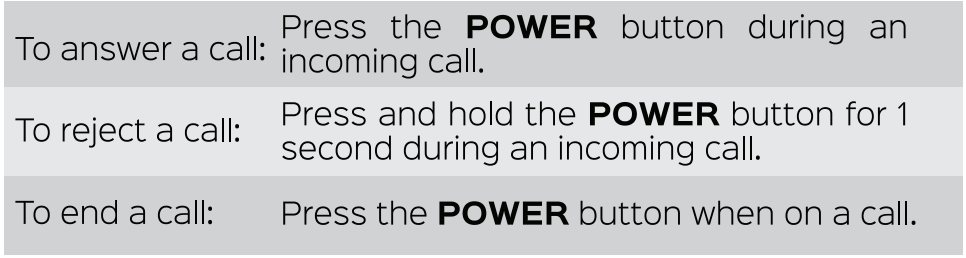
VOICE ASSISTANT ACTIVATION
The TREBLAB U5 headphones support the voice assistant activation command. To use any of the voice assistants while in the wireless mode, press and hold the ANC button for 1 second. After the sound notification, you can transmit your voice commands using an inbuilt mic.
RESET THE MEMORY LIST
You can reset the U5 headphones to the factory default settings by cleaning up the pairing list with the last 6 connected to the U5 devices. Turn the headphones on and make sure that they are disconnected from any device. Press and hold the VOLUME + and the VOLUME – buttons at the same time for 3 seconds. The headphones will automatically restart. The device memory is now returned to the factory settings.
CHARGING AND BATTERY
When the battery is running low, you will hear the sound prompt resembling a busy tone. To charge the headphones, plug the supplied cable into the Type-Ccharging port on the right earcup and the other end ofthe charging cord into a standard USB port of a wall charger or acomputer. The LED light next to the charging port will turn RED. It takes up to 4 hours to charge U5 fully. The RED light will turn BLUE when the headphones are fully charged. Be sure to use a 5V DC, 0.5-2A adapter or charger. Using a power source with lower power will increase the overall charging time. Unplug U5 from the charging cable and the cable from the power source when not in use. If left unused, a fully charged battery will lose its charge over time. We recommend charging the EBLAB U5 fully at least twice a month to maintain sufficient battery life.
TROUBLESHOOTING
Doesn’t turn on
Make sure the headphones are charged. Charge up to 4 hours until the battery is fully charged, if necessary. Press and hold the POWER button again for 2 seconds.
Music is not playing.
Make sure that the music is playing on the source device. Make sure the headphones are charged. Make sure the AUX cable is correctly and firmly connected to the headphones if you are using the AUX mode. Make sure theAUX cable has been removed from the headphones if you are using the wireless connection. Make sure the volume level is not set toana O level on both the headphones and the device. Make sure that the distance between your device and the headphones is less than 30 feet / 10 meters. Make sure your smart device’s wireless communication functionis on, and the device is not engaged in any kind of wired connection.
Headphones don’t pair with my device.ice
Make sure the AUX cable is not plugged in. Make sure the headphones are not paired with any other two devices, as they canpair only with two devices at a time. Make sure that the distance between your device and the headphones is less than 30 feet /10 meters. Make sure your smart device’s wireless communication function i,s on and the device is not engaged in any kind of wired connection. Reset your headphones to the factory settings by following the steps from the previous section. Try to pair again.
Headphones are visible on my device, but do not connect
Make sure the headphones are not paired with any other two devices, as they can pair only with two devices at a time. Make sure that the distance between your device and the headphones is less than 30 feet / 10 meters. Reset your headphones to the factory settings by following the steps from the previous section. Try to pair again.
I cannot find a wireless driver for my laptop.
Make sure your laptop supports the wireless connection. If it doesn’t, you will need an external wireless USB adapter compatible with your laptop. For further details, consult with your laptop manufacturer.
Frequent disconnection and noise
Make sure that the distance between your device and the headphones is less than 30 feet / 10 meters. Make sure that nothing is blocking the signal between your device and U5. Check if the headphones are running out of power.
SAFETY RULES
- Don’t disassemble or modify your headphones for any reason. Doing this may cause the headphones to malfunction or become combustible. The damage to your device can void your warranty.
- Do not let your device get wet – liquids can cause serious damage. Damage to your device caused by water can void your warranty.
- Make sure the headphones are completely dry before charging.
- Avoid exposing TREBLAB U5 to extreme temperatures (below 37°F / 3°C or above 112°F / 45°C). Extreme temperatures can cause the deformation of the U5 components, reduce the battery life and the lifespan of your new headphones.
- Don’t put the device’s LED lights close to humans’ or animals’ eyes.
- Do not use your U5 during a thunderstorm. Thunderstorms can cause serious malfunction and increase the risk of electric shock.
FCC STATEMENTS
FCC Compliance Statement – Part 15
This device complies with Part 15 of the FCC Rules. Operation is subject to the following two conditions:
- This device may not cause harmful interference, and
- This device must accept any interference received, including interference that may cause undesired operation.
FCC Interference Statement – Part 15
This equipment has been tested and found to comply with the limits for a Class B digital device, pursuant to Part 15 of the FCC Rules. These limits are designed to provide reasonable protection against harmful interference in a residential installation. This equipment generates, uses and can radiate radio frequency energy and, if not installed and used in accordance with the instructions, may cause harmful interference to radio communications. However, there is no guarantee that interference will not occur in a particular installation. If this equipment does cause harmful interference to radio or television reception, which can be determined by turning the equipment off and on, the user is encouraged to try to correct the interference by one of the
following measures
- Reorient or relocate the receiving antenna
- Increase the separation between the equipment and receiver.
- Connect the equipment into an outlet on a circuit different from that to which the receiver is connected.
- Consult the dealer or an experienced radio/TV technician for help.
RF Exposure Information
The device has been evaluated to meet general RF exposure requirements. The device can be used in portable exposure conditions without restriction.
RECYCLING
The headphones can be recycled, and they should be to keep our planet clean. Where should you bring them?
In the US, there are a couple of options: https://www.call2recycle.org
SPECIFICATIONS
- Speaker unit: 040 mm, 320
- Charging port: USB Type-C
- Dimensions: 210 x 195 x 78 mm / 8.26 × 7.67 x 3.07 in
- Weight: 265 g / 0.58 lbs / 9.34 oz
FAQs
How effective is the noise cancellation on the TREBLAB U5?
Using cutting-edge active noise cancellation technology, the TREBLAB U5 dramatically reduces low-frequency background noises like traffic, aeroplane engines, and office noise so you can concentrate on your calls or music.
Can I use the TREBLAB U5 headphones for phone calls?
Indeed. Even in somewhat busy settings, the TREBLAB U5’s integrated microphone provides crystal-clear speech pickup for voice assistants, video conferences, and phone calls.
How long does the battery last on a full charge?
The TREBLAB U5’s long-lasting playback on a full charge makes it appropriate for long listening sessions, travel, or workdays without frequent recharging.
Are the TREBLAB U5 headphones comfortable for long wear?
Of course. Whether you’re working, commuting or lounging at home, the headphones’ adjustable headband and soft ear cushions provide comfort during extended use.
Do these headphones support wireless connectivity?
Indeed. Smartphones, tablets, laptops, and other Bluetooth-capable devices can be connected to the TREBLAB U5 wirelessly over Bluetooth, providing a reliable and smooth connection.
Can I use the headphones without noise cancellation turned on?
Indeed. Without turning on noise reduction, you can enjoy the TREBLAB U5 in conventional listening mode, offering you a choice based on your surroundings and preferences.
Are the TREBLAB U5 headphones suitable for travel?
Indeed. They are a great option for long trips, public transportation, and air travel because of their wireless design, noise cancellation, and comfortable fit.
How long does it take to fully charge the headphones?
Using the provided charging cable, the TREBLAB U5 charges effectively and achieves a full battery in a comparatively short amount of time.