

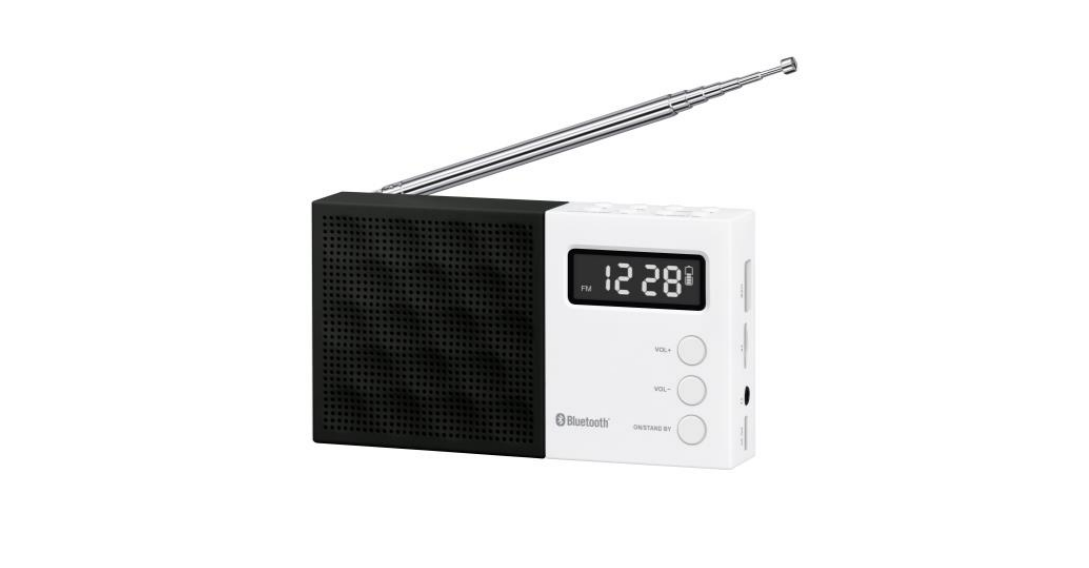

Adler AD 1908 Modern Digital PLL AM/FM Radio
Safety Instructions
- Connect the device only to a 5V⎓3A USB outlet.
- Take special care when using the device when children are around.
- Always remove the plug from the power outlet after use by holding the outlet with your hand.
- When removing the plug from the outlet, never pull on the power cord; only on the plug.
- Do not immerse the cable, lug, or the entire device in water or other liquid.
- Do not use the device near flammable materials.
- Do not leave the device or the power supply to the outlet unattended.
- Never use the device without water! This risks damaging it.
- Never direct a jet of hot steam or water toward your body.
- Never use the device with carbonated water!!!
- Never leave the device at temperatures below 0 degrees Celsius, as it risks damaging it.
- Always disconnect the device from the power supply before filling the tank with water.
- Use a liquid descaler designed for espresso machines to descale the machine.
- Never touch the brewing chamber during use.
- Use only original accessories.
- Do not rearrange or move the machine during operation.
Parts
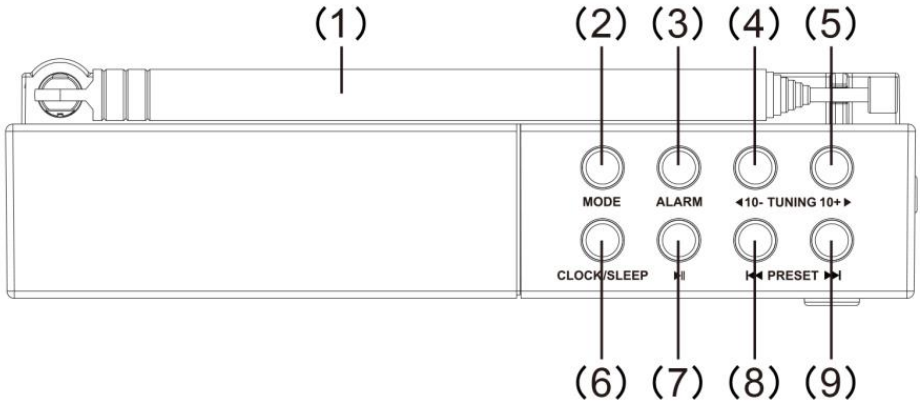
- ANTENNA
- MODE (FM / BLUETOOTH / USB / TF)
- ALARM SETTING
- TUNING –
- TUNING +
- SLEEP / CLOCK SETTING
- PAUSE PROG/PLAYBACK
- PRESET – / PREVIOUS
- PRESET + / NEXT

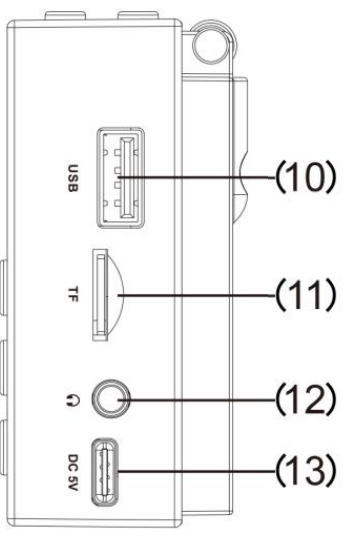
- USB PORT
- TF (MICRO SD) CARD SLOT
- HEADPHONE JACK
- DC 5 V SOCKET
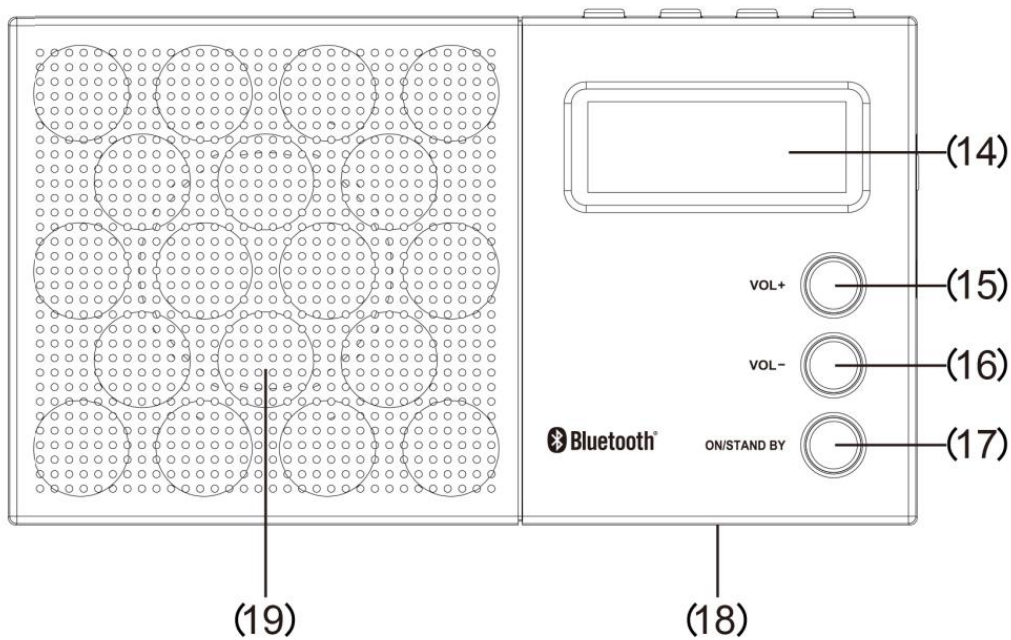
- LCD DISPLAY 15
- VOLUME + 16
- VOLUME –
- ON / STANDBY
- BATTERY COMPARTMENT COVER (REAR)
- SPEAKER
Instruction Manual
DC (battery) operation
Open the battery compartment door (18) and insert one 3.7V lithium-ion battery (included) according to the instructions in the compartment and close the battery cover.
Charging the Battery
Connect the device by inserting the USB charging cable (included) into the DC 5 V socket (13) and the other end into the USB interface or USB charger. Charging time is approximately 2 hours. The charging indicator will flash while the battery is charging. Do not charge the battery for more than 24 hours.
- Press the ON/STAND BY button (17) once to turn on the unit.
- The display will show the details of the radio station in radio mode.
- Select your station with TUNING + (5) or TUNING -(4).
- Adjust the sound with VOLUME + (15) or VOLUME (16).
- Press ON / STAND BY to enter standby mode
Bluetooth Function
- Turn on the device and press MODE to turn on the Bluetooth function.
- The Bluetooth indicator will flash on the display.
- Activate the Bluetooth function on your Bluetooth device.
- Select “AD 1908” on your Bluetooth device for pairing.
- The speakers will emit a pop sound to confirm a successful connection to the Bluetooth device.
- Start playing music on your Bluetooth device.
- Once connected, you can control playback, pause, and next previous functions directly from your Bluetooth device and device.
- Press and hold PROG for 3 seconds to disconnect Bluetooth function pairing.
- The Bluetooth indicator will start flashing when the Pairing is disconnected.
Specification
- Frequency range: FM: 87.5-108 MHz
- Speaker: 2-inch, 4-ohm dynamic speaker
- Output power: 1.2 watts RMS
- AC power supply: power adapter ⎓ 5 V
- Rechargeable battery: lithium-ion DC 3.7 V 800 mAh
- DC power supply: ⎓ 6 V (4 x 1.5 V “AAA”)
Environmental Instructions
- Dispose of cardboard packaging and polyethylene (PE) bags in the appropriate containers for separate collection of municipal waste according to their description.
- If there are batteries in the device, remove them and separately return them to the collection and storage facility. Return the used device to a suitable collection and storage facility, as the hazardous substances in it may pose a threat to health and the environment.
- Waste electrical equipment is waste that contains substances harmful to humans, animals, and the environment.
- These substances can lead to contamination of the soil, water, or air, and through this they can get into the human body and lead to numerous health ailments, such a vision, hearing, and speech disorders; they can also lead to kidney, liver, and heart damage, and cause skin diseases.
- Harmful substances can also have adverse effects on the respiratory and reproductive systems and lead to cancerous changes. Consumption of plants growing on the contaminated soils, and products made from them, may risk the above-mentioned health effects.
- Do not dispose of the device in the municipal Adler AD 1908 Modern Digital PLL AM/FM Radio waste container!!! Service: If you wish to purchase spare parts or report any complaints, please contact directly with the seller who issued the receipt directly.
Customer Service
- Website: service@adlerglobal.com.
- Ph: 0800 9753 003
- Timings: Mo – Fr, 8:30 am – 5:00 pm
FAQs
What makes the Adler AD 1908 radio different from other radios?
Phase-Locked Loop (PLL) digital tuning of the Adler AD 1908 ensures accurate and steady frequency reception free from drift. Additionally, it has a clear digital display, preset memory, and a contemporary appearance that blends traditional radio listening with contemporary convenience.
What is PLL technology?
Your selected station will stay clear without the need for manual re-tuning over time thanks to PLL (Phase-Locked Loop) technology, which enables precise and consistent frequency locking.
How do I turn the radio on and off?
To turn the radio on, press the Power/Standby button. To put it in standby mode or turn it off, press it one more.
How do I switch between AM and FM bands?
To switch between AM and FM modes, use the “Band” button. The screen will show the band that is now playing.
How can I manually tune a station?
To find the station you want, gradually change the frequency using the Tuning + / – buttons.
How can I use the auto-scan feature?
For a few seconds, press and hold the Scan button. The next available station will be found by the radio automatically, and it will stop there.
How do I save a station to memory?
After selecting a station, attach it to a preset number by holding down the Memory key or a Preset button (1–10). Later on, you can easily access it.