

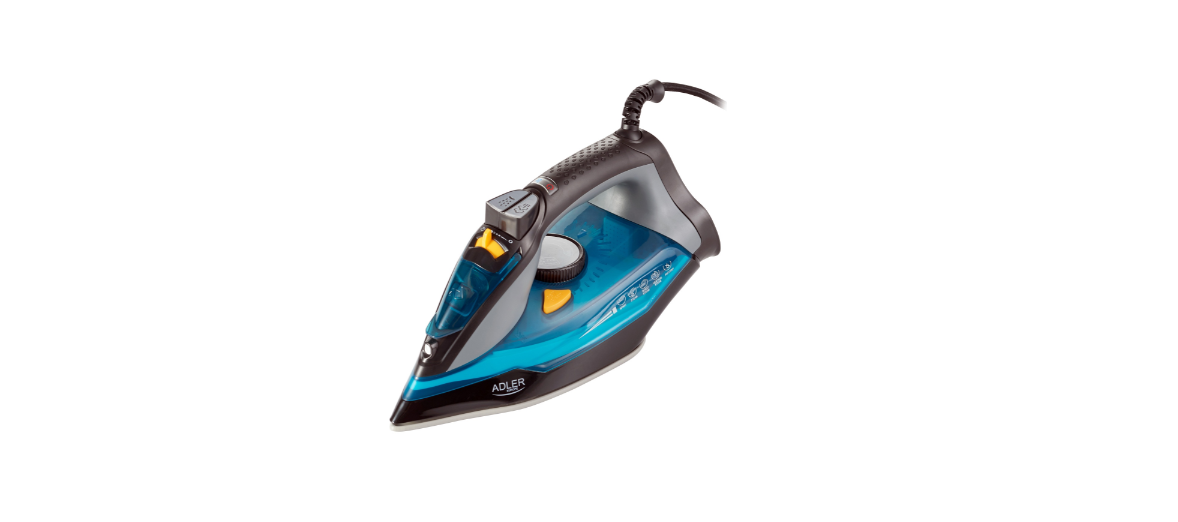

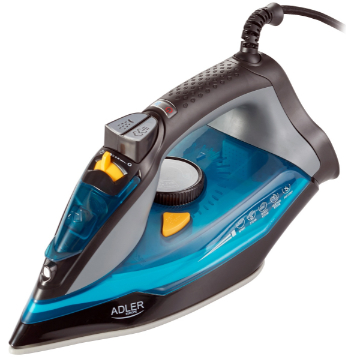
Adler AD 5032 Multi-Functional Steam Iron
Safety Instructions
- Before using the product, please read carefully and always comply with the following instructions.
- The manufacturer is not responsible for any damages due to any misuse.
- Do not use the product for any purpose that is not compatible with its application.
- The applicable voltage is 220-240V, ~50/60Hz.
- For safety reasons, it is not appropriate to connect multiple devices to one power outlet.
- Please be cautious when using around children.
- Do not let the children play with the product.
- Do not let children or people who do not know the device use it without supervision.
- Never leave the product connected to the power source without supervision.
- Even when use is interrupted for a short time, turn it off from the network, unplug the power.
- Never put the power cable, the plug, or the whole device into the water.
- Never expose the product to the atmospheric conditions such as direct sunlight or rain, etc.
- Never use the product in humid conditions.
- Never use the product close to combustibles.
- Do not let the cord hang over the edge of the counter.
- Do not immerse the motor unit in water..
- Always, before filling with water or when the steam iron is not used, unplug it from the mains.
- Touching a hot soleplate, contact with hot steam, or water may cause burns.
- DO NOT allow for prolonged contact with hot steam on fabric or flammable materials.
- If you do not use iron, even for a short time, turn off the option for steam.
Description
- Spray nozzle
- The water inlet hole
- Steam control switch
- Spray button
- Steam burst button
- Power Cord
- Rotary cable gland
- Heating / Thermostat indicator light I. Temperature control knob – thermostat J. Self-clean button
- Water tan
- Ceramic-coated soleplate
- Power indicator light
- Synthetic fabric – one drop natWa٨:٥٨n٨_hua dran
Indicator Light
Plug in the iron, the power indicator light (M) turns on (always), when the thermostat works, the heating indicator light (H) turns on, once the thermostat is off, the heating indicator light (H) turns off.
Filling the Water
- Set the steam control (C) to “0” (= no steam).
- Open the water filling cover and turn the iron at a 45° angle to a flat, dry surface.
- Fill the water tank with water to “MAX”.
- Push the water filling cover to close it.
Prepation
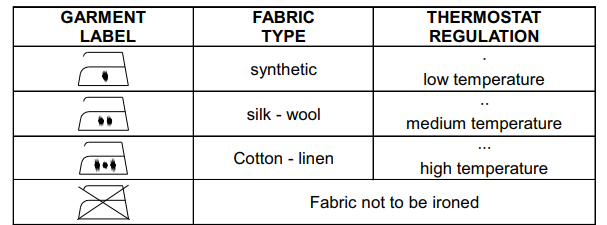
Sort the laundry to be ironed according to the international symbols on the garment label, or if this is missing, according to the type of fabric
Before First Use
When using the iron for the first time, you may notice a slight emission of smoke and hear some sounds made by the expanding plastics. This is quite normal, and it stops after a short time. We also recommend passing the iron over an ordinary cloth when using it for the first time. In a new iro, you may find residual water, which is caused by a routine seal test during mass production.
Function
- Connect the power cord of the appliance to the wall outlet
- Make sure that the steam control switch (C) is in the “0” position.
- When the iron reaches the required temperature, the heating indicator light (H) will turn off.
- After use, turn the temperature control knob (I) to the “OFF” position.
- Remove the plug from the wall socket
Spraying
- Fill the water tank with water as described in “Filling with water”.
- Press the water spray button (D).
- Note: No matter what, steam ironing of dry ironing is, a spray will always be available in any case.
Steam Ironing
- Fill the water tank with water as described in “Filling with water”.
- Plug in. The power/heating indicator lights (M / H) will turn on.
- Turn the temperature control knob (I) clockwise to the “MAX” position. Do not turn the switch to” N” or “O” for steam ironing.
- When the iron reaches the required temperature, the heating indicator light (H) will turn off.
- Adjust the steaming by moving the steam control switch (C).
- After use, turn the temperature control knob (I) to the “OFF” position.
- Remove the plug from the wall socket.
- After each use, make sure that the water tank is empty.
Caution: Do not steam iron synthetic fabrics, nylon, synthetic silk, or silk fabrics. Steam can ruin the texture of the fabric.
Burst of Steam Function
This function will be able to provide more steam to remove stubborn creases.
- Set the temperature control knob (l) to MAX until the indicator light (H) goes off.
- Release the steam by pressing the steam button (E). Wait for several minutes and let the steam
- penetrate through the fabric, and then release more steam by pressing this
Vertical Steam Ironing
- Fill the water tank with water as described in “Filling with water”.
- Plug in. The power/heating indicator lights (M/H) will turn on.
- Turn the temperature control knob (I) to the “MAX” position.
- Do not turn the switch to” N” or “O” for steam ironing.
- Hang the garment on a clothes hanger and pull the garment tight with one hand.
- Touch the garment lightly with the soleplate of the iron to remove creases:
- After use, turn the temperature control knob (I) switch to the “OFF” position.
- Remove the plug from the wall socket.
- After each use, make sure that the water tank is empty.
- Caution: Do not use steam ironing on clothes or fabrics that are worn by people or animals.
- The temperature is too high.
Self Cleaning
- Fill the water tank with water up to “MAX”.
- Do not use vinegar or other descaling liquids in the water tank.
- 2. Plug in and turn the temperature control knob (l) to the “MAX” position.
- The power/heating indicator lights (M/H) will turn on.
- When the heating indicator light (H) turns off, unplug.
- Hold the iron in a horizontal position above the sink. Press and hold the Self-Clean button (J).
- Gently move the iron back and forth until the water tank is empty.
- When the water tank is empty, release the self-clean button.
- Allow the iron to cool down completely.
- Wipe the soleplate with a cold, damp cloth.
Anti-Drip System
This iron is equipped with a drip stop function: the iron automatically stops steaming when the temperature is too low to prevent water from dripping out of the soleplate.
With the anti-dripping system, you can perfectly iron even the most delicate fabrics.
Auto Shut Off
- An electronic safety device will automatically switch the heating element off if the iron has not been moved for more than 30Seconds in a horizontal position. If in a vertical position, this will happen after 8 minutes.
- When picking up the iron again, the power indicator light (M) and the heating indicator light (H) will turn on. This indicates that
After Ironing
To extend the working life of the iron, whenever you finish ironing, you are recommended to empty the reservoir as follows: Unplug from the mains socket. Empty the iron by opening the water tank cover and holding it with the tip pointing downwards.
Shake it lightly above a sink, then close the cover. To dry the remaining moisture, turn the iron on again with the thermostat control knob (I) in the MAX position with the steam control switch (C) in the MAX position until the Power indicator light (M) goes off. Unplug from the mains socket and allow it to cool down. Clean the soleplate with a dry cloth, as traces of moisture could mark it.
Cleaning & Maintainance
Before cleaning, remove the plug from the socket and allow the iron to cool down sufficiently.
- Wipe off the soleplate with a damp cloth and a non-abrasive (liquid) cleaner.
- If the fiber is adhered to the soleplate, use a damp Adler AD 5032 Multi-Functional Steam Iron cloth with vinegar to wipe off the soleplate.e
- Never use strong acid or alkali in order to avoid damaging the soleplate.
Technical Data
- Voltage: 220-240V ~50/60Hz
- Power Nom.: 2400W
- Power Max: 3000W
Environmental Instructions
- Dispose of cardboard packaging and polyethylene (PE) bags in the appropriate containers for separate collection of municipal waste according to their description.
- If there are batteries in the device, remove them and separately return them to the collection and storage facility. Return the used device to a suitable collection and storage facility, as the hazardous substances in it may pose a threat to health and the environment.
- Waste electrical equipment is waste that contains substances harmful to humans, animals, and the environment.
- These substances can lead to contamination of the soil, water, or air, and through this they can get into the human body and lead to numerous health ailments, such a vision, hearing, and speech disorders; they can also lead to kidney, liver, and heart damage, and cause skin diseases.
- Harmful substances can also have adverse effects Adler AD 5032 Multi-Functional Steam Iron on the respiratory and reproductive systems and lead to cancerous changes. Consumption of plants growing on the contaminated soils, and products made from them, may risk the above-mentioned health effects.
- Do not dispose of the device in the municipal waste container!!! Service: If you wish to purchase spare parts or report any complaints, please contact directly with the seller who issued the receipt directly.
Customer Service
- Website: service@adlerglobal.com.
- Ph: 0800 9753 003
- Timings: Mo – Fr, 8:30 am – 5:00 pm
FAQs
What is the Adler AD 5032 Multi-Functional Steam Iron designed for?
The Adler AD 5032 is a multipurpose steam iron designed to make ironing quick and easy. It is appropriate for a variety of textiles and clothing kinds because it has several ironing modes, including dry ironing, continuous steam, vertical steaming, and spray mist.
Can I use the iron without water?
Indeed. Just put the control in “Dry” mode and leave the tank empty. For fragile textiles that cannot withstand steam or moisture, this is perfect.
How do I adjust the temperature for different fabrics?
A fabric selector dial on the AD 5032 has settings for cotton, linen, wool, silk, nylon, and other fabrics. To prevent burning sensitive textiles, always start with the lowest temperature and raise it gradually.
Can I iron vertically with this model?
Indeed! It is possible to use the Adler AD 5032 as a vertical steamer. To remove wrinkles quickly, hold the iron upright and aim the steam towards drapes or hanging clothing; an ironing board is not necessary.
What does the spray button do?
Before ironing, the spray mist feature helps to soften stubborn creases by misting your clothing with a fine water mist. It works particularly well with heavier materials like linen or denim.
How often should I clean my steam iron?
Depending on water hardness and usage frequency, use the self-clean feature once every two to four weeks for optimal results.
Can I leave water in the tank between uses?
No. After every usage, always drain the tank and quickly heat the iron to remove any last traces of moisture. This stops leaks and mineral accumulation.