

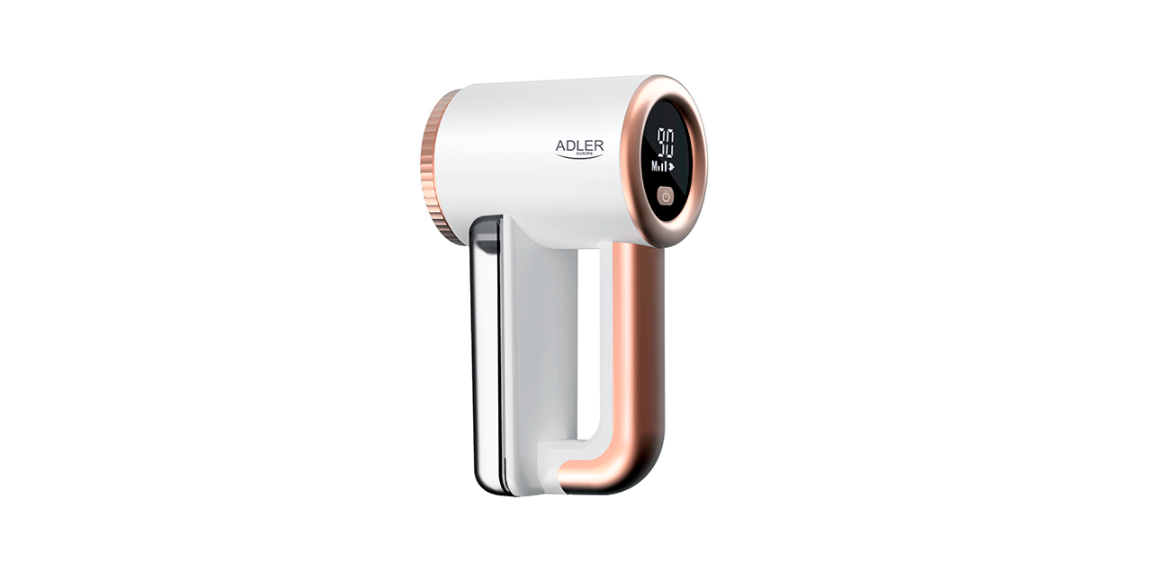

Adler AD 9617 Lint Remover with LCD Display
Safety Instructions
- Before using the device, read the user manual and follow the instructions contained therein.
- Do not use it for other purposes that are inconsistent with its intended use.
- Only connect the device to a 5V/1A USB port.
- Be especially careful when using the device when children are around.
- Do not immerse the cord, plug, or entire appliance in water or any other liquid.
- Do not use the device if it has been dropped or damaged in any way, or if it is not working properly.
- Return the damaged device to the appropriate service centre for inspection or repair.
- Any repairs may only be made by authorized service points.
- Improperly performed repairs may result in danger to the user.
- Do not use the device near flammable materials.
- Do not leave the device switched on unattended.
- Use extreme care when removing the blades.
- Wipe the body of the device with a dry cloth.
- Empty the fluff container when it is 3/4 full.
- Flatten the fabric surface before using the device.
- Do not press the device into the fabric, as this may damage the fabric.
- The device has a protective lock. It will not function unless the blade cover is refitted.
- Do not use the device near water, e.g., in the shower, bathtub, or over a wash basin with water.
- Do not handle the device with wet hands.
- The device should be turned off each time it is put away.
Description
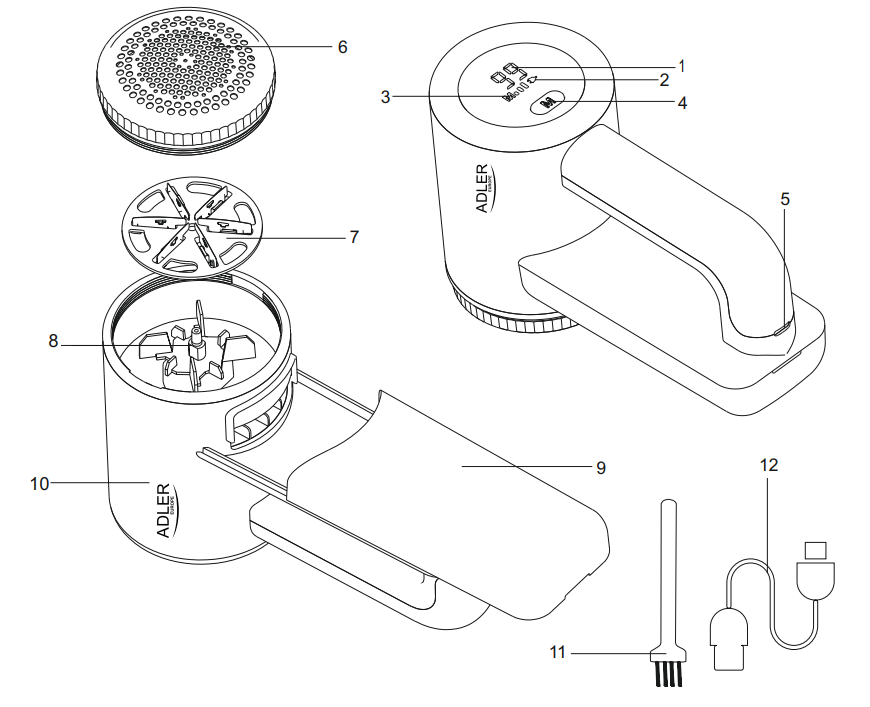
- Battery level indicator
- Battery charging indicator
- Working speed indicator
- Button for changing the working speed / ON OFF power
- USB Type-C charging port
- Blade Cover
- Blades
- Rotary shaft
- Bin for knots and pilling
- Housing
- Cleaning brush
- USB charging cable
Battery Charging
To start charging, plug the charging cable (12) into the charging socket (5) and then connect it to the power supply. When connected to power, the battery charge indicator (2) will illuminate, and the battery charge indicator (1) will display the current battery charge.
When the battery is fully charged, the battery level indicator will show 100%. The time to fully charge the battery is 2-3 hours. Whefullyll charged, the run time is approximately 120 minutes, depending on the selected speed. The device should not be used while charging.
Using the Device
- Place the garment (fabric) on a flat surface, and smooth out the wrinkles.
- Switch on the device by pressing the button (4). The device has three speeds. To increase the speed, press button (4) again. Available speeds: 6500, 7500, 8500 rpm
- Move the device back and forth across the material.
- Stubborn knots can be removed by moving the device across and then along (“checkered”) on one small piece of clothing.
- Thin garments can be defrosted by placing them on flat, rigid cardboard.
- For fabrics with a pattern, move the device in the direction of the pattern.
Cleaning
- Switch off the device by pressing the button (4).
- Unscrew the blade protection cover (6) counterclockwise.
- Remove the blades (7) by pulling them upwards (Caution! The blades are very sharp!).
- Clean the blade cover (6), the blades (7), and the rotating shaft (8) with the included brush (11).
- Empty the knots and lint container (9).
- After cleaning, reassemble all the disassembled parts.
Technical Data
- Power: 5W
- Power supply: USB 5V/1A
Environmental Instructions
- Dispose of cardboard packaging and polyethylene (PE) bags in the appropriate containers for separate collection of municipal waste according to their description.
- If there are batteries in the device, remove them and separately return them to the collection and storage facility. Return the used device to a suitable collection and storage facility, as the hazardous substances in it may pose a threat to health and the environment.
- Waste electrical equipment is waste that contains substances harmful to humans, animals, and the environment.
- These substances can lead to contamination of the soil, water, or air, and through this they can get into the human body and lead to numerous health ailments, such a vision, hearing, and speech disorders; they can also lead to kidney, liver, and heart damage, and cause skin diseases.
- Harmful substances can also have adverse effects on the respiratory and reproductive systems and lead to cancerous changes. Consumption of plants growing on the contaminated soils, and products made from them, may risk the above-mentioned health effects.
- Do not dispose of the device in the municipal waste container!!! Service: If you wish to purchase spare parts or report any complaints, please contact Adler AD 9617 Lint Remover with LCD Display directly with the seller who issued the receipt directly.
Customer Service
- Website: service@adlerglobal.com.
- Ph: 0800 9753 003
- Timings: Mo – Fr, 8:30 am – 5:00 pm
FAQs
What is the Adler AD 9617 Lint Remover used for?
To help clothing, upholstery, and textiles look smooth and brand new again, the Adler AD 9617 is made to remove lint, fuzz, and fabric pills.
What makes this model different from other lint removers?
The AD 9617 is more sophisticated and practical than conventional models because of its rechargeable battery, changeable cutting settings, and LCD that indicates power level and working speed.
What kinds of fabrics can I use it on?
The majority of fabric kinds, including polyester, acrylic, cotton, and wool, can be used with it. Steer clear of delicate textiles like lace or silk.
How do I turn the device on and off?
To activate the lint remover, press and hold the power button for two to three seconds. Press and hold the same button once more to turn it off.
How do I adjust the shaving speed?
Depending on the fabric type and lint density, you can choose between low and high speed settings using the speed adjustment button (if your model has one).
Can I use the lint remover while charging?
It is advisable to avoid using the device while charging for safety concerns. Before using it, make sure it is completely charged.
How do I charge the lint remover?
Plug the gadget into a computer port or USB converter and connect it to the provided USB charging cord. An icon for charging will appear on the LCD screen.
How long does it take to fully charge?
Depending on usage and speed settings, charging usually takes two to three hours, allowing for up to 60 minutes of continuous running.