


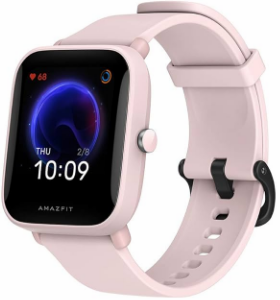
Amazfit Bip U A2017 Smartwatch Fitness Tracker
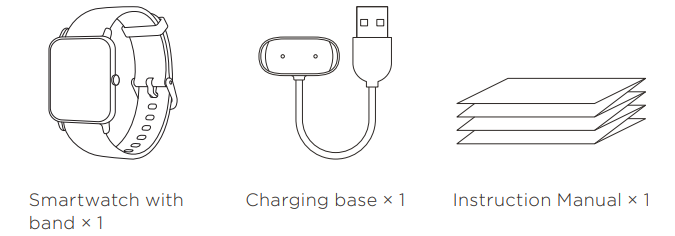
Package Contents
About the Watch
Note
Press and hold the power button to power on the watch. If the watch cannot be turned on, please charge it first.

Safety Notice
- Please do not allow children or pets to bite or swallow the product or its accessories, as this may cause injury.
- Do not place this product under excessively high or low temperatures, which may cause the product to catch fire or explode.
- Do not place this product near heat sources or open flames, such as ovens and electric heaters.
- Some people may experience allergic skin reactions to plastics, leathers, fibers, and other materials, and symptoms such as redness, swelling, and inflammation will occur after long-term contact with this product’s components. If you experience such symptoms, please discontinue use and consult your doctor.
- Do not use unauthorized or Amazfit Bip U A2017 Smartwatch Fitness Tracker incompatible power adapters or data cables, which may damage the watch and accessories or cause fire, explosion, or other hazards.
- The radio waves generated by this product may affect the normal operation of implanted medical devices or personal medical devices, such as pacemakers and hearing aids. If you use any such medical devices, consult the manufacturer for relevant usage restrictions.
- Do not dispose of this device or its accessories as ordinary household waste. Please comply with local regulations for the disposal of this device and its accessories, and support recycling.
Battery Safety
- Disposal of a battery into a fire or a hot oven, or mechanically crushing or cutting a battery, can result in an explosion.
- Leaving a battery in an extremely high temperature environment can result in an explosion or the leakage of flammable liquid or gas.
- A battery subjected to extremely low air pressure may result in an explosion or the leakage of flammable liquid or gas.
Pairing the Watch
- Scan the QR code on the Instruction Manual with your mobile phone to download the app to your mobile phone. You can also download the latest version of the App from the Google Play Store or the Apple App Store.
- Open the APP, register an account, and log in. Follow the steps in the app to pair your watch correctly. Once pairing is complete, the watch will display the correct time.
- You can set the other watch functions as needed.
Note
- For a better user experience, please use the most recent version of the app.
- The operating system needs to be Android 5.0, iOS 10.0, or above.
- Do not pair the watch directly using your mobile phone’s Bluetooth. Follow the steps in the app to pair your watch correctly.


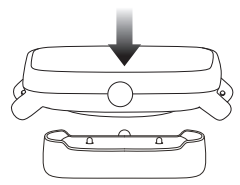
Charging the Watch
- Connect the USB port of the watch charging cable to a mobile phone
charger or a computer USB port. - Put the watch into the charging base. Pay attention to the direction
and the position of the watch, and make sure that the metal contacts on
The back of the watch fits closely with the charging base. - When charging starts, the watch screen displays the charging progress.
Note
- Please use the charging base that comes with the watch. Make sure that the charging base is dry before charging.
- Please use a 1A or above power adapter.
Disassembly and Assembly
Please refer to the illustrations to disassemble or assemble the watch strap.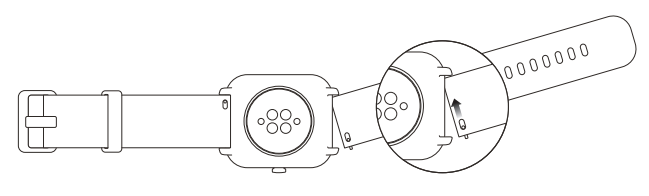
Note
Once the strap is assembled, pull the strap properly to ensure it is installed successfully.
Wearing the Watch
- Wear the watch strap not too tightly or too loosely, and leave enough space for the skin to breathe. This makes you feel comfortable and allows the sensor to function.
- When measuring blood oxygen saturation, wear the watch correctly. Avoid wearing the watch on the wrist joint, keep your arm flat, maintain a comfortable (appropriately tight) fitting between the watch and the skin of your wrist, and keep your arm still throughout the measurement process. When affected by external factors (arm sag, arm sway, arm hair, tattoo, etc.), the measurement result may be inaccurate or the measurement may fail and provide no output.
- We recommend that you tighten the watch strap during exercise and loosen it afterwards.
Basic Parameters
- Product model: A2017
- Input: 5V d.c. 500mA
- MAX Bluetooth version: BLE V5.0
- BLE output power: <5 dBm
- Operating temperature: 0°C to 45°C
- Water resistance rating: 5 ATM
- Bluetooth frequency: 2400–2483.5 MHz
- Device requirements: Devices installed with Android 5.0 or iOS 10.0 or above OS versions.
Repair and Maintenance
- Avoid using detergents such as soap, hand sanitizer, bath foam, or lotion for cleaning to prevent chemical residues from irritating the skin, corroding the device, or degrading the water resistance of the device.
- After wearing the device while bathing (for devices that support bathing), swimming (for devices that support swimming), or sweating, please promptly clean and dry the device.
- The leather strap is not waterproof. Avoid getting the strap wet, as this may shorten its service life.
- When using light-colored watch straps, avoid contact with dark clothing to prevent staining.
- Do not wear your watch during snorkeling, hot showers, hot springs, saunas (steam rooms), diving, underwater diving, water skiing, and other activities involving high-speed water currents.
- Do not place the device in direct sunlight for long periods. Excessively high or low ambient temperature may cause device failure.
- Handle with care during transportation. Keep the device dry and away from humidity.
Regulatory Notice
This device complies with part 15 of the FCC Rules. Operation is subject to the following two conditions:
- This device may not cause harmful interference, and
- this device must accept any interference received, including interference that may cause undesired operation.
This device contains licence-exempt transmitter(s)/receiver(s) that Amazfit Bip U A2017 Smartwatch Fitness Tracker comply with Innovation, Science and Economic Development Canada’s licence-exempt RSS(s). Operation is subject to the following two conditions:
- This device may not cause interference.
- This device must accept any interference, including interference that may cause undesired operation of the device.
Disposal and Recycling Information
All products bearing this symbol are waste electrical and electronic equipment (WEEE as in directive 2012/19/EU), which should not be mixed with unsorted household waste. Instead, you should protect human health and the environment by handing over your waste equipment to a designated collection point for the recycling of waste electrical and electronic equipment, appointed by the government or local authorities. Correct disposal and recycling will help prevent potential negative consequences to the environment and human health. Please contact the installer or local authorities for more information about the location, as well as the terms and conditions of such collection points.
Warranty and Return Policy
The Amazfit Limited Warranty covers Amazfit products against manufacturing defects beginning on the original purchase date. The warranty period is 12 months or another specified period as the applicable consumer laws in the consumer’s country of purchase require. Our warranty is in addition to rights provided by applicable consumer laws.
Customer Support
- Official website: en.amazfit.com
- Support: support.amazfit.com
FAQs
Q: Can I track blood oxygen (SpO₂)?
Indeed. Depending on the app settings, the Bip U’s SpO₂ measurement can be completed manually or automatically while tracking sleep.
Q: Can I swim with the Bip U?
Indeed. The watch is appropriate for swimming, showering, and exposure to rain because it has a 5 ATM water resistance (50 meters). Don’t press buttons while submerged.
Q: How do I update firmware?
The Zepp app is used to manage firmware updates. The app will walk you through the procedure and alert you of updates once it is connected.
Q: Can I track multiple types of workouts?
Indeed. Running, cycling, yoga, swimming, HIIT, and more are among the more than 60 sports modes that the Bip U can support.
Q: How do I measure blood pressure?
Blood pressure is not measured by the Bip U. It is not a medical device, but it does monitor heart rate, SpO₂, and sleep.
Q: Can multiple users use the same watch?
No, only one user account is intended for the Bip U. Only one Zepp account can be paired with each watch at a time.
Q: Who do I contact for warranty or support?
Use the Zepp app or the official website to get in touch with Amazfit customer service for fixes, replacements, or technical support.
Q: Is the watch compatible with fitness apps like Strava or Google Fit?
Indeed. For thorough tracking, you can integrate your fitness and health information with Strava, Google Fit, and Apple Health via the Zepp app.