



Bose 018SLRVP2B SoundLink Revolve Plus Instruction
Important Safety Instructions
- Keep these instructions. Heed all warnings. Follow all instructions.
- Do not install near any heat sources such as radiators, heat registers, stoves, or other apparatus (including amplifiers) that produce heat. For more details on connecting and managing Bose amplifiers, see our Bose Veritas 1100BH Intelligent Mixer Amplifier User Guide.
- Only use attachments/accessories specified by the manufacturer.
- Unplug this apparatus during lightning storms or when unused for long periods of time.
- Refer all servicing to qualified personnel.
- Servicing is required when the apparatus has been damaged in any way, such as power-supply cord or plug is damaged, objects have fallen into the apparatus, it does not operate normally, or it has been dropped.
CAN ICES-3(B)/NMB-3(B)
Management Regulation for Low-power Radio-frequency Devices Article XII According to “Management Regulation for Low-power Radio-frequency Devices,” without permission granted by the NCC, any company, enterprise, or user is not allowed to change frequency, enhance transmitting power, or alter original characteristics, as well as the performance of approved low-power radio-frequency devices.
Article XIV
The low-power radio-frequency devices shall not influence aircraft security and interfere with legal communications; If found, the user shall cease operating immediately until no interference is achieved. The said legal communications means radio communications operated in compliance with the Telecommunications Act.
The low-power radio-frequency devices must be susceptible to interference from legal communications or ISM radio wave radiated devices. DON’T attempt to remove the rechargeable lithium-ion battery from this product. Contact your local Bose retailer or other qualified professional for removal.
Product Power State Table
The product, in accordance with the Ecodesign Requirements for Energy Related Products Directive 2009/125/EC and the Ecodesign for Energy-Related Products and Energy Information (Amendment) (EU Exit) Regulations 2020, complies with the following norm(s) or document(s): Regulation (EC) No. 1275/2008, as amended by Regulation\ (EU) No. 801/2013.
| Required Power State Information | Power Modes | |
| Standby | Networked Standby | |
| Power consumption in specified power mode, at 230V/50Hz input | ≤ 0.5 W | Bluetooth® ≤ 2.0 W |
| Time after which the equipment is automatically switched into mode | ≤ 20 minutes | ≤ 5 minutes |
| Power consumption in networked standby if all wired network ports are connected and all wireless network ports are activated, at 230V/50Hz input | N/A | ≤ 2.0 W |
| Network port deactivation/activation procedures. Deactivating all networks will enable standby mode. | Bluetooth: Deactivate by clearing the pairing list by pressing and holding the Bluetooth button for 10 seconds. Activate by pairing with a Bluetooth source. | |
Contents
Confirm that the following parts are included:
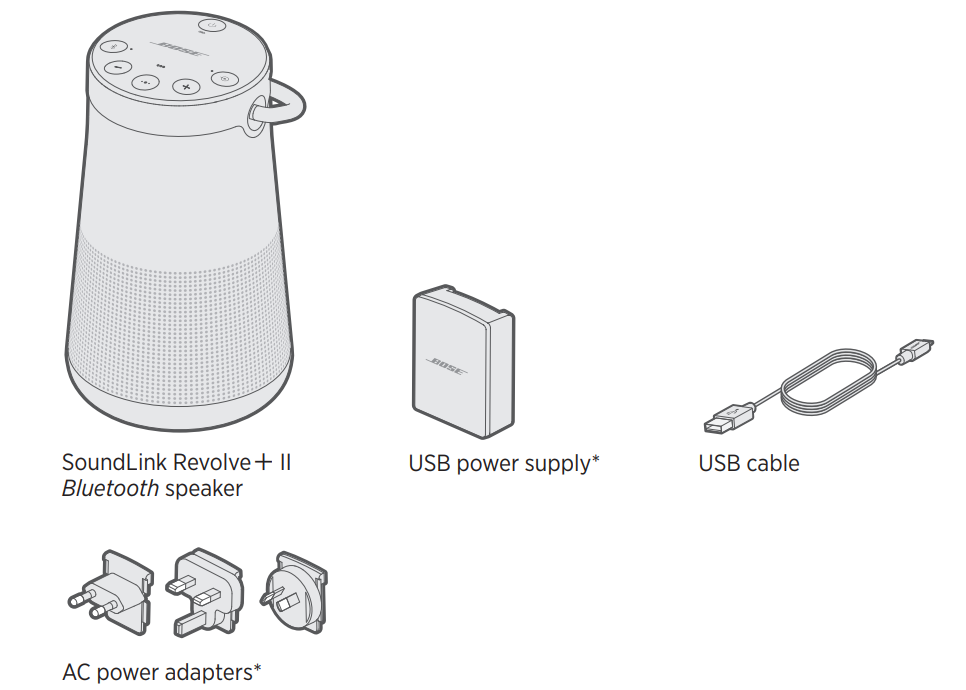
The Bose Connect app lets you set up and control the speaker from any mobile device, such as a smartphone or tablet. Using the app, you can manage Bluetooth connections, choose your voice prompt language, manage speaker settings, and get new features.
Placement Guidelines
- For best Bluetooth performance, place your mobile device within 33 ft (10 m) of your speaker, and make sure there is a clear line of sight between you and your speaker.
- Moving your device farther away or not having a clear line of sight may impact sound quality, and your device may disconnect from your speaker.
- Keep other wireless equipment at least 3 ft (1 m) away from your speaker.
- Place your speaker and your device outside of and away from metal cabinets, other audio/video components, and direct heat sources.
Connect to Power
Your speaker ships with a partial charge. Before using your speaker for the first time, connect it to an AC (mains) outlet. Your speaker does not need to be fully charged, but it does require the initial connection to activate the battery.
- Plug the small end of the USB cable into the micro-B USB connector on your speaker.
- Plug the other end into the USB power supply.
- Plug the USB power supply into an AC (mains) outlet.
Power ON/OFF
On the button pad, press the Power button I.
- The first time you power on your speaker, the Bluetooth light glows blue, and you hear a voice prompt to select a language (see page 20).
- If you have already powered on your speaker and paired at least one mobile device, the Bluetooth light blinks white and connects to the last two paired mobile devices.
- You hear “Battery percent. Connected to .” The Bluetooth light glows solid white.
Battery Protection Mode
When your speaker is unplugged and unused for more than three days with a remaining charge of less than 10 percent, it enters battery protection mode to preserve battery power. To reactivate your speaker, connect it to AC (mains) power. When not in use, store your speaker in a cool place.
Auto-Off
Your speaker powers off after 20 minutes of inactivity (no sound coming from your speaker) while using the following connections and power sources:
- AUX connection operating on battery or AC (mains) power.
- Bluetooth connection operates on battery power.
Disable Auto-off
- Press and hold H and the Input mode button 7 simultaneously. You hear “Auto-off disabled.”
- Repeat to re-enable the auto-off feature.
The button pad enables you to power on your speaker and control your speaker’s playback, volume, and speakerphone.
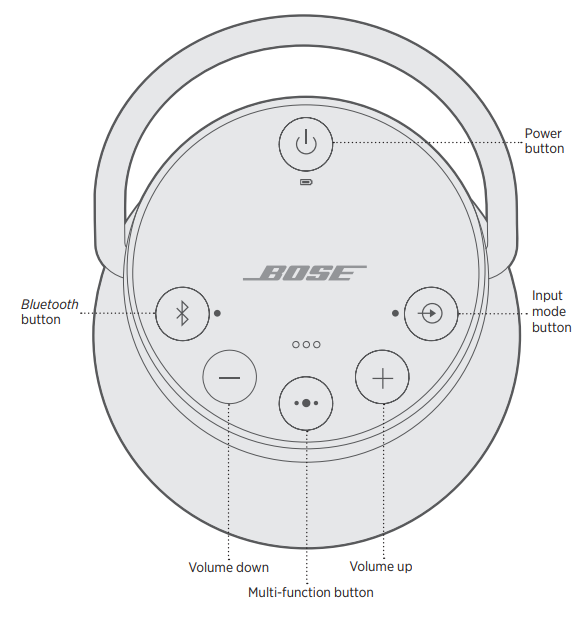
The Multi-function button V controls music sources and speakerphone calls on your mobile device from your speaker.
Media Playback & Volume
| Play/Pause | Press V. |
| Skip forward to the next track | Double-press V. |
| Skip backward to the previous track. | Triple-press V. |
| Volume up | Press H. |
| Volume down | Press z. |
Function for Calls
| Make a call | Press and hold the Multi-function button V to activate voice control on your mobile device. See “Access voice control” below. |
| Switch a call from speakerphone to your mobile device while on a call | Press and hold V. |
| Answer/End a call | Press V. |
| Decline an incoming call. | Press and hold V. |
| Answer a second incoming call and put the current call on hold | While on a call, press V to answer a second call. |
| Decline a second incoming call and stay on the current call | While on a call, press and hold V for one second. |
| Switch between two calls. | With two active calls, double-press V. |
| Mute/unmute a call | While on a call, press H and z simultaneously. |
Access Voice Control
The microphone in the speaker acts as an extension of the microphone in your smartphone. Using V on the speaker, you can access voice control on your mobile device to make/take calls, play music, tell you the weather, give you the score of a game, and more. Press and hold V to access voice control on your device. You hear a tone that indicates voice control is active.
Voice alerts
- Your speaker identifies incoming callers (when applicable). To disable this feature, see page 20.
- Voice prompts guide you through the Bluetooth pairing and connecting processes.
Pre-Installed Languages
- English
- German
- Korean
- Swedish
- Polish
- Spanish
- Mandarin
- Italian
- Dutch
- French
- Japanese
- Portuguese
- Russian
Select A Language
- Press Z or H to scroll through available languages.
- When you hear your language preference, press and hold the Multi-function button V to select it.
- You hear a beep and “Ready to pair.”
Changing the Language
- Press and hold z and the Input mode button 7 simultaneously until you hear the voice prompt for the first language option.
- Press Z or H to scroll through available languages.
- When you hear your language preference, press and hold V until you hear a beep, and “Connected to .”
Disable Voice Prompts
Press and hold Z and H simultaneously until you hear “Voice prompts off.” Bluetooth wireless technology lets you stream music from mobile devices such as smartphones, tablets, and computers. Before you can stream music from a device, you must pair the device with your speaker.
Choosing the Method
You can pair your device with your speaker using Bluetooth wireless technology or Near Field Communication (NFC). You can also use the Bose Connect app to pair your device (see page 1 ).
What is NFC?
NFC is a technology that enables mobile devices to establish wireless communication with each other by simply tapping the devices together. Refer to your device owner’s guide to see if your model supports NFC
| If your device does not support Bluetooth pairing via NF, C, or if you are unsure: | Follow the instructions for “Pair your mobile device” on page 22. |
| If your device supports Bluetooth pairing using NFC: | Follow the instructions for “Pair a mobile device with NFC” on page 23. |
Pairing Your Mobile
When you power on your speaker for the first time, the speaker automatically searches for your mobile device.
- On your device, turn on the Bluetooth feature. TIP: The Bluetooth feature is usually found in the Settings menu.
- Select your Bose Revolve + II SoundLink speaker from the device list.
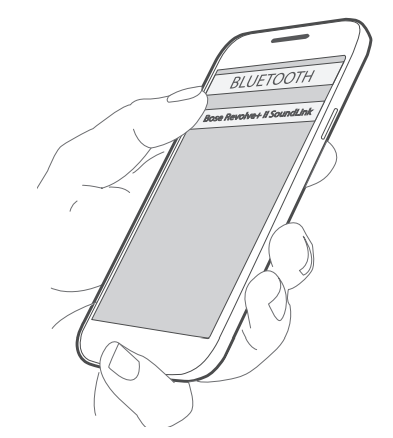
Once paired, you hear “Connected” and the Bluetooth light glows solid white.
Mobile Pairing With NFC
- Unlock your mobile device, and turn on the Bluetooth and NFC features.
- Refer to your device owner’s guide to learn more about these features.
- Tap and hold the NFC touchpoint on your device to the top center of your speaker.
- The target area is the Bose logo. Your device may prompt you to accept pairing.
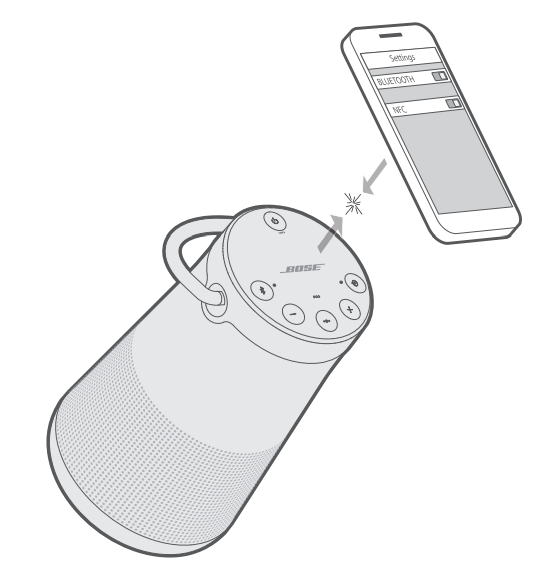
Once paired, you hear “Connected to,” and the Bluetooth light glows solid white. You can store up to eight paired mobile devices in the speaker pairing list.
- Press and hold the Bluetooth button until the Bluetooth light blinks blue, and you hear.
- Ready to pair another device. Pair your device to the speaker (see page 23)
Disconnect A Device
Turn off the Bluetooth feature on your device. If your device supports pairing via NFC, tap and hold the NFC touchpoint on your device to the top center of your speaker. The target area is the Bose logo.
Reconnect A Device
- When powered on, your speaker tries to reconnect with the two most recently connected devices.
For Identification
- Press the Bluetooth button to hear which devices are currently connected.
Switching Your Devices
- Pause audio on your first device.
- Play audio on your second device.
Previously Paired Device
- Press l to hear which device is currently connected.
- Press l within two seconds to connect to the next device in your speaker’s pairing list.
- Repeat until you hear the desired device name. You hear a tone that indicates the device is connecting.
- Play audio on the connected device.
Clear the Speaker Pairing List
- Press and hold l for 10 seconds, until you hear. Bluetooth device list cleared. Ready to pair.
- All devices are cleared, and your speaker is ready to pair with a new device.
- Delete your speaker from the Bluetooth list on your device.
Use the Bose Connect App
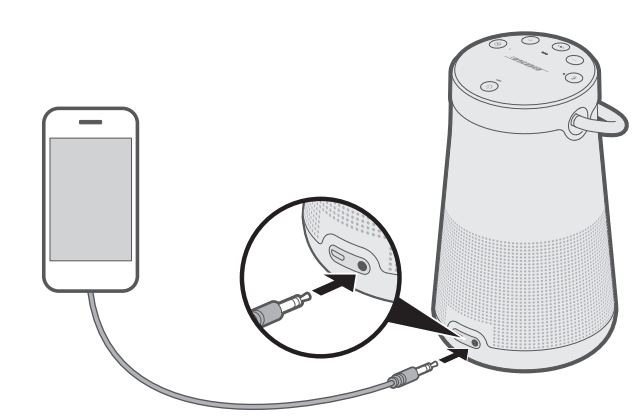
You can also easily manage multiple connected devices using the Bose Connect app. You can connect the audio output of a smartphone, tablet, computer, or other type of mobile device to the AUX connector or micro-B connector.r
Connect the 3.5 MM Stereo Cable
The AUX connector accepts a 3.5 mm stereo cable plug (not provided).
- Using a 3.5 mm stereo cable, connect your mobile device to the AUX connector on your speaker.
- Press I on your speaker.
- Press and release 7 until you hear “USB audio.”
The top of the speaker has a series of lights that glow according to the system state.
Battery Status
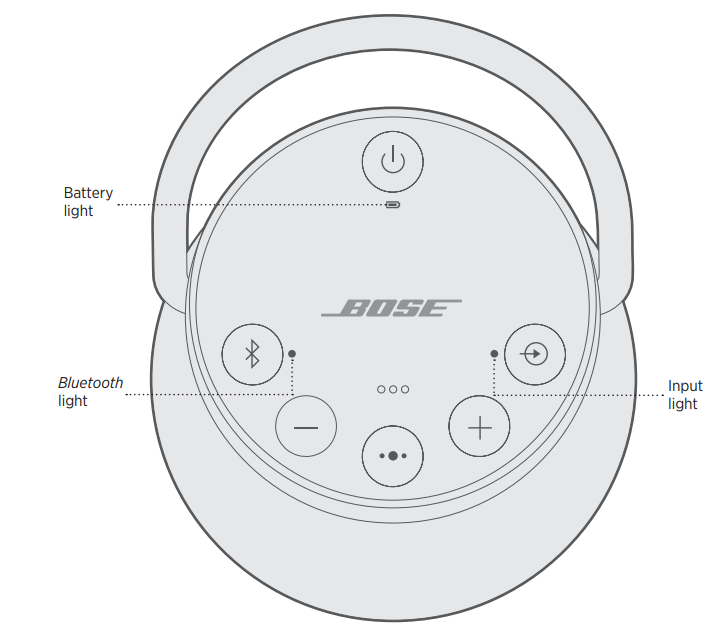
Shows the battery charge level. Each time you power on your speaker, the battery light 6 displays the battery charge level for two seconds, and a voice prompt announces the battery charge level. To check the battery charge level, press and hold the Power button I for three seconds while checking 6.
Light Activity System State
| Solid green | Medium to full charge |
| Blinks amber | Charging |
| Solid amber | Medium charge |
| Blinks red | Need to charge |
Bluetooth Device
| Blinks blue | Ready to connect |
| Blinks white | Connecting |
| Solid white | Connected |
Input Status
Shows the connection status of a device connected with an AUX or micro-B USB cable.
| Solid with the speaker | rs ready to play content from a device |
You can pair your SoundLink Revolve + II with other Bose speakers to create your own audio.
Speaker Pairing Method
| Bose SoundLink Bluetooth speaker | Pair with another Bose SoundLink Bluetooth speaker |
| Bose Home Speaker or Bose Soundbar | Pair with a Bose Home Speaker or Soundbar |
Pair the speakers manually.
If you are unable to access the Bose Connect app, follow the instructions below.
Party mode
- Make sure both speakers are powered on.
- Make sure a speaker is connected to your mobile device.
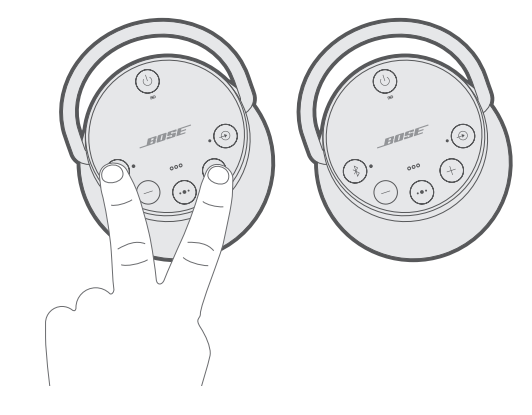
- On the speaker connected to your device, press and hold the Bluetooth button and H simultaneously
- Release the buttons when you hear “Press the Bluetooth and volume down buttons simultaneously on a second Bose device.”
- On the other speaker, press and hold Ll and Z simultaneously.
- Release the buttons when the speaker emits a tone. After 10 seconds, you hear “Party mode” from both speakers simultaneously. Party mode is enabled. You are now able to play audio in unison using your device.
- For an optimal experience, position your speakers:
- In the same room or outdoor area
- So there are no obstructions between them
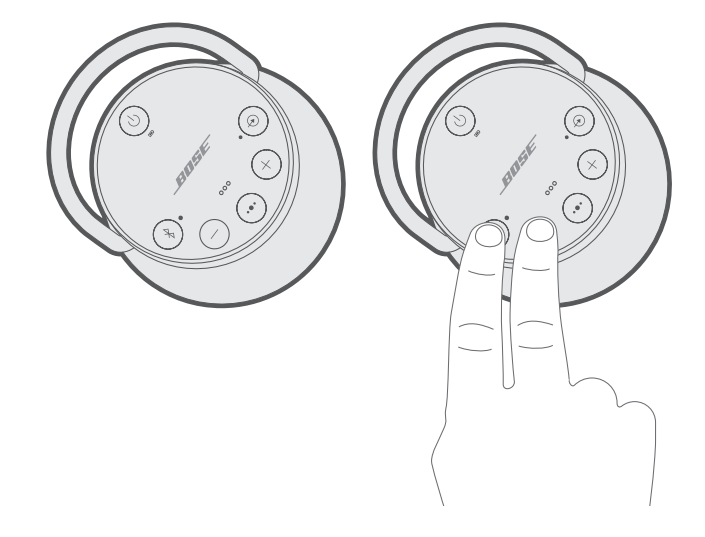
Stereo Mode
- Configure your speakers for Party mode (see page 30).
- On a speaker, press the Bluetooth button and H simultaneously.
- Release the buttons when you hear “Stereo mode.” You hear “Left” from the left speaker and “Right” from the right speaker. Stereo mode is enabled. You are now able to play audio in stereo using your mobile device.
- For an optimal experience, position your speakers:
- In the same room or outdoor area
- Within 10 feet of each other, free from obstructions
- So that your distance to each speaker is equal
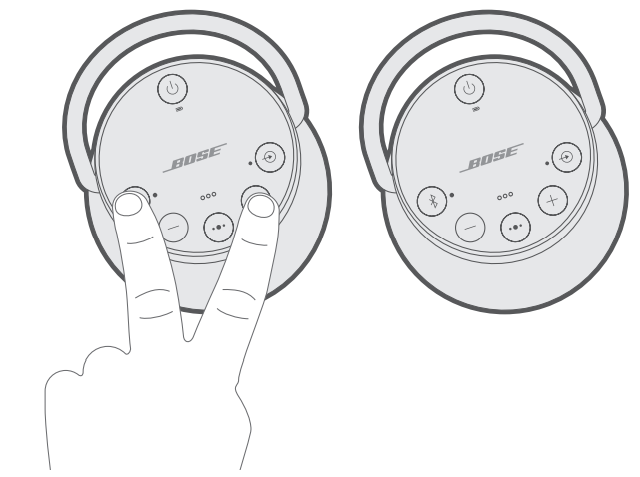
Switch between Party mode and Stereo mode
- On either speaker, press button L and H simultaneously.
Disable Party mode or Stereo mode
- Do one of the following on either speaker:
- Press and hold l until you hear “Bose speakers unlinked.”
- Press and hold the Multi-function button V and H simultaneously until you hear Bose speakers unlinked.”
- Press the Power button to power off the speaker
Pairing with Soundbar
With Bose SimpleSync technology, you can pair your SoundLink Revolve + II speaker with a Bose Home Speaker or Bose Soundbar to listen to the same song in two different rooms at the same time.
Compatible Products
You can pair your SoundLink Revolve + II speaker with any member of the Bose Home Speaker family. Popular compatible products include:
- Bose Soundbar 700
- Bose Soundbar 500
- Bose Home Speaker 500
- Bose Home Speaker 300
- Bose Portable Home Speaker
Pair using the Bose Music app
- On your SoundLink Revolve + II speaker, press and hold the Bluetooth button until the Bluetooth indicator blinks blue, and you hear “Ready to pair another device.
- In the Bose Music app, from the My Bose screen, select your Bose Home Speaker or Bose Soundbar.
- Tap the product image in the bottom-right corner of the screen.
- Tap Group Speakers.
- Follow the app instructions to connect a new Bluetooth device using SimpleSync.
Reset Your Speaker
Factory reset clears paired mobile devices and language settings from your speaker and returns it to the original factory settings.
- Power on your speaker.
- Press and hold the Power button for 10 seconds.
- The speaker powers off.
- Press I.
The Bluetooth light glows blue, and you hear a voice prompt to select a language (see page 20)
Cleaning
- Clean the surface of the speaker and handle with a soft, damp cloth (water only).
- Do not use any sprays near the speaker. Do not use any solvents, chemicals, or cleaning solutions containing alcohol, ammonia, or abrasives.
- Do not allow liquids to spill into any openings.
Troubleshooting
| The battery does not charge. | Make sure you are using the Bose-provided USB cable and USB power supply. Connect the USB cable to a different USB power supply. Use a different USB cable. Connect to a different AC (mains) power source. |
| The speaker does not pair with the mobile device. | On your mobile device, turn the Bluetooth feature off and then on. Remove your speaker from the Bluetooth list on your device. Pair your device again. Pair a different device. Clear your speaker’s pairing list (see page 25). Pair your device again. Reset your speaker. |
| does not pair with NFC.. | Unlock your device and turn on the Bluetooth and NFC features. Tap and hold the NFC touchpoint on the back of your device to the top of your speaker. Remove your device from the case. Make sure a language is selected (see page 20). Use Bluetooth to pair your device (see page 22). |
| Bose SoundLink Bluetooth speakers do not pair together manually | Download the Bose Connect app for an additional method for pairing your Bose speakers (see page 13). |
| No sound from a cabled device | Power on the device and play music. Increase the volume on your speaker and device. Press and release the Input mode button 7 until the Input light glows white. Use a different cable. Connect a different device. |
| Poor sound quality | Use a different music source. Pair a different device (see page 24). If there are two devices connected, disconnect the second device. Increase the volume on the device. Check device audio settings. |
| Poor sound quality from a cabled device | Increase the volume on your speaker and device. Use a different cable. Connect a different device. Check device audio settings. |
| Audio plays from the wrong device (when two devices are connected) | Make sure voice prompts are on. Press the Bluetooth button to hear the connected device(s). Make sure you are using the correct device. Pause or quit the music source on the device playing music. Disconnect the second device. |
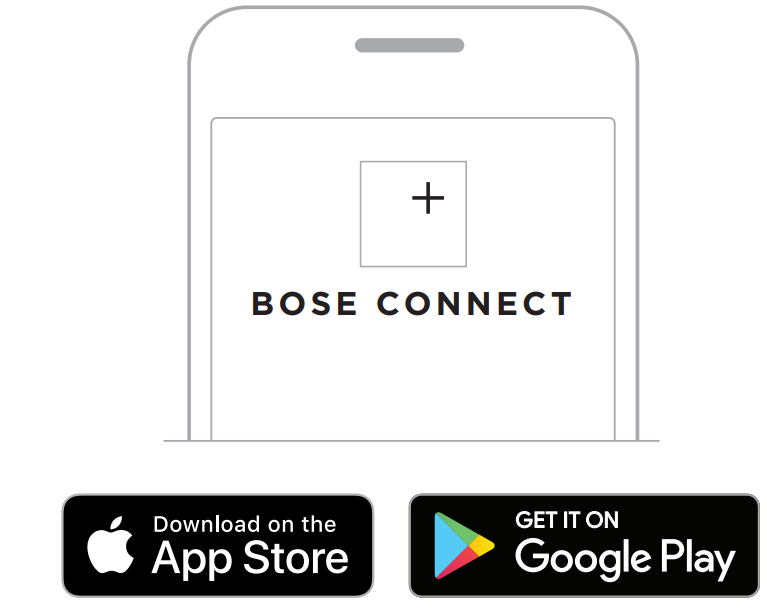
Downloading the App
- On your mobile device, download the Bose Connect app.
- Follow the app instructions.
Limited Warranty
Failure to register will not affect your limited warranty rights. If you experience problems with the speaker:
- Check the battery light 6. Charge your speaker if necessary.
- Secure all cables.
- Check the state of the status lights.
- Place your speaker according to placement guidelines.
- Make sure your mobile device supports Bluetooth or pairing via NFC technology.
- This product is covered by a limited warranty.
- For warranty details, visit BoseProfessional.com/warranty.
Customer Support
- Tel: 1-800-278-1083
- Website: https://support.bose.com/
MA 01748 USA Bose is a trademark of Bose Corporation. ArenaMatch is a trademark of Transom Post OpCo LLC. ©2024 Transom Post OpCo LLC.
FAQs
Q: What is the SoundLink Revolve Plus designed for?
With its 360-degree omnidirectional sound design, the SoundLink Revolve Plus is a portable Bluetooth speaker that offers clear, rich audio in both indoor and outdoor settings.
Q: How long does the battery last?
Depending on the volume and content, the SoundLink Revolve Plus may play music for up to 17 hours.
Q: Can I connect more than one device?
Indeed, you may actively connect to two devices at once for smooth switching, and the speaker can remember up to eight devices.
Q: Can I use the speaker while it is charging?
Indeed. You can listen to music continuously while the SoundLink Revolve Plus is charging.
Q: Can I pair two Revolve Plus speakers together?
Yes, for a better sound experience, you may use the Bose Connect app to activate Party Mode (same audio) or Stereo Mode (left/right channels).
Q: Can I use the speaker with a wired connection?
No, the SoundLink Revolve Plus lacks an auxiliary input and is only compatible with Bluetooth.
1 Comment
Thanks for sharing. I read many of your blog posts, cool, your blog is very good.