



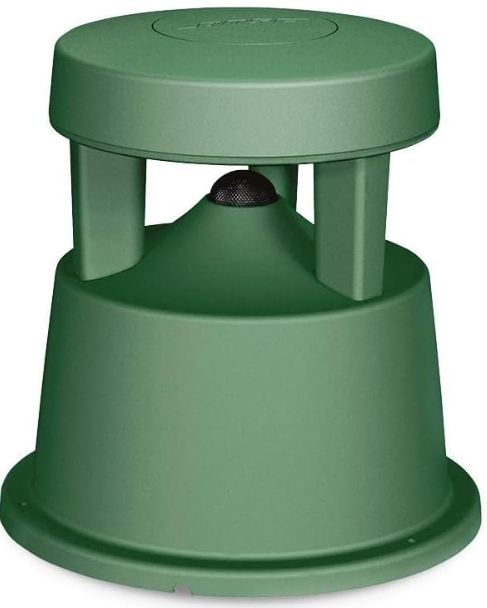
Bose FreeSpace 360P Series II Loudspeaker
Safety Instructions
- Do not block any ventilation openings. Install in accordance with the manufacturer’s instructions.
- Only use attachments/accessories specified by the manufacturer.
- Professional products must be installed in accordance with state, federal, and industry regulations.
- Do not mount on surfaces that are not sturdy or that have hazards concealed behind them, such as electrical wiring or plumbing.
- Ensure the bracket is installed by a qualified professional installer and in accordance with local building codes.
- Use only the hardware and accessories included or specified by Bose Professional for use with FreeSpace 360P II loudspeakers. Hardware for securing the loudspeaker to the mounting surface is not supplied.
- Keep the product away from fire and heat sources. Do not make unauthorized alterations to this product.
- Do not expose loudspeaker or mounting components to any chemical substances that are not specified by Bose Professional, including but not limited to lubricants, cleaning agents, contact sprays, or hydrocarbon-based solvents.
- Exposure to such substances can lead to degradation of the plastic material, resulting in cracking and creating a falling hazard.
- Clean speakers using only a dry cloth. Do not expose the loudspeaker to soap, detergent, mineral oil, alcohol, or other cleaning agents or chemicals.
Product Ratings
- Input Voltage: 70V/100V
- Impedance: 8 Ω, 30 W
- Current or Power: (70V): 10W, 20W, 40W, 80W (100V): 5W, 10W, 20W, 40W, 80W
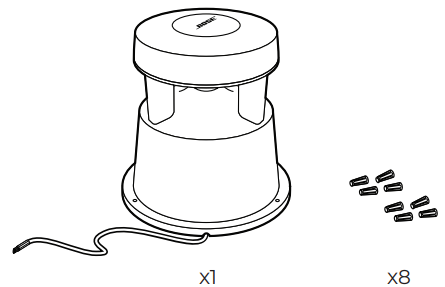
Package Contents
 Dimensions
 Dimensions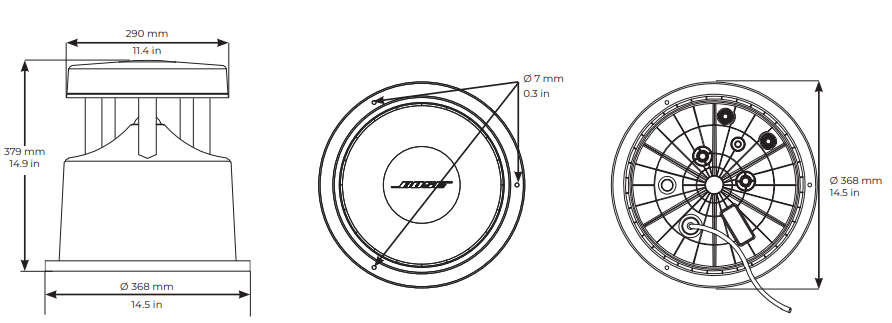
Technical Specifications
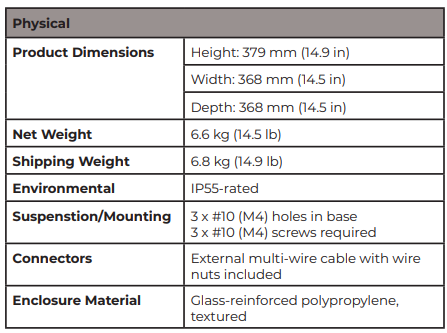
Wiring the Loudspeaker
Wire Gauge
The FreeSpace 360P Series II Loudspeaker is designed to work with 16 AWG to 20 AWG size wire. 18 AWG wire gauge is recommended for optimal performance.
Connection Diagrams
Strip wire insulation 10mm-12mm where needed. Connecting the Loudspeaker to an Amplifier.
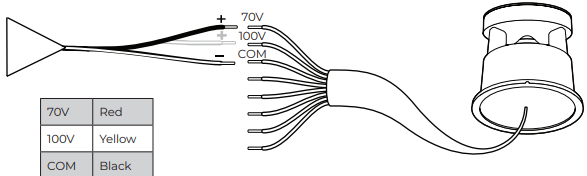
- Connect the appropriate wire for your desired voltage from the loudspeaker to the positive (+) terminal on your amplifier cable.
- Connect the COM wire from the loudspeaker to the negative (-) terminal on your amplifier cable.
- Seal connections with wire nuts.
Transformer Tap Settings
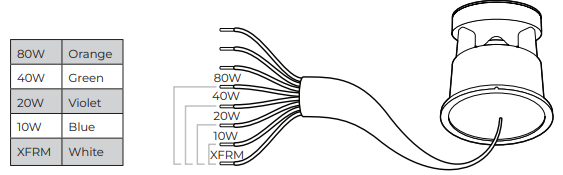
- Twist the appropriate color wire for your desired tap setting with the tap common wire (XFRM).
- Seal with a wire nut.
- Cap all unused wires with the included wire nuts.
Low-impedance (8Ω) Operation
- Connect the XFRM wire to the positive (+) and connect the COM wire to the negative (-).
- Do NOT connect the red and yellow wires.
- Cap all unused wires with the included wire nuts.
Power
- Rated 30 W continuous, 120 W peak when operated in low-Z (8 Ω).
Recommended high-pass filter
- 60 Hz with a 24 dB/octave filter. Preset available on some Bose Professional DSPs & amplifiers
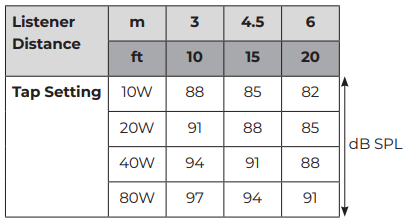
Transformer Tap Chart
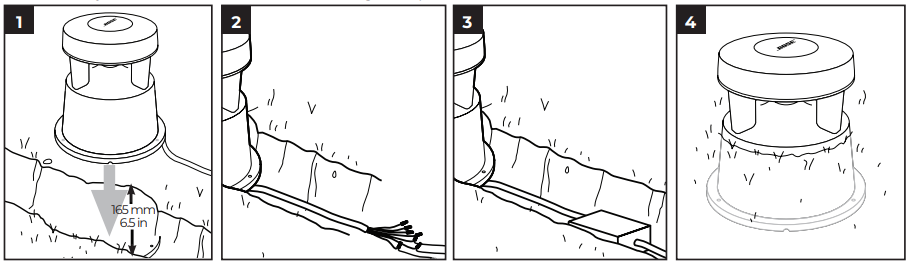
Installing the Loudspeaker On the Ground
Consult local utility authorities to verify that digging in the area is safe. A drainage medium placed beneath the loudspeaker is recommended for optimal performance.
- Dig a hole up to 165 mm (6.5 in) deep with a diameter of at least 368 mm (14.5 in).
- Dig a reservoir wide and deep enough to bury the wires.
- Lay the loudspeaker and wire junctions in the hole.
- For extra protection, install a bury-rated junction box (optional).
- Carefully fill the hole back in, surrounding the speaker base.
Loudspeaker on a Surface
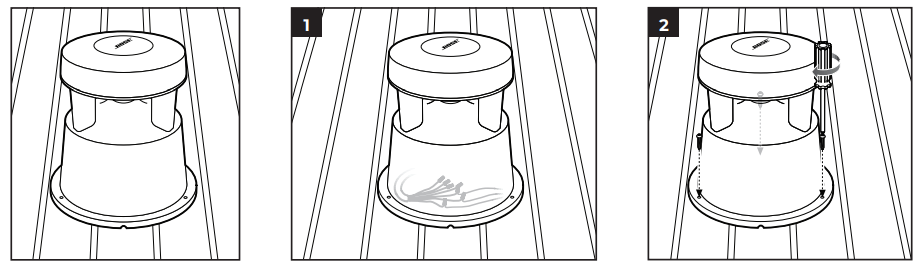
- Place the external cable and wire connections under the loudspeaker or in an external junction box.
- Secure the loudspeaker to the surface with three #10 or M4 mounting screws (not included).
Regulatory Compliance
The FreeSpace 360P Series II loudspeaker is suitable for general-purpose use. Environmentally rated to IP55
- This product conforms to all applicable EU directive requirements.
- Proper disposal and recycling help protect natural resources, human health, a nd the environment.
- For more information on the disposal and recycling of this product, contact your local municipality, disposal service, or the shop where you bought this product.
Warranty
- This product is covered by a limited warranty.
- For warranty details, visit BoseProfessional.com/warranty
Customer Support
- Tel: 1-800-278-1083
- Website: https://support.bose.com/
MA 01748 USA Bose is a trademark of Bose Corporation. ArenaMatch is a trademark of Transom Post OpCo LLC. ©2024 Transom Post OpCo LLC.
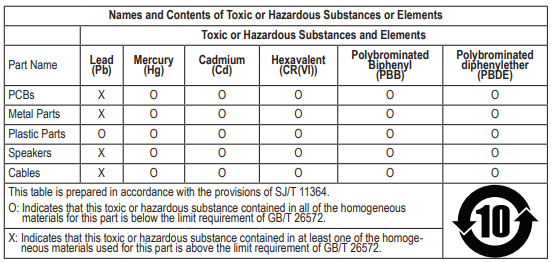
China Restriction of Hazardous Substances Table
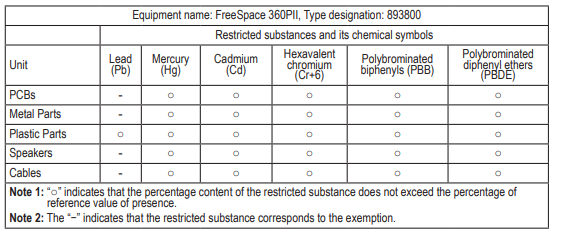
Taiwan Restriction of Hazardous Substances Table
FAQs
Q: How should I position the loudspeaker for best performance?
Place the speaker in the middle, preferably high on a wall or on the ceiling. Keep it away from recessed spaces, corners, and reflecting surfaces that could cause sound distortion. When positioned correctly, the 360° design guarantees consistent coverage.
Q: What power and impedance ratings does the speaker require?
70V or 100V distributed audio systems can be used with the 360P Series II. With low-impedance wiring, it has a nominal impedance of 8 ohms and selectable power taps (usually 2.5 W, 5 W, 10 W, and 20 W).
Q: Can multiple speakers be connected?
It is possible to use a distributed audio system to connect many units. To equalise output levels among several units, use the speaker’s built-in tap selector.
Q: How do I connect the speaker to an amplifier or audio source?
Utilise the input terminals on the device’s rear. Use the appropriate tap to connect 70V/100V systems. Use the conventional wiring connectors for low-impedance (8-ohm) configurations. Always use the correct polarity (black = −, red = +).
Q: How do I maintain or clean the speaker?
Use a gentle, dry cloth to clean the grille and cabinet. Steer clear of strong chemicals, solvents, and extreme dampness. Dusting regularly guarantees longevity and the best possible sound quality.