


 Bose PS604D PowerShare Adaptable Amplifiers


Safety Instructions
- Do not use this apparatus near water.
- Clean only with a dry cloth.
- Do not block any ventilation openings. Install in accordance with the manufacturer’s instructions.
- Do not defeat the safety purpose of the polarised or grounding-type plug.
- A polarised plug has two blades with one wider than the other.
- A grounding type plug has two blades and a third grounding prong.
- The wide blade or the third prong is provided for your safety.
- Only use attachments/accessories specified by the manufacturer.
- Unplug this apparatus during lightning storms or when unused for long periods of time.
- If the provided plug does not fit into your outlet, consult an electrician for replacement of the obsolete outlet.
Product Features
Distribute the total 600 (400) watts asymmetrically across all outputs using patented PowerShare technology, which allows each output to deliver full power. Instead of selecting amplifier power based on the need of the largest zone, you now have the freedom to use total amplifier power in any application. This enables more flexibility during the initial design, or later on-site when making unplanned changes that take advantage of surplus power.
Load-independent Outputs
Configure channel for low-impedance (4-8 Ω) or high-impedance (70/100V) applications without bridging or using jumpers.
Integrated Dante Audio Networking
Support four audio input channels from a Dante network and mix onboard analog inputs with digital Dante inputs as selected in ControlSpace Designer software.
Dual Feedback Loop System
Improve performance and reliability. The Dual Feedback Loop system, inherited from the field-proven Bose. The Professional PowerMatch amplifier line allows for continuous monitoring and control of both the current and voltage delivered to each output load. This combination provides improved linearity and lower distortion while protecting loudspeakers.
Control Space Networking
Configure using ControlSpace Designer software for inclusion into larger networked audio systems, where end-user controllers and scheduling events can control amplifier parameters.
Integrated Loudspeaker Processing
Adjust various parameters using ControlSpace Designer software: nine-band PEQs, matrix mixing, crossover, limiters, delay, mute/output polarity, and more.
Auto-standby
Save power — PowerShare amplifiers can be configured to automatically enter standby mode when the audio signal falls below a set threshold, then wake when audio returns.
Accessories
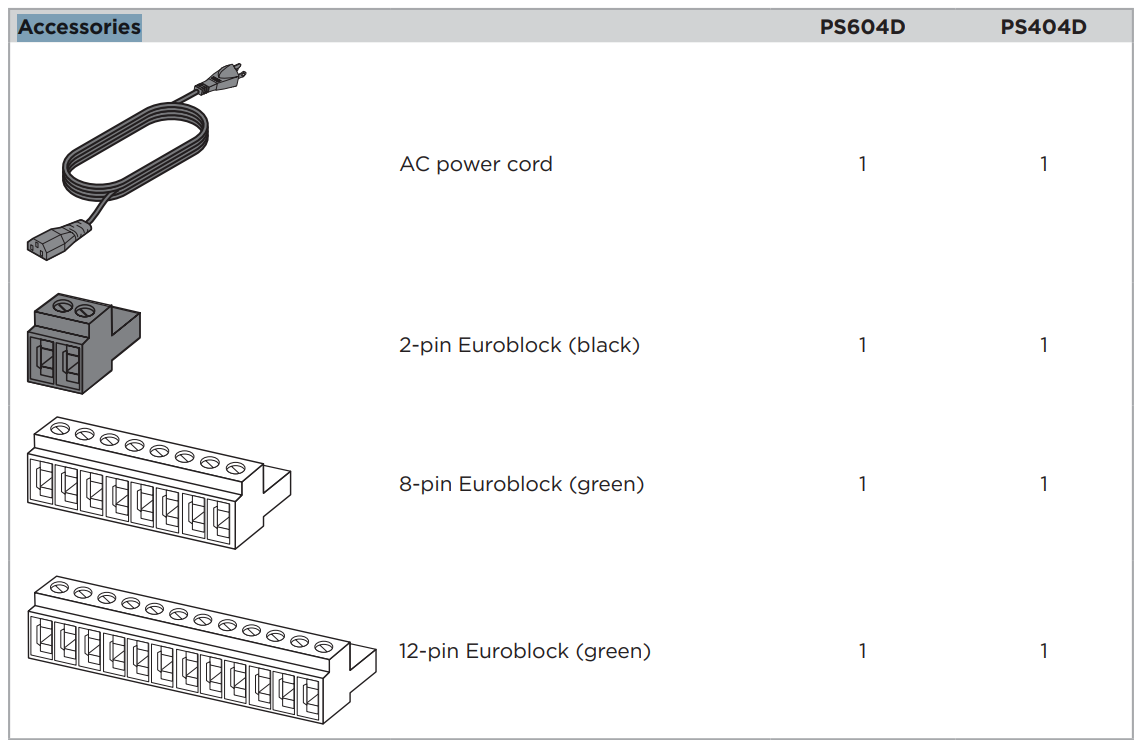
PowerShare PS604D/PS404D
Front Panel

| 1 Power switch: | On/Off AC power. | |
| 2 Power LED: | Power or fault state indication. | Green (solid): Power is on Green (blinking): Unit is in standby mode Amber (solid): Thermal fault Red (solid): Power supply fault |
| 3 Input Signal LED: | Each LED operates independently. | Green: Signal present Amber: Input is near clipping Red (solid): Indicates a fault Red (blinking): Input is clipping |
| 4 Output Limit LED: | Each LED operates independently. | Amber: Amplifier limiting an output Red (solid): Indicates a fault Red (blinking): Amplifier muted |
Rear Panel

- Dante ports
- Ethernet ports for connection of Dante® and ControlSpace devices. Transports up to four
digital audio channels between a Dante device and the amplifier. The amplifier supports a THRU path for daisy-chaining to other Dante devices in switched mode. Dante audio and ControlSpace control can be separated using Isolated mode.
- Ethernet ports for connection of Dante® and ControlSpace devices. Transports up to four
- Analog Input
- Line-level input for balanced analog audio signals.
- Mute port
- Normally open or normally closed (consult ControlSpace Designer help system) dry contacts can mute all outputs.
- Reset button
- Resets the amplifier to factory default settings (see Resetting the PS604D/PS404D on page 14).
- Output Attenuation controls
- Output attenuation controls for each output. Turn the controls clockwise to decrease attenuation and counter-clockwise to increase attenuation.
- Analog Output
- Eight-pin Euroblock connector for loudspeaker connections.
- Power input
- Power cord connection (IEC 60320-C14 inlet). Removing the power cord when the amplifier is on is equivalent to powering down using the front panel power switch, and is an acceptable power-down method.
Installation
Setting Up the PowerShare Amplifier
The asymmetrical PowerShare capability of the amplifier is easy to use and does not require software to
configure. Set the output trims according to the power you want distributed to each output load, and the
amplifier ensures that the 600 watts (PS604D), or 400 watts (PS404D), power is not exceeded. In scenarios
where more power is demanded from the amplifier, the amplifier will automatically limit all outputs equally
until the power demand is reduced.
Set Up a PowerShare Amplifier
- Starting with the amplifier power OFF, make all required power and audio connections.
- All configuration is done within the ControlSpace Designer software:
- A. Connect the PC or laptop to either amplifier’s Dante port, or connect to the amplifier via a network switch.
- B. Turn the amplifier ON.
- C. Start the ControlSpace Designer software on your PC or laptop and configure each signal processing block as required for the application. See the ControlSpace Designer help system for details.
- D. Inputs are analog by default to ensure audio can pass through the amplifier with no programming necessary. Use ControlSpace Designer to change each input from analog to Dante® as necessary.
- If using CC-D ControlCenter digital zone controller(s) for remote control, rotate each Output Attenuation control fully clockwise to 0 dB attenuation.
- The total amplifier wattage can be distributed in any way across all amplifier outputs.
- Since each output is configurable to drive either Hi-Z or Low-Z loudspeakers, the amplifier can support
mixed-impedance installations. In this setup, first configure the Hi-Z channels before configuring the Low-Z channels. - When setting up the amplifier, monitor the Input Signal LEDs for input clipping and the Output Limit LEDs for output limiting to ensure the amplifier is working within proper operating conditions. Make adjustments if necessary.
Technical Considerations
- When a loudspeaker EQ is selected in ControlSpace Designer, the appropriate crossover and VPk and VRMS limiters for that loudspeaker are automatically loaded.
- Adjusting the Output Attenuation control of a single channel does not affect the level of other channels.
- The only exception is if the amplifier is attempting to deliver more than the total amplifier wattage.
- If the total amplifier power is exceeded, the amplifier will limit all outputs simultaneously and equally until the demand is reduced.
- If the demand remains too high, the amplifier will gradually limit to an average of 200 watts continuously.
- There are multiple ways to adjust output power in a PowerShare amplifier application:
- Adjust the input signal level relative to the sensitivity setting of the amplifier.
- Adjust the Matrix level in ControlSpace Designer.
- Adjust the Out levels in ControlSpace Designer.
- Adjust the Output Attenuation controls of the amplifier.
- Adjust the CC-D ControlCenter digital zone controller(s) settings.
- Adjust the limiter settings for each output using ControlSpace Designer software.
- Adjust the transformer tap settings of any connected Hi-Z loudspeakers.
Network Connection
Before configuring your PowerShare PS604D/PS404D, download the latest version of ControlSpace Designer at BoseProfessional.com.
Establish Network Connection
Connect the PS604D/PS404D either directly to a PC or through an Ethernet switch via one of the two Dante
ports. Ensure that the PC is on the same subnet as the PS604D/PS404D using one of the following methods:
- Set the PC to DHCP and connect a DHCP server to the network. Both the PS604D/PS404D and the PC will obtain an IP address from the DHCP server.
- Set the PC to DHCP without a DHCP server. Both the PS604D/PS404D and the PC will obtain an AutoIP-assigned IP address (link-local).
- For more information, see the ControlSpace Designer software help system.
ControlSpace Designer Configuration
- If all the network connections and settings are done correctly, ControlSpace Designer should automatically
Identify the PowerShare amplifier on the network. - With a network connection in place and ControlSpace Designer software installed, use the Hardware Manager
tool inside ControlSpace Designer to scan and update the amplifier firmware. - For full details on using ControlSpace Designer to configure, control, and monitor the amplifier or systems built with Bose Professional networked system electronics, consult the ControlSpace Designer help system.
Resetting the PS604D/PS404D
The reset procedure can be used on a PowerShare PS604D or PS404D amplifier to clear the project file (programming defaults) and network settings. Reset your amplifier to clear all device settings to start from a factory default version. Resolve the network issue where the IP address is unknown. The IP address will default to DHCP, and if the DHCP server is not available, a link-local address will be used. Diagnose/resolve problems with a bad or incompatible project file.
The reset procedure can be done with the following steps. Read the whole procedure before following the steps.
- If possible, back up your CSD design before doing a reset because the amplifier’s settings will be cleared, and default settings will be restored.
- Turn the power off with the Power switch.
- Wait over 10 seconds for the power to fully discharge.
- Use a paper clip (or similar tool) to depress the Reset button in the rear panel of the amplifier.
- While depressing the Reset button, press the Power switch to turn the device power back on. The Input Signal LEDs will light green.
- Continue depressing the Reset button until the Input Signal LEDs are lit for four seconds, then release the Reset button. The Input Signal LEDs will blink rapidly if the reset procedure was successful.
Proper Ventilation
For placement of the amplifier, keep the following in mind
- Make sure that air can circulate freely from left to right for adequate ventilation. There are vents on the sides.
- The temperature of the rack should be controlled to ensure that amplifiers are not exposed to ambient temperatures exceeding 40 °C (104 °F).
- Do not cover or block amplifier vents.
- Do not place the amplifier in an enclosed space, such as a cabinet.
- Make sure the chassis is protected from heat and kept away from direct heat sources, such as heating vents and radiators.
- The two fans in each amplifier run together at a variable speed. The fans will spin faster as the internal temperature increases in order to keep the amplifier out of thermal shutdown when operating at 40 °C (104 °F) or less, and at 200 watts of continuous power or less.
Rack Mounting
Use four fasteners with washers (not supplied) to mount the amplifier front panel rack ears to the equipment rack rails.
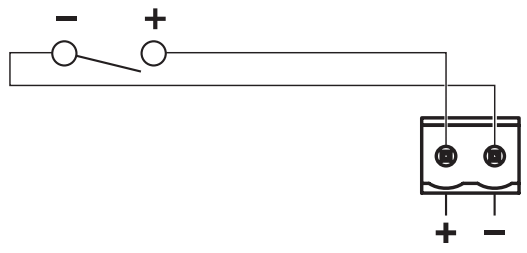
Mute with Standard Contact Closure
- The default state is Normally Open (NO), where a short across the mute connector will mute all outputs.
- Use the included 2-pin Euroblock.
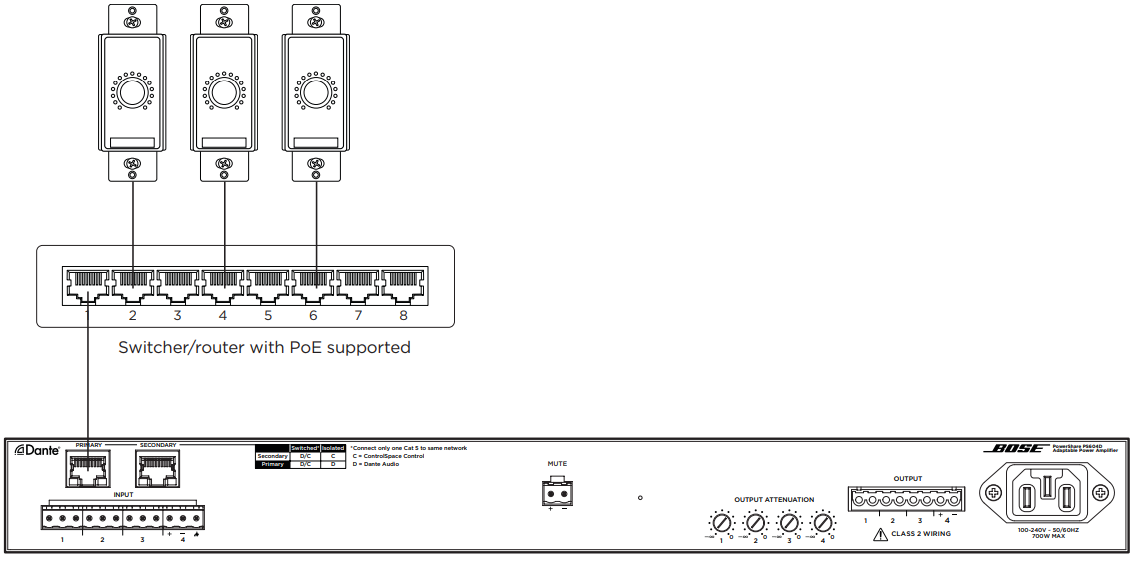
ControlCenter Digital Zone Controllers
- Remotely control the volume of the PS604D and PS404D amplifiers with Bose Professional ControlCenter digital zone controllers (CC-1D, CC-2D, and CC-3D). Use CC-1D for volume control and use CC-2D and CC-3D for volume and source control.
- A CC-D can be connected to a PS604D/PS404D directly to one of the two Dante ports using a standard Cat 5 cable. CC-D controllers must be connected via a PoE network switch. Configure your CC-D controllers using ControlSpace Designer.
Technical Specifications
PS604D
| Power Rating | ||
| Amplifier Power | 4 × 150 W (THD+N < 0.04% 1 kHz, 4–8 Ω, 70/100 V) | |
| Maximum Power per Channel | 600 W @ 4–8 Ω, 70/100 V | |
| Gain (Low-Z mode) | 32.0 dB | |
| Gain (70 V mode) | 35.0 dB | |
| Gain (100 V mode) | 38.0 dB | |
Audio Performance | ||
| Frequency Response | 4–8 Ω: 20 Hz to 20 kHz (± 0.5 dB @ 1 W); 70/100 V: Same as 4–8 Ω with 50 Hz high-pass filter | |
| Channel Separation (Crosstalk) | > 85 dB @ 1 kHz, > 65 dB @ 20 kHz | |
| Signal to Noise Ratio | 100 dB (at rated power, A-weighted) | |
| Audio Inputs | Analog | Dante® |
| Input Channels | 4 balanced | 4 digital |
| Connectors | 12-pin Euroblock | RJ-45 (primary) |
| Input Impedance | 20 kΩ | — |
| Maximum Input Level | 20 dBu (at 12 dBu sensitivity setting) | — |
| Sensitivity | 4 / 12 dBu (low/high sensitivity) | — |
Audio Outputs | Analog | Dante |
| Outputs | 4 | 4 digital |
| Connectors | 8-pin inverted Euroblock | RJ-45 (secondary) |
| Integrated DSP | ||
| A/D and D/A Converters | 24-bit / 48 kHz | |
| Processing Functions | Matrix mixer, loudspeaker EQ, real-time 9-band PEQ, VPk/VRMS limiters, delay, band pass, mute/ output polarity inversion | |
| Audio Latency | < 1 ms (Analog input to analog loudspeaker output) | |
| Indicators and Controls | ||
| Power LED | Solid green: Power is on. Blinking green: Unit is in standby mode. Solid amber: Thermal fault. Solid red: Supply fault. | |
| Input Signal LED | Green: Signal present. Amber: Input is near clipping. Red: Input is clipping. Solid red: Indicates a fault. | |
| Output Limit LED | Amber: Amplifier limiting an output. Blinking red: Amplifier muted. Solid red: Indicates a fault. | |
| Controls, Front Panel | Power On/Off | |
| Controls, Rear Panel | Output attenuators | |
Electrical | ||
| Mains Voltage | 100 VAC to 240 VAC (±10%, 50/60 Hz) | |
| AC Power Consumption | 120 VAC: 14 W (Standby), 700 W (Max) 230 VAC: 14 W (Standby), 700 W (Max) | |
| Mains Connector | Standard IEC (C14) | |
| Maximum Inrush Current | 14.14 A (230 VAC / 50 Hz), 8.04 A (120 VAC / 60 Hz) | |
| Protections | High temperature, output short, extra high frequency (EHF), excessively low or high AC line voltage | |
| Physical | ||
| Dimensions (H × W × D) | 44 mm × 483 mm × 414 mm (1.7 in × 19.0 in × 16.3 in) | |
| Shipping Weight | 7.8 kg (17.2 lbs) | |
| Net Weight | 6.4 kg (14.1 lbs) | |
| Cooling System | Microprocessor-controlled, variable-speed fans, left-to-right air flow | |
| General | ||
| Inputs (Control) | Mute input control | |
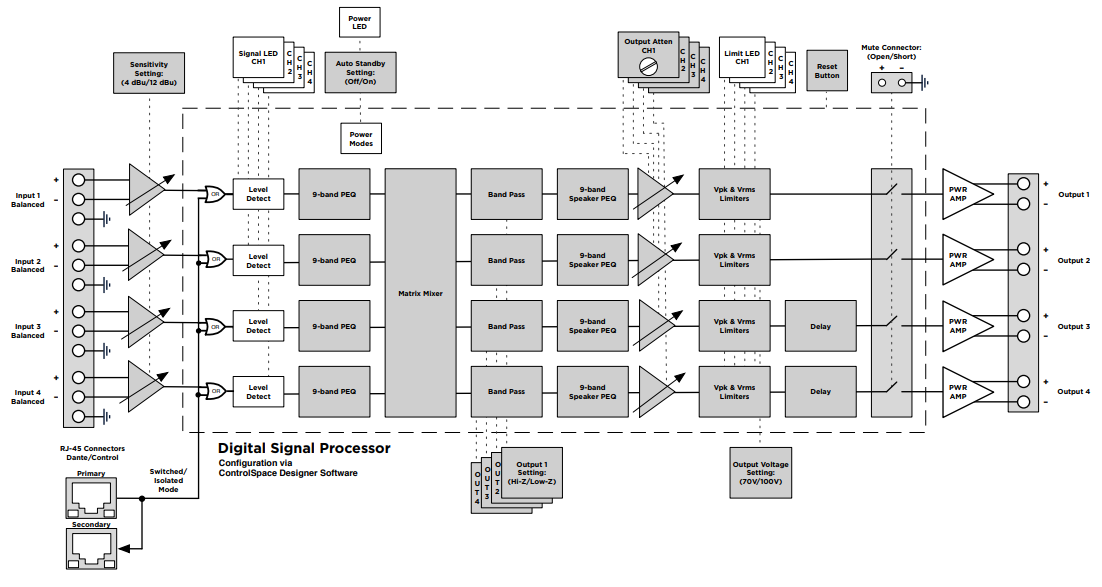
Block Diagrams
PowerShare PS604D and PS404D
Troubleshooting
| Problem | What to do |
| No PS604D/PS404D network connectivity with ControlSpace Designer running on PC | Verify that the amplifier is fully booted. The Power LED should appear solid green. Check firewall settings on the PC, unblock all ports. Verify that the Current Project Settings Network Address and Subnet Mask within ControlSpace Designer Hardware Manager match the network, whether using DHCP or link-local (link-local uses Subnet Mask 255.255.0.0). |
| No PS604D/ PS404D Dante® audio subscriptions or audio | Ensure the amplifier’s Dante IP address is on the same network as the other Dante devices in the system. To change the amplifier’s Dante IP, use Audinate’s Dante Controller software, or consult the ControlSpace Designer help system. Sometimes it can be helpful to change the PC’s network settings from static IP to DHCP to view and change the Dante IP address. |
AC Current Draw and Thermal Dissipation
PS604D
The amplifier rated channel power for the PS604D is 600 W, distributed across four outputs.
| PS604D AC Current Draw and Thermal Dissipation (120 VAC, 60 Hz) | ||||||
| Test Signal & Power Level | Load Configuration (All channels driven) | Total Audio Output, W | Line Current, A | Thermal Dissipation, Max | ||
| Watts | BTU/hr | kCal/hr | ||||
| Power On, Idling | 0 | 0.63 | 76 | 258 | 65 | |
| 1/8th Rated Power IEC268 Bandlimited Pink Noise | 4-8 Ω | 75 | 1.60 | 117 | 399 | 101 |
| 1/8th Rated Power IEC268 Bandlimited Pink Noise | 70/100V | 75 | 1.40 | 93 | 317 | 80 |
| 1/3rd Rated Power IEC268 Bandlimited Pink Noise | 4-8 Ω | 200 | 2.85 | 142 | 485 | 122 |
| 1/3rd Rated Power IEC268 Bandlimited Pink Noise | 70/100V | 200 | 2.70 | 124 | 423 | 107 |
| PS604D AC Current Draw and Thermal Dissipation (230 VAC, 50 Hz) | ||||||
| Test Signal & Power Level | Load Configuration (All channels driven) | Total Audio Output, W | Line Current, A | Thermal Dissipation, Max | ||
| Watts | BTU/hr | kCal/hr | ||||
| Power On, Idling | 0 | 0.33 | 76 | 259 | 65 | |
| 1/8th Rated Power IEC268 Bandlimited Pink Noise | 4-8 Ω | 75 | 0.80 | 109 | 372 | 94 |
| 1/8th Rated Power IEC268 Bandlimited Pink Noise | 70/100V | 75 | 0.74 | 95 | 325 | 82 |
| 1/3rd Rated Power IEC268 Bandlimited Pink Noise | 4-8 Ω | 200 | 1.50 | 145 | 495 | 125 |
| 1/3rd Rated Power IEC268 Bandlimited Pink Noise | 70/100V | 200 | 1.40 | 122 | 416 | 105 |
Current Draw and Thermal Dissipation
| PS404D AC Current Draw and Thermal Dissipation (120 VAC, 60 Hz) | ||||||
| Test Signal & Power Level | Load Configuration (All channels driven) | Total Audio Output, W | Line Current, A | Thermal Dissipation, Max | ||
| Watts | BTU/hr | kCal/hr | ||||
| Power On, Idling | 0 | 0.63 | 76 | 258 | 65 | |
| 1/8th Rated Power IEC268 Bandlimited Pink Noise | 4-8 Ω | 50 | 1.25 | 100 | 341 | 86 |
| 1/8th Rated Power IEC268 Bandlimited Pink Noise | 70/100V | 50 | 1.20 | 94 | 321 | 81 |
| 1/3rd Rated Power IEC268 Bandlimited Pink Noise | 4-8 Ω | 133 | 2.10 | 119 | 406 | 102 |
| 1/3rd Rated Power IEC268 Bandlimited Pink Noise | 70/100V | 133 | 2.00 | 107 | 365 | 92 |
AC Current Draw and Thermal Dissipation (230 VAC, 50 Hz) | ||||||
| Test Signal & Power Level | Load Configuration (All channels driven) | Total Audio Output, W | Line Current, A | Thermal Dissipation, Max | ||
| Watts | BTU/hr | kCal/hr | ||||
| Power On, Idling | 0 | 0.33 | 76 | 259 | 65 | |
| 1/8th Rated Power IEC268 Bandlimited Pink Noise | 4-8 Ω | 50 | 0.66 | 102 | 347 | 88 |
| 1/8th Rated Power IEC268 Bandlimited Pink Noise | 70/100V | 50 | 0.60 | 88 | 300 | 76 |
| 1/3rd Rated Power IEC268 Bandlimited Pink Noise | 4-8 Ω | 133 | 1.10 | 120 | 409 | 103 |
| 1/3rd Rated Power IEC268 Bandlimited Pink Noise | 70/100V | 133 | 1.00 | 97 | 331 | 83 |
Regulatory Compliance
Environmentally rated to IP55
- This product conforms to all applicable EU directive requirements.
- Proper disposal and recycling help protect natural resources, human health, a nd the environment.
- For more information on the disposal and recycling of this product, contact your local municipality, disposal service, or the shop where you bought this product.
Warranty
- This product is covered by a limited warranty.
- For warranty details, visit BoseProfessional.com/warrant.y
Customer Support
- Tel: 1-800-278-1083
- Website: https://support.bose.com/
MA 01748 USA Bose is a trademark of Bose Corporation. ArenaMatch is a trademark of Transom Post OpCo LLC. ©2024 Transom Post OpCo LLC.
FAQs
Q: What is the main purpose of the Bose PS604D amplifier?
Designed for commercial sound installations, the PS604D is a 600-watt adjustable amplifier. It is perfect for mixed-load zones including restaurants, schools, places of worship, and retail establishments since it can distribute power among output channels as needed.
Q: What does “PowerShare” mean?
The amplifier can dynamically divide its entire power—600 watts in this model—across all output channels thanks to PowerShare technology. This implies that without requiring human reconfiguration, each channel can demand varying amounts of power based on the speaker load.
Q: What’s the difference between the PS604 and PS604D?
The amplifier can be integrated with networked audio systems thanks to the “D” version’s DanteTM digital audio networking. The PS604D is required if your installation makes use of Dante.
Q: Do I need external DSP processing?
No. EQ settings, crossover filters, delay, limiters, loudspeaker protection, and routing control via Bose ControlSpace software are all provided by the PS604D’s integrated Bose DSP.
Q: Does the amplifier work without Dante?
Of course. No matter how Dante is configured, analogue inputs are always operational. The amplifier operates normally with analog-only sources if you are not utilising a networked audio setup.