



Bowers And Wilkins 700 Series 3 Home Speaker
 Safety Instructions
 Safety Instructions
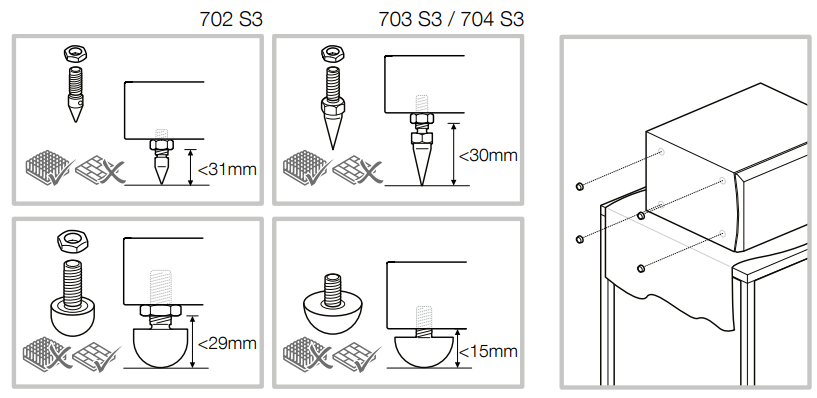
- The spike feet are designed to pierce carpet and rest on the floor surface. Initially, screw the lock nuts onto the spikes just far enough to leave the nuts floating just above the carpet when the spikes are resting on the floor beneath.
- Then, screw the spikes fully into the threaded inserts in the plinth. If the cabinet rocks when placed on the floor, unscrew the two spikes that do not touch the floor until the cabinet rests firmly without rocking.
- Finally, lock the nuts against the base by using the supplied spanner to gently tighten the nut whilst using the supplied tommy bar to stop the spike foot rotating.
- If there is no carpet and you wish to avoid scratching the floor surface, use either a protective metal disc (a coin, perhaps) between the spike and the floor, or use the supplied rubber feet.
- Fit the rubber feet and level the cabinet in the same manner as with the spike feet.
- The 705 S3, 706 S3, and 707 S3 are primarily designed to be mounted on a dedicated floor stand (FS-700 S3), but may be placed on a shelf if preferred.
- However, it should be noted that this offers less flexibility to optimise the speaker’s performance.
- If shelf placement must be used, we recommend using the foam plugs (supplied) to optimise port performance (see Section 4: Fine-Tuning).
- In both installation cases, the speakers’ tweeters should be approximately at ear height at your usual listening position.
Carton Contents
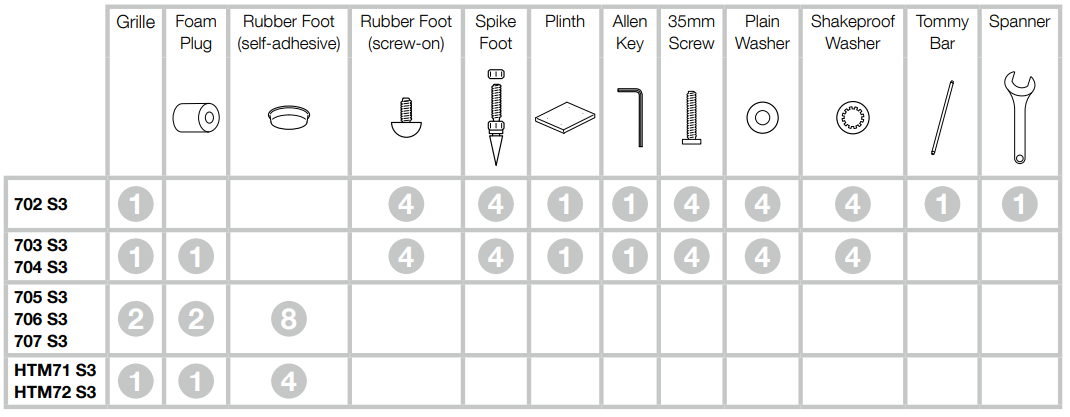
- The table above illustrates the parts that are packed with the product. In the unlikely event that anything is missing, please contact the retailer from whom you purchased the speakers.
- The tweeter assembly on 702 S3, 703 S3, 705 S3, and HTM71 S3 loudspeakers is a decoupled component that is mechanically isolated from the main part of the cabinet.
- As such, it may appear to be loose when the product is first removed from its packaging. This is not a fault: it is an inherent feature of the design and ensures optimum performance from your speaker.
Tools
Positioning
Speaker Installation
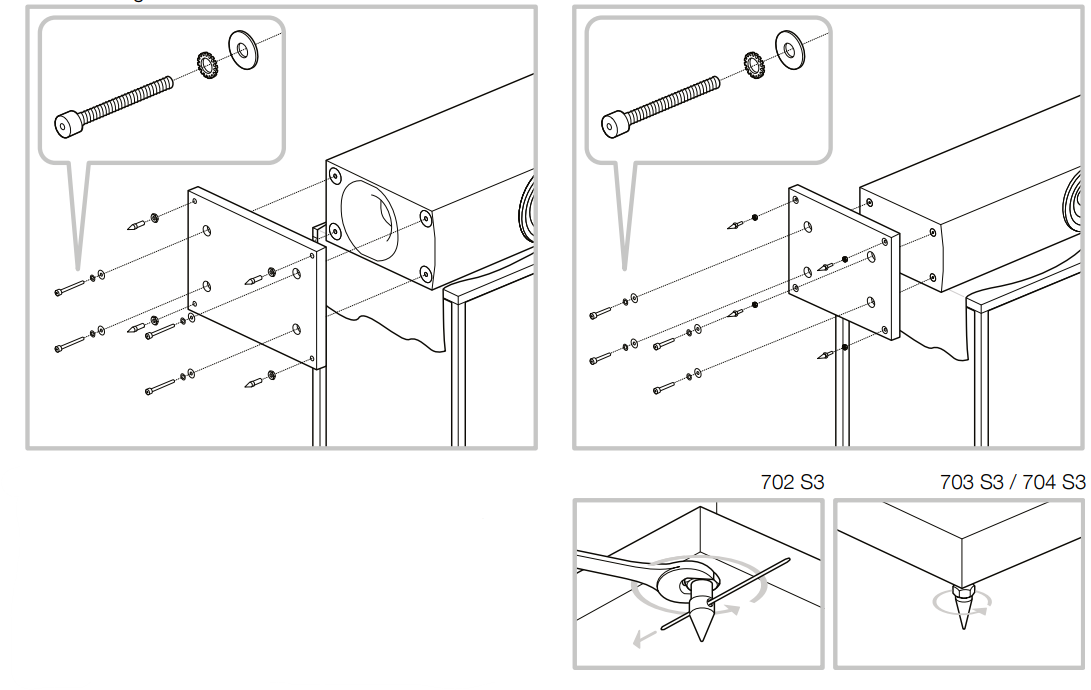
- 702 S3 / 703 S3 / 704 S3 702 S3, 703 S3 and 704 S3 are intended to be floor mounted only.
- For proper stability, always install the provided plinth, then ensure that the speakers stand firmly on the floor using the spike or rubber feet supplied.
- You may attach the plinth during the unpacking process, following the illustrations above or the diagrams on the top flap of the carton.
The plinth MUST always be used, with the rubber or spike feet inserted into the plinth. DO NOT insert rubber or spike feet directly into the cabinet.
HTM71 S3 / HTM72 S3
If using a projection television with an acoustically transparent screen, position the speaker behind the centre of the screen. Otherwise, position it either directly below or above the screen using either a floor stand, furniture unit, or wall shelf, ensuring the speaker is as close to ear height as possible. If the speaker is to be placed either on a shelf or in a rack shared with other AV equipment, fix the four self-adhesive rubber feet to the base of the speaker. They provide a degree of vibration isolation.
Speaker Positioning
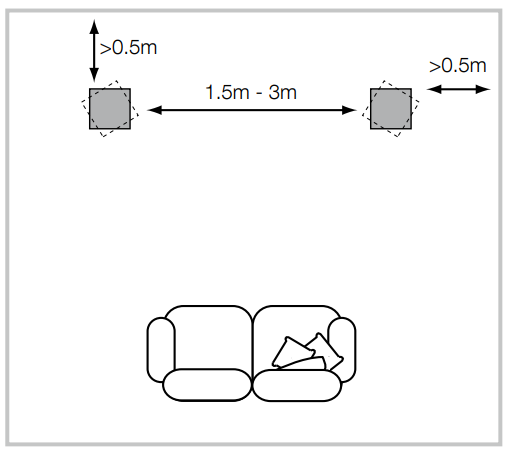
In either stereo or home theatre installations, try to ensure that the immediate surroundings of each speaker are similar in acoustic character. For example, suppose one speaker is adjacent to bare walls while the other is adjacent to soft furnishings and curtains. In that case, both the overall sound quality and the stereo image are likely to be compromised.
While the 700 Series 3 speakers provide exceptional sound quality for home theatre and stereo setups, users looking for wireless streaming with AirPlay support may also consider the Bowers & Wilkins A7 Speaker with AirPlay for seamless connectivity and compact design.
Conventional Stereo Systems
To begin with, the speakers should be positioned between 1.5m and 3m apart at two corners of an equilateral triangle completed by the listening area at the third corner. The speakers should be placed at least 0.5m away from the back and any side walls (as per the illustration above).
Home Theatre Systems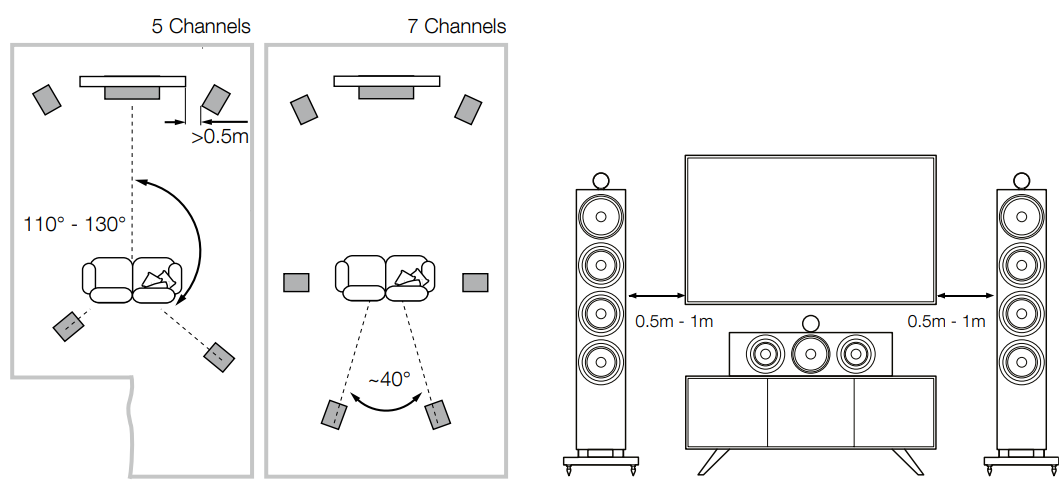 If the speakers are to be used for the front channels in a home theatre system, they should be placed closer together than for 2-channel audio, because the surround channels tend to widen the image. Positioning the speakers within approximately 0.5m of the sides of the screen will also help keep the sound image in scale with the visual image. As with conventional stereo positioning, the speakers should ideally be at least 0.5m away from any side walls.
Stray Magnetic Fields
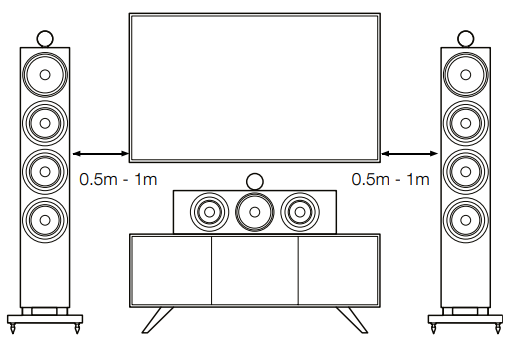
The speaker drive units create stray magnetic fields that extend beyond the boundaries of the cabinet. We recommend you keep magnetically sensitive articles (CRT television and computer screens, computer discs, audio and video tapes, swipe cards, and the like) at least 0.5m from the speaker. LCD, OLED, and plasma screens are not affected by magnetic fields.
Connections
- Ask your dealer for advice when selecting speaker cable. Keep its total impedance below the maximum recommended in the speaker specification and use a low inductance cable to avoid attenuation of high frequencies.
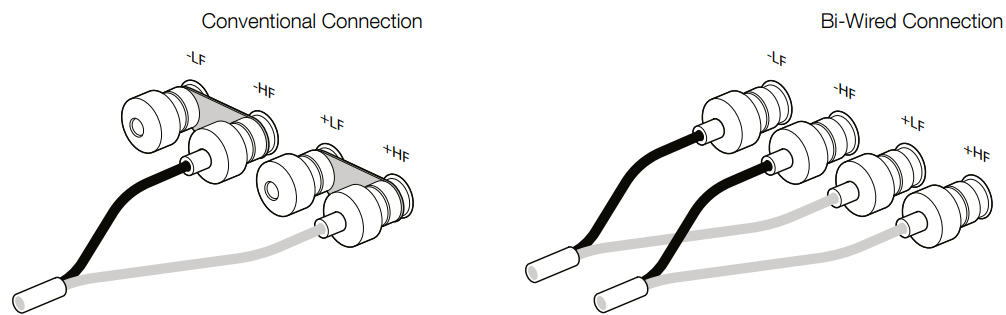
- There are two linked pairs of terminals on the back of the speaker. For a conventional connection (above left), the terminal links should remain in place (as delivered) and just one pair of terminals connected to the amplifier.
- For bi-wire connections or bi-amplification (above right), the terminal links should be removed and each pair of terminals connected to the amplifier or amplifiers independently. Bi-wiring can improve the resolution of low-level detail.
- An incorrect connection will not result in damage, but will cause poor stereo imaging and loss of bass. Always screw the terminal caps down fully to prevent rattles.
Fine-Tuning
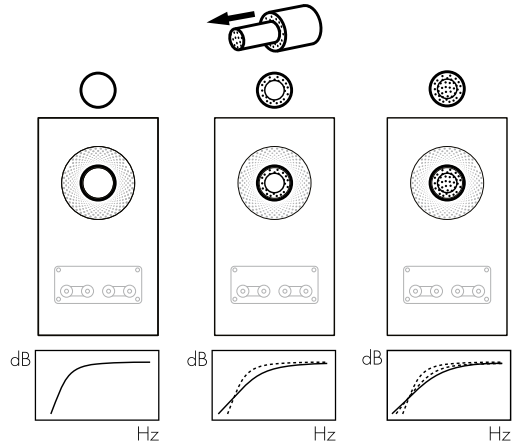
Before fine-tuning, make sure that all the connections in the installation are correct and secure. Moving the speakers further from the walls will generally reduce the volume of the bass. Space behind the speakers will also help to create an aural impression of depth.
Try moving the listening position or locating the speakers along a different wall. The presence and position of large pieces of furniture can also influence resonance modes. If no alternatives exist, you can adjust your loudspeakerslow-frequencycy performance using the supplied foam plugs.
Running In
The performance of the speaker will change subtly during the initial listening period. If the speaker has been stored in a cold environment, the damping compounds and suspension materials of the drive units will take some time to recover their correct mechanical properties.
The drive unit suspensions will also loosen up during the first hours of use. The time taken for the speaker to achieve its intended performance will vary depending on previous storage conditions and how it is used.
Aftercare
- The cabinet surfaces will usually only require dusting. We recommend you use a soft microfibre cloth.
- Avoid abrasive products or those containing acid, alkali, or anti-bacterial agents.
- Do not use cleaning agents on the drive units.
- Avoid touching the drive units as damage may result.
- This process can take several days or even weeks, but may be accelerated by careful use of an ultraviolet lamp. Wood veneered surfaces should also be kept away from direct sources of heat, such as radiators and warm air vents, to minimise the possibility of the wood veneer cracking.
- The tweeter housing has a textured finish that may collect superficial marks when handled. It can be cleaned by wiping a soft microfibre cloth around the housing, in line with the surface texture.
Environmental Information
- This product automatically manages its power state without the need for any interaction. When connected to a network and not in use, power consumption is automatically reduced below 2 watts.
- This product complies with international directives, including but not limited to the Restriction of Hazardous Substances (RoHS) in electrical and electronic equipment, the Registration, Evaluation, Authorisation and restriction of Chemicals (REACH), and the disposal of Waste Electrical and Electronic Equipment (WEEE).
- Consult your local waste disposal authority for guidance on how to properly recycle or dispose of this product.
Customer Service
- Ph: 800 370 3740
- Website: https://www.bowerswilkins.com/
FAQs
Q: Are these speakers compatible with subwoofers?
In order to increase bass performance, the 700 Series 3 does indeed work well with a subwoofer.
Q: Can I use these speakers outdoors?
No, the 700 Series 3 is exclusively intended for indoor use. The cabinet and drivers may sustain damage from exposure to dampness, severe temperatures, or direct sunshine.
Q: My speakers are sounding dull or muted—what should I check?
Make sure that the connections are connected correctly and have the same polarity. Examine the tone and EQ controls on the amplifier. Examine the arrangement of the space; too much carpet or drapes might absorb high frequencies. Verify the quality of the source; low-bitrate or compressed files may sound flat.
Q: How do I safely move or reposition the speakers?
Never lift from the drivers, but rather from the base or side panels. To prevent cable strain, move one speaker at a time. When it comes to floor-standing versions, you might want to use a dolly or many people for heavy units.
Q: Are there any precautions when pairing with a subwoofer?
To mix in perfectly with the mains, gradually adjust the subwoofer’s volume. To prevent dips or peaks in the bass response, make sure the phases are aligned.
Q: How can I enhance dialogue clarity for movies?
For reliable vocal reproduction, place a centre channel speaker at ear level. To expand the soundstage, tilt the 700 Series 3 speakers slightly in the direction of the listening position. Think about utilising the clarity or dialogue enhancement options on the AV receiver.
4 Comments
Can you be more specific about the content of your article? After reading it, I still have some doubts. Hope you can help me. https://www.binance.info/kz/register?ref=K8NFKJBQ
Thank you for your sharing. I am worried that I lack creative ideas. It is your article that makes me full of hope. Thank you. But, I have a question, can you help me? https://accounts.binance.info/register-person?ref=IHJUI7TF
Your point of view caught my eye and was very interesting. Thanks. I have a question for you.
Your point of view caught my eye and was very interesting. Thanks. I have a question for you. https://www.binance.com/register?ref=JW3W4Y3A