



Bowers & Wilkins PI4 Wireless Headphones
Features
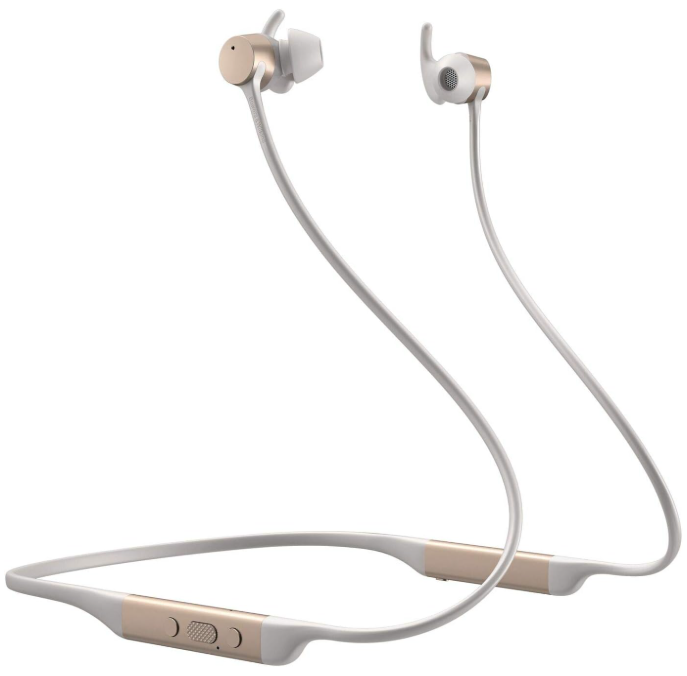
The Bowers & Wilkins PI4 are high-performance in-ear headphones designed to deliver the highest quality mobile personal audio experience, combined with the convenience of wireless operation and the serenity of noise-cancellation.
- Your PI4 headphones can play music streamed wirelessly from your mobile phone, tablet or computer via Bluetooth and used for wireless telephony. PI4 can also play audio while being charged via USB.
- PI4 Real World Listening features include our latest innovations in Adaptive Noise Cancellation, Ambient Pass-Through and Magnetic Clip Sensor technologies.
- Our latest generation noise cancellation feature was designed from the ground up with intelligent environment sensing capabilities, automatically selecting the appropriate type of noise cancellation best suited to your surrounding environment. Its only goal is to deliver an uncompromised listening experience.
- Ambient Pass-Through enables external sounds, such as conversation or safety announcements, to be heard clearly without any need to remove the headphones.
- The Magnetic Clip Sensing feature enables the PI4 to respond naturally, pausing and resuming the music simply by clipping the earpieces together.
- These features can be enabled and further customized via the Bowers & Wilkins Headphone App, available for free on iOS and Android devices.
- PI4 headphones incorporate a rechargeable battery pack. When fully charged and depending on the degree of Bluetooth, Adaptive Noise Cancellation and Ambient Pass-Through use, the battery pack can provide up to 10 hours of continuous wireless media streaming with noise cancellation enabled at average playback volume levels.
Contents
- PI4 headphones
- Storage case
- USB-C charging cable
- Ear tips (small, medium and large)
- Ear sstabilizers(small, medium and large)
- Document pack
Know your Product
Switching Headphones On and Off
Switching On
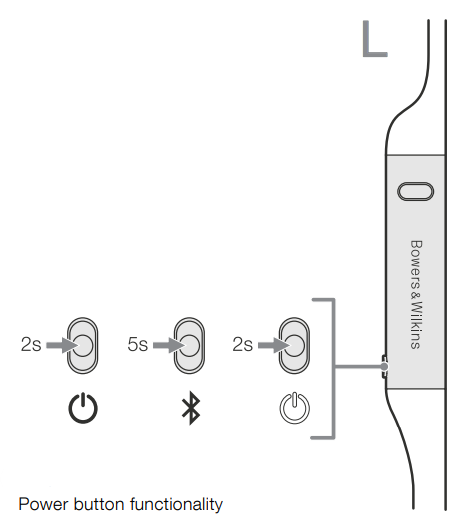
The Power button is located on the left control unit. Press and hold the Power button for 2 seconds. An audible cue will be presented, and the LED indicator will light up in either green, amber or red, displaying the current charge level.
Switching Off
- Press and hold the Power button for 2 seconds.
- An audible cue will be presented, and the headphones will power down when the LE indicator is no longer lit.
Headphone Controls
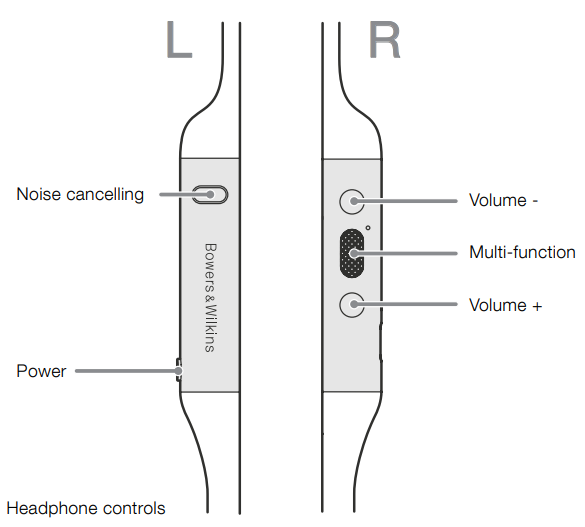
The following buttons on the right control unit are used for media playback.
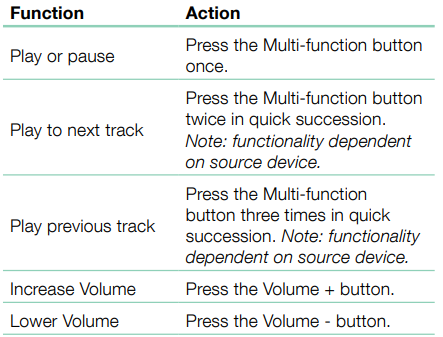
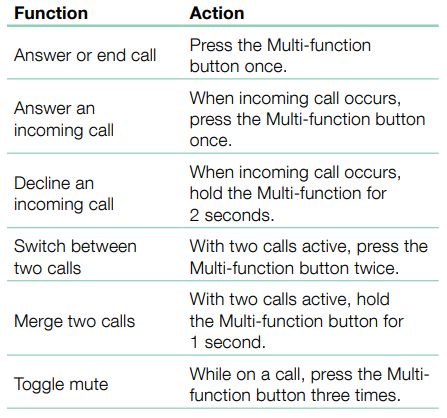
The following buttons on the right control unit are used for phone call functionality.y
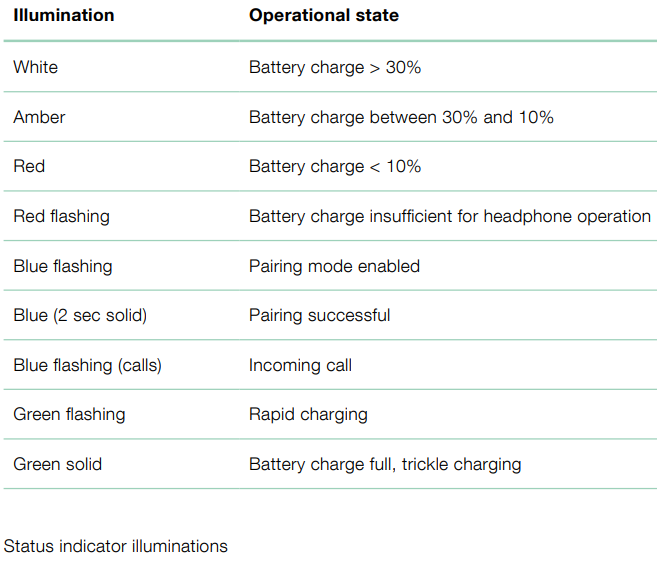
Status Indicator
The status LED indicator is located on the right control unit.
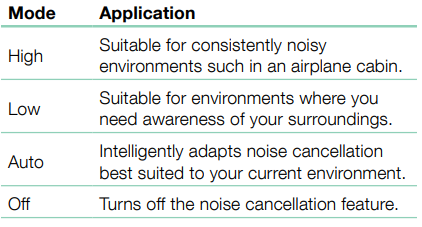
Adaptive Noise Cancellation
- Noise cancellation is a series of advanced technologies that aid in removing undesired noise from the surrounding environment.
- PI4 features our latest innovations in adaptive noise cancellation. This includes intelligent sensing that adapts noise cancellation and tuning best suited to your surrounding environment.
- As your surroundings change, noise cancellation will auto-adapt to complement your new environment.
- The Noise Cancellation button on the left control unit is used to cycle between the following modes.
Ambient Pass-Through
PI4 features Ambient Pass-Through, which lets some external noise from the surrounding environment, such as safety announcements or conversations, be heard without taking the headphones off. The Noise Cancellation button on the left control unit also controls this feature; see Diagram 2 for button location.
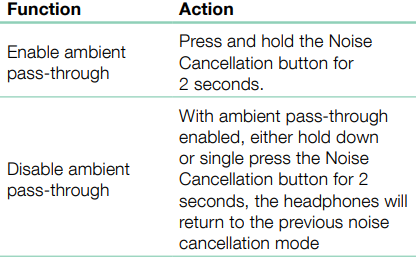
The level of ambient pass-through can be further customized to suit your needs using the Bowers & Wilkins Headphones App.
Magnetic Clip Sensors
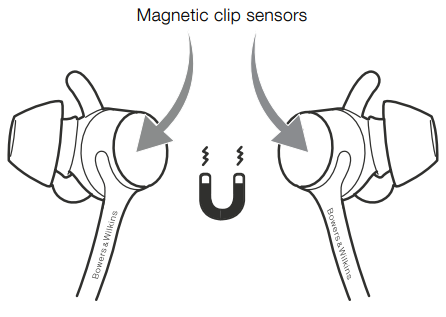
- PI4 incorporate magnetic clip sensors in the earpieces, enabling intelligent battery conservation by entering standby when clipped together.
- When unclipped again, PI4 automatically wakes and connects to the last connected Bluetooth device.
- During media playback, PI4 will auto-pause when both earpieces are clipped together.
- If unclipped before standby, playback will automatically resume.
- Auto resume has also been optimized, so it is ready only when you are.
This means the headphone will not attempt to resume playback under the following conditions:
- The headphone powers on from the off state.
- The headphone wakes from the standby state.
- Headphone reboots (such as after a factory reset). Magnetic sensors and standby can be adjusted using the Bowers & Wilkins Headphones App.
Battery Charging and Power Saving
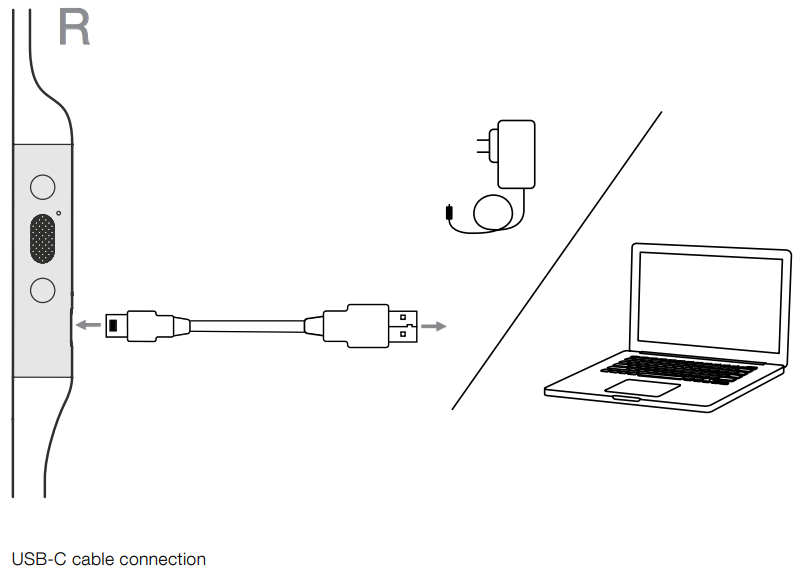
Your PI4 comes with the battery partially charged may be used immediately. For best practice, we recommend fully charging the headphones before first use. Please allow up to 3 hours for a full charge. The headphones can be used while charging. To charge:
- Please use the supplied charging cable and connect the USB-A plug to a wall charger or a powered computer USB-A socket.
- Then connect the USB-C end to the headphones’ USB-C socket.
Standby Power Saving
- PI4 magnetic clip sensors intelligently conserve power. When removed from your ears and clipped together, PI4 will automatically enter Standby, which will pause media playback, disconnect Bluetooth, and switch to a low power state.
- When unclipped again, PI4 will wake and reconnect to the last connected Bluetooth source. If the magnetic sensors are disabled using the App, this feature will also be disabled.
- With the app, you can customize how long the headphones will wait before switching to Auto Standby. Please see Standby Timer under Settings in the App.
Wearing
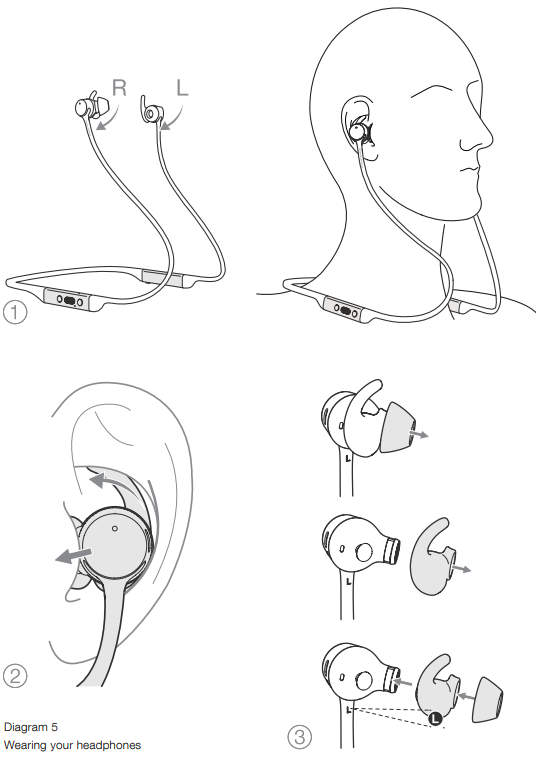
Wearing your headphones correctly will help ensure you get the best possibleexperiencee. Like many in-ear headphones, the PI4 earpieces are designed to seal the ear canal to perform optimally. The earpieces are also designed to be used with the stabilizer fins and must be installed before use.
Both ear tips and stabilizer fins come in three sizes (small, medium and large). Finding the proper size for your ear is critical to obtaining a good seal and ensuring PI4 and the advanced features, such as Adaptive Noise Cancellation, perform optimally.
- Identify the left and right earpieces by finding the identification legends located on the interior of each cable near the earpieces.
- Hold PI4 by the left and right control units and hang the headphone around your neck comfortably, the earpieces should be at equal length.
- Place the earphones in your ear so that the tips sit comfortably at the opening of the ear canal.
- Ensure the stabilizer fins are sitting comfortably in the ear. Try another size if they do not fit.
- Different-sized ear tips and stabilizer fins can be used to ensure the best possible fit.
Bluetooth Connection
Pairing
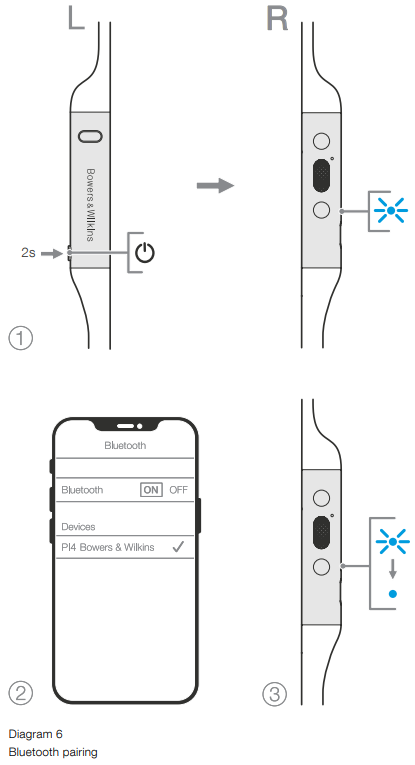
PI4 is designed to stream media wirelessly from Bluetooth audio devices, such as smartphones, tablets or personal computers.
- Ensure the Bluetooth feature is enabled on the audio device. PI4 will appear in the discovery list; select it to pair.
- The indicator will flash blue while pairing is in progress. This will change to solid blue, and an audible cue will be presented when pairing is successful.
Your headphones will remember up to eight paired Bluetooth devices. Repeat the above steps to pair more devices.
Multiple Bluetooth Connections
PI4 can connect up to two devices at the same time, but note that you can only play audio or take calls from one device at a time. To switch between two devices:
- Pause audio on the first device, or use the PI4 multi-function button.
- Play audio from the second device, and the headphones will switch over.
- Ending the call will automatically resume playback from the first device.
Disconnect from a Device
- Alternatively, you can manage connections in further detail using the Bowers & Wilkins Headphones app under Connections.
Setting Up Headphones with the App
The Bowers & Wilkins Headphones app provides extended setup. The app also provides further customizations such as voice prompt, standby time, connection management and headphone software updates. The app is available as a free download on iOS and Android devices. To add your headphones:
- From your mobile device, download and install the Bowers & Wilkins Headphones app.
- Launch the app, then read and follow the instructions about app notifications and permissions.
- After reaching the main screen, simply tap + and follow the in-app instructions.
Headphone Software Updates
Bowers & Wilkins will occasionally make available software updates that refine and optimize the performance of your headphones or add new features. The Bowers & Wilkins Headphones app will notify you when a software update is available. Tap on the notification and follow the in-app instructions.
Specifications
- Wearing Style: Bluetooth Wireless In-Ear Headphones
- Drive Units: 2 x ø14.2mm full range
- Microphones: 2x mics for ANC 2x mics for telephony (CVC1 – Clear Voice Communication v1)
- Frequency Range: 10Hz to 30kHz
- Distortion: (THD) <0.3% (1kHz/10mW)
- Battery Type: Rechargeable Lithium Polymer
- Battery Life & Charging: 10 hrs Bluetooth with ANC, 3hrs with 15min charge
- Inputs: Bluetooth, USB-C audio
- In Box Accessories: 20cm USB-A to USB-C cable, Storage Pouch, Ear (S, M, L) & Stability Fins (S, M, L)
- Weight: 40 grams
Technical Features
- Adaptive Noise Cancellation
- Ambient Pass-Through
- Magnetic Clip Sensor
- Bluetooth 5.0 with AptX-Adaptive technology
- USB-C charging and audio interface
Bluetooth Codecs
- AptX-Adaptive
- AptX-HD
- AptX-Classic
- AAC
- SBC
Bluetooth Profiles
- A2DP v1.3.1
- AVRCP v1.6.1
- HFP v1.7.1
- HSP v1.2
- BLE GATT (Generic Attribute Profile)
Power Cycle
You can power cycle your PI4, simultaneously hold the Volume + and Volume – buttons for 10 seconds until the indicator LED extinguishes, a nd let go when the indicator lights up again. Rebooting your headphones will not reset their internal settings or clear the paired device history.
Reset to Default
- You can clear the paired device history and restore all settings to their defaults. With the PI4 powered on, simultaneously hold the Volume + , Volume – and
- Noise Cancellation buttons for 10 seconds until the indicator LED extinguishes, let go when the indicator lights up again, and the headphones will be ready to pair to a device.
- Alternatively, you can also reset from the Bowers & Wilkins Headphones app. Please see Reset under Settings in the app.
Care & Maintenance
Storing Your PI4
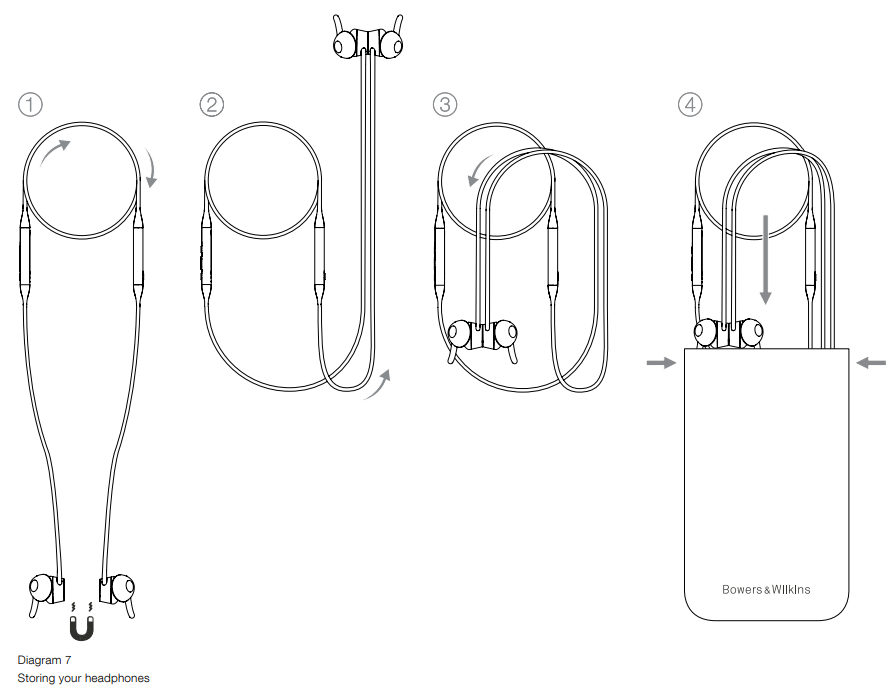
Taking care of your PI4 will ensure it continues to deliver the best performance and experience. When not used, stow your headphones using the included storage pouch.
- With the headphones not worn, take the neckband and form a single loop.
- Bundle the loop and control units together in one hand. With the free hand, clip the earpieces together and loop the earbuds over the bundle.
Cleaning
Your PI4 can be cleaned by a soft, damp microfiber cloth, gently wiping or dabbing it clean. Removable pieces such as ear tips and stabilizer fins should be taken off and cleaned separately. If you notice wax and residue accumulation on the sound tubes, take a cotton swab or soft brush and gently wipe away.
- Do NOT aggressively rub or use an abrasive tool to clean.
- Do NOT use paper towels, napkins or tissue as they will leave residue.
- Do NOT use cleaning detergents, soapy water, polish or chemical cleaners.
- Do NOT wash or submerge all or parts of the headphones in liquid.
Environmental Information
This product automatically manages its power state without the need for any interaction. When connected to a network and not in use, power consumption is automatically reduced below 2 watts. This product complies with international directives, including but not limited to the Restriction of Hazardous Substances (RoHS) in electrical and electronic equipment, the Registration, Evaluation, Authorization and restriction of Chemicals (REACH), and the disposal of Waste Electrical and Electronic Equipment (WEEE). Consult your local waste disposal authority for guidance on how to properly recycle or dispose of this product.
Customer Service
- Ph: 800 370 3740
- Website: https://www.bowerswilkins.com/
FAQs
Q: Are the Bowers & Wilkins PI4 headphones truly wireless?
Indeed. The PI4 are Bluetooth-enabled wireless in-ear neckband headphones that don’t require a physical connection to your smartphone.
Q: What Bluetooth codecs do the PI4 support?
They provide high-quality audio on compatible devices by supporting aptX, aptX HD, aptX Adaptive, and AAC.
Q: Do the PI4 have Active Noise Cancellation (ANC)?
Indeed. The PI4 has pass-through (ambient) mode, adaptive active noise cancellation, and call noise-cancelling microphones.
Q: Are the PI4 suitable for workouts?
Indeed. They have an IPX4 splash-resistant certification, making them appropriate for modest exercises and perspiration, but, not suggested for heavy rain or water submersion.
Q: How do I pair the PI4 with a new device?
Press and hold the multi-function button until the LED glows blue. Then pick “Bowers & Wilkins PI4” from your device’s Bluetooth menu.
Q: Can the PI4 connect to multiple devices at once?
You may stay connected to two devices at once thanks to the PI4’s support for multipoint networking.
Q: Do they come with built-in controls?
Indeed. The neckband contains physical buttons for volume, playback, ANC mode selection, voice assistant activation, and call control.
Q: Is there an app for customizing the PI4?
Indeed. The Bowers & Wilkins Headphones App allows you to customize your listening experience, modify noise-cancellation settings, and update firmware.