



Cablematic Home Led Line-Interactive UPS
Introduction
- This product is designed to provide emergency power to devices such as cash registers, alarm systems, servers, consumer electronics, and computers.
- The product is not designed to work with household appliances that require a continuous pure sine wave, such as hair dryers, refrigerators, microwaves, washing machines, vacuum cleaners, fans, electric kettles, induction stoves, and other similar appliances.
- Do not connect items that can overload the UPS. The UPS system should not be used in life support systems or other vital critical equipment.
Safety Instructions
- Risk of electric shock! Do not open the housing yourself;f, entrust servicing to a qualified person.
- Do not use the device in low or high temperatures, strong magnetic fields, or in humid or dusty environments.
- Do not obstruct the ventilation openings.
- Connect all wiring in a manner that complies with applicable local electrical codes and in such a way as to eliminate the risk of stepping on or tripping over it. Use only VDE-certified and CE-certified power cables when connecting loads to the UPS.
- In case of smoke coming out of the device, disconnect the mains supply as soon as possible. In case of fire, disconnect the mains supply as soon as possible and notify the fire department of the situation by calling the fire department number of the country you are in.
Switching on the UPS
- The UPS has a „cold start” function that allows it to be turned on without being plugged into an AC outlet.
- Each time the UPS starts up, an automatic diagnostic test is carried out, which is indicated by alternating LED lights.
Overview
Switching off the UPS
- When shutting down in power supply (AC) mode, the UPS will stop supplying power to rear-connected devices and will enter standby mode.
- Despite the shutdown, the UPS will continue to run in the background, charging the batteries.
- Complete shutdown of the UPS occurs when the plug is removed from the AC outlet.
- When shutting down in battery (DC) mode, the UPS will shut down after a long beep.
Connecting the UPs
Plug the UPS plug directly into a verified 3-wire grounded AC outlet. Do not connect the UPS to any surge suppressors, splitters, or power strips.
Connecting to bExternal Devices
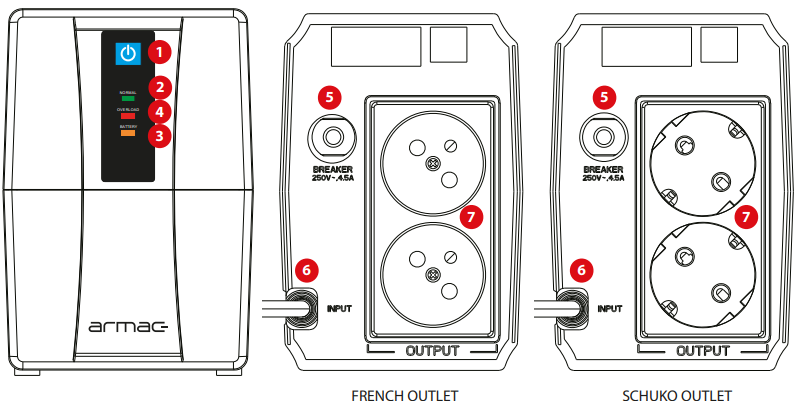
Plug the UPS plug into the output power socket (7), located on the back of the UPS. Do not use adapters, splitters, or outlet replacements to swap the output type of the output socket.
- If the UPS is overloaded during its operation, it will shut down automatically after 10 seconds if no preventive steps are taken by the user.
Meaning of buttons and UPS components
- Mains (AC) power ON/OFF The
- LED indicates that the device is operating in mains (AC) power mode
- The ED indicates that the device is operating in battery (DC) mode
- LANED indicates that the device is overloaded
- Fuse
- Input power cable
- French (E) / Schuko (F) type power outlets
Storage
Charge the device for 4 hours before storing it. Store under cover in a dry, cool location. When storing, remember to charge the battery periodically:
| Storage temperature | Recharge frequency | Charging duration |
| -25°C – 10°C or 40°C – 45 °C | Every 2 months | 1-2 hours |
| 10°C – 40°C | Every 3 months |
| UPS sound signals and their meaning | |
| The device beeps every 8 seconds | UPS went into battery mode |
| The device beeps every 1 second | Hold time is less than 1 minute |
| The device emits a continuous sound | UPS is overloaded |
Main Power
- When the UPS is operating in the mains (AC) mode, the green LED indicator will continuously light up to indicate normal UPS operation. While the load level reaches over 100%, the red LED indicator will flicker and the unit will emit long beeps.
- When mains (AC) power is restored after a sudden loss of power, the UPS will automatically start up and return to normal operation.
Battery Mode
While the UPS is operating in battery power (DC) mode, the orange LED indicator will be continuously lit, and the UPS will beep every 8 seconds. While the battery level is low, the orange LED indicator will be continuously lit and the unit will beep every second.
When the UPS is overloaded, the red LED indicator will flicker and the unit will beep for a long time. When the battery is almost depleted, the UPS will shut down automatically.
- To turn off the beeps in battery mode, briefly press the switch.
- Before checking for possible problems with the device, check if.
- The UPS is properly connected to the output power outlet.
- The voltage present on the line is specified.
- The fuse or circuit protection device on the rear panel is open.
Specifications
| Model | HOME LITE 650/LED/V2 | HOME LITE 850/LED/V2 |
| Apparent power | 650 VA | 850 VA |
| Rated power | 390 W | 480 W |
| Battery | 12V 7Ah x1 | 12V 9Ah x1 |
| Topology | Line-Interactive | |
| Input voltage | 145 V ~ 290 V ± 5 V | |
| Input frequency | 45 ~ 65 Hz | |
| Output voltage | 230 V | |
| Output voltage range | 195 V ~ 255 V | |
| Output frequency range | 50 Hz / 60 Hz (auto detection, battery mode) | |
| Output waveform type | Simulated sinewave | |
| Power outlets | 2x AC 230V | |
| Communication ports | – | |
| Response time | Typical 2 ~ 6 ms | |
| Battery type | Sealed, lead-acid (AGM) | |
| Monitoring software | No | |
| Working temperature | 0 ~ 45 °C | |
Troubleshooting
| Symptom | Possible reason | Possible solution |
| UPS cannot be turned on | UPS is not connected to the mains and is overloaded | Plug the UPS into the mains and remove the load |
| The fuse is turned off | Reset the fuse (press it again), remove some of the load, or check that the load does not have a short circuit or is damaged | |
| The voltage input is too low | Check if the power supply voltage is too low | |
| UPS malfunction | Send the device to the local service for repair purposes. | |
| UPS beeps every 8 seconds | UPS switches to battery mode, despite the current power | Promptly save data and turn off the devices connected to the UPS |
| UPS beeps every second | The remaining backup time is shorter than 1 minute | Turn off the operating system and charge the UPS again |
| UPS emits a constant beeping | UPS is overloaded. For protection purposes, it has been switched off | Remove the load, which may cause the inclusion of security |
| Backup time is shorter than the specification | UPS is overloaded | Reduce the UPS load |
| The battery is not fully charged | Recharge the batteries again for at least 12 hours and retest the backup time | |
| The charger is damaged | Send the device to the local service for repair purposes. |
Customer Support
- Website: comercial@cablematic.com
- Ph: 2035146931
- Timings: 09:00 h to 18:00 h from Monday to Friday
Warranty
- Unauthorized repair or disassembly will void the warranty and may damage the product. Breaking or damaging the warranty seal and improper Cablematic Home Led Line-Interactive UPS use will void the warranty.
- Entrust servicing to qualified technical personnel.
FAQs
What is the Cablematic Home LED Line-Interactive UPS used for?
The purpose of this uninterruptible power supply (UPS) is to safeguard computing equipment and home gadgets (such as PCs, routers, modems, and entertainment systems) against electrical surges, power outages, and voltage decreases.
What does “Line-Interactive” mean?
A Line-Interactive UPS uses automatic voltage regulation (AVR) to stabilise incoming voltage. It extends battery life by correcting low/high voltage without using the battery and switching to battery power during outages.
How long does the UPS provide backup power?
Backup duration is load-dependent. It might last 30 to 60 minutes for light loads like a modem or router. To properly shut down your equipment, allow 5 to 15 minutes for heavy loads (such a desktop PC).
How long does it take to fully charge the battery?
It usually takes 4 to 8 hours to fully recharge a battery, depending on its capacity and current charge level.
Can I replace the battery?
For information on the proper battery model and safety measures, consult the guide.
How do I connect devices to the UPS?
Connect your essential gadgets, such as your PC or modem, to the outlets that are powered by batteries. If available, non-essential equipment can be plugged into the surge-only outlets.