


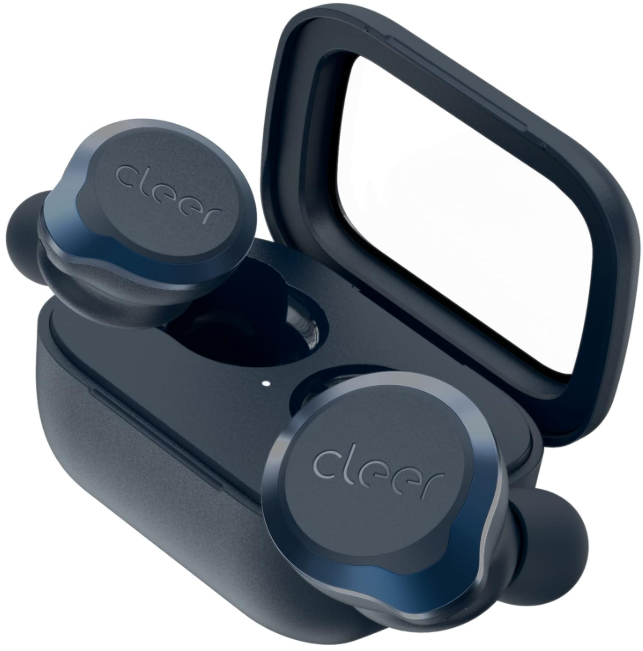
 Clear ALLY PLUS II True Wireless Headphones

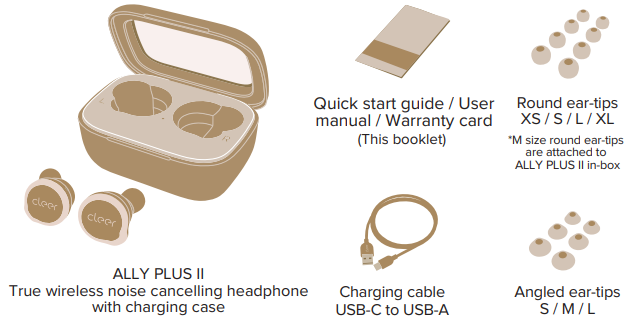
Box Contents
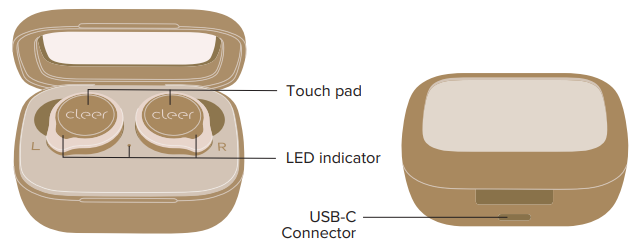
Overview
Quick Start
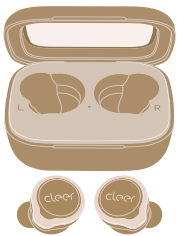
- ALLY PLUS II will power ON
- Automatically, when removed from the charging case.
- ALLY PLUS II will go into pairing mode automatically when powered ON for the first time (if you need to manually go into pairing mode, please follow the steps on page 5).
- ALLY PLUS II will automatically connect to the last connected device if it is in range and available for pairing.
- Select “Cleer ALLY PLUS II” on the new Bluetooth device list and tap it to pair.
- Enjoy your ALLY PLUS II.
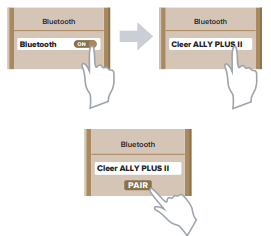

Bluetooth Pairing
Pairing Mode
- Remove both earbuds from the charging case.
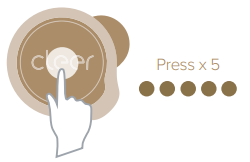
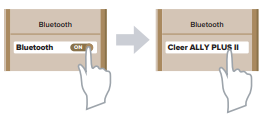
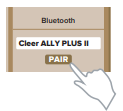
- Press the touch pad on either earbud 5 times.Select “Cleer ALLY PLUS II” on the new Bluetooth device list and tap it to pair.
- ALLY PLUS II is now paired.
To Clear the Pairing Record
- Remove both earbuds from the charging case 2.
- Put both earbuds into pairing mode,
- Press and hold the touch pad until the LEDs on the earbuds flash red 3 times,
- Return the earbuds to the charging case and leave them there for 10 seconds,
- The pairing record is now cleared.
Track Control
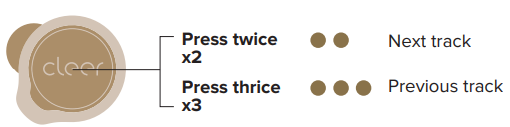
You can select which earbud to use this function on the Cleer+ app; it is set to the left earbud by default.
Ambient Noise Control
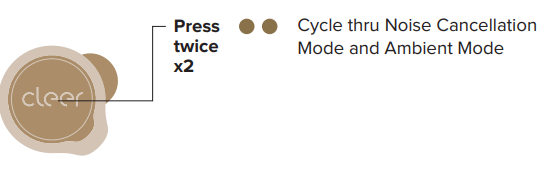
You can select which earbud to use this function on the Cleer+ app; it is set to the right ear.
Noise Cancellation Mode
- Our noise-cancelling technology and optimized passive isolation can suppress wide-band ambient noise.
Ambient Mode
- Allows you to hear sounds around you even while wearing your ALLY PLUS II.
- ALLY PLUS II will go into Noise Cancellation Mode by default when powered ON.
Call and Playback Control
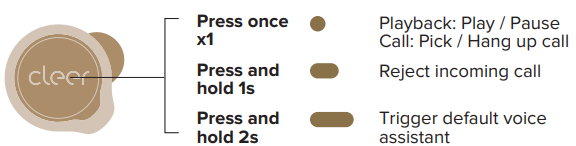
Removing either earbud from your ears during playback will pause the playback.
Volume Control
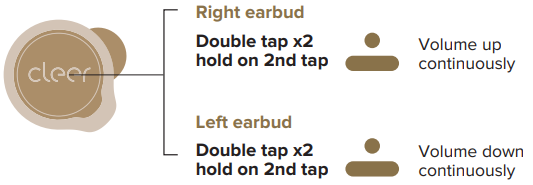
Charging
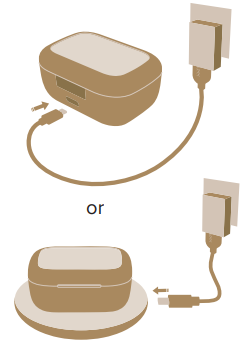
- Connect ALLY PLUS II to a power source with the provided USB-C cable or put the charging case on a wireless charging pad.
- 5 minutes of charge time (with a USB-C cable) equals 1 hour of playtime.
- Up to 20 hours (with ANC ON) or 22 hours (with ANC OFF) of playtime when fully charged.
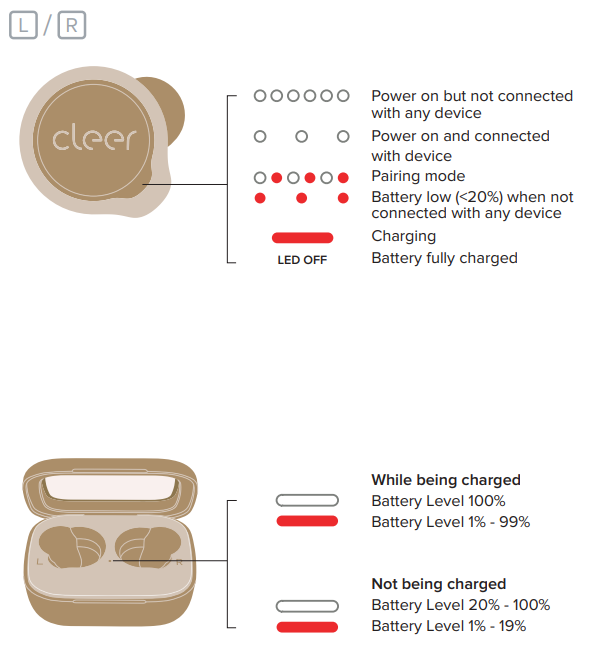
LED Behavior
Specifications
- Driver: 10mm graphene dynamic driver
- Supported audio CODEC: SBC, aptX Adaptive
- Frequency response range: 20 – 20,000Hz
- Connections: USB-C cable and wireless charging for the charging case
- Battery charging: A 5-minute charge delivers up to 1 hour of playback; less than 2 hours for a full charge (when charging via the USB-C cable provided).
- Playback time:
- ANC ON: Up to 10 hours, with up to an additional 20 hours with the charging case
- ANC OFF: Up to 11 hours, with up to an additional 22 hours with the charging case
- Supported Bluetooth profiles: BT 5.2, A2DP v1.3, AVRCP v1.6, HFP v1.7, HSP v1.2
Bluetooth Transmission
- frequency range: 2.402-2.480GHz
- Bluetooth transmission power: <8.0dBm
- Water resistance rating: IPX4 (for earbuds only)
- Weight: 6.8g (per earpiece), 58g (both earpieces and case)
Warranty
Labor: For a period of (1) year from the original date of purchase of the product (“Labor Warranty”), Cleer Limited will, at its option, repair or replace with a new or refurbished product, the product determined to be defective. If Cleer Limited elects to replace the product after this Labor Warranty has expired but while the parts warranty is still in effect, it will do so for the applicable labor charge.
Parts: For a period of (1) year from the original date of purchase of the product (“Parts Warranty”), Cleer Limited will supply new or refurbished replacement parts in exchange for parts determined to be defective.
Repair / Replacement Warranty: This Limited Warranty shall apply to any repair, replacement, part, or replacement product for the remainder of the original Limited Warranty period or for (90) days, whichever is longer. Any product replaced under this.
Customer Service
- Website: www.cleeraudio.com
- Ph: 1 888 672 5337 (67 CLEER)
FAQs
What is Cleer ALLY PLUS II and what are its main features?
With active noise cancellation (ANC) and ambient awareness mode, the ALLY PLUS II are true-wireless earbuds that allow you to either block out or accept background noise.
How good is the battery life?
Each earbud can play music for up to 11 hours on a full charge.
Does ALLY PLUS II support noise cancelling, and can I adjust it?
Yes, it has adaptive ANC, which uses feed-forward and feed-back ANC architecture to reduce background noise by up to about 34 dB.
What about call quality for phone/video calls?
Calls are typically clear even in crowded settings thanks to the ALLY PLUS II’s twin built-in microphones and Qualcomm’s cVc 8th generation noise reduction technology, which helps separate your voice from background noise.
Are they suitable for workouts, commuting, or outdoor use?
Yes, they are safe for running, exercise, and use in mild rain thanks to their IPX4 water and sweat resistance certification.
What audio codecs and Bluetooth specs do they support?
With the audio codecs SBC and aptX Adaptive (for improved latency and higher-quality audio on compatible devices), they support Bluetooth 5.2.
What’s included in the box — and how do I charge them?
The earbuds, a charging case, a USB-C charging cable, and a set of silicone ear tips in different sizes to guarantee a comfortable fit are all included in the box.
Do the ALLY PLUS II earbuds support single-ear (mono) listening?
Indeed. Both earbuds can be used separately. Switching between the left and right earbuds helps make calls, multitasking, and prolonging battery life.
2 Comments
Your article helped me a lot, is there any more related content? Thanks!
Can you be more specific about the content of your article? After reading it, I still have some doubts. Hope you can help me. https://accounts.binance.info/register-person?ref=IXBIAFVY