


 EarFun Air True Wireless Earbuds

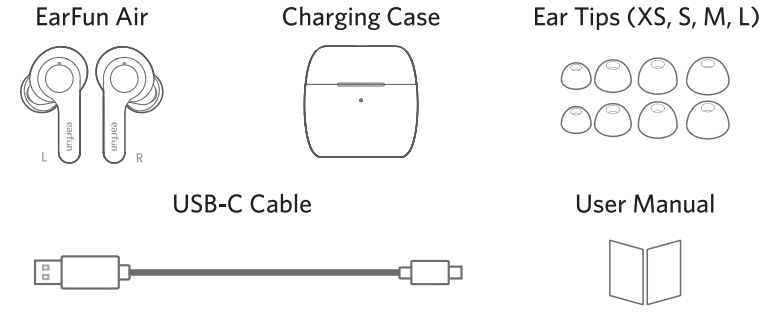
What’s in the Box
How to Fit
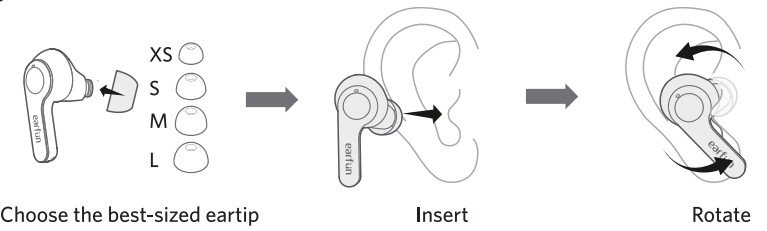
- Please choose the suitable eartip for the best sound and secure fit.
- Select the left or right earbud and insert it into the corresponding ear.
- Rotate the eartip back and forth for the eartip to create a comfortable seal.
Diagram
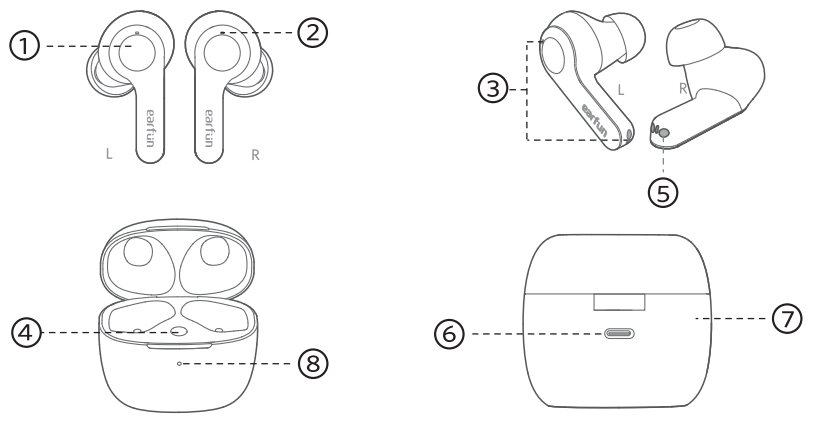
- Touch control zone
- Earbuds LED indicator
- Microphone
- Charging case button
- Charging contactor
- USB-C charging port
- Charging case
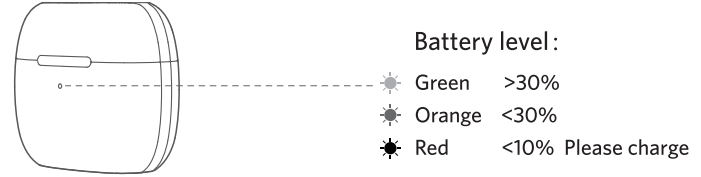
- Battery indicator
Pairing
Pairing with Device
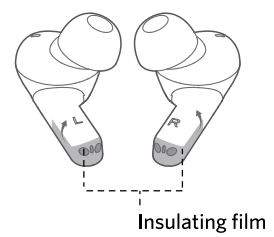
- Remove the insulating film from both earbuds.
- Put both earbuds back into the charging case and close the charging case.
- Open the charging case and the earbuds will automatically Insulating film power on and go into pairing mode.
- Activate Bluetooth on your Bluetooth-enabled device and search for other Bluetooth devices.
- Select “EarFun Air” from the list of Bluetooth devices shown. (If a password is requested, type ‘0000’.)
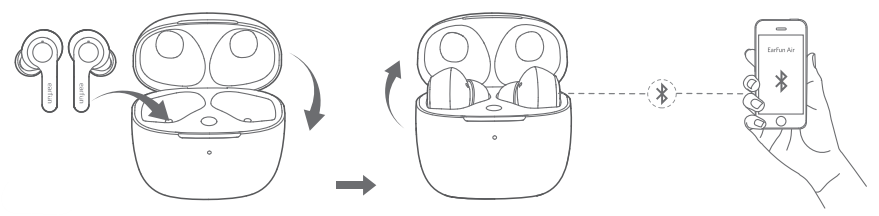
- The earbuds will automatically connect with the previously paired device when the case is open.
- Each earbud can be used independently.
Connect to a New Device
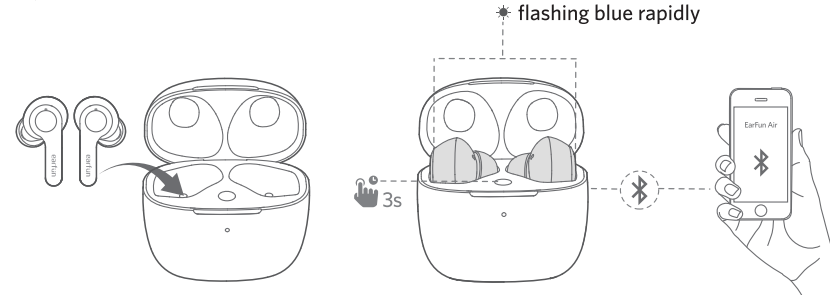
- Put both earbuds back into the charging case and make sure they are being charged. Keep the lid open – then press and hold the button on the case for 3 seconds until the LED indicators on the earbuds start flashing blue rapidly.
- Search on the new device and connect.
Specitications
- Bluetooth frequency: 2.402GHz-2.480GHz
- Bluetooth transmitted power: <7dBm (for EU)
- Bluetooth profile: A2DP, AVRCP, HFP, HSP
- Maximum working range: 15m(without obstacles)
- Battery capacity: 45mAh x 2(earbuds), 500mAh(charging case)
- Charging time:
- 1.5hoursr (for earbuds),
- 2 hours(for charging case via USB-C),
- 3.5 hours(for charging case via wireless charger)
- Playtime: Up to 7 hours, Totally 35 hours with the charging cae, (varies by volume level and audio content)
- Input: 5V=-1A
- Dimensions: 57.4mm x 32.5mm x 51.8mm
- Weight: 53g
Functions
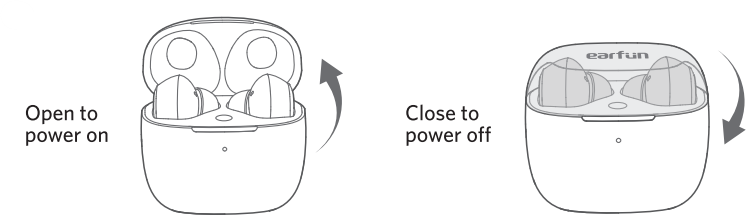
If the earbuds are not connected to any device, they will automatically power off after 10 minutes to save battery life.
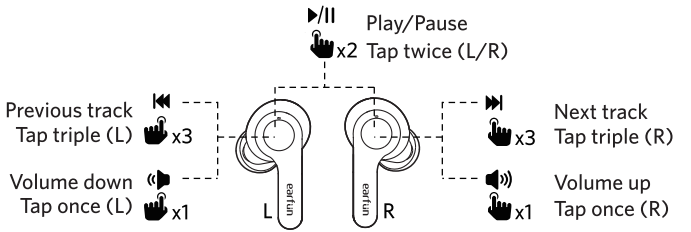
Playing Music
Hands Free Conversations
Answer / End a Call
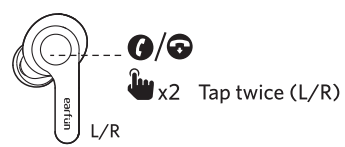
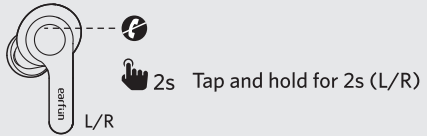
Reject a Call
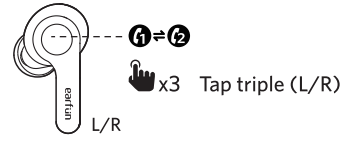
Answer and transfer two Calls.
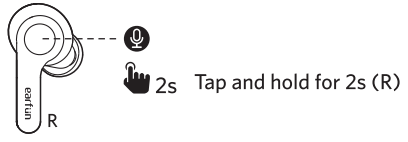
Activate Voice Assistant
Game Mode
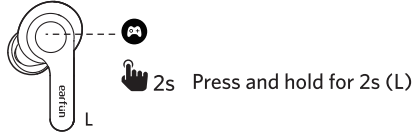
- Turning on the game mode can drop latency to as low as 100ms and improve the gaming and video experience, but it will shorten the connection distance. We suggest you turn off the game mode when you use the earbuds for music.
- The normal mode provides a atency of about 200ms.
- Bluetooth technology can’t eliminate latency.
Earbuds LED Indicator
- Power on: Blue indicator flashes for 1s
- Power off: Red indicator flashes for 1s
- Pairing mode: Indicator flashes in blue
- Successfully connected: Indicator turns off
- Charging: Indicator flashes red
- Factory reset: Indicator flashes purple
Reset and Reconnecting
If you fail to establish a connection between two earbuds or between the earbuds and Bluetooth devices, please try the following steps
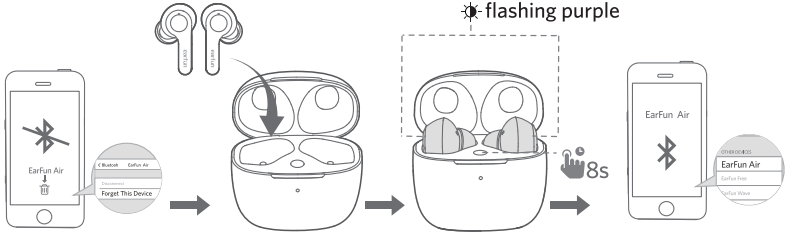
- Delete the old connection record from the Bluetooth device.
- Place the earbuds into the charging case to ensure they are being charged.
- With the charging case open, press and hold the charging case button for 8 seconds until both LED indicators on earbuds flash purple quickly. Wait for 3s and then connect to “EarFun Air”
Charging
- Dry the earbuds, charging contactors and USB port completely before charging.
- Open or close the charging case to activate the case battery level LED indicator.
- Put the earbuds back into the charging case, and the earbuds will start charging.
- Fully charge both the earbuds and the charging case before first use.
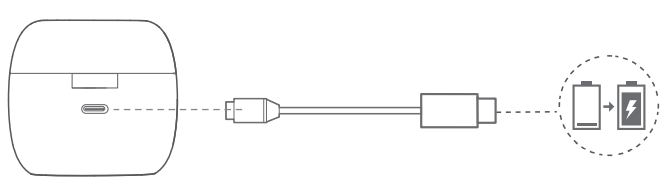
Connect the USB-C cable for charging.
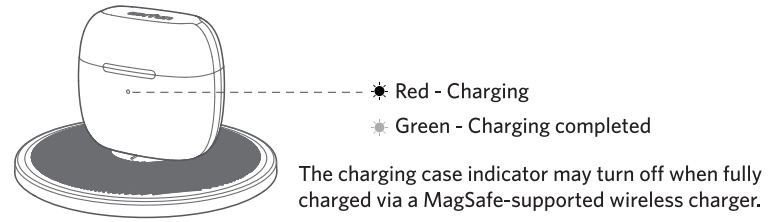
Wireless charging supported
Customer Service
- Email: service@myearfun.com
- Visit: www.myearfun.com
FAQs
What devices can the EarFun Air earbuds connect to?
Any Bluetooth-capable device, such as smartphones, tablets, laptops, gaming consoles, and smart TVs that support Bluetooth audio, can pair with the EarFun Air.
How long is the battery life?
On a full charge, you can anticipate extended playback, with the charging case adding extra hours. The precise battery life varies depending on features like improved bass and volume level.
Are the EarFun Air earbuds water-resistant?
Indeed. Because the EarFun Air is made to withstand sweat and water, it may be used for outdoor activities, running, and exercise.
Do the earbuds support single-ear (mono) mode?
Indeed. You may use each earbud on its own. It functions independently without the second earbud; just remove one from the casing and connect as normal.
How do I control music and calls?
You can play or pause music, skip tracks, change the volume, answer calls, and use your phone’s voice assistant with the EarFun Air’s snappy touch controls.
Do they include noise cancellation?
The earbuds employ passive noise isolation, which means that outside noise is naturally reduced by the seal of the ear tips. Unless your model variant specifies otherwise, they do not include ANC.
How long does it take to charge the earbuds and case?
The case typically takes a few hours to charge via USB-C. When the earphones are inserted into the case, they immediately charge and usually soon reach full power.
Do the EarFun Air earbuds work for phone calls?
Indeed. To enhance clarity during conversations and video conferences, they have integrated microphones with noise-reduction algorithms.