



EarFun Free Pro 2 ANC Wireless Earbuds
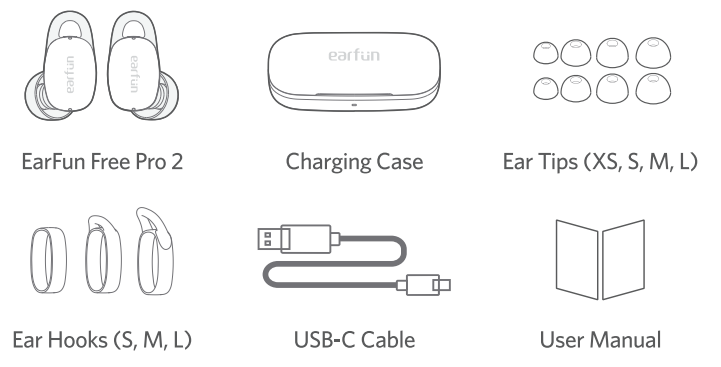
What’s in the Box
Description
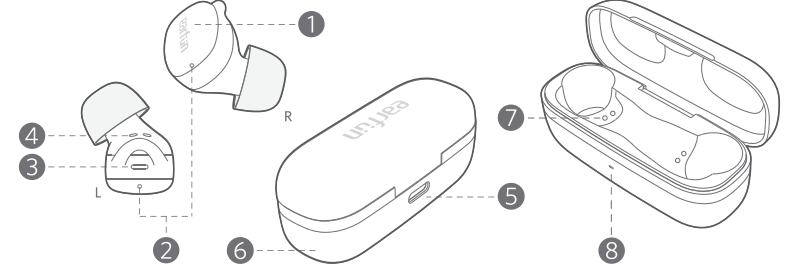
- Touch control zone
- Charging contactor
- Charging dock
- Microphone
- USB-C charging port
- Charging case indicator
- Earbuds LED indicator
- Charging case
Charging
- Remove the insulating film on the charging case for the first time.
- Fully charge both the earbuds and the charging case before first-time usage.
- Place the earbuds back into the charging case, and the earbuds will start charging.
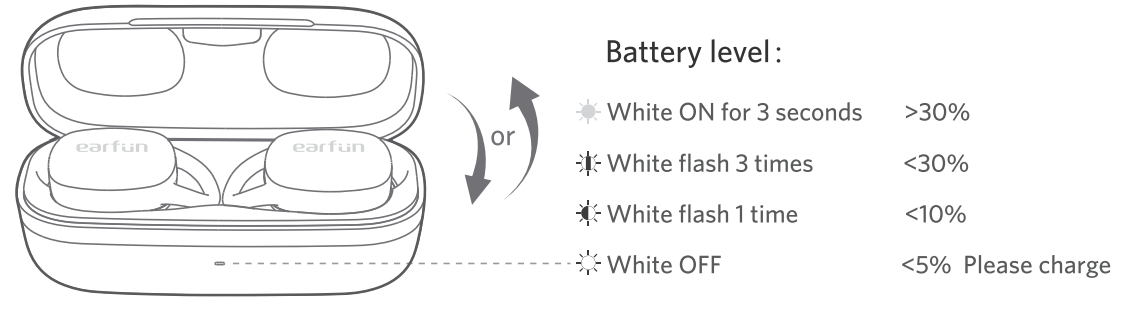
- Open or close the charging case to activate the LED battery level indicator.
- Fully dry off the earbuds and the USB port before charging.
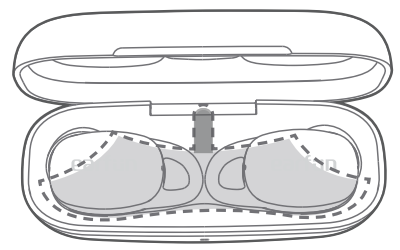
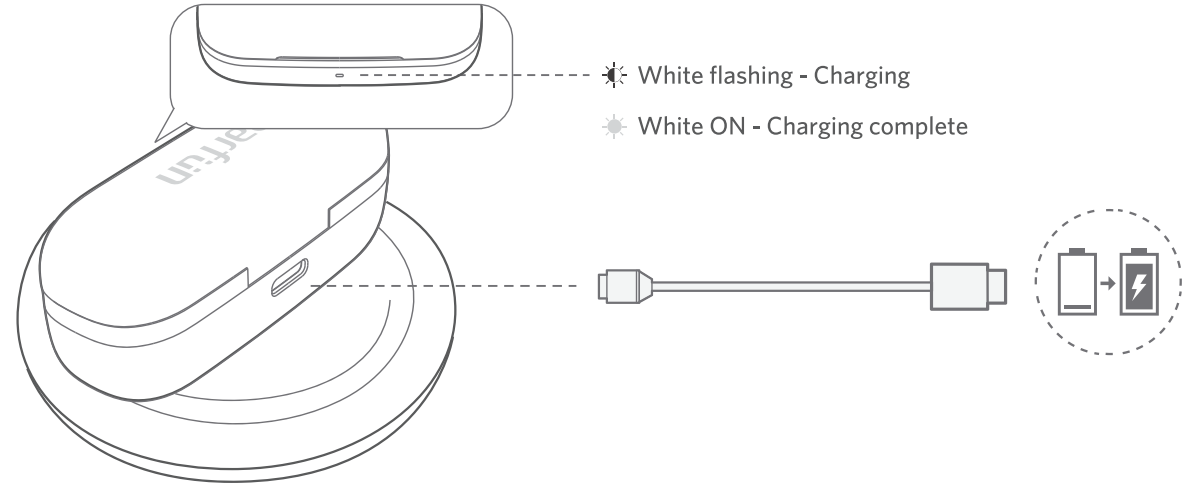
Connect the USB-C cable for charging. Wireless charging(not included)
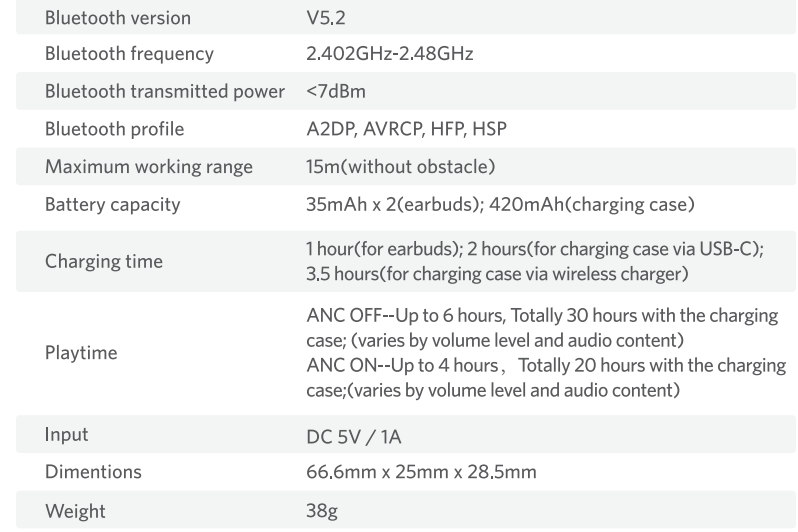
Specifications
How to Fit
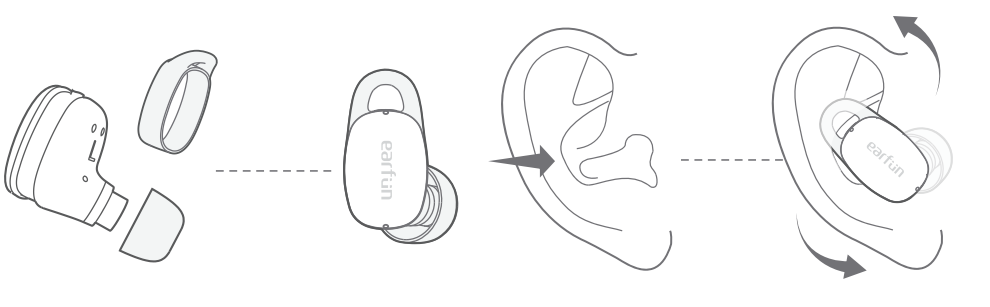
- Choose the ear tips and ear hooks that fit your ears the best. If you couldn’t use the ear hook, please choose the one without the wing.
- Identify the left and right earbuds.
- Insert the earbuds into the canal of your ears;s, the ear hook should also be inserted into the upper canal of your ears.
- Turn and find the most comfortable position.
Pairing Your tarbuas
- First-time Pairing with Device
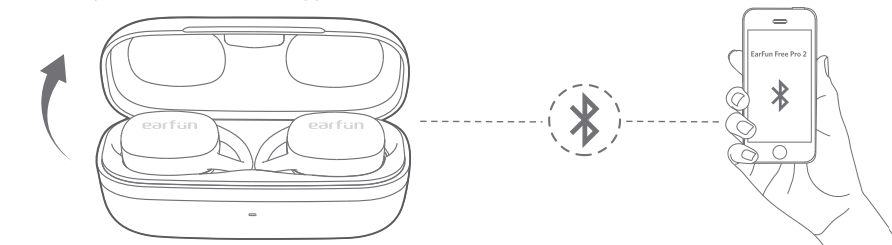
- Step 1: Open the charging case, and the earbuds will automatically power on and enter pairing mode.
- Step 2: Activate Bluetooth on your Bluetooth-enabled device and search for other Bluetooth devices.
- Step 3: Select “EarFun Free Pro 2” from the list of Bluetooth devices shown(if a password is needed, type ‘0000’).
Connect to a New Device
Option A
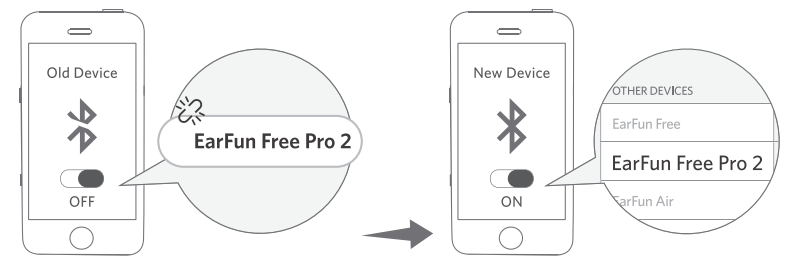
- Step 1: Unpair the earbuds from the Bluetooth-enabled device that’s connected. The earbuds will disconnect from the current device and enter pairing mode for another pair.
- Step 2: Search for the new device and connect.
Option B
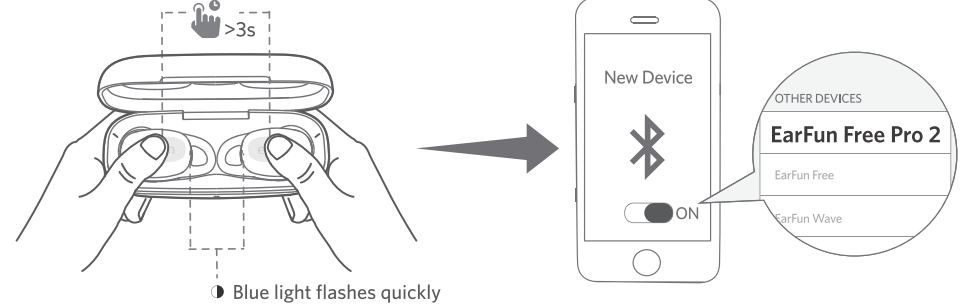
- Step 1: Place both earbuds back into the charging case and ensure they are being charged. Keepep the cover open, then press and hold the two earbuds for 3 seconds until the LED lights on both earbuds flash in blue rapidly. When the earbuds enter the pairing mode.
- Step 2: Search for the new device and connect.
Functions
Power on/off
Open the charging case, and the earbuds will automatically power on. Place the earbuds back into the charging case. Close the case, and the earbuds will automatically power off.

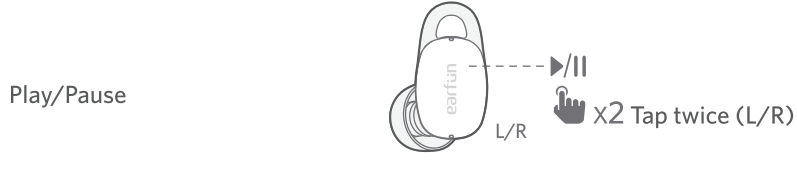
Playing music
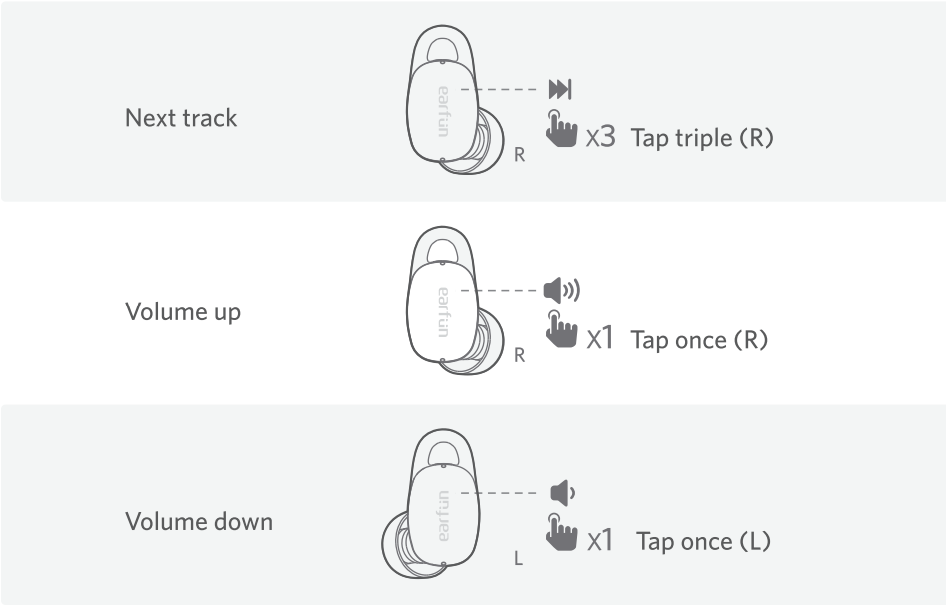
Hands-free conversation
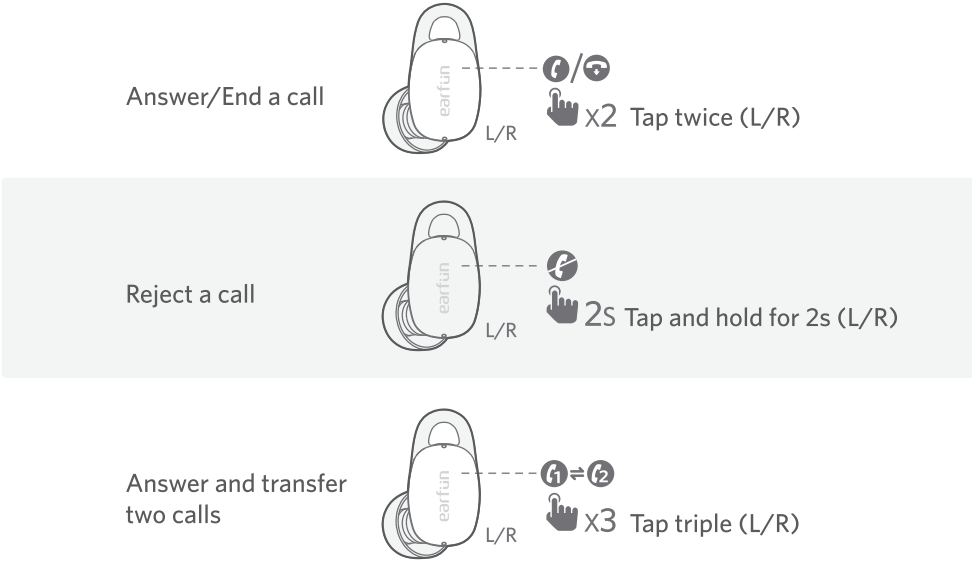
Activate the voice assistant. Turning on the game mode can drop latency to as low as 80ms and improve the gaming and video experience, but it will shorten the connection distance. We suggest you turn off the game mode when you use the earbuds for music.
- The normal mode provides a latency of about 200ms.
- Bluetooth technology can’t eliminate latency.
Earbuds LED Indicator
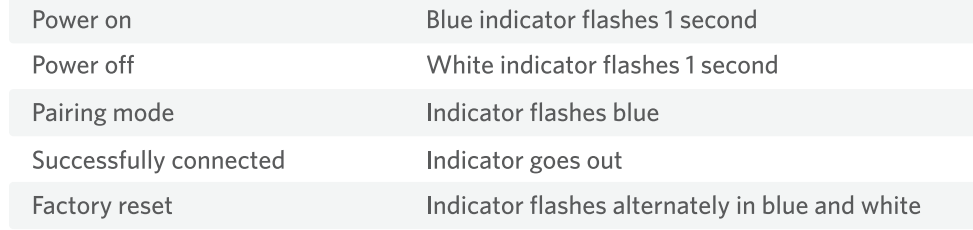
Reset and Reconnecting
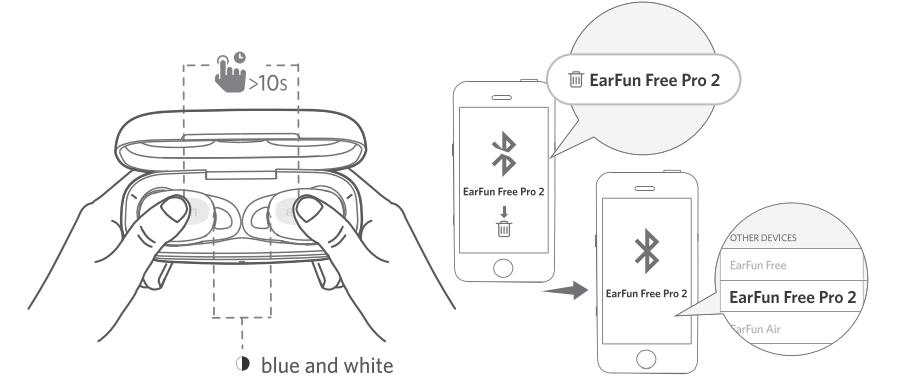
If you fail to build a connection between two earbuds or between earbuds and a Bluetooth device, please try the following steps:
- Place both earbuds into the charging case.
- Keep the charging case open, then touch and hold the button on each earbud at the same time
for at least 10 seconds until they flash alternately in blue and white, then the earbuds have been reset successfully. - Delete the old connection from the Bluetooth device and reconnect to “EarFun Free Pro 2”.
FCC Statement
This device complies with Part 15 of the FCC Rules. Operation is subject to the following two conditions. This device may not cause harmful interference. This device must accept any interference received, including interference that may cause undesired operation.
Changes or modifications not expressly approved by the party responsible for compliance could void the user’s authority to operate the equipment. This equipment generates uses and can radiate radio frequency energy and, if not installed and used in accordance with the instructions, may cause harmful interference to radio communications. However, there’s no guarantee that interference will not occur in a particular installation.
- Consult the dealer or an experienced radio/TV technician for help.
- Increase the separation between the equipment and the receiver
- Reorient or relocate the receiving antenna.
Radiation Exposure Statement
This equipment complies with FCC radiation exposure requirements. The device can be used in portable exposure conditions without RF restriction. This device complies with Industry Canada licence-exempt RSS standard(s). Operation is subject to the following two conditions
- This device may not cause interference, and
- This device must accept any interference, including interference that may cause undesired operation of the device.”
EU Declaration of Conformity
Earfun Technology (HK) Limited hereby declares that this equipment complies with the essential requirements and other relevant provisions of Directive 2014/53/EU and RoHS 2011/65/EU Directive.
UK Declaration of Conformity
Hereby, [Earfun Technology (HK) Limited] declares that the radio equipment type [K2] complies with UK Radio Equipment Regulations (SI 2017/1206).
ISED Compliance Statements
This device contains licence-exempt transmitters/receivers (s) that comply with Innovation, Science and Economic Development Canada’s licence-exempt RSS(s). Operation is subject to the following two conditions:
- This device may not cause interference.
- This device must accept any interference, including interference that may cause undesired operation of the device.
This equipment complies with IC RSS-102 radiation exposure limits set forth for an uncontrolled environment.
Customer Service
- Website: www.myearfun.com
- Email: service@myearfun.com
- Ph: +91-99997-92449
FAQs
Q: Do they offer active noise cancellation (ANC)?
Yes, the Free Pro 2’s hybrid ANC (also known as “QuietSmart 2.0”) can cancel ambient noise up to roughly 40 dB, which greatly reduces background noise from things like traffic, rumbling public transportation, office noise, and busy areas.
Q: Can I use one earbud at a time (mono mode)?
Indeed. Every earbud is capable of operating on its own. Thishelps makeg phone conversations, travel, or maintain awareness of your surroundings while wearing a single earbud.
Q: Do they support calls and voice‑assistant use? How good is the call quality?
Yes, each earbud features several built-in microphones (a total of six microphones across the two earbuds) with anti-wind noise suppression and other noise reduction algorithms that help provide clear sound during calls.
Q: Can I use the earbuds for gaming or video watching — latency good enough for sync?
Indeed. When gaming or watching movies, the Free Pro 2’s low-latency “Game Mode” (~80 ms latency) helps minimise audio-visual lag, making the experience smoother than with many typical earbuds.
Q: Are the earbuds water- or sweat‑resistant? Can I use them during workouts or outdoors?
They are appropriate for exercise, mild rain, commuting, and outdoor use because of their IPX5 water/sweat resistance rating. They are not completely waterproof, though, so stay away from submersion or prolonged exposure to water.6
Q: What are the Bluetooth range and connection stability like?
In perfect circumstances (no impediments), they provide a range of around 15 meters (≈ 50 feet). Walls, interference, and devices can all affect real-world performance.