


 Harman Kardon AVR 3700 Audio-Video Receiver
 Harman Kardon AVR 3700 Audio-Video Receiver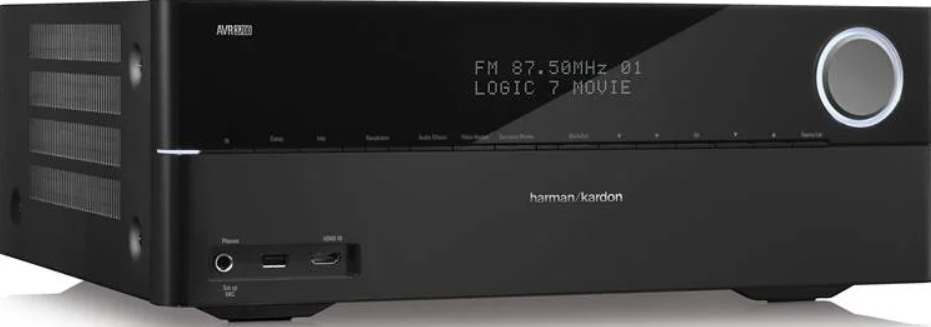
Introduction
Thank you for choosing the Harman Kardon AVR 3700 Audio-Video Receiver!
- For more than fifty years, the Harman Kardon mission has been to share a passion for music and entertainment, using leading-edge technology to achieve premium performance.
- Sidney Harman and Bernard Kardon invented the receiver, a single component designed to simplify home entertainment without compromising performance. Over the years, Harman Kardon products have become easier to use, while offering more features and sounding better than ever.
- The AVR 3700/AVR 3707.2-channel and AVR 2700/AVR 2707.1-channel digital audio/ video receivers continue this tradition with some of the most advanced audio and video processing capabilities yet, and a wealth of listening and viewing options.
- To obtain the maximum enjoyment from your Harman Kardon AVR 3700 Audio-Video Receiver, please read this manual and refer back to it as you become more familiar with its features and operation.
Safety Instructions
For safe operation, always follow the guidelines provided for the Harman Kardon AVR 3700 Audio-Video Receiver.
Verify Line Voltage Before Use
- The AVR 3700 and AVR 2700 have been designed for use with 120-volt AC.
- The AVR 370 and AVR 270 have been designed for use with 220 – 240-volt AC. Connection to a line voltage other than that for which your receiver is intended can create a safety and fire hazard and may damage the unit.
- If you have any questions about the voltage requirements for your specific model, or about the line voltage in your area, contact your selling dealer before plugging the unit into a wall outlet.
Do Not Use Extension Cords
- To avoid safety hazards, use only the power cord supplied with your unit. We do not recommend that extension cords be used with this product.
- As with all electrical devices, do not run power cords under rugs or carpets, or place heavy objects on them.
- Damaged power cords should be replaced immediately by an authorized service center with a cord meeting factory specifications.
Handle the AC Power Cord Gently
For optimal safety and longevity, make sure the Harman Kardon AVR 3700 Audio-Video Receiver is powered off before handling the AC power cord.
- When disconnecting the power cord from an AC outlet, always pull the plug; never pull the cord.
- If you do not intend to use your receiver for any considerable length of time, disconnect the plug from the AC outlet.
Do Not Open the Cabinet
- There are no user-serviceable components inside this product. Opening the cabinet may present a shock hazard, and any modification to the product will void your warranty.
- If water or any metal object, such as a paper clip, wire, or staple, accidentally falls inside the unit, disconnect it from the AC power source immediately and consult an authorized service center.
Antenna Grounding
- If an outside antenna or cable system is connected to this product, be certain that it is grounded so as to provide some protection against voltage surges and static charges.
- Section 810 of the United States National Electrical Code, ANSI/NFPA No. 70-1984, provides information with respect to proper grounding of the mast and supporting structure, grounding of the lead-in wire to an antenna discharge unit, size of grounding conductors, location of antenna discharge unit, connection to grounding electrodes, and requirements of the grounding electrode.
- This reminder is provided to call the CATV (cable TV) system installer’s attention to article 820-40 of the NEC, which provides guidelines for proper grounding and, in particular, specifies that the cable ground shall be connected to the grounding system of the building, as close to the point of cable entry as possible.
Supplied Accessories
- System remote control
- Zone 2 remote control (AVR 3700/AVR 370 only)
- EzSet/EQ™ microphone
- AM loop antenna
- FM wire antenna
- Six AAA batteries (AVR 3700/AVR 370); four AAA batteries (AVR 2700/AVR 270)
- AC power cord
Place the Receiver
- Place the receiver on a firm and level surface. Be certain that the surface and any mounting hardware can support the AVR’s weight.
- Provide proper space above and below the AVR for ventilation. Recommended clearance distances are 30cm above the unit, 30cm behind the unit, cm on each side of the unit.
- If you install the AVR in a cabinet or other enclosed area, provide cooling air within the cabinet.
- Do not obstruct the ventilation slots on the top of the receiver or place objects directly over them.
- Do not place the receiver directly on a carpeted surface.
- Do not place the receiver in moist or humid locations, in extremely hot or cold locations, in areas near heaters or heat registers, or in direct sunlight.
One App
With the Harman Kardon One app on your Android™ or iOS device, you can set up a multi-channel sound system by wirelessly pairing your Enchant Sub with:
- Enchant 900 / 1100 (soundbar, sold separately): to enhance the bass performance.
- For more information, see “5 SETUP”.
For users looking for a premium soundbar solution that works seamlessly with your Harman Kardon AVR 3700 Audio-Video Receiver, check our Harman Kardon Citation MultiBeam 700 Soundbar User Guide for setup tips and features.
Customer Service
- Address: Open Source, Gregor Krapf-Gunther, Parking 3, 85748 Garching bei Munchen, Germany.
- Website: www.harmankardon.com.
- Tel: (800) 422-8027
- Timings: Mon – Fri – 9:00 am 11:00 pm (ET) Sat – Sun – 9:00 am 5:00 pm
© 2013 HARMAN International Industries, Incorporated. All rights reserved.
FAQs
Q: How do I set up the AVR 3700 for the first time?
Attach your TV, speakers, and subwoofer (via HDMI OUT). Next, connect your streaming device, game console, or Blu-ray as input sources. Turn the device on and proceed with the on-screen setup wizard, which walks you through setting up the speakers, choosing a language, and connecting to the network.
Q: How many channels does the AVR 3700 support?
For rich surround sound, the AVR 3700 is a 7.2-channel receiver that can accommodate up to seven speakers and two subwoofers.
Q: Does the AVR 3700 support 4K Ultra HD video?
Indeed. With the AVR 3700, you can watch ultra-high definition television without signal degradation thanks to 4K pass-through on compatible HDMI inputs and outputs.
Q: How do I connect my TV to the AVR 3700?
Connect the AVR’s HDMI OUT (ARC) to the TV’s HDMI ARC connector using an HDMI cable. In the TV’s audio options, turn on ARC and HDMI-CEC. After that, you can use your TV remote to adjust the AVR’s volume.
Q: Can I stream music wirelessly to the AVR 3700?
Indeed. With the AVR 3700’s integrated Wi-Fi and DLNA 1.5 connectivity, you can stream music straight from networked devices, smartphones, and tablets.
Q: How do I connect Bluetooth devices to the AVR 3700?
There is no built-in Bluetooth on the AVR 3700 itself. For wireless playback, though, you can attach a Bluetooth adapter to one of the receiver’s analogue or digital inputs.
Q: What is the maximum power output of the AVR 3700?
For home theatre installations, the AVR 3700 provides dynamic and potent audio performance with 125 watts per channel (RMS, two channels powered) at 8 ohms.