



Harman Kardon ENCHANT Compact Wireless Speaker
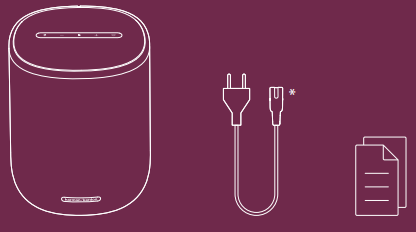
What’s in the Box
- Power cord quantity
- Plug
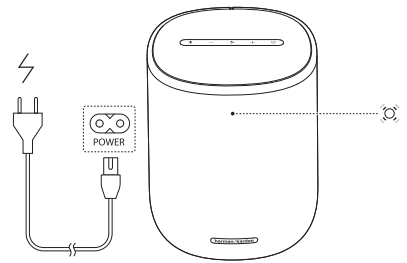
Power On
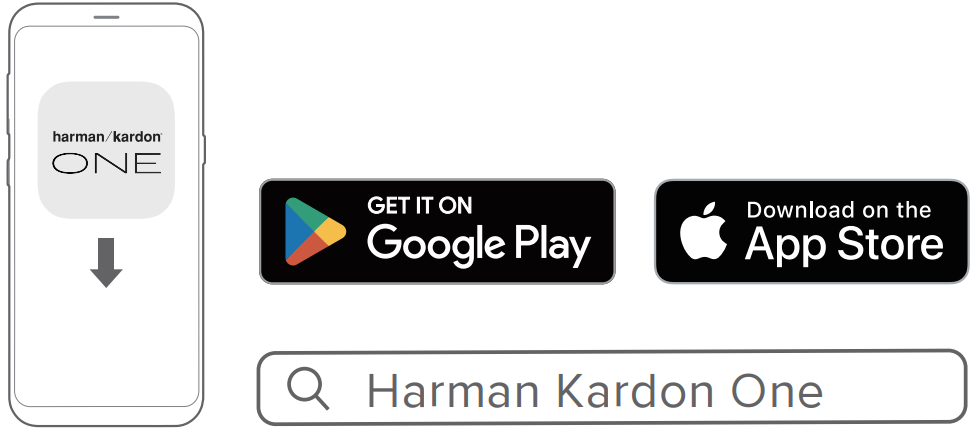
On an Android™ or iOS device, add the Harman Kardon ENCHANT Compact Wireless Speaker to your home Wi-Fi network through the Harman Kardon One app. Follow the app instructions to complete setup.
- Some features require subscriptions or services not available in all countries.
Wi-Fi Setting
On an Android™ or iOS device, add the Harman Kardon ENCHANT Compact Wireless Speaker to your home Wi-Fi network through the Harman Kardon One app. Follow the app instructions to complete setup. Some features require subscriptions or services not available in all countries.
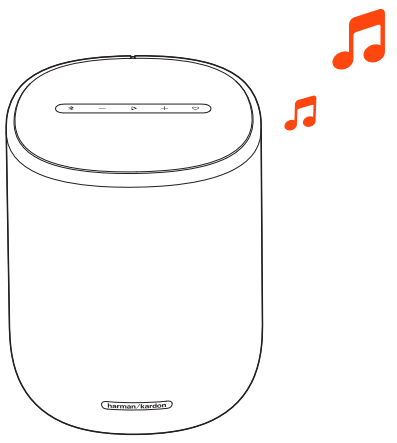
Music
If you also use other Harman Kardon speakers, like the Onyx Studio series, you can check its guide here: Harman Kardon Onyx Studio Wireless Speaker Manual. Stream music through the Harman Kardon One app or supported music services.

Spotify
- Use your phone, tablet, or computer as a remote control for Spotify.
- Go to spotify.com/connect to learn how.
- The Spotify Software is subject to third-party licenses found here:
- https://www.spotify.com/connect/third-party-licenses.
Apple AirPlay
- Use of the Works with Apple badge means that an accessory has been designed to work specifically with the technology identified in the badge and has been certified by the developer to meet Apple performance standards.
- Apple and AirPlay are trademarks of Apple Inc., registered in the U.S. and other countries.
- To control this AirPlay 2–enabled speaker, iOS 13.4 or later is required.
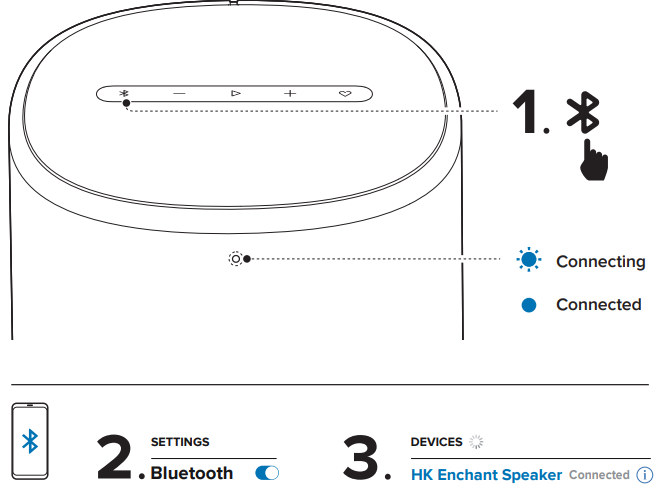
Bluetooth Pairing
Music streaming through Bluetooth will pause when you start music streaming through Wi-Fi.
 Button Controls
 Button Controls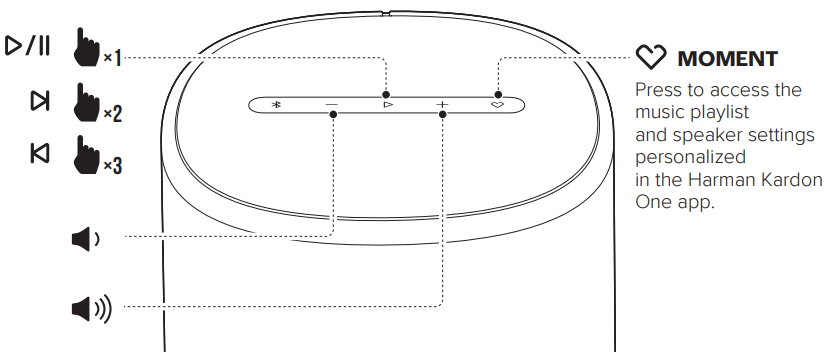
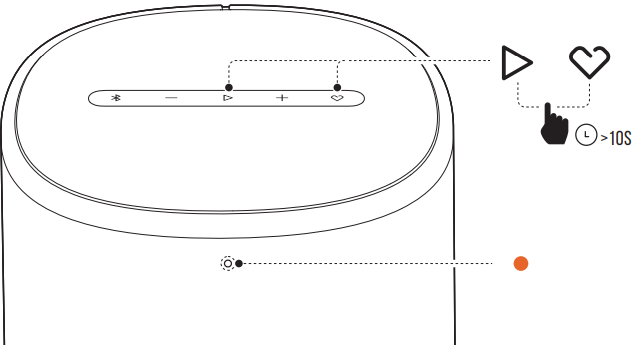
Factory Reset
Online Support
Technical Specification
General Specification
- Model: Enchant Speaker
- Power supply: 100 – 240 V AC, ~ 50/60 Hz
- Total speaker power output (Max @THD 1%): 180 W
- Transducer: 1x 25 mm tweeter, 1x 92 mm woofer, 2x 50 mm full-range drivers
- Networked standby power: < 2.0 W
- Operating temperature: 0 °C – 45 °C
Audio Specification
- Frequency response: 55 Hz – 20 kHz (-6 dB) Wireless specification
- Bluetooth version: 5.0
- Bluetooth profile: A2DP 1.2, AVRCP 1.5
- Bluetooth transmitter frequency range: 2400 MHz – 2483.5 MHz
- Bluetooth transmitter power: < 13 dBm (EIRP)
- Wi-Fi network: IEEE 802.11 a/b/g/n/ac/ax (2.4GHz/5GHz)
- 2.4G Wi-Fi transmitter frequency range: 2412 – 2472 MHz (2.4 GHz ISM Band, USA 11 Channels, Europe and others 13 Channels)
- 2.4G Wi-Fi transmitter power: < 20 dBm (EIRP)
- 5G Wi-Fi transmitter frequency range: 5.15 – 5.35 GHz, 5.470 – 5.725 GHz, 5.725 – 5.825 GHz
- 5G Wi-Fi transmitter power: 5.15 – 5.25 GHz < 23 dBm, 5.25 – 5.35 GHz < 20 dBm, 5.470 – 5.725 GHz < 20 dBm, 5.725 – 5.825 GHz < 14 dBm
Dimensions
- Dimensions (W x H x D): 163 x 205 x 163 mm / 6.4″ x 8.0″ x 6.4″ Weight: 2.16 kg / 4.76 lbs
- Packaging dimensions (W x H X D): 212 x 318 x 212 mm / 8.35″ x 12.52″ x 8.35″
- Packaging weight: 3.05 kg / 6.72 lbs
- Enchant Speaker complies with European Commission Regulation (EC) No 1275/2008 and (EU) No 801/2013 as networked equipment.
- Bluetooth/Wi-Fi wireless mode: Consumers can stream Bluetooth/Wi-Fi audio to the speaker. When the product is connected through Bluetooth/Wi-Fi, the Bluetooth/Wi-Fi connection must remain active at all times to ensure proper operation.
- The product will enter networked standby after 20 minutes without operation. The power consumption in standby mode is less than 2.0 Watts, after which it can be reactivated via Bluetooth/Wi-Fi connection.
- Bluetooth/Wi-Fi disconnection mode: The product will enter standby mode after 20 minutes without operation. The power consumption in standby mode is less than 0.5 Watts.
IC Caution
The user should also be advised that:
- The device for operation in the band 5150 – 5250 MHz is only for indoor use to reduce the potential for harmful interference to co-channel mobile satellite systems.
- The maximum antenna gain permitted for devices in the bands 5250 – 5350 MHz and 5470 – 5725 MHz shall comply with the e.i.r.p. limit: and
- The maximum antenna gain permitted for devices in the band 5725 – 5825 MHz shall comply with the e.i.r.p. limits specified for point-to-point and non-point-to-point operation as appropriate.
- Users should also be advised that high-power radars are allocated as primary users (i.e., priority users) of the bands 5250 – 5350 MHz and 5650 – 5850 MHZ, and that these radars could cause interference and/or damage to LE-LAN devices
Warranty
- This equipment generates, uses, and can radiate radio frequency energy and, if not installed and used in accordance with the instructions, may cause harmful interference to radio communications.
- However, there is no guarantee that interference will not occur in a particular installatioSuppose
- Reorient or relocate the receiving antenna.
- Increase the separation between the equipment and receiver.
- Connect the equipment to an outlet on a circuit different from that to which the receiver is connected.
- Consult the dealer or an experienced radio/TV technician for help.
- High-power radars are allocated as primary users of the 5.25 to 5.35 GHz and 5.65 to 5.85 GHz bands.
- These radar stations can cause interference with and/or damage this device.
- No configuration controls are provided for this wireless equipment, allowing any change in the frequency of operations outside the FCC grant of authorization for US operation according to Part 15.407 of the FCC rules.
FCC/IC Radiation Exposure Statement
- This equipment complies with FCC/IC RSS-102 radiation exposure limits set forth for an uncontrolled environment.
- This equipment should be installed and operated with a minimum distance of 20cm between the radiator and your body.
One App
With the Harman Kardon One app on your Android™ or iOS device, you can set up a multi-channel sound system by wirelessly pairing your Enchant Sub with your speaker. For full setup instructions, you can also check the Harman Kardon Enchant Sub Wireless Subwoofer Manual.
- Enchant 900 / 1100 (soundbar, sold separately): to enhance the bass performance.
- For more information, see “5 SETUP”.
Customer Service
- Address: Open Source, Gregor Krapf-Gunther, Parking 3, 85748 Garching bei Munchen, Germany.
- Website: www.harmankardon.com.
- Tel: (800) 422-8027
- Timings: Mon – Fri – 9:00 am 11:00 pm (ET) Sat – Sun – 9:00 am 5:00 pm
© 2013 HARMAN International Industries, Incorporated. All rights reserved.
FAQs
Q: What is the Harman Kardon Enchant Compact Speaker used for?
The purpose of the Enchant Compact Wireless Speaker is to provide excellent Harman Kardon sound in a more compact, all-in-one package. For a more comprehensive home entertainment experience, it smoothly integrates with other Enchant soundbars and subwoofers and is ideal for music, movies, a nd TV audio.
Q: Can I connect the speaker wirelessly to other Harman Kardon products?
Indeed. To build a full surround sound system, the Enchant Compact may wirelessly link to Enchant soundbars and subwoofers that are compatible.
Q: What types of wireless connectivity does it support?
The Enchant Compact has built-in Chromecast (if available in your area), Bluetooth, and Wi-Fi (2.4GHz and 5GHz). This enables you to cast straight from compatible devices or stream music from well-known services.
Q: Can I connect multiple Enchant Compact speakers in different rooms?
Indeed. For synchronised multi-room playback, you can use the Controller App to group several Enchant Compact speakers or other Harman Kardon compatible devices.
Q: Is the Enchant Compact battery-powered or plug-in only?
The Enchant Compact has no integrated rechargeable battery and runs solely on AC power.
Q: Can I connect the Enchant Compact via HDMI to my TV?
Indeed. To connect straight to your TV, use the HDMI ARC port. Make sure your TV has the HDMI-CEC option turned on so you can use a single remote to control both power and volume.
Q: Can I stream music from apps like Spotify or YouTube?
Indeed. Via Bluetooth, built-in Chromecast, or Wi-Fi with the Controller App, you can stream straight from apps. Just choose “Harman Kardon Enchant Compact” from your app’s casting option to use Chromecast.
1 Comment
Pingback: Harman Kardon GO + PLAY 3 Bluetooth Speaker | Complete Guide