

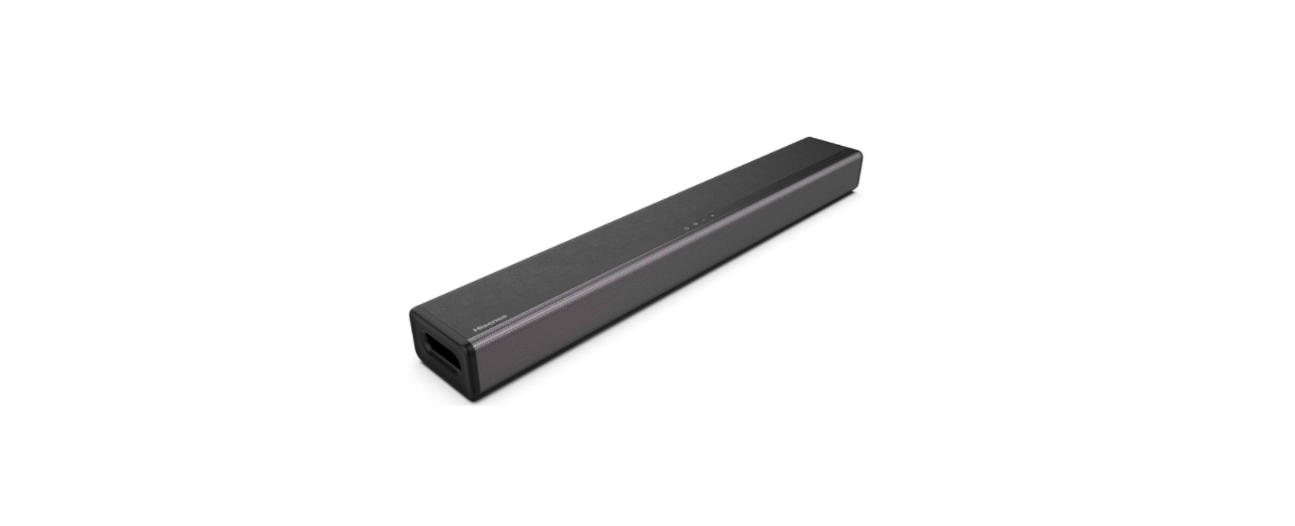

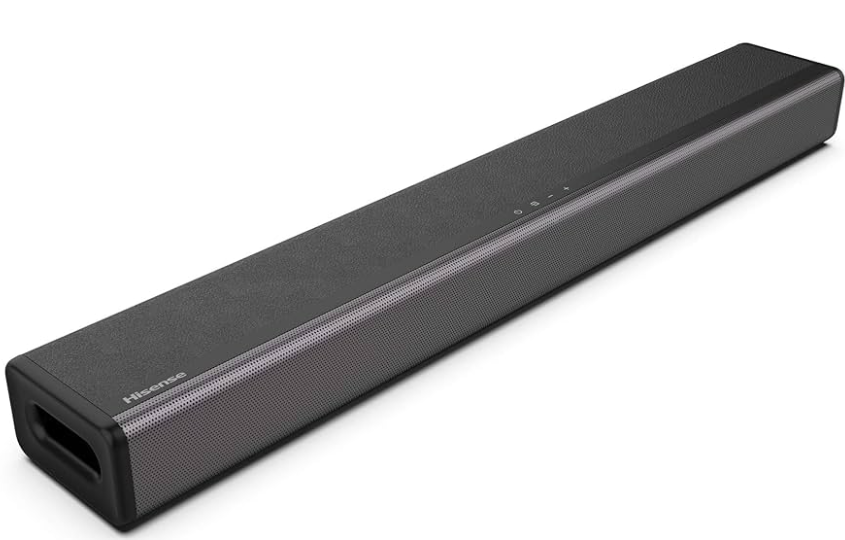
Hisense HS214 2.1 Channel Soundbar Home Theater
Important Safety Instructions
- The lightning flash with arrowhead symbol, within an equilateral triangle, is intended to alert the user to the presence of uninsulated“dangerous voltage” within the product’s enclosure that may be of sufficient magnitude as to constitute a risk of electric shock to persons.
- The exclamation point within an equilateral triangle is intended to alert the user to the presence of important operating and maintenance (servicing) instructions in the literature accompanying the appliance.
Safety Instructions
- Avoid connecting the refrigerator to a Ground Fault Interruptor (GFI) circuit.
- Do not use an extension cord or adapter plug.
- Never unplug the refrigerator by pulling on the power cord.
- Always grip the plug firmly and pull straight out from the receptacle to prevent damaging the power cord.
- Unplug the refrigerator before cleaning to avoid electrical shock.
- Keep all packaging away from children to avoid the risk of suffocation.
- Break off any old locks or latches as a safeguard and remove the door to prevent children from playing from suffering an electric shock or from closing themselves inside it.
- Minimum distance around the apparatus for sufficient ventilation is 5cm.
- The ventilation should not be impeded by covering the ventilation openings with items, such as newspapers, tablecloths, curtains, etc.
- No naked flame sources, such as lighted candles, should be placed on the apparatus.
- Batteries should be recycled or disposed of as per state and local guidelines.
- The use of apparatus in moderate or tropical climates.
- To reduce the risk of fire or electric shock, do not expose this apparatus to rain or moisture.
- The apparatus must not be exposed to dripping or splashing, and objects filled with liquids, such as vases, must not be placed on the apparatus.
- Danger of explosion if the battery is incorrectly replaced.
- Replace only with the same or equivalent type.
Package Contents
- Main Unit

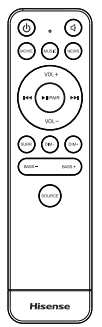
- Remote Control
- R03(Size AAA)Battery x2
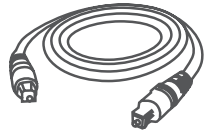
- Optical Cable
- Wall Mounting Kit
- AC Power Cord
- User Manual/Quick Start Guide
- HDMI Cable


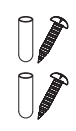
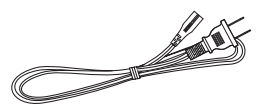
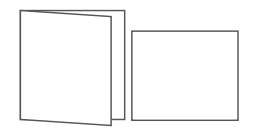
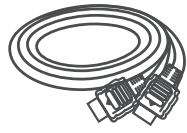
Design and specification are subject to change without notice.
Product Diagram
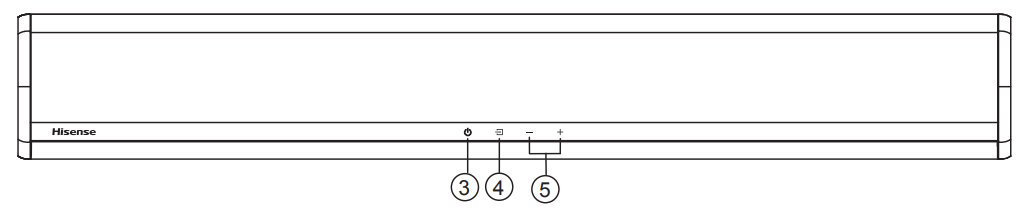
Main Unit
- Remote Control Sensor
- Receive signal from the remote control.
- LED Indicators
- Red: In STANDBY mode.
- Orange: Optical mode.
- Blue: In Bluetooth mode.
- White: In HDMI ARC mode.
- Green: In AUX mode.
- Yellow: In USB mode.
- ON/OFF Button
- Switch the unit between ON and STANDBY mode.
- SOURCE Button
- Select the play mode.
- +/- Vol+/Vol- Buttons
- Increase/decrease the volume level.
- Increase/decrease the volume level.
- Wall Mount
- Install the wall mounting screws into the wall mount of the unit.
- AC Socket
- Connect to the power supply.
- IR Repeater
- Transfer the signal received from the remote control to the TV
- COAXIAL Socket
- Connect to a coaxial audio output on the TV.
- HDMI ARC Socket
- Connect to a TV via an HDMI cable.
- Aux Socket
- Connect to an external audio device.
- OPTICAL Socket
- Connect to an optical audio output on the TV.
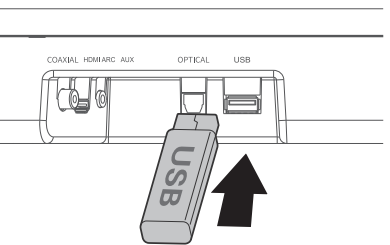
- USB Socket
- Insert the USB device to play music.


Remote Control
- ON/OFF
Switch the unit between ON and STANDBY mode. - MUTE
Mute or resume volume. - EQ buttons
Select MOVIE/MUSIC/NEWS sound effect. - VOL+/VOL-
Increase/decrease the volume level. - In Bluetooth/USB mode
Skip to previous/next track. - PAIR
Play/pause/resume playback in Bluetooth/ USB mode. Press and hold to activate the pairing function in Bluetooth mode or disconnect the existing paired Bluetooth device. - SURR
Adjust the surround ON/OFF - DIM –
Decrease the display brightness. - DIM +
Increase the display brightness - BASS + , BASS –
Increase/decrease the bass level. - SOURCE
Select the play mode
Prepare the Remote Control
- The Remote Control allows the unit to be operated from a distance.
- Even if the Remote Control is operated within the effective range 26.2 26.2 feet (8m), remote control operations may be disrupted if there are any obstacles between the unit and the remote control.
- If the Remote Control is operated near other products that generate infrared rays, or if other remote control devices using infrared rays are used near the unit, it may operate incorrectly. Conversely, the other products may operate incorrectly.
Replace the Remote Control Battery
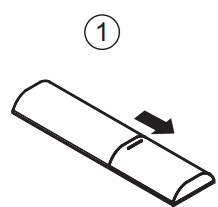
- Push the tab on the side of the battery tray toward the tray, and then pull the battery tray out of the remote control.
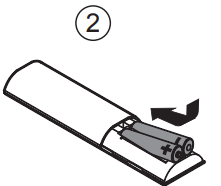
- Remove the old batteries. Place 2 x new AAA batteries into the battery tray with the correct polarity (+/-) as indicated.
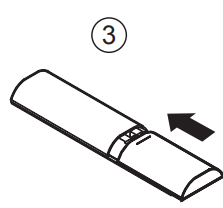
- Slide the battery tray back into the slot in the remote control.
Batteries Precautions
- When the remote control is not to be used for a long time (more than a month), remove the batteries from the remote control to prevent them from leaking.
- If the batteries leak, wipe away the leakage inside the battery compartment and replace the batteries with new ones.
- Do not use any batteries other than those specified.
- Do not heat or disassemble batteries.
- Keep away from heat or moisture.
- Do not carry or store batteries with other metallic objects.
- Doing so could cause batteries to short-circuit, leak, or explode.
- Never charge a battery unless it is confirmed to be a rechargeable type.
Placement and Mounting
Placement
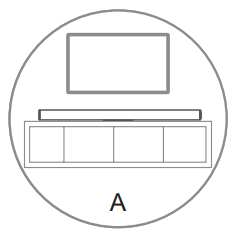
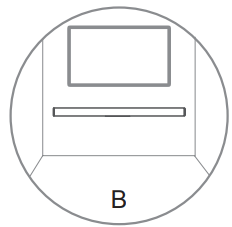
- If your TV is placed on a table, you can place the unit on the table directly in front of the TV stand, centered with the TV screen.
- If your TV is attached to a wall, you can mount the unit on the wall directly below the TV screen.
Wall Mounting
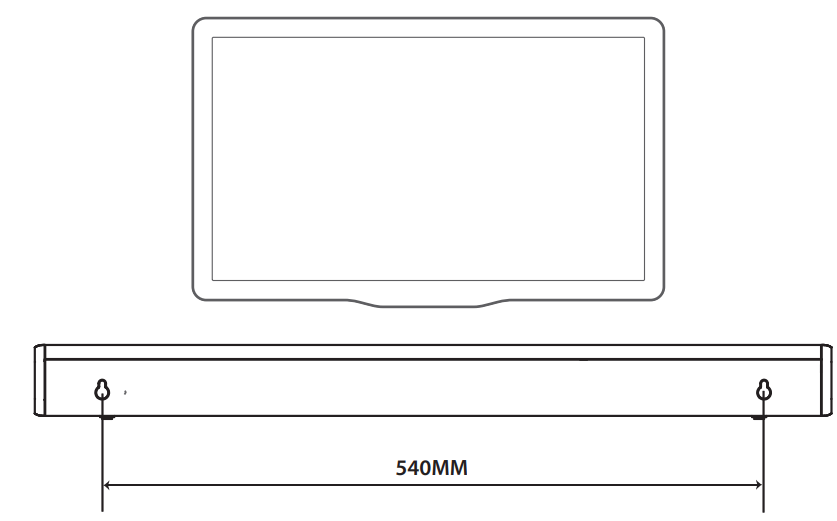
- It is the installer’s responsibility to verify that the wall will safely support the total load of the unit and wall brackets.
- Additional tools (not included) are required for the installation.
- Do not overtighten screws.
- Keep this instruction manual for future reference.
- Use an electric stud finder to check the wall type before drilling and mounting.
Connections
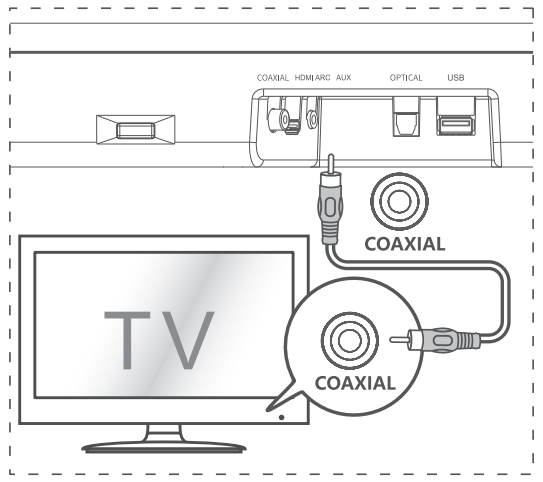
COAXIAL Socket
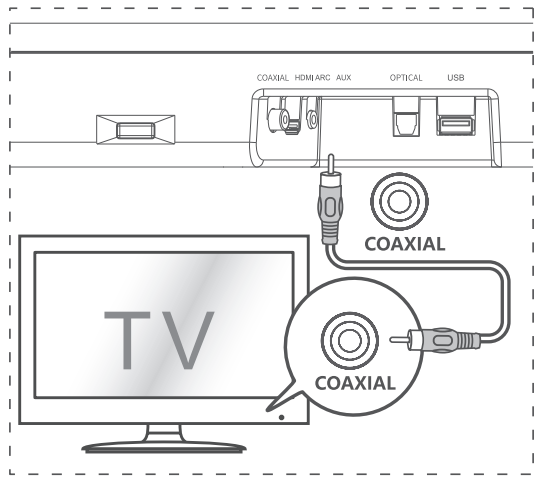
- You can use a COAXIAL cable (not included) to connect the TV’s COAXIAL OUT socket and the COAXIAL socket on the unit.
HDMI ARC Socket
Your Soundbar supports HDMI with Audio Return Channel (ARC). If your TV is HDMI ARC compliant, you can hear the TV audio through your Soundbar by using a single HDMI cable.
- Use a High Speed HDMI cable to connect the HDMI ARC connector on your Soundbar and the HDMI ARC connector on the TV.
- The HDMI ARC connector on the TV might be labelled differently. For details, see the TV user manual.
- On your TV, turn on HDMI-CEC operations. For details, see the TV user manual.
- Tips
Your TV must support the HDMI-CEC and ARC functions. HDMI-CEC and ARC must be set to On. - The setting method of HDMI-CEC and ARC may differ depending on the TV. For details about the ARC function, please refer to your TV user manual.
- Only HDMI 1.4 compatible cables can support the ARC function.
- Tips
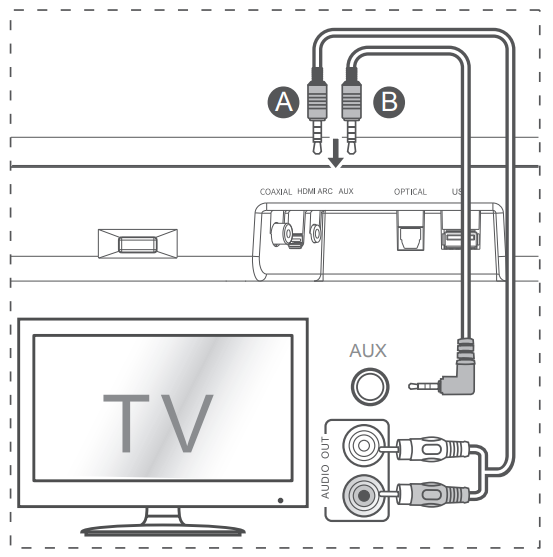
AUX Socket
- Use an RCA to 3.5mm audio cable (not included) to connect the TV’s audio output socket and the AUX socket on the unit.
- Use a 3.5mm to 3.5mm audio cable (not included) to connect the TV’s or external audio device Aux socket to the Aux socket on the unit.
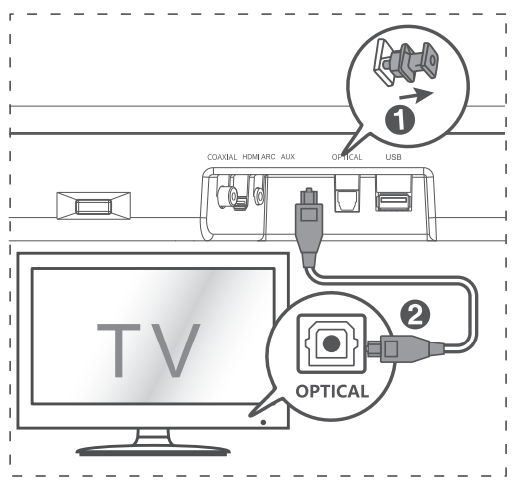
OPTICAL Socket
- Remove the protective cap of the OPTICAL socket, then connect an OPTICAL cable (included) to the TV’s OPTICAL OUT socket and the OPTICAL socket on the unit.
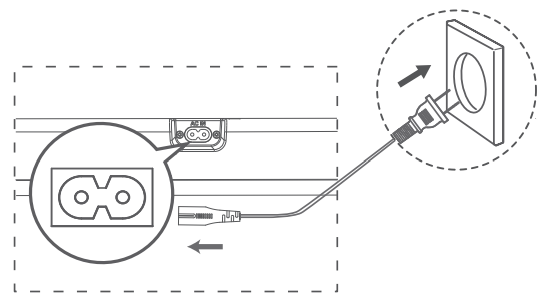
Connect Power
- Ensure that the power supply voltage corresponds to the voltage printed on the back or the underside of the unit.
- Before connecting the AC power cord, ensure you have completed all other connections.
- Connect the mains cable to the AC Socket of the main unit and then to a mains socket.
Basic Operation
Standby/On
- When you first connect the main unit to Hisense HS214 2.1 Channel Soundbar Home Theater the mains socket, the main unit will be in STANDBY mode.
- Press the button on the unit or on the remote control to switch the unit ON.
- Press the button again to switch the unit back to STANDBY mode.
- Disconnect the mains plug from the mains socket if you want to switch the unit OFF completely.
Auto Wake
- If a TV or an external device is connected (AUX / OPTICAL / COAXIAL / HDMI ARC), the unit will switch on automatically when the TV or the external device is switched on.
How to Enable Auto Wake
- Press the (SOURCE) button and the + (VOL +) button on the unit to enable or disable the Auto Wake function.
- Auto Wake On: White and green LEDs blink twice sequentially. While in STANDBY mode, the RED LED is breathing.
- Auto Wake Off: White and red LEDs blink twice sequentially. While in STANDBY mode, the LED is in solid red.
Automatic Power Off Function
The unit automatically turns to STANDBY mode after about 15 minutes if the TV or the external unit is disconnected or switched off.
- To switch the unit off completely, disconnect the mains plug from the mains socket.
- Please turn the unit off completely to save energy when not in use.
Select Modes
Press the (SOURCE) button repeatedly on the unit or the SOURCE button on the remote control to select the desired mode. The LED indicator on the front of the main unit will show which mode is currently in use.
Adjust the Volume
Press the + / – buttons on the unit or VOL+ / VOLon the remote control to adjust the volume. If you wish to turn the sound off, press the button on the remote control. Press the button again or press the + / – buttons on the unit or VOL+ / VOL- on the remote control to unmute.
Select a Preset Sound Effect
While playing, press the NEWS / MOVIE / MUSIC buttons on the remote control to select the preset equalizers:
- MOVIE (recommended for watching a movie)
- MUSIC (recommended for listening to music)
- NEWS (recommended for listening to the news)
OPTICAL/COAXIAL/HDMI ARC/AUX Operation
- Ensure that the unit is connected to the TV or audio device.
- Press the button repeatedly on the unit or the SOURCE button on the remote control to select the OPTICAL, CO
- Operate your audio device directly for playback features.
- Press the +/– button on the unit or VOL+ / VOL on the remote control to adjust the volume to your desired level.
Bluetooth Operation
- During ON mode, press the button repeatedly on the unit or the SOURCE button on the remote control to select Bluetooth mode. The Blue indicator light will ash.
- Activate your Bluetooth device and select the search mode. “Hisense HS214” will appear on your Bluetooth device list.
- Button on the remote control to enter Hisense HS214 2.1 Channel Soundbar Home Theater pairing mode again. You will hear an audio prompt from the unit and
- Select “Hisense HS214 ” in the pairing list. After the audio prompt, the system is successfully connected, and the Bluetooth indicator will light up solidly.
- Play music from the connected Bluetooth device.
To disconnect the Bluetooth function, you can
- Switch to another source on the unit.
- Disable the function on your Bluetooth device.
- The Bluetooth device will be disconnected from the unit after the audio prompt.
- Press and hold the PAIR button on the remote control.
Listen to Music from a Bluetooth Device
- If the connected Bluetooth device supports Advanced Audio Distribution Profile (A2DP), you can listen to the music stored on the device through the unit.
- If the device also supports Audio Video Remote Control Profile (AVRCP), you can use the unit’s remote control to play music stored on the device.
- Pair your device with the unit.
- Play music via your device (if it supports A2DP).
- Use the supplied remote control to control play (if it supports AVRCP).
- To play/pause, press the button on the remote control.
- To skip a track, press the buttons on the Hisense HS214 2.1 Channel Soundbar Home Theater remote control.
USB Operation
- Insert a USB device.
- During playback.
- To play/pause, press the PAIR button on the remote control.
- To skip to the previous/next track, press the buttons on the remote control.
- The unit can support USB devices Hisense HS214 2.1 Channel Soundbar Home Theater with up to 64 GB of memory.
- This unit can play MP3s.
- This unit can support WAV/WMA/FLAC.
- The unit supports FAT32.
- An embedded USB full-speed host for USB applications should not exceed 6.5Mbps.
- For the LE in FLAC format, the max block size 8107/8109 can support 4608 as the maximum.
Specification
| Soundbar | |
| Power Supply | 100-240V~ 50/60Hz |
| Power Consumption | 20W |
| Standby Power | 0.45W |
| USB Port for Playback USB Compatibility | 5V Hi-Speed USB (2.0) / FAT32 |
| USB Playback Support/File Formats | WAV、MP3、WMA、FLAC |
| Dimension (WxDxH) | 25.59 x 3.74 x 2.42 inches / (650 x 95 x 61.5 mm ) |
| Net Weight | 4.78 lbs (2.17kg) |
| Impedance | 4Ω+8Ω x 2 |
| Frequency Response | 40Hz-20KHz |
| Bluetooth Version | V4.2 |
| Bluetooth Maximum Power Transmitted | 9dBm |
| Frequency Bands | 2402 ~ 2480 MHz |
| Amplifler(Output power) | 54W + 27W x 2 |
| Total | 108W |
| Remote Control | |
| Distance/Angle | 8m / ±30°; 90° |
| Battery Type | AAA Zn-Mn battery |
Troubleshooting
To keep the warranty valid, never try to repair the Hisense HS214 2.1 Channel Soundbar Home Theater unit yourself. If you encounter problems when using this unit, check the following points before requesting service.
- Ensure that the AC power cord of the unit is properly connected.
- Ensure that there is power at the AC outlet.
- Press the standby button to turn the unit on.
- Before you press any playback control button,
- Reduce the distance between the remote control and the unit.
- Insert the batteries with their polarities (+/-) aligned as indicated.
- Replace the batteries.
- Increase the volume. Press VOL+ on the remote control or + on the unit.
- Press the remote control to ensure the soundbar is not muted.
- Press the SOURCE button to select a different input source.
- When using either of the Digital inputs, if there is no audio:
- Try setting the TV output to PCM or
- Connect directly to your Blu-ray/other Hisense HS214 2.1 Channel Soundbar Home Theater source; some TVs do not pass through digital audio.
Disposal
- Child entrapment and suffocation are not the only problems of the past. Junked or abandoned refrigerators are still dangerous – even if they are sitting “for just a few days”. If you are getting rid of your old refrigerator, please follow the instructions below to help prevent accidents.
- Remove doors.
- Leave shelves in place so children may not easily climb inside. Have refrigerant removed by a qualified service technician.
Disposal of the appliance
Packaging materials: Packaging materials Hisense WMS017M6XBE Use & Care Refrigerator with the recycling symbol are recyclable. Dispose of the packaging in a suitable waste collection container to recycle it.
Before disposal of the appliance
- Pull out the main plug from the main socket.
- Cut off the power cord and discard the main plug.
Customer Service
- Website: https://global.hisense.com/
- Tel: 0191 387 0804
- Opening hours: Monday to Friday 9.00 am – 6.00 pm Saturday 9.00 am – 5.00 pm
FAQs
What devices can I connect to the Hisense HS214 soundbar?
TVs, cellphones, tablets, game consoles, and other audio sources can be connected using RCA inputs, Bluetooth, optical cables, or AUX (3.5mm).
How do I pair my Bluetooth device with the soundbar?
Press the Bluetooth button on the remote control or soundbar to turn it on, then wait for the LED indicator to flash. To finish pairing, choose “Hisense HS214” from the Bluetooth settings on your device.
What is the difference between the 2.1 channel setup?
The “2.1” stands for two primary speakers (left and right) and one bass-focused subwoofer channel, which produces a fuller, richer sound with better low frequencies.
Is there a night mode or sound mode for different listening experiences?
Indeed, there are several sound modes available on the soundbar, including Standard, Music, Movie, and Night mode. These modes maximise audio output in quieter settings without sacrificing clarity.
What should I do if there is no sound from the subwoofer?
Verify that the subwoofer is turned on and plugged in. Verify that the soundbar is connected to it (the LED indicator should be solid). Additionally, make sure the bass settings on the soundbar are not too low or muted.