



Klipsch FLEXUS CORE 300 Soundbar Speakers
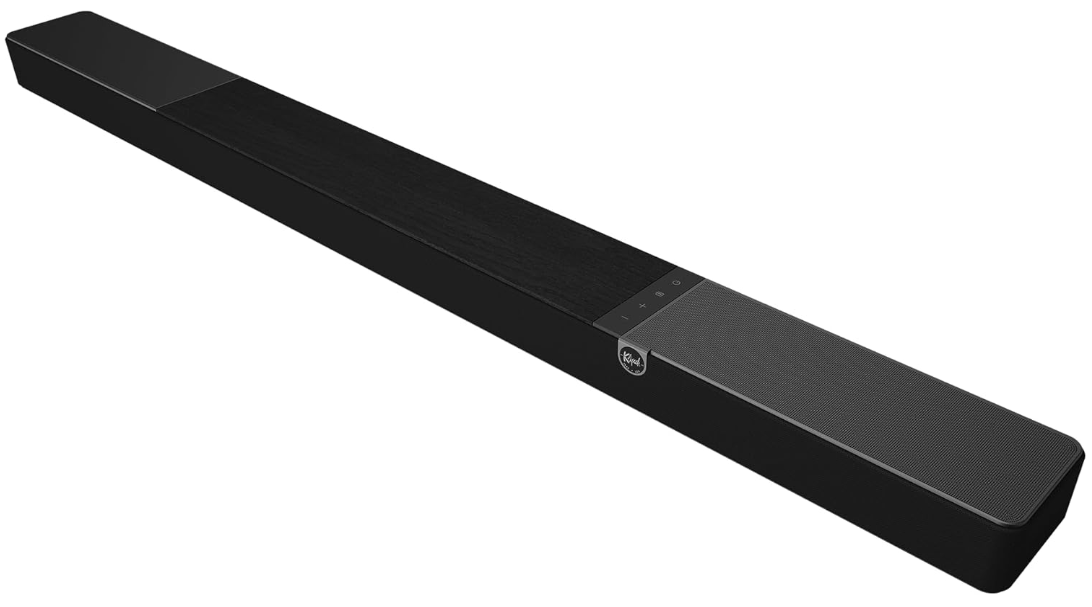
Features
Sound Bar with Dirac Room Correction
The Klipsch Flexus Core 300 powered by Onkyo is the first-ever sound bar with Dirac Live auto-room correction to create the perfect sound landscape for your space by correcting anomalies in the room to create the best possible acoustic experience. After a quick scan of your room using the Klipsch Connect Plus app, the Core 300 is ready to deliver lifelike audio
Unlike any other sound bar
Legendary American Sound
Klipsch has been making premium loudspeakers for the better part of a century. We pack decades of acoustic know-how into every product. The Klipsch Flexus Sound System is a partnership of our iconic American audio muscle with the technical precision of Japanese engineering from Onkyo. This strategic partnership fortifies our commitment to delivering unparalleled sound experiences.
Powered by Japanese Precision Technology
We’ve teamed up with Onkyo, combining their decades of proven manufacturing and tech prowess with our classic Klipsch acoustics, to ensure your home entertainment system is as epic in audio quality as it is in reliability. This collaboration with Onkyo infuses hundreds of years of expertise, innovation, and extensive testing protocols. The integration of Onkyo technology into the Flexus Sound System represents a deliberate stride toward perfecting every aspect of sound reproduction within our sound bars.
Dolby Atmos Advanced Sound Experience
The Flexus Core 300 was built for processing the newest movies, shows, and games featuring Dolby Atmos technology in two 2.25” built-in elevation speakers and two (2.5”) side-firing speakers. Dolby’s immersive audio formatting enhances your experience by placing sounds precisely around and above you, creating a realistic, multidimensional audio environment.
Connect Plus App to Customize
Streamline setup and control of Klipsch products with this user-friendly mobile app featuring controls for custom audio settings, managing multiple devices, and accessing firmware updates.
Network Music Streaming
The Flexus Core 300 allows you to stream all your favorite music in high-resolution (via network connection) for the most impactful and immersive experience through apps such AirPlaylay, Google Cast, Spotify, Tidal Connect, Qplay, and Bluetooth.
DTS: X Decoding On board
The Core 300 provides advanced DTS: :X Decoding, which allows the soundbar to decode all major audio formats via HDMI input for seamless playback of DTS: X-encoded movies and music.
Specification
| SPEAKER SYSTEM | 5.1.2 Dolby Atmos Soundbar |
| MAX ACOUSTIC OUTPUT | 106dB |
| FRONT FIRING DRIVERS | 4 x 2.25” Drivers 1 x .75” Horn-Loaded Tweeter |
| UPFIRING DRIVERS | 2 x 4” High-Output Woofers 2 x 2.25” Discrete Full-Range Drivers |
| SIDE-FIRING DRIVERS | 2 x 2.25” Drivers |
| ENCLOSURE TYPE | Sealed – Plastic, Metal |
| FREQUENCY RESPONSE | 43Hz-20kHz |
| INPUTS | HDMI 2.1 Passthrough, HDMI eARC • Bluetooth • USB-C • Digital Optical |
| OUTPUTS | HDMI Out, Subwoofer (RCA) Output |
| DIMENSIONS | 3 1/16” (7.8cm) H x 54” (137.2cm) W x 4 15/16” (12.6cm) D |
| FINISH | Ebony Vinyl |
| WEIGHT | 18.7lbs (8.5kgs) |
| INCLUDED ACCESSORIES | (1) BLE Backlit Remote Control (1) 2.0m Power Cord (Region Specific) (1)1.5m HDMI Cable (2)AAA Batteries (1) User Manual |
| MOUNTING OPTIONS | 1/4” x 20 Threaded Insert, optional slim-depth wall bracket (sold separately) |
| USB INPUT | (1) USB Type-A Connection For System Updates and playback of MP3 files. |
| MODEL NAME | SKU | REGION | UPC | EAN |
| FLEXUS CORE 300 | 1072083 | NA | 743878066692 | 0743878066692 |
| FLEXUS CORE 300 | 1072084 | EUA | 743878066708 | 0743878066708 |
| FLEXUS CORE 300 | 1072085 | CCC | 743878066715 | 0743878066715 |
Customer Service
- Website: Klipsch.com
- Ph: 1-800-554-7724
FAQs
Q: What is the FLEXUS CORE 300 designed for?
The FLEXUS CORE 300 is a tiny, high-performance soundbar that is perfect for small to medium-sized spaces. It provides powerful bass, crisp conversation, and immersive audio for TVs, streaming devices, and music players.
Q: Can I use the soundbar wirelessly?
Indeed. You can play music wirelessly with the FLEXUS CORE 300 thanks to Bluetooth streaming from smartphones, tablets, and other compatible devices.
Q: How do I adjust volume, bass, and treble?
Use the soundbar’s touch-sensitive buttons or the remote control that comes with it. Certain versions might provide sophisticated audio customisation with the Klipsch app.
Q: Can I connect a subwoofer or additional speakers?
For improved bass, the FLEXUS CORE 300 is compatible with Klipsch wireless subwoofer integration. Depending on the system’s wireless expansion capability, more rear speakers could be attached.
Q: How do I reset the soundbar to factory settings?
For ten seconds, simultaneously press and hold the input and power buttons until the LED flashes, signifying a successful reset.
Q: How do I update the firmware?
Firmware updates, if available, are delivered through the Klipsch app. Ensure the soundbar is connected to Wi-Fi or Bluetooth and follow the prompts in the app.
Q: Can I use the soundbar for music streaming?
Indeed. Play music from PCs, tablets, smartphones, and other audio devices via Bluetooth or compatible cable inputs.
Q: How do I clean and maintain the soundbar?
Wipe the speaker grille and cabinet with a gentle, dry cloth. Steer clear of liquids, solvents, and abrasive materials that might harm the speakers or finish.