



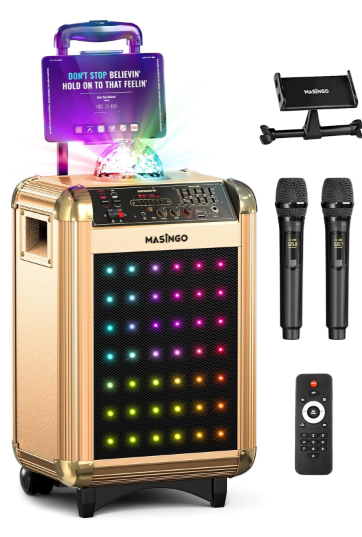
MASiNGO Soprano X1 Karaoke Machine
Function Board
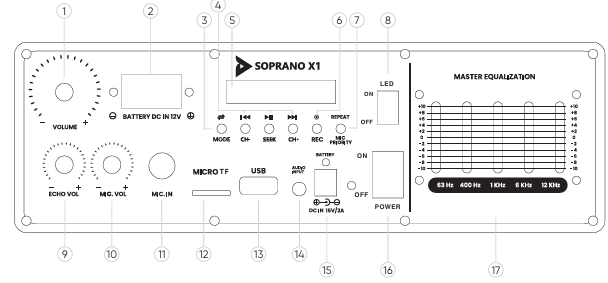
- Master Volume Control
- DC12V Car Battery Input
- Mode
- Channels Control
- Digital Display
- Record
- Repeat/Mic Priority
- LED Lights and Disco Ball On/Off
- Echo Volume
- Mic Volume
- Mic Input
- Micro TF
- USB Port
- Audio Input
- DC15V/2A Charging Cable Input
- Power
- Master Equalizer
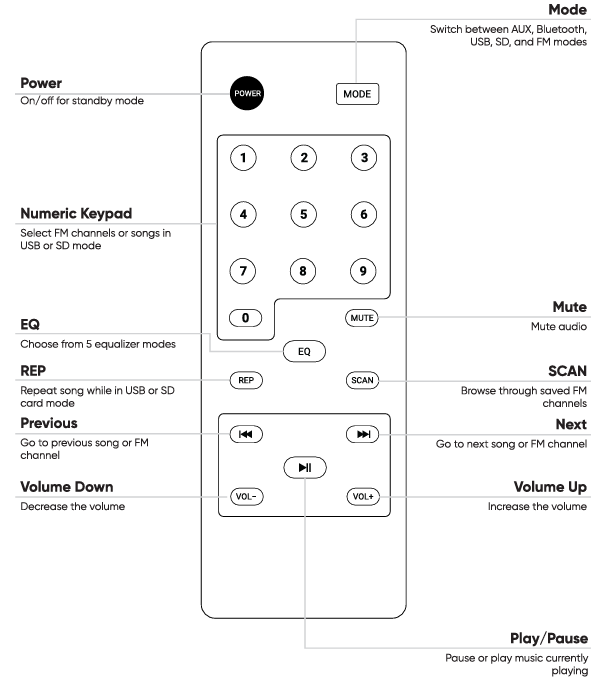
Remote Control
Before Using
- Keep this manual for any future reference.
- Adhere to all warnings.
- Keep ventilation openings clear; do not block any of this machine’s vents/openings.
- Install and set up the machine according to the instructions provided in this manual.
- Use the polarized plug or grounding type plug carefully.
- These plugs are made for safety purposes.
- A polarized plug has two blades with one wider than the other.
- A grounding type plug has two blades and a third grounding prong.
- The wider blade and the third prong are provided for your safety.
- Please consult an electrician if the provided plug does not fit into your outlet.
Detailed Usage
- Connect the charger plug into the machine’s DC15V/2A Charging Cable Input and to a polarized outlet.
- Be sure to charge fully before each use. The indicator light will turn on to indicate charging.
How to turn the machine on/off
- Depress the Power (insert diagram number) switch towards the side labeled ON to turn the machine on. To turn it off, depress the same switch towards the side labeled OFF.
How to turn the LEDs (lights) and disco ball on/off
- Depress the LED (insert diagram number) switch towards the side labeled ON to turn the lights and disco Ball on. To turn them off, depress the same switch towards the side labeled OFF.
Microphones
- Plug the MicroUSB included into the bottom of the microphone and a wall outlet.
- Be sure to charge fully before each use.
- While charging, the battery icon on the display will flash, then stop flashing when the battery is full.
Turn the microphones on
- Turn on the microphones using the Power button on each handle. They will automatically connect to the machine.
Set up
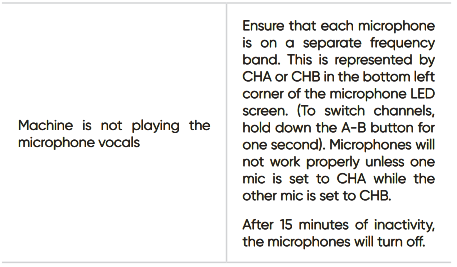
- The A-B button controls both the microphone’s channel and the microphone’s frequency band.
Customize your vocal mix
- To adjust the volume of your singing over the music, click the Volume +/ – buttons up or down as desired. Use the EQ button to choose between 5 different equalizer selections.
Music
Set up playback
- Your machine has 6 different playback options: Bluetooth, SD, AUX, USB, FM, and PA. Each has its hookup location (diagram on page 7) and set-up method (see the subsections below).
Connect to Bluetooth
- Playing music from your device: Click the Mode button on the machine’s function board until the digital display indicates you are in Bluetooth mode.
- Then, search for the machine name “MASINGO” under your device’s Bluetooth connection settings and click to connect.
SD mode
- Playing music from an SD card.d Plug your MicroSD card into the MicroSD Slot on the machine’s function board. The stored music on your SD card will begin playing automatically.
AUX mode
- Playing music from an AUX-compatible device. Plug the AUX cable into the AUX Input on the machine’s function board to activate AUX mode.
- Plug the other end of the cable into the designated input on your device and play your music just as you normally would.
Connect to a TV
- Plug the AXU-RCA cable into the AUX input on the machine’s function board to activate AUX mode in order to connect a TV.
- Insert the other end into the designated port on your TV play your music just as you would in regular AUX mode.
USB mode
- Playing music from a USB drive. Plug your USB into the USB Port on the machine’s function board.
- The stored music on your USB will begin playing automatically.
FM mode
- Playing music from an FM radio station. Click the Mode button on the function board of the machine until “FM” appears on the display screen.
- Once the FM mode has been activated, press and hold the ni button on either the remote control or function board for the machine to begin seeking and storing all of your local radio station channels.
PA motion
- When there is no music playing, this machine will automatically start PA Mode.
- Simply use the microphones by ensuring that they are turned on.
- Adjust the microphone’s volume and echo on the machine’s function board or the microphone itself.
To record
- Begin by inserting a suitable recording device into the function board via the MicroSD slot or USB port.
- Ensure that the microphone is turned on nd, and then proceed to press the REC button on he function board.
- Speak or sing into the microphone, and when finished recording, click REC again to stop it.
- To listen to the recorded audio, remove and then reinsert the USB or MicroSD recording device.
Multiple playback modes
- To use playback modes interchangeably, simply activate each mode according to the instructions above, then click Mode to switch between the inputs.
Maintainance
- Turn the machine and microphone off and unplug all wires. Gently wipe the outside of the machine using a clean, dry cloth.
- Keep all vents, buttons, and openings free of lint and dirt. Do not immerse the machine in water, a nd do not use any harsh cleaners.
- Charge the machine so that it’s ready the MASiNGO Soprano X1 Karaoke Machine next time you want to use it. Make sure that the machine is clean and dry. Bind the unplugged cord gently with an electrician-approved fastener.
- Do not wrap the cord around the machine. Store the machine in a cool, dry place away from damaging elements. For best results, clean and store the machine after each use.
- The Soprano XI was designed intentionally with wheels at the bottom for easy transportation.
- Simply unplug all wires and extend the handle on the machine to roll it around just like a suitcase.
- Place the microphones in a suitable bag and carry them separately.
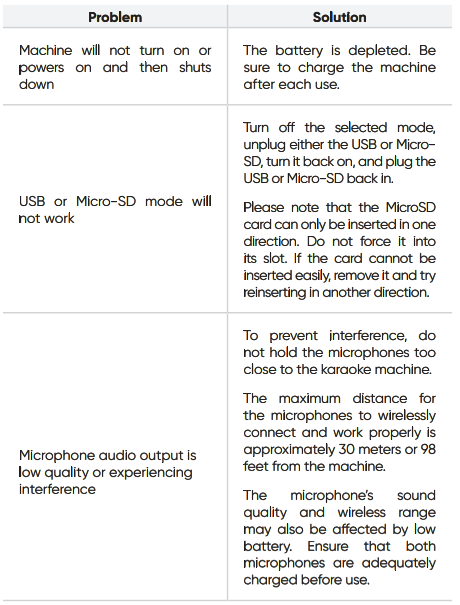
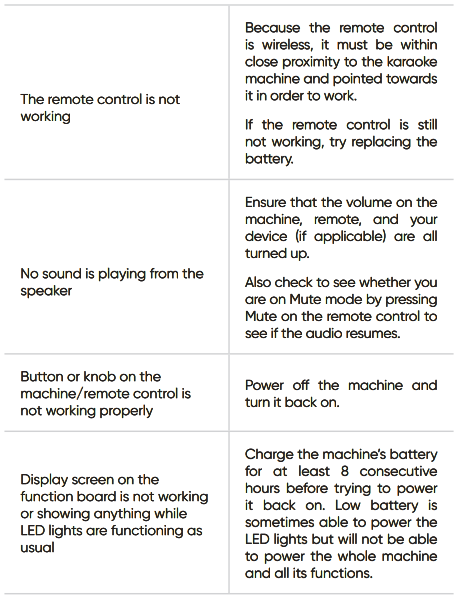
Troubleshooting
FCC Statement
This device complies with part 15 of the FCC rules. Operation is subject to the following two conditions: (1) this device may not cause harmful interference, and (2) this device must accept any interference received, including interference that may cause undesired operation. Changes or modifications not expressly approved by the party responsible for compliance could void the user’s authority to operate the equipment.
- Reorient or relocate the receiving antenna.
- Increase the separation between the equipment and receiver.
- Connect the equipment into an outlet on a circuit different from that to which the receiver is connected.
- Consult the dealer or an experienced MASiNGO Soprano X1 Karaoke Machine radio/TV technician for help. Radiation Exposure Statement
This equipment complies with FCC radiation exposure limits set forth for an uncontrolled environment. This equipment should be installed and operated with a minimum distance of 20cm between the radiator and your body.
Customer Service
- Website: support@masingo.com
- Tel: 844-262-7464
- Timings: 9 am to 5 pm EST
FAQs
Q: Does this machine support duet singing?
Ans: Of course! Duets, group songs, and karaoke bouts may all be performed with the two wireless mics that are supplied.
Q: Is the Soprano X1 battery-powered or does it need to be plugged in?
Ans: Usually powered by AC, the primary MASiNGO Soprano X1 Karaoke Machine karaoke speaker needs to be hooked into an outlet. However, when the AA batteries used by the wireless microphones run low, they must be recharged or replaced.
Q: What file formats are supported via USB?
Ans: MP3 audio files can be played on the Soprano X1 over USB. Video and karaoke CDG files are not natively supported by it.
Q: Can I connect it to a TV or external display?
Ans: There is no visual output on the Soprano X1 for displaying lyrics. You’ll need to utilise a Bluetooth-enabled phone or tablet to view the lyrics using apps like YouTube, Smule, or Karaoke apps.
Q: Does the speaker light up with LED effects?
Ans: Indeed! Great for parties and shows, the MASiNGO Soprano X1 has multicoloured LED lights that pulse and change in time with the music.
Q: Can I use it as a regular Bluetooth speaker?
Ans: Indeed. The Soprano X1 is an excellent Bluetooth speaker that can play music, podcasts, or audio from any compatible device while it is not singing.
Q: Is this karaoke machine portable?
Ans: Indeed. Because of its portability and carry handle, the device is perfect for outdoor use (with power access) or parties and family get-togethers.