



Mixx Audio StreamBuds True Wireless Earbuds
Let’s Start
Please read this information carefully before using “Mixx Audio StreamBuds Mini True Wireless Earbuds User Guide”
What’s in the box?
A pair of earbuds
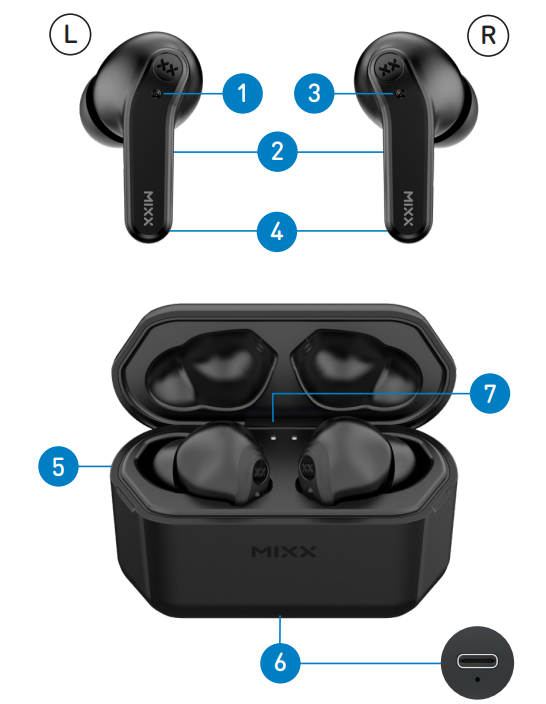

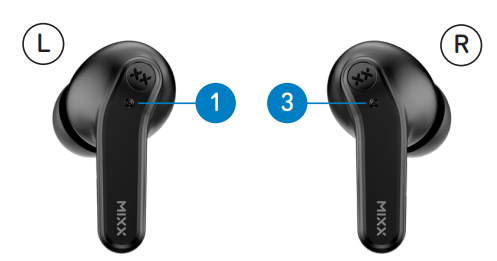
- Left Touch Sensor
- Earbud LED Lights (Back)
- Right Touch Sensor
- Microphones (Back)
- Portable Charging Case
- USB Type-C Charging Port (Base)
- LED Charge Indicators
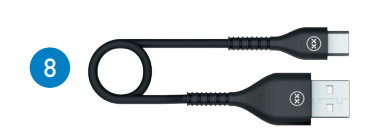
- USB Type-C Charging Cable
- 3 Pairs of Ear Cushions (S, M, and L)
Let’s Connect
First time pairing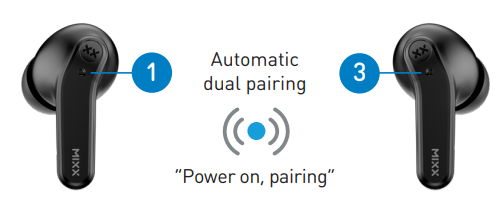
- Remove both earbuds from the Portable Charging Case. They will automatically pair together and will confirm with ‘Power on, pairing’.
- One Earbud LED Light will flash RED and BLUE to indicate pairing mode.
- Go to the Bluetooth settings on your audio device to select ‘MIXX StreamBuds Mini’ from the list.
- Once paired successfully, you will hear ‘Connected’ and the Earbud LED Lights will turn off. You can now enjoy your music, watch a video, or take a call hands-free.
- The earbuds will automatically reconnect to the last device they were paired with, confirming ‘Connected’.
Let’s Ask Google Assistant And Siri
Pair your Bluetooth device with your earbuds. Double-tap the RIGHT Touch Sensor to activate Siri or 0Google Assistant. The voice assistant familiar ‘Beep’ will sound to confirm the connection. You can now ask Siri or Google Assistant a question or state a command.
Let’s Use the Preset EQ Settings
- Bass boost mode increases the bass sound.
- Voice mode decreases the bass, the high-frequency tones and increases the speech frequencies.
- Music mode returns you to the optimal EQ for music listening. To change EQ settings, use the LEFT Touch Sensor to cycle through the Music, Bass Boost, and Voice modes to find your preferred sound.
Let’s Stay Charged
The Earbuds. A voice prompt ‘Battery low’ allows for 2 minutes of play time before the earbud powers down, stating ‘Battery low, power off’. The Earbuds LED Light will flash RED once and then switch off. Charge the earbuds using the Portable Charging Case. Insert both earbuds into the case and close the lid.
TIP
15-MINUTE QUICK CHARGE
The Portable Charging Case
When all 4 LED Charge Indicators switch off, then it is time to recharge. Always connect the case to a suitable USB wall charger, computer USB port, or a power bank using the USB Type-C charging cable supplied. Each LED Charge Indicator represents 25% charge on the case. The first LED indicator will flash WHITE until it reaches 25% charge, then it will remain on as the next LED indicator begins to flash. The case is fully charged when all 4 of the LED Charge Indicators are WHITE. This can take up to 2 hours.
Let’s Play
TIP
For better noise isolation, comfort, and sound quality, ensure the correctly sized (S, M, or L) ear cushions supplied are fitted on the earbuds.
First initial pairing
Remove both earbuds from the charging case. Go to the Bluetooth settings on your audio device to select ‘MIXX StreamBuds Mini’ from the list. Once paired, you will hear ‘Connected’.
- Play / Pause: Long-press for 1 second on either Touch Sensor
- Increase Volume
Single tap RIGHT Touch Sensor - Decrease Volume
Single tap LEFT Touch Sensor - Activate Siri / Google Assistant
Double-tap the RIGHT Touch Sensor. The voice assistant familiar ‘Beep’ will sound, then ask a question or state a command.
Change the Preset Equalisation (EQ) Settings
Double-tap the LEFT Touch Sensor to cycle through the Music, Bass Boost, and Voice modes to find your preferred sound.
- Answer / End a call
Long-press for 1 second either the Touch Sensor or - Decline an Incoming Call
Double-tap either Touch Sensor - Power On
Remove both earbuds from the case, and they will automatically turn on and pair together. To manually turn on, long-press for 2 seconds each Touch Sensor. - Power Off
Insert both earbuds into the case and close the lid. This will automatically turn off the earbuds and the Bluetooth.
Technical Specifications
- Play time on a single charge: Up to 6 hours
- Play time with charging case: Up to 24 hours
- Bluetooth: Version 5.1
- Resistance: IPX5, water and dust resistant
- Supported profiles: HSP, HFP, A2DP, AVRCP
- Wireless range: 10m
- Earbud capacity: 40mAh each side
- Charge case capacity: 300mAh
- Standby: 120 days
- Dynamic driver: 10mm
- Frequency response: 20Hz – 20KHz
- Weight including case: Total 45g (earbuds 9g each)
- Portable case dims: 66 x 47 x 27 mm (L x H x D)
Compatibility
Suitable for most Bluetooth audio-supported smartphones, tablets, notebooks, laptops, and computers.
Need Extra Help?
Common solutions
If you are experiencing problems with your earbuds:
- Power on the earbuds (see page 8).
- Check the status of the LED Lights (see pages 5-6).
- Charge the earbuds (see pages 5-6).
- Move your device closer to the earbuds and away from any obstructions or interference.
- Try connecting to another device.
Customer Support
- Email: support@mixx-io.com
- Visit: mixxaudio.com
- Address: 5 The Pavilions, Brighton Road, Pease Pottage, West Sussex, RH11 9BJ. United Kingdom
- Tel: 0844 800 3480
FAQs
Q: Can I use only one earbud at a time?
Ans: Indeed! Both the left and right earbuds can be used separately for music or calls. Just take the desired earbud out of its case and connect it to your gadget.
Q: How long does the battery last on a single charge?
Ans: When fully charged, the StreamBuds Mini can play for up to four hours. Additional charges are available for the charging case, allowing for up to 20 hours of use overall.
Q: How can I check the battery level?
Ans: The LED indicators will momentarily show the battery level when you take the earphones out of the case. The Bluetooth settings on your linked device may also display the battery life of each earpiece.
Q: What should I do if the earbuds won’t connect or sync?
Ans: Restart pairing mode by putting the earphones back in the charging case, closing the lid, and then taking them out again. Try pairing the earphones again after resetting them, if necessary, by holding down the touch regions of both earbuds for ten seconds until the LEDs flash.
Q: Are the StreamBuds Mini sweat or water-resistant?
Ans: Indeed, they are resistant to perspiration and mild splashes thanks to their IPX4 classification. But don’t put them in the water or let them sit in a lot of rain.
Q: What is the Bluetooth range of the StreamBuds Mini?
Ans: In an open space, the earphones sustain a steady Bluetooth connection for about 10 meters (33 feet).