



Mixx Audio xBoost2 Wireless Party Speaker
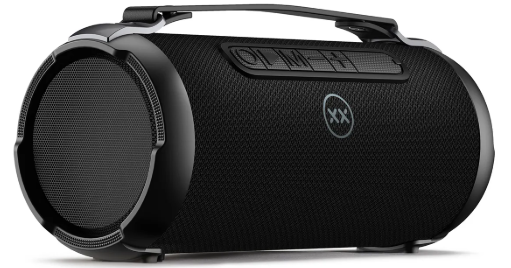
Let’s Check
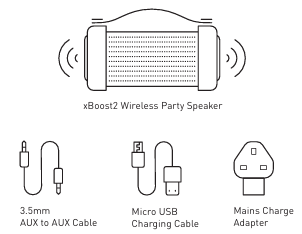
What’s in the box?
Let’s Start
Let’s Power
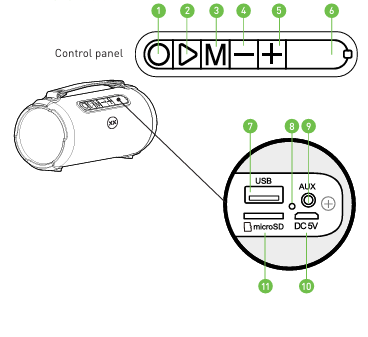
ON/OFF – Press and hold the Power Button until you hear ‘Power on/Power off’, and the LED Light will flash BLUE quickly.
Let’s Select a Mode
There are four modes in which you can listen to your playlist.
- Let’s Pair via Bluetooth
- Let’s Play using a USB Stick*
- Let’s Play using a Micro SD Card*
- Let’s Go Wired using the AUX Port
Let’s Pair
Via Bluetooth
- The first time you pair with the MIXX xBoost2 Wireless Speaker, press and hold the Power Button until you hear ‘Power on, pairing’ and the LED Light will flash BLUE quickly.
- Go to the Bluetooth settings on your audio device and select ‘MIXX xBoost2’ from the list. Once paired successfully, your speaker will say ‘Connected’ and the LED Light will flash BLUE slowly.
- You can now enjoy your music. Your speaker will say ‘Connected’ when it automatically reconnects to the last audio device it was paired with.
Note
In Bluetooth mode, you can use either your audio device or the control panel on the MIXX xBoost2 speaker to control your music.
Let’s Play
Using a USB stick
Power on your speaker and insert your USB stick into the audio input USB Port. You should hear a ‘beep’ as confirmation. Your music will begin to play automatically from your USB stick, and the LED Light will flash BLUE slowly. Power off your speaker before you remove your USB stick.
Using a Micro SD card
Power on your speaker and insert your micro SD Card into the audio input Micro SD Card Port. Push the SD card so that it locks into place. You should hear a ‘beep’ as confirmation. Your music will begin to play automatically from the micro SD card, and the LED Light will flash BLUE slowly. Power off your speaker before you remove your micro SD card. Simply push in the SD card, and it will release from the Micro SD card Port.
NOTE: The speaker will switch from Bluetooth to Play mode when you insert either the micro SD card or a USB stick into their relevant audio input ports. It will then automatically play your playlist from your media source. You can shortcut-press the Mode Button at any time to return to Bluetooth mode.
Let’s Go Wired
- Power on your speaker, then using the 3.5mm AUX to AUX Cable supplied, insert it into the audio input AUX Port. The speaker will confirm with a ‘beep’.
- Now connect to an audio device* such as a smartphone, laptop, iPod, or MP3 player with a 3.5mm output AUX socket. The xBoost2 will automatically switch to AUX mode.
- This is the default mode as long as the 3.5mm AUX to AUX Cable is connected.
- Under AUX mode, all control functions can be controlled by the external audio device to which it is connected.
Note
You cannot change play modes while using the AUX Port. You will need to disconnect the AUX cable to revert to Bluetooth.
Let’s Charge
- Insert the Micro USB Charging Cable supplied into the Micro USB Charging Port (DC 5V).
- And connect it to a suitable USB wall charger (using the Main Adapter Charger included), USB port, or a power bank to begin charging your xBoost2.
- While charging, the LED Light will remain RED and then switch off when fully charged.
Let’s Be Safe
- You must read this section completely, especially the ‘Warnings, Caution and Safe Usage’ instructions. Please keep the product out of reach of children and animals.
- Do not listen to loud music for a long duration of time. Adjust the volume to a comfortable level before listening. We recommend referring all servicing to qualified persons.
- Servicing may be required when the product has been damaged in any way, does not operate normally, or has been dropped.
- The operating temperature range for this product is 5°- 40° Celsius. WARNING: The speaker, the 3.5mm AUX cable connector, and the micro USB charging cable connector are not water resistant.
- They should not be exposed to rain, moisture, any splashing, or liquid spills. This may cause excessive heat and can lead to fire damage or personal injury.
Recycle
- This product can be recycled.
- Products bearing this symbol must NOT be thrown away with normal household waste.
- Take the product to a collection point designated for the recycling of electronic devices.
- Find out more about return and collection points through your local authority.
Specifications
- Product dimensions 297 x 127 x 141mm (L x W x H)
- Audio inputs Bluetooth Version: V5.0+BR+EDR+BLE, Micro SD card port, USB audio port, 3.5mm AUX port
- Play time Up to 7 hours of play at 50% volume level
- Speaker configuration: 4” full range speakers x2
- Power supply 5V DC micro USB
- Bass reflex port Yes
- Output 9.5W, 4Ω
- Frequency response 130Hz – 13kHz
Customer Support
- Email: support@mixx-io.com
- Visit: mixxaudio.com
- Address: 5 The Pavilions, Brighton Road, Pease Pottage, West Sussex, RH11 9BJ. United Kingdom
- Tel: 0844 800 3480
FAQs
Q: How do I pair my device with the xBoost2 speaker?
Press the Power button to turn on the speaker. When pairing mode is selected, the LED indicator will blink blue. Navigate to your device’s Bluetooth settings, choose “Mixx xBoost2,” and establish a connection. The LED turns solid blue after pairing.
Q: How long does the battery last, and how do I know when to charge?
When fully charged, the xBoost2 can play for up to 10 hours. A voice prompt to recharge will sound, nd and the LED indicator will blink red when the battery is low.
Q: How long does it take to fully charge the xBoost2?
It takes about 3 to 4 hours to fully charge using the provided USB-C cable.
Q: Can I use the speaker while it is charging?
Yes, you can use the speawhiler as it charges, although it might take longer and get warmer.
Q: Is the xBoost2 waterproof or splash-resistant?
With its IPX5 splash-resistant rating, the speaker is shielded from splashes and light rain. Keep the speaker out of the water.
Q: Does the xBoost2 support wired connections?
Indeed! The speaker has a USB connector for playing music straight from a USB drive and a 3.5mm AUX input for connected devices.
Q: Can I use a microphone with the xBoost2?
The xBoost2 does indeed have a microphone input for announcements or singing. Use the 6.35mm jack to connect your microphone (an adaptor might be needed).
Q: What is the Bluetooth range of the xBoost2?
In an open space, the wireless range can reach up to 10 meters (33 ft). Interference and walls might shorten the effective range.