



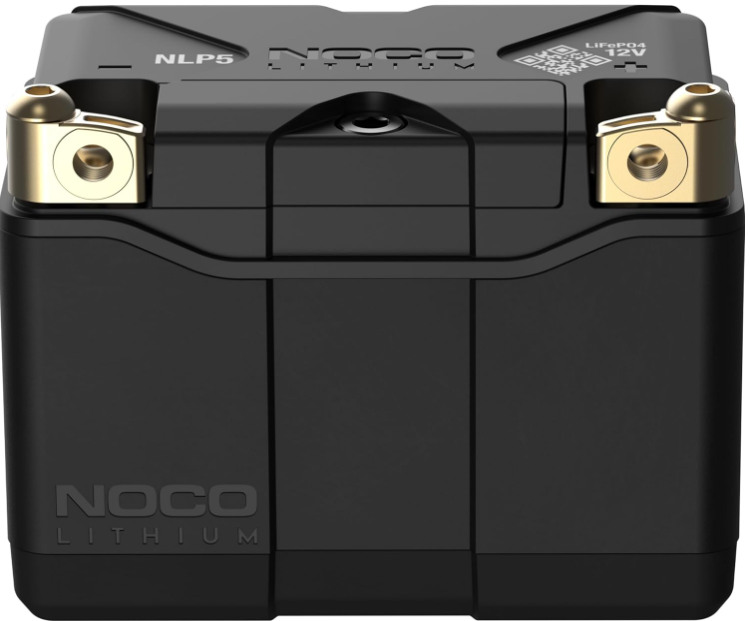
NOCO NLP5 250A Lithium Powersport Battery
Safety Instructions
- Wear eye protection when operating the product. Batteries can explode, causing flying debris.
- Battery acid can cause eye and skin irritation.
- In the event of eye or skin contamination, flush the affected area with clean running water and contact poison control immediately.
- Working in the vicinity of a lead-acid battery is dangerous.
- Batteries generate explosive gases during normal battery operation.
- Review cautionary markings on these products and on the engine.
- Battery posts, terminals, and related accessories contain chemicals, including lead.
- These materials are known to the State of California to cause cancer and birth defects, and other reproductive harm.
- Only use the product as intended. Someone should be within range of your voice or close enough to come to your aid in case of an emergency.
- Have a supply of clean water and soap nearby in the case of battery acid contamination.
- Wear complete eye protection and protective clothing while working near a battery.
- Always wash your hands after handling batteries and run an elated material.
- Do not handle or wear any metal objects when working with batteries, including tools, watches, or jewelry.
Handling
- Handle the product with care. The product can become damaged if impacted.
- Do not use a damaged product, including, but not limited to, cracks to the casing or damaged cables.
- Do not use the product with a damaged power cord.
- Humidity and liquids may damage the image product.
- Do not handle the product or any electrical components near any liquid.
- Store and operate products in dry locations. Do not operate the product if it becomes wet.
Modifications
- Do not attempt to alter, modify, or repair any part of the product.
- Disassembling the product may cause injury, death, or property damage.
- If the product becomes damaged, malfunctions, or comes in contact with any liquid, discontinue use and contact NOCO.
- Never disable the internal battery management system (BMS) for any reason.
- Any modifications to the product void your warranty.
Operating
The operating temperature range is -4ºF (-20ºC) to 140ºF (60ºC). The charging temperature range is 14ºF (-10ºC) to 122ºF (50ºC). Do not operate outside of the recommended temperature ranges.
Storage
- The recommended storage temperature range is -4ºF (-20ºC) to 140ºF (60ºC).
- Never exceed 140ºF (60ºC) under any circumstances. For optimal longevity, store at 77ºF (25ºC) and a state-of-charge (SOC) higher than seventy percent (70%).
- The storage self-discharge rate is less than five percent (5%) per month.
- It is not recommended to store the battery for more than 6 months without charging.
Ventilation
- The product does not release gas during regular use, so there are no specific ventilation requirements.
- However, it is crucial to minimize temperature extremes or restrict airflow to the product.
- A minimum of 0.50” (12.7 mm) of space should be kept around the product to allow for adequate airflow.
Disposal
- The product must be recycled or disposed of separately from household waste.
- Disposal of the product in household trash is unlawful under state and federal environmental laws and regulations.
- Always take the product to your local battery recycling center.
Retrofit
- Lithium-ion batteries weigh substantially less than lead-acid batteries of comparable capacity.
- Some equipment is designed to utilize the weight of lead-acid batteries to achieve weight distribution.
- Using the product as a replacement battery could impact the weight distribution of the equipment.
- Understand the consequences of modified weight distribution and ensure safe weight distribution.
- You assume all responsibility and liability for any damages, injuries, or accidents that may occur due to degraded stability.
Charging
- The product is a 12-volt lithium-ion battery.
- Do not use a charger that utilizes a pulse charge or a desulfation feature.
- For optimal performance, we recommend only using the 12-volt lithium mode on NOCO Genius chargers.
- If using a third-party charger, it must be compatible with 12-volt Lithium Iron Phosphate (LiFePO4) batteries with a charging voltage of 14.6 volts, and be certified under one or more of the following standards: IEC60601, UL1236, RCM, PSE, or CE (LVD, EMC).
- Be cautious of using low-quality chargers, as they may present a severe electrical risk that can result in injury to a person and property, as well as shorten the life of the product and cause the product to malfunction.
- NOCO is not responsible for the user’s safety when using accessories or chargers that are not approved by NOCO.
- During charging, if the battery becomes excessively warm, deforms, swells, or emits smoke or odor, discontinue use immediately and contact support.
Connections
Make sure all connections to the product are secure. Use 70-90 inch-pounds of torque to secure the connections properly. Loose connections may cause reduced performance and increased heat due to resistance that may cause the melting of the enclosure or potentially a fire.
Medical Devices
The product may emit electromagnetic fields. The product contains magnetic components that may interfere with pacemakers, defibrillators, or other medical devices. Consult with your physician before use if you have any medical conditions. If you suspect the product is interfering with a medical device, stop using the product immediately and consult your physician.
Cleaning
Disconnect and remove the product before cleaning. Immediately dry the product if it comes in contact with liquid or any contaminant. Use a soft, lint-free (microfiber) cloth. Do not use a pressure washer to clean the battery.
Explosive Atmospheres
Obey all signs and instructions. Do not operate the product in any area with a potentially explosive atmosphere, including fueling areas or areas that contain chemicals or particles such as grain, dust, or metal powders.
High-Consequence Activities
Do not use the product where the failure of the product could lead to injury, death, or severe environmental damage.
Radio Frequency Interference
This product complies with regulations governing radio frequency emissions. Such emissions from the product may negatively affect the operation of other electronic equipment, possibly causing them to malfunction.
Before installing the product, make sure it’s fully charged. Visually inspect the product for any signs of damage (e.g., cracks, dents). Make sure the battery terminals are free from dirt, oxidation, or corrosion. Install the product in any horizontal or vertical orientation, except with the terminals facing downward.
- Remove the original battery following the manufacturer’s guidelines.
- Compare the height of the original battery to the product.
- If the original battery dimensions are larger than the product, use the included spacers and foam to adjust the height to match the original battery as closely as possible.
- For more fitment information, see our battery fitment guide.
- Using the included fastening hardware, attach the positive (+) battery cable to the positive (+) battery terminal and the negative (-) battery cable to the negative (-) battery terminal.
- Make sure the battery cables connect to the correct polarity.
- Securely fasten to the battery by using 70-90 inch-pounds of torque. Do not overtighten.
The following table provides the battery fitment and the corresponding spacers and foam needed to achieve proper height, width, and length for retrofit applications.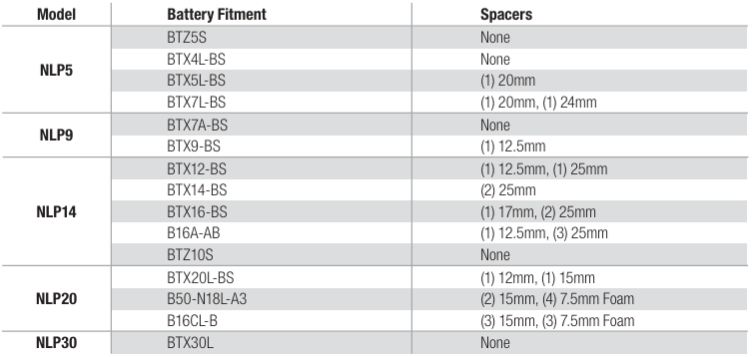
Dynamic BMS
The product utilizes a dynamic Battery Management System (BMS) that monitors the internal lithium-ion cells and disconnects them if a fault occurs. The BMS protects against over-charge, over-discharge, over-current, short-circuit, over-temperature, and undertemperature fault conditions.
The BMS also includes cell balancing to maintain voltage balance between individual cells to ensure optimal battery performance. The BMS automatically recovers from fault conditions without user intervention.
In extremely cold temperatures, the battery may be slow to provide power initially. If this occurs, attempt to start the equipment again. Repeated attempts will self-heat the lithium cells and allow them to provide sufficient power.
In order to protect the lithium cells, the BMS will not allow charging below -10ºC (14.0°F). Once the battery temperature reaches -10ºC (14.0°F) or higher, charging will be allowed.
In order to protect the lithium cells, the BMS will not allow charging or discharging when the battery temperature reaches 60ºC (140°F). This situation can occur with high ambient temperature and repeated starting attempts, which can self-heat the battery. Once the battery is fully col, the BMS will allow charging and discharging.
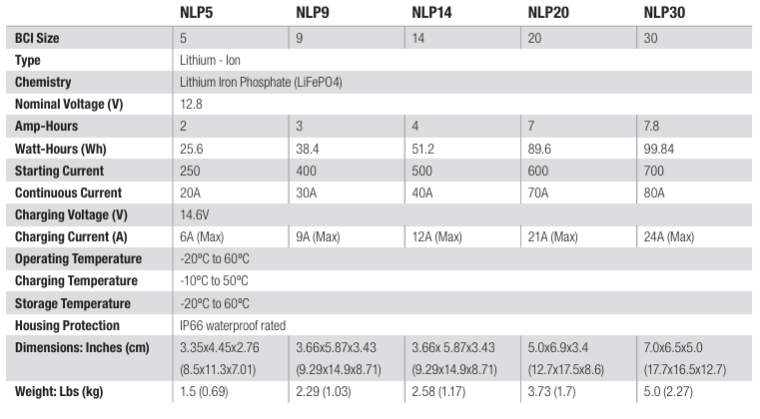
Technical Specifications
Troubleshooting
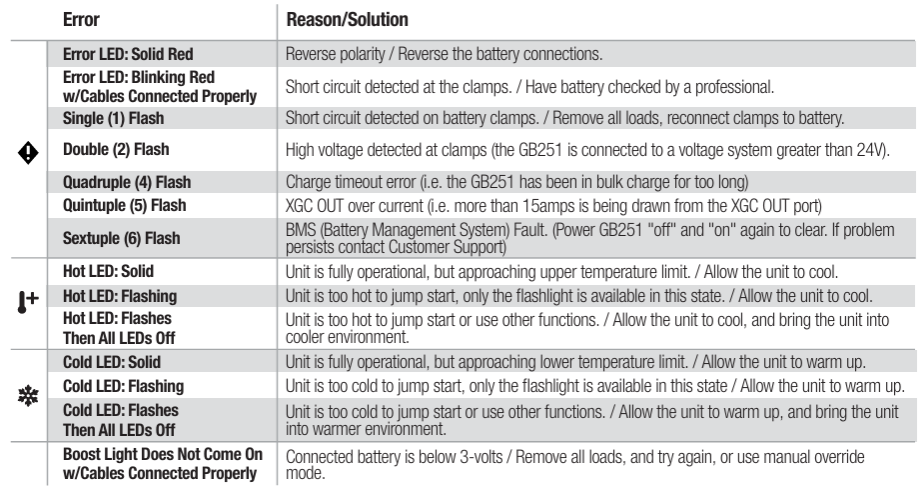
Error Codes
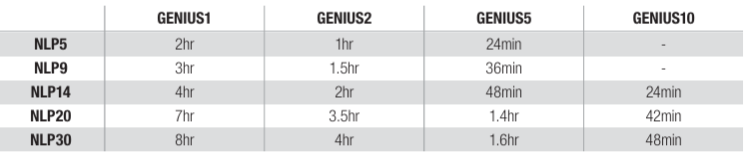
Recharge Times Using NOCO GENIUS Chargers
NOCO Five-Year Limited Warranty
NOCO warrants that this product, NOCO Lithium Powersport Battery (the “Product”), will be free from defects in material and workmanship for Five (5) Years from the date of purchase (the “Warranty Period”). For defects reported during the Warranty Period, NOCO will, at its discretion, and subject to NOCO’s technical support analysis, either repair or replace defective products. Replacement parts and products will be new or serviceably used, comparable in function and performance to the original part, and warranted for the remainder of the original Warranty Period.
The original purchaser is responsible for NOCO Lithium Powersport Battery (and must prepay) all packaging and transportation costs to ship products for warranty service.
Notwithstanding the above, this noco lithium powersport battery hassle-free warranty is void and does not apply to products that: are misused, mishandled, subjected to abuse or careless handling, accident, improperly stored, or operated under conditions of extreme voltage, temperature, shock, or vibration noco lithium powersport battery beyond noco’s recommendations for safe and effective use; are/were modified without the express written consent of noco; (d) have been disassembled, altered or repaired by anyone other than noco; (e) the defects of which were reported after the warranty period.
THIS HASSLE-FREE WARRANTY DOES NOT COVER: (1) normal wear and tear; (2) cosmetic damage that does not affect functionality; or (3) Products where the NOCO serial number is missing, altered, or defaced
Condotions
These conditions apply only to the product during the warranty period. The Hassle-Free Warranty is void either by elapsed time from the date of purchase (elapsed time from the serial number date, if no proof of purchase) or from the conditions listed earlier in this document. Return the product with the appropriate documentation.
Customer Service
- Address: 30339 Diamond Parkway, #102, Glenwillow, OH 44139 USA.
- Website: support@no.co
- Tel: 1.800.456.6626;
FAQs
Q: Is the NLP5 a drop-in replacement for lead-acid batteries?
The NLP5 is a lightweight lithium-ion battery that can replace a lot of common lead-acid powersport batteries. Verify the dimensions and terminal compatibility of your car by consulting its specs.
Q: Can I use the NLP5 to power electronics?
Yes, but only with gadgets that don’t go above the battery’s continuous discharge restrictions and are compatible with 12V lithium batteries. Refrain from drawing more power than is specified.
Q: Is the NLP5 waterproof?
Although the battery is splash-proof and protected, it shouldn’t be completely submerged. Keep terminals free of water penetration.
Q: Can the NLP5 be installed upside down or sideways?
No, follow the manufacturer’s instructions for battery installation. Poor installation might harm the battery or impair performance.
Q: Is the NLP5 safe for air travel or shipping?
Yes, the lithium-ion battery complies with airline restrictions; however, carefully verify carrier policies. Deliver in authorised protective containers or the original packing.
Q: Can I use the NLP5 for off-season storage of my powersport vehicle?
Indeed. After completely charging the battery, unplug it from the car and keep it somewhere dry and cold. To keep healthy, recharge every three to six months.
Q: What happens if I accidentally reverse the terminals during installation?
The NLP5’s integrated reverse polarity protection guards against harm to the car’s electronics or batteries. To prevent needless error triggers or blown fuses, constantly double-check connections.
Q: Can the NLP5 be jump-started if completely discharged?
Yes, but make use of a jump starter or charger that is compatible with lithium. Traditional lead-acid jump-start techniques should be avoided since they have the potential to harm the battery.