



PROTECH PP2147 Engine Code Reader
Introduction
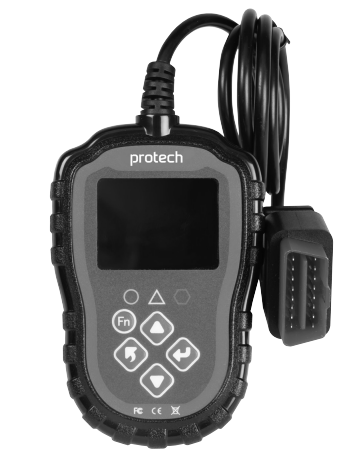
The PROTECH PP2147 Engine Code Reader is a great way to accurately identify car problems and avoid unnecessary or costly maintenance. This handy diagnostic tool plugs into the OBDII port of your car and displays the data from the engine system directly on the backlit 2.4” colour LCD screen. See engine performance in real-time, quickly read and clear engine Diagnostic Trouble Codes (DTC), turn off the MIL light, perform electrical cranking or charging tests, check emission monitor status, drive cycle verification, and much more. It works with most OBD2-compliant cars, SUVs, and light-duty vehicles sold worldwide since 1996.
If you want to inspect hard-to-reach areas of your vehicle while diagnosing, the PROTECH QC8716 Video Inspection Camera can be a perfect companion tool for detailed visual checks.
Location of the Data Link Connector (DLC)
The DLC is usually located 30 cm (12”) from the centre of the instrumental panel (dash), above or around the driver’s knees for most vehicles.
Description
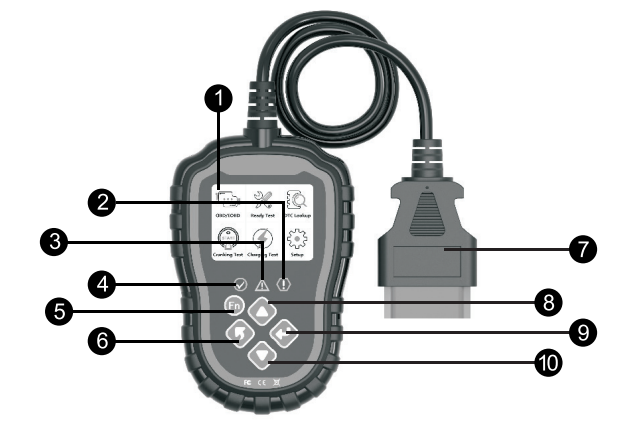
| 1 | LCD Display |
| 2 | Red LED: indicates a problem with the engine. The “MIL” (Malfunction Indicator Light) may be on. |
| 3 | Yellow LED: indicates a possible problem. Some diagnostics could not be performed, and/or a DTC is pending. |
| 4 | Green LED: indicates correct engine operation. No diagnostic trouble codes. |
| 5 | Fn Button |
| 6 | Back or Exit Button |
| 7 | OBDII Connector |
| 8 | Up Button |
| 9 | Enter Button |
| 10 | Down Button |
Features
The PROTECH PP2147 Engine Code Reader offers a wide range of diagnostics and real-time engine monitoring.
- Dual-system diagnostic, optional engine and transmission.
- Quickly indicate engine fault codes, with green/yellow/red LED indicators as fault lights.
- To read or clear engine fault codes, 16929 diagnostic trouble code definitions can be inquired about.
- Dynamic display of sensor data stream information, supporting 249 types of sensors.
- View freeze frame data and I/M status information.
- Read vehicle information: vehicle identification number (VIN), calibration identification number (CIN), calibration verification number (CVN).
- Test the cranking and charging system of the vehicle.
- Multi-language support.
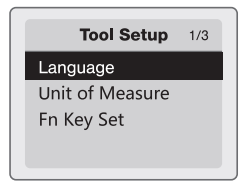
Tool Setup
- Language: The factory default is English; other languages can be selected manually.
- Unit of Measure: Supports metric and imperial units. Factory default is metric.
- Fn Key Set: Set up the Fn key as a one-click quick test among “Usual Datastream”, “All Datastream”, “I/M Readiness”, and “Read Codes”.
Diagonstics
Dual-system Selection
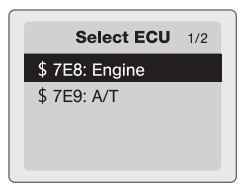
Start the car’s engine and plug the OBDII connector into the car’s OBDII interface. Enter the main interface, click the Enter key to start scanning the vehicle’s (DLC) system. If only a single (engine) system is detected, it will automatically provide options for the engine system. If dual systems are detected, it will allow you to select which system to diagnose.
- $7E8: Engine – Engine System
- $7E9: A/T – Transmission system

Diagnostic Menu
- Read codes: Read the Diagnostic Trouble Code (DTC) in the engine or transmission system and display the standard definition.
- Erase Codes: Clear all DTCs in the system.
- Data Stream: Read and display all supported sensor data, up to 249 types of sensors.
- Freeze Frame: The freeze frame data records the vehicle operating status information (fault code, vehicle speed, water temperature, etc.) at the moment when an emission-related fault occurs.
- I/M Readiness: The I/M Readiness function is used to check the operations of the Emission System of OBDII-compliant vehicles. Some latest vehicle models may support two types of I/M Readiness tests:
- Since DTCs Cleared -indicates the status of the monitors since the DTCs are erased.
- This DriveCycle indicates the tatus of monitors since the beginning of the current drive cycle.
- “OK”: completed diagnostic testing
- “INC”: diagnostic testing is incomplete
- “N/A”: not supported
- Vehicle Information: Review vehicle identification number (VIN) / calibration identification number (CIN) / calibration verification number (CVN)
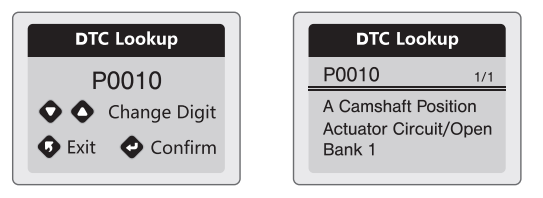
DTC Lookup
- There are 16929 DTC definitions in the dadatabaseInputthe t the DTC and press the Enter key.
- Displays detailed fault code definition for maintenance reference.
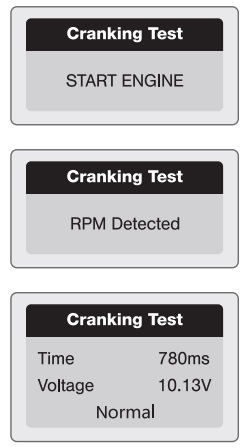
Cranking System Test
- Select “Cranking Test” and press the Enter key to start.
- Start the engine when prompted, and the tester will automatically complete the cranking test and display the result.
- The test results will include actual cranking voltage and actual cranking duration.
- This is for the convenience of the maintenance personnel to quickly know the whole state of the cranking system according to data.
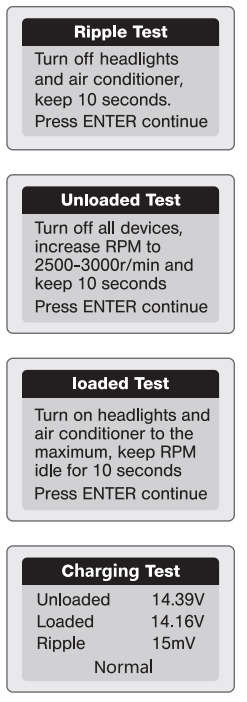
Charging System Test
- Select “Charging Test” and press the Enter key to start.
- After the test has finished, the tester displays the loaded and unloaded charging voltages, ripple voltage, and charging test result.
Specifications
| Operating Voltage: | 8V ~ 25V |
| Operating Current: | 52mA |
| Operating Temperature: | -20°C ~ 70°C (-4°F ~ 158°F) |
| Storage Temperature: | -30°C ~ 80°C (-22°F ~ 176°F) |
| LCD Screen: | 2.4” TFT Colour Screen |
| Dimensions: | 132 (L) x 85 (W) x 22 (H) mm |
| Support Data Stream Type: | 249 |
| Fault Code Analysis Number: | 16929 |
One-Year Limited Warranty
Should your PROTECH product prove defective within one year from the date of purchase, contact PROTECH’s Customer Support Team with the serial number and proof of purchase to make a warranty claim.
Under this warranty, PROTECH will repair or replace any parts found defective with new or remanufactured parts or exchange the defective product with a new, refurbished, or remanufactured product at our discretion.
This warranty is not transferable. After the expiration of the warranty, the cost of labor and parts will be the responsibility PROTECH CDM-600BW Freestanding Refrigerator of the original owner.
Please package the product carefully in its original packaging to avoid damage in transit. PROTECH is not responsible for damage resulting from shipper mishandling or improper packaging. Please retain the original box and packaging materials.
Warranty Does Not Cover
- Acts of God, such as fire, flood, hurricanes, earthquakes, and tornadoes.
- Improper power supply, such as a power surge, low voltage, defective household wiring, or inadequate fuses.
- Damage, accidental or otherwise, to the product while in the possession of a consumer, not caused by a defect in material or workmanship.
- Damage caused by consumer misuse, PROTECH CDM-600BW Freestanding Refrigerator tampering, lack of maintenance, or failure to follow the care and special handling provisions in the instructions.
- Damage to the finish of the case or other appearance parts caused by wear.
- Damage caused by repairs or alterations to the product by anyone other than authorized by the
manufacturer. - Removal, Replacement, Packaging, Freight, and Insurance costs for the warranty service.
- Products sold AS IS or from an unauthorized reseller.
- Products that have had their serial numbers removed or defaced.
Customer Support
- Email: support@whynter.com
- Website: WWW.WHYNTER.COM
- Tel: 800-443-6153
Product contents and specifications may change without notice. Copyright © 2024
FAQs
Q: What is the PROTECH PP2147 Engine Code Reader?
It is a diagnostic instrument for reading, clearing, and analyzing OBD-II/CAN engine fault codes in automobiles. It facilitates the prompt and precise identification of engine and emission problems.
Q: Does it display live sensor data?
Indeed, it is capable of displaying real-time data, including engine temperature, oxygen sensor readings, fuel system condition, RPM, and other important metrics.
Q: Can I use it while the engine is running?
While the engine is running, you can access real-time data, but you should always take safety steps to prevent distractions while the car is moving.
Q: Can it read ABS, airbag, or transmission codes?
Engine and emission-related codes are the main emphasis of the basic PP2147. Specialised scanners are advised for diagnostics particular to ABS, airbags, or transmissions.
Q: Can I save or print the results?
Certain versions enable data export to a PC via USB or memory card. For a list of supported choices, consult your device’s handbook.