



PROTECH QM7420 Dual Laser Thermometer
Introduction
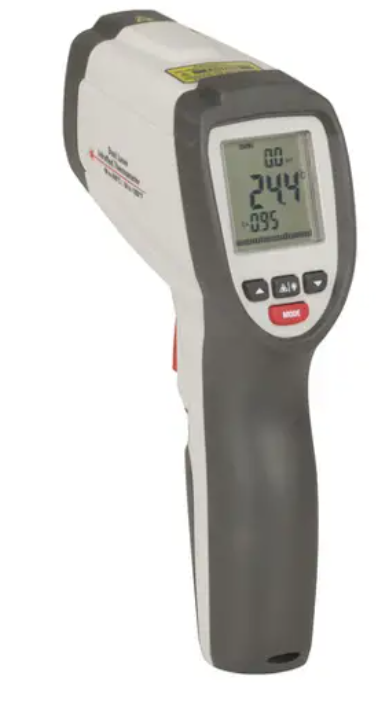
Thank you for purchasing the PROTECH QM7420 Dual Laser Thermometer. This IR thermometer is capable of non-contact (infrared) temperature measurements at the touch of a button. The built-in laser pointer increases target accuracy while the backlight LCD and handy push-buttons combine for convenient, ergonomic operation.
The Non-contact Infrared Thermometers can be used to measure the temperature of objects’ surfaces that are improper suitable for measurement by traditional (contact) thermometers (such as moving objects, surfaces with electric current, or objects that are difficult to touch). Proper use and care of this meter will provide years of reliable service.
Features
The PROTECH QM7420 Dual Laser Thermometer comes with the following features for accurate and convenient temperature measurement:
- Rapid detection function
- Precise non-contact measurements
- Dual laser sighting
- Unique flat surface, modern housing design
- Automatic Data Hold
- Emissivity Digitally adjustable from 0.10 to 1.0
- MAX, MIN, AVG, D IF temperature displays
- Backlight LCD
- Automatic selection range and Display Resolution 0.1ºC (0.1ºF)
- Set high and low alarms with a red backlight
Front Panel Description
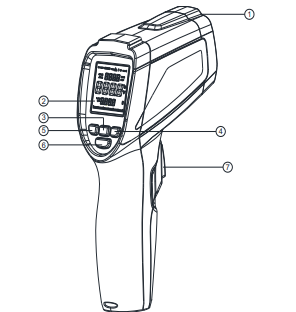
- IR sensor
- LCD Display
- Laser/Backlight button
- Down button
- UP button
- mode button
- Measurement Trigger

Indicator
- Scan symbol
- Data hold
- Temperature change indication
- ℃/℉ symbol
- High alarm and low alarm symbols
- Low power symbols
- Laser ” on” symbols
- Symbols for MAX/MIN/DIF/AVG
- Temperature values for the MAX/MIN/DIF/AVG
- Current temperature value
- Emissivity value
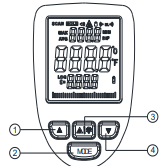
Buttons
- Up button (for EMS, HAL, LAL)
- MODE button (for cycling through the mode loop)
- Laser/Backlight button
- Down button (for E, HAL, LAL)
Wide-Range Applications
Food preparation, Safety and Fire inspectors, Plastic molding, Asphalt, Marine and Screen printing, measure ink, and Dryer temperature, HVAC/R, Diesel, and Fleet maintenance. For electrical and voltage measurements, consider the PROTECH QM1549 RMS IP67 Digital Multimeter User Manual for guidance.
Distance & Spot Size
As the distance (D) from the object increases, the spot size (S) of the area measured by the unit becomes larger. The relationship between distance and spot size for each unit is listed below. The focal point for each unit is 203mm (8”). The spot sizes indicate 90% encircled energy.
Functional Design
- IN the hold time, the MODE button is used to change MAX/MIN/DIF/AVG.
- To set values for the High Alarm (HAL), Low Alarm (LAL), and Emissivity (EMS), press and hold the MODE button until the appropriate code appears in the display, and press the UP and down buttons to adjust the desired values.
- You can turn on/off the backlight/laser by pressing the Laser/Backlight button at any state.
MODE Button Function
Pressing the mode button also allows you to access the set state, missivity(EMS), C/F, HAL adjustment, LOW adjustment, and TRIG. Each time you press the button, you advance through the mode cycle. The diagram shows the sequence of functions in the mode cycle.
EMS adjustment. The Emissivity(EMS) digitally
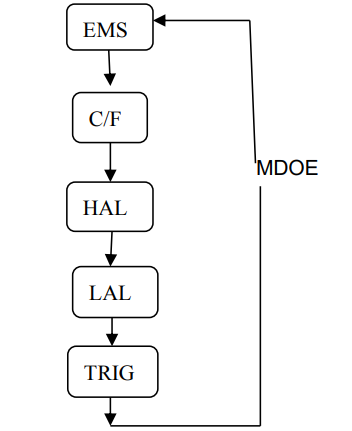
Adjustable from 0.10 to 1.0.
C/F
Pressing the up/down button or the Laser/Backlight button to change the temperature unit (℃ or ℉)
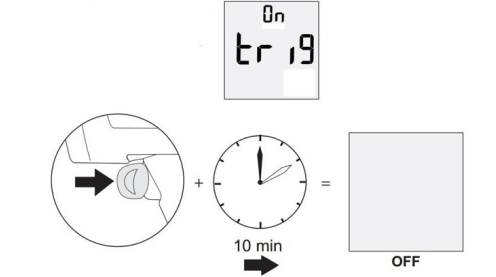
HAL (LOW) on/off. Press the Laser/Backlight button to turn on or off. Press the Measurement Trigger to confirm the High(Low)alarm mode.Hal(LOW) adjustment. The high(Low) alarm adjustable form -40 to 650 oC(-40 ~ 1202 ) The function of the TRRIG means that when the TRRIGs are turned on, pressing and holding the trigger for more than 10 minutes, the device will turn off.
MA, X M, IN DIF AVG indicate the MAX IN DIF AVG record that displays between the pressing and releasing of the “ON/OFF” button each time.
MAX MIN DIF AVG display
MAX maximum: the maximum value of the measurement. MIN= minimum. Minimum value of measurement.DIF= difference. Difference value of measurement. AVG= average. Average value of measurement.
Measurement Operation
- Hold the meter by its Handle Grip and point it toward the surface to be measured.
- Pull and hold the Trigger to turn the meter on and begin testing.
- The display will light if the battery is good. Replace the battery if the display is off.
- The meter will automatically power down after approximately 8 seconds after the trigger is released.
Holding the meter by its handle, point the IR Sensor toward the object whose temperature is to be measured. The meter automatically compensates for temperature deviations from ambient temperature.
Keep in mind that it will take up to 30 minutes to adjust to the wide ambient temperatures to be measured, followed by high temperature measurements.
Sometimes (several minutes) is required after the low (and before the high) temperature measurements are made. This is a result of the cooling process, which must take place for the IR sensor.
Battery Replacement
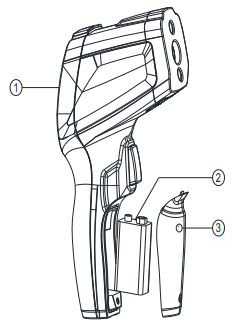
- As battery power is not sufficient, the LCD will display a flashing battery Symbol. Replace with a new 9V battery.
- Open the battery cover, then take out the battery from the instrument and replace it with ew battery, and place the battery cover back.

Maintainance
- Repairs or services are not covered in this manual and should only be carried out by qualified, trained technicians.
- Periodically, wipe the body with a dry cloth. Do not use abrasives or solvents on this instrument.
- For service, use only the manufacturer’s specified parts.
Specifcations
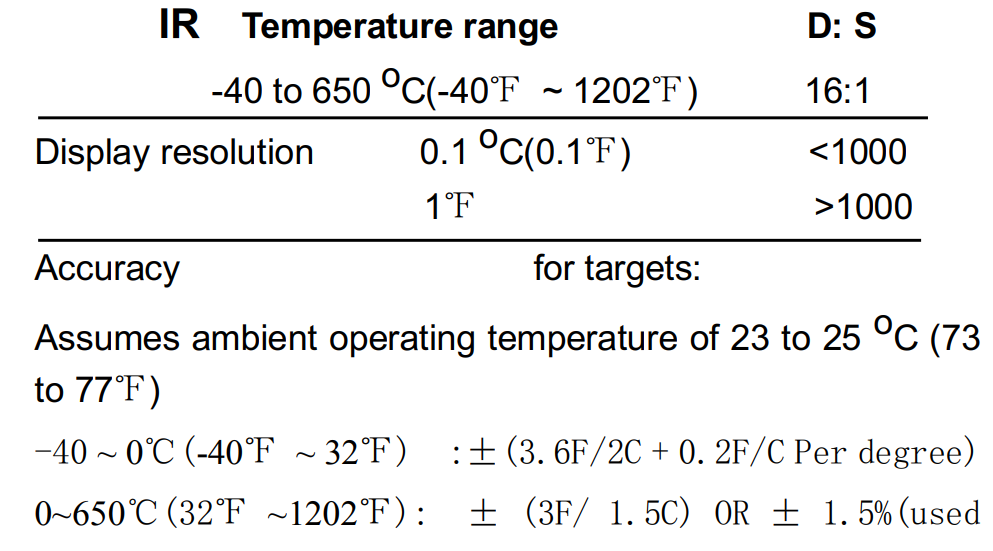
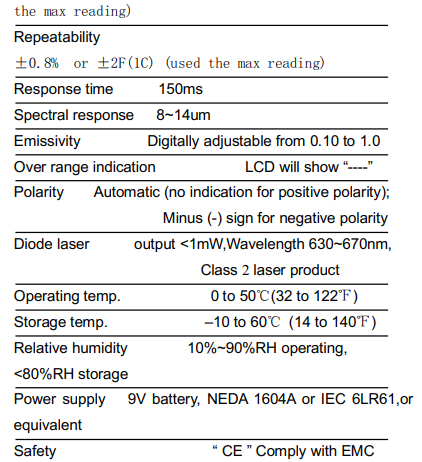
The following specifications of the PROTECH QM7420 Dual Laser Thermometer provide detailed information on its measurement accuracy, field of view, and other key features.
Troubleshooting
How it Works
- Field of View: Make sure that the target is larger than the unit’s spot size. The smaller the target, the closer you should be to it. When accuracy is critical, make sure the target is at least twice as large as the spot size.
- Distance & Spot Size: As the distance (D) from the object increases, the spot size (S) of the area measured by the unit becomes larger. See: Fig. 1.
- Locating a Hot Spot: To find a hot spot, aim the thermometer outside the area of interest, then scan across with an up-and-down motion until you locate a hot spot.
Emissivity
Emissivity is a term used to describe the energy-emitting characteristics of materials. Most (90% of typical applications) organic materials and painted or oxidized surfaces have an emissivity of 0.95 (pre-set in the unit). Inaccurate readings will result from measuring shiny or polished metal surfaces. To compensate, cover the surface to be measured with masking tape or flat black paint. Allow time for the tape to reach the same temperature as the material underneath it. Measure the temperature of the tape or painted surface.
Emissivity Values
| Substance | Thermal emissivity | Substance | Thermal emissivity |
| Asphalt | 0.90 to 0.98 | Cloth (black) | 0.98 |
| Concrete | 0.94 | Human skin | 0.98 |
| Cement | 0.96 | Lather | 0.75 to 0.80 |
| Sand | 0.90 | Charcoal (powder) | 0.96 |
| Earth | 0.92 to 0.96 | Lacquer | 0.80 to 0.95 |
| Water | 0.92 to 0.96 | Lacquer (Matt) | 0.97 |
| Ice | 0.96 to 0.98 | Rubber (black) | 0.94 |
| Snow | 0.83 | Plastic | 0.85 to 0.95 |
| Glass | 0.90 to 0.95 | Timber | 0.90 |
| Ceramic | 0.90 to 0.94 | Paper | 0.70 to 0.94 |
| Marble | 0.94 | Chromium oxides | 0.81 |
| Plaster | 0.80 to 0.90 | Copper oxides | 0.78 |
| Mortar | 0.89 to 0.91 | Iron oxides | 0.78 to 0.82 |
| Brick | 0.93 to 0.96 | Textiles | 0.90 |
Warranty
This product is protected by a lifetime warranty (from the date of purchase) covering all product manufacturing defects/faults that may occur within this timeframe.
This warranty does not cover damage caused by neglect, misuse, contamination, alteration, accident, or abnormal conditions of operation or handling, including failures caused by use outside of the product’s specifications, or the normal wear and tear of mechanical components. If you suspect your product is defective/faulty, cease using the product when the suspected defect/fault arises and return the product along with proof of purchase to the place of purchase or distributor for assessment.
Customer Support
- Email: support@whynter.com
- Website: WWW.WHYNTER.COM
- Tel: 800-443-6153
Product contents and specifications may change without notice. Copyright © 2024
FAQs
Q: What is the PROTECH QM7420 Dual Laser Thermometer used for?
With two lasers for accurate targeting, the QM7420 is a non-contact infrared thermometer. It is perfect for industrial inspections, automotive operations, HVAC maintenance, and cooking because it measures surface temperatures fast and precisely.
Q: How do I use the dual lasers?
The measurement area is indicated by the two lasers. For an accurate reading, always aim at the centre of the target surface and make sure the whole measuring area lies between the laser pointers.
Q: Does the thermometer measure internal temperatures?
No, it simply gauges the temperature at the surface. Use a probe thermometer for internal readings.
Q: What temperature range does the QM7420 support?
Usually, it ranges from -50°C to 550°C (-58°F to 1022°F). For precise specifications, consult the handbook.
Q: How accurate is the thermometer?
For standard settings, accuracy is typically within ±1-2°C (±2-4°F). For optimal results, make sure the distance and surface targeting are correct.
Q: How far can I measure with this thermometer?
The device’s Distance-to-Spot (D:S) ratio is typically between 12:1 and 16:1. This indicates that it has a 1 cm diameter at a distance of 12–16 cm. For the precise ratio, consult the handbook.
Q: How do I switch between Celsius and Fahrenheit?
A °C/°F button is typically located on the side or back of the model. To switch between units, press it.
Q: Can it measure shiny or reflective surfaces?
Inaccurate measurements could result from reflective surfaces. For accurate results, measure matte areas or use non-reflective tape.