



PROTECH TS1564 48W Soldering Station
Safety Instructions
- Before using the PROTECH TS1564 48W Soldering Station, verify that the voltage specified on the appliance’s rating plate matches the local electrical network’s voltage before connecting it to the main power supply.
- Adult supervision is recommended for children aged under 8.
- Do not use the appliance if it has a damaged plug or cord, has malfunctioned, or has been dropped or damaged in any manner.
- Always place the soldering iron on its stand when not in use.
- Maintain adequate space and ventilation around the appliance to facilitate the dissipation of heat and/or fumes.
- Avoid contact with any metal parts close to the soldering tip/nozzle.
- Never leave the soldering iron unattended when it is powered on.
- Confirm that the power switch is turned off and disconnect the appliance from the power source when not in use.
- Prior to storing, make sure the appliance is switched off and allow it to cool down to room temperature.
Box Content
- 1x Soldering Iron
Before First use
Using the PROTECH TS1564 48W Soldering Station for the first time requires careful preparation to ensure safety and effectiveness. Here are the steps to follow before you begin:
Preparation
- Inspect the Soldering Iron: Check for any visible damage to the cord, handle, or tip.
- Assemble the Stand: Set up the soldering iron stand to safely hold the iron when not in use.
- Attach the Tip: Ensure the soldering tip is securely attached to the iron.
Initial Setup
- Heat the Iron: Plug in the soldering iron and let it reach its operating temperature.
- Apply Solder: Once done, apply a small amount of solder to the tip, covering it entirely with a thin layer.
- Wipe Excess Solder: Use a damp sponge to wipe off excess solder, leaving a shiny, tinned tip.
Testing
- Test the Iron: Practice on a scrap piece of metal or wire to get a feel for the soldering iron and ensure it is working correctly.
Features
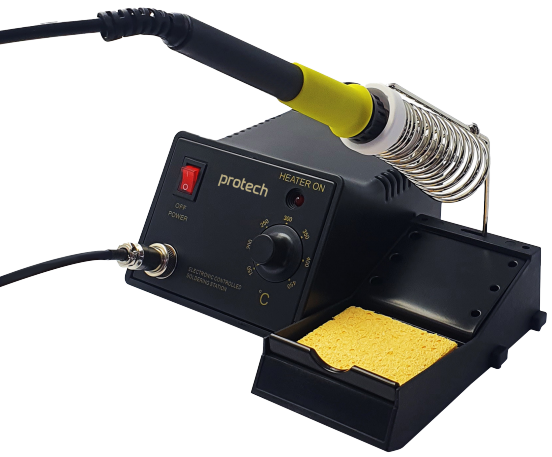
The PROTECH TS1564 48W Soldering Station comes with a high-performance LED soldering iron featuring four long-life LEDs for superior soldering accuracy and enhanced illumination.
The operation method is as follows
- When powered on, the red LED indicator will illuminate.
- To activate the soldering iron, press the switch on the handle to the first gear.
- To activate the four LED lights, press the switch on the handle to the second gear.
Operation Instructions
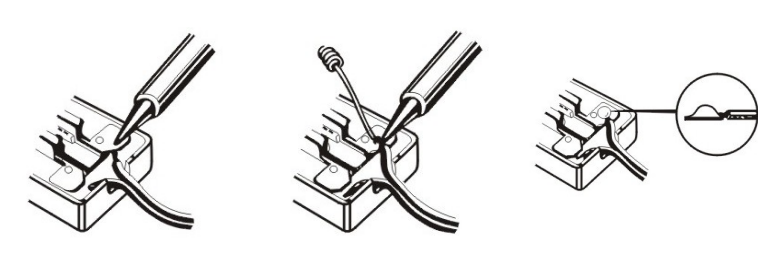
- Remove any dirt, rust, or paint from the part you intend to solder.
- Then, heat the part using the soldering iron.
- Apply rosin-based solder to the part and melt it with the soldering iron.
- Allow the solder to cool and harden before handling the soldered part.
Soldering steps to protect the tip from oxidation
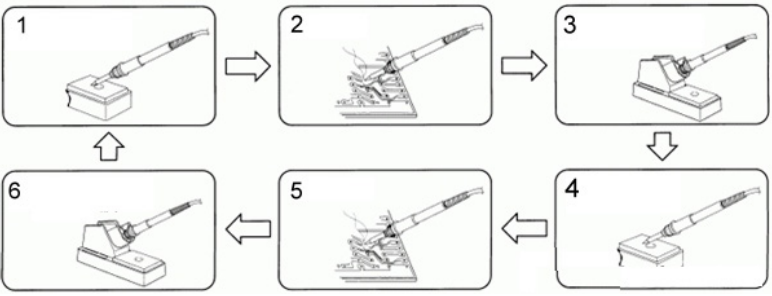
- Before soldering, clean the tip using a sponge, and then apply tin to the tip.
- Begin your soldering work.
- When not in use, please place the soldering iron in the holder.
- Clean the tip and apply tin to it.
- Proceed with the soldering.
- Repeat steps 1 to 5 as needed.
- When your soldering work is finished, either adjust the temperature to 270°C or switch off the power.
- Afterward, clean the tip and apply tin for protection.
Maintenance
- Clean the Tip: Clean the tip with a damp sponge during use to remove oxidation and solder residue.
- Unplug After Use: Always unplug the soldering iron when finished and let it cool down before storing it.
Cleaning, Care & Storage
Proper maintenance of the PROTECH TS1564 48W Soldering Station ensures long-lasting performance and reliable soldering results. Always follow these guidelines:
- Always ensure that the tips are coated with tin to prolong their service life.
- Avoid leaving the iron at high temperatures for an extended duration.
- Never clean the tip with abrasive materials.
- Do not quench the tip in water.
- Refrain from using fluxes that contain chloride or acid; opt for rosin or activated resin fluxes only.
- Avoid using any compounds or anti-seize materials.
- Ensure the soldering tip is correctly fitted and the locking screw is tightened securely.
Soldering Iron Maintenance
This tool should be placed on its stand when not in use. If the supply cord is damaged, it should be replaced by the manufacturer, its service agent, or a similarly qualified person to avoid any hazards. Do not attempt to file the specially-plated tip.
Specifications
- Heating Element 40W
- Temperature Range 420-450ºC
- Input Voltage 240VAC @ 50/60Hz
- Weight 195g
- Dimensions 215(H) x 35(Dia.)mm
- Cable Length 1m
Working Temperature
For optimal performance, always use the PROTECH TS1564 48W Soldering Station at the correct soldering temperature. Soldering at the correct temperature is crucial to ensuring a perfect solder connection. If the temperature is too low, the solder will not flow correctly and may result in cold solder joints. Conversely, if the temperature is too high, it can lead to the burning of the flux, preventing the solder from flowing properly. High temperatures can also cause damage to the PCB (Printed Circuit Board) and other sensitive components.
The most common solder wire contains a composition of 60% tin and 40% lead (60/40). A typical working temperature for 60/40 solder is as follows:
- Melting point…………………………………………………………………………………419ºF (215ºC)
- Normal operation…………………………………………………..419ºF-572ºF (215ºC – 300ºC)
- Production line operation ……………………………………..608ºF-716ºF (320ºC – 380ºC)
- Desoldering operation for small joint…………………………………………..599ºF (315ºC)
- Desoldering operation for larger joint…………………………………………752ºF (400ºC)
- Temperature range………………………………………………..300ºF-790ºF (150ºC – 420ºC)
Replacement
Tip replacement or cleaning should be performed only when the iron is at room temperature or below. To change or replace the tip, unscrew the knurled nut barrel assembly. Ensure that the station is switched off and allowed to cool both before and during this operation, as leaving the system on without the tip inserted could lead to damage. After removing the tip, clean any oxide dust that may have formed in the tip-retaining area of the barrel.
Be cautious to prevent dust from getting into your eyes. To replace the tip, screw the retaining knurled nut barrel assembly using only the PROTECH TS1470 40W LEDs Soldering Iron hand pressure to tighten. Pliers should be used only if the nut needs tightening when the iron is hot, to avoid burns on your fingers. Be careful not to overtighten, as this could damage the heating element.
You can clean the outer case of the iron or PROTECH TS1470 40W LEDs Soldering Iron station with a damp cloth and a small amount of liquid detergent. Do not submerge the unit in liquid or allow any liquid to enter the case of the station. Never use a solvent to clean the case.
One-Year Limited Warranty
Should your PROTECH product prove defective within one year from the date of purchase, contact PROTECH’s Customer Support Team with the serial number and proof of purchase to make a warranty claim. Under this warranty, PROTECH will repair or replace any parts found defective with new or remanufactured parts or exchange the defective product with a new, refurbished, or remanufactured product at our discretion.
This warranty is not transferable. After the expiration of the warranty, the cost of labor and parts will be the responsibility of the original owner. Please package the product carefully in its original packaging to avoid damage in transit. PROTECH is not responsible for damage resulting from shipper mishandling or improper packaging. Please retain the original box and packaging materials.
Warranty Does Not Cover
- Acts of God, such as fire, flood, hurricanes, earthquakes, and tornadoes.
- Damage, accidental or otherwise, to the product while in the possession of a consumer, not caused by a defect in material or workmanship.
- Damage caused by consumer misuse, tampering, lack of maintenance, or failure to follow the care and
special handling provisions in the instructions. - Damage to the finish of the case or other appearance parts caused by wear.
- Damage caused by repairs or alterations to the product by anyone other than authorized by the
manufacturer. - Removal, Replacement, Packaging, Freight, and Insurance costs for the warranty service.
- Products sold AS IS or from an unauthorized reseller.
- Products that have had their serial numbers removed or defaced.
Customer Support
- Email: support@whynter.com
- Website: WWW.WHYNTER.COM
- Tel: 800-443-6153
Product contents and specifications may change without notice. Copyright © 2024
FAQs
What type of soldering tips can I use with the TS1564?
Standard soldering tips from the 900M series are compatible with the TS1564. Using incompatible tips could harm the heating element or lower performance.
What is the temperature range of the soldering station?
The TS1564 is appropriate for a variety of soldering operations, from delicate electronics to heavy-duty components, because it can be adjusted between 200°C and 480°C (392°F and 896°F).
How long does it take to heat up?
Depending on the intended temperature and tip type, the TS1564 usually reaches its desired temperature in 30 to 40 seconds.
Can I use lead-free solder with this station?
Indeed, both leaded and lead-free solder can be used with the TS1564. Since lead-free solder melts at a higher temperature, use a slightly higher temperature for adequate wetting.
Can the TS1564 be left on for long periods?
Yes, however extended periods of inactivity could reduce tip life. In order to minimise oxidation and save energy, some users lower the temperature during pauses.
Can I solder sensitive electronics with this station?
Yes, as long as you use the right temperature and a fine tip, the TS1564 is appropriate for fragile components. If needed, gradually raise the temperature from a lower starting point.
Does the station have any safety certifications?
The PROTECH TS1564 conforms to applicable electrical safety regulations (CE or UL, depending on the area). To ensure compliance and safety, always adhere to the manufacturer’s recommendations.
Can I use the station for desoldering?
Yes, if you have a suitable vacuum pump attachment or desoldering tip. To prevent harming the board or its components, make sure the temperature is set correctly.
1 Comment
Pingback: PROTECH TS1470 40W LEDs Soldering Iron | Setup & Guide