

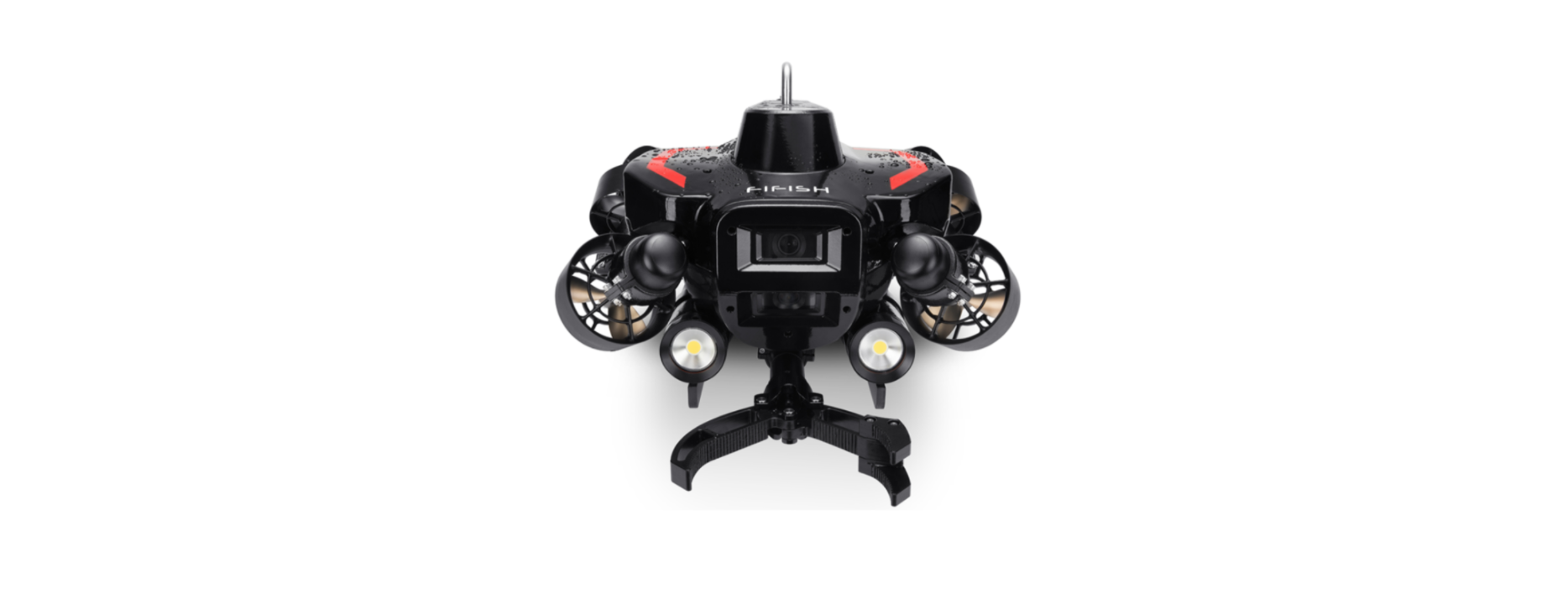

QYSEA FIFISH PRO W6 Ultimate Underwater Drone
Introduction
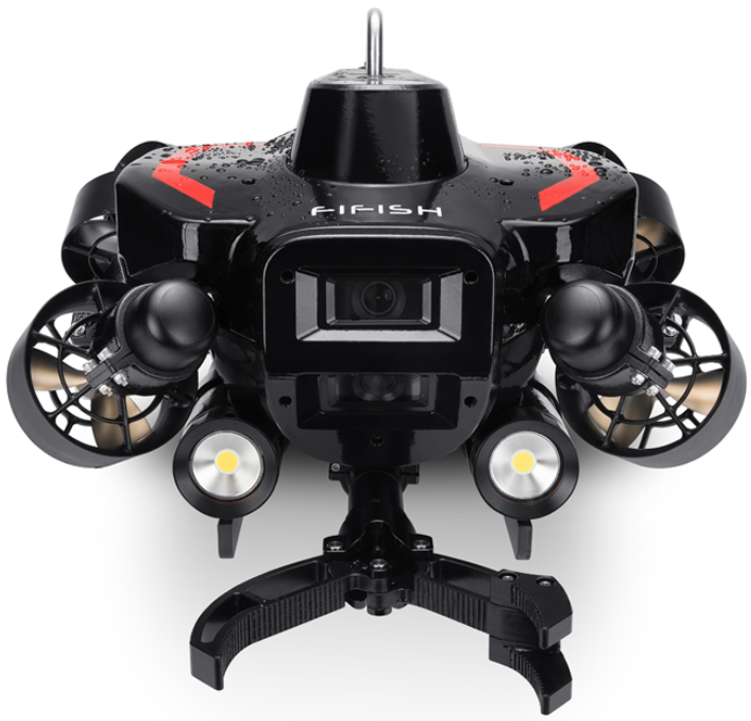
The FIFISH PRO W6 is an ROV (Remote Operated Vehicle) for underwater operations. 6 vector thrusters™ optimize the maneuverability and speed at the same time. 350 m (over 1100 ft) depth rating covers 95% of underwater operation fields. 2nd gen Q-motor Pro has higher output and energy efficiency. The Aluminum Alloy propeller is coated with a catto withstand the harsh conditions. The top speed is 2 m/s (4 knots), capable of going against the current. The dual camera system provides a larger FOV, and the 4K UHD camera produce high resolution image and videos. A high-capacity lithium battery means longer operation time, and a swappable design keeps underwater operation running all the time.
The standard laser scaler makes underwater measurement and inspection easier than ever. FIFISH W6’s new Q-BOX can expand the interface, support fast switch and add-ons. Extensible accessories include on-shore power supply, collision avoidance system sonar, DVL, Image Sonar, USBL ultra-short base positioning, U-QPS (underwater quick positioning system), metal thickness gauge, Q-camer, 3-claws robotic arm, rescue clamp, mud sampler, compass ruler clamp, water sampler, salinity sensor, pH sensor, dissolved oxygen sensor, hydrophone, etc. Such a wide variety of accessories can fulfill any kind of application field.
Safety Instructions
- Do NOT touch the running propeller.
- Avoid overheating of motors; do NOT run the thrusters in air for over 30 seconds.
- Do NOT throw the ROV when deploying into the water
- Do NOT look directlyato the LEDs, and do NOT touch the LEDs when they are ON
- Laser Radiation Class 3B. Avoid direct exposure to the eyes.
- Beware of the environment while operating the ROV (tide, water level, water traffic, etc.)
- Be part of marine protection and conservation for the local coral and marine li.fe
- Avoid the reefs, rocks, seaweeds, fishline, or other objects that may cause damage to or entanglement of the ROV or tether.
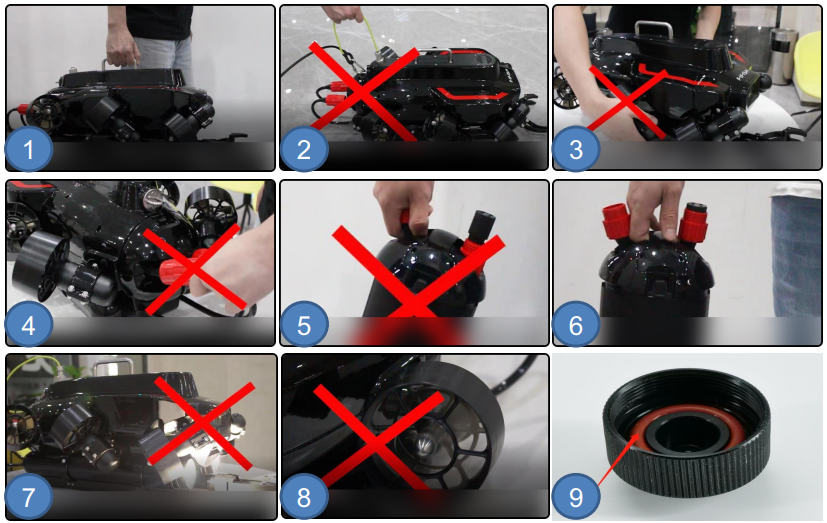
- Holding ONLY on the stainless-steel handle
- Do NOT pull the tether between the en and the connector and the safety lock.
- Do NOT ONLY hold on to the thrusters
- Do NOT pull the battery plug cables
- Do NOT pull the battery plugs
- Holding on to the battery handle when swap battery
- LEDs shall not turn ON for over 10 seconds in the air
- Motors shall not unlock for over 5 seconds in the air
- Check the O-rings regularly
Parts List
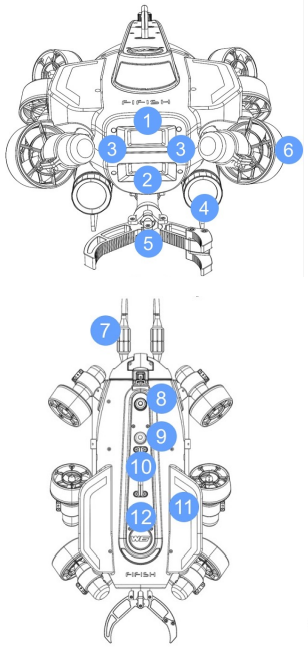
- 4K UHD Underwater Camera #1
- 4K UHD Underwater Camera #2
- Lasers × 2
- 6,000 Lumens LEDs × 2
- Robotic Arm
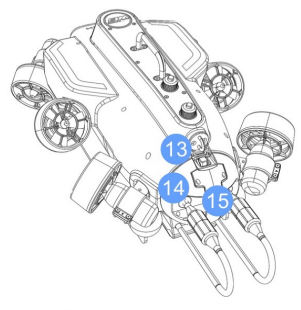
- 2nd gen Q-motor Pro Thrusters × 6
- Battery Plug × 2
- ROV Tether Port
- FIFISH Q-lnterface2
- Stainless steel handle
- W6 wings × 2
- Logo Plate
- W6 Safety Lock3
- Battery
- Battery Handle
 Remote Control
 Remote Control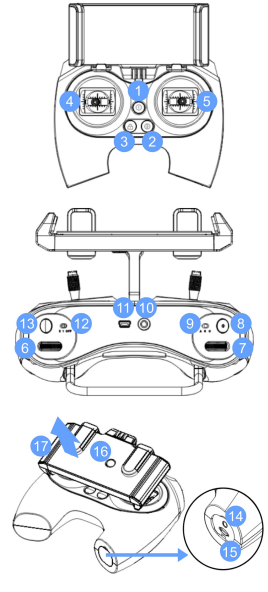
- ON/OFF
- Depth Holding (ON/OFF)
- LOCK/UNLOCK
- Left Control Stick
- Right Control Stick
- Right Wheel
- Left Wheel
- Video (Record/Stop)1
- Control Mode (Attitude / Sport / Combine)
- Tether Port
- Ethernet Port (mini USB)
- LED Brightness (OFF, 1,2)
- Photo (Snap)2
- Charging Port
- microSD Slot
- Clamp Release Button
- Clamp for Smart Device
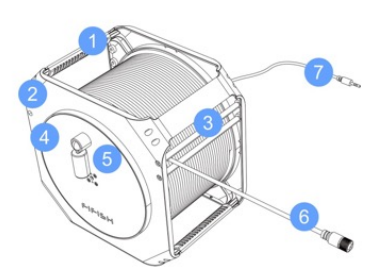
- Spool Handle
- Spool Frame
- Tether Regulator
- Reel
- Foldable Handle
- ROV Plug
- RC Plug
Hardware Connection
- Take off the protective cap on the ROV Tether Port
- Hook the safety lock and fasten the security nut
- Align first, then insert the ROV plug-twist to the end fowater-tightht (finger-tight)
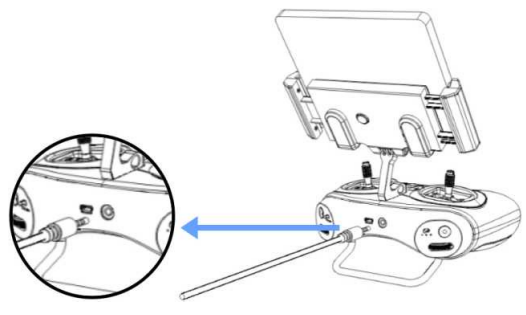
- Fully insert the RC plug (3.5mm) to RC’s Tether Port.
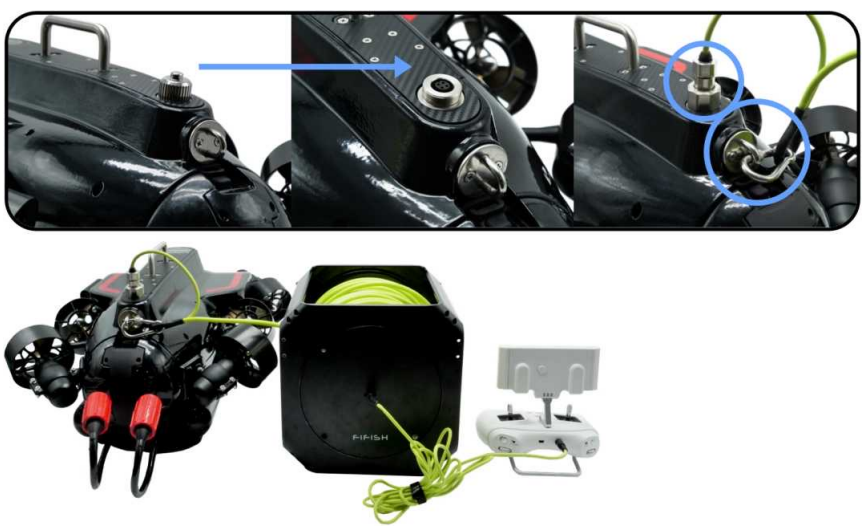
- Plug the tether (3.5 mm head) intothe remote controller.
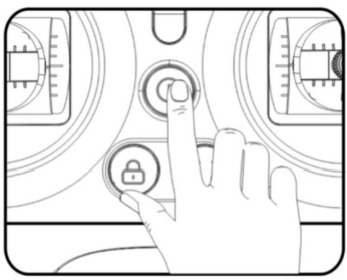
- Turn ON the RC. Press and hold the ON/OFF button, you can hear 7 chimes from low to high (Do, Re, Mi, Fa, Sol, La, Ti)
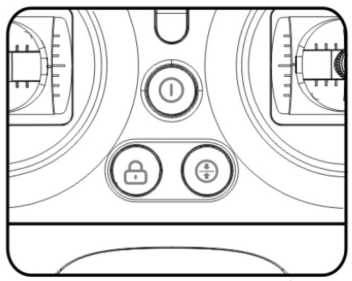
- The “ON/OFF”, “Depth Holding,” and “LOCK/UNLOCK” will flash and rotate clockwise, which indicates “Ready to be connect..ed”
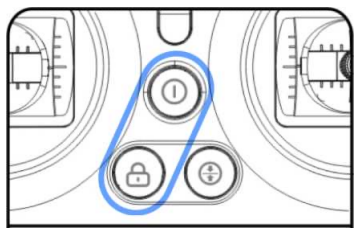
- Check the RC, the “ON/OFF” and “LOCK/UNLOCK” buttons will stay on, which indicates the hardware connection successfully
Software Connection
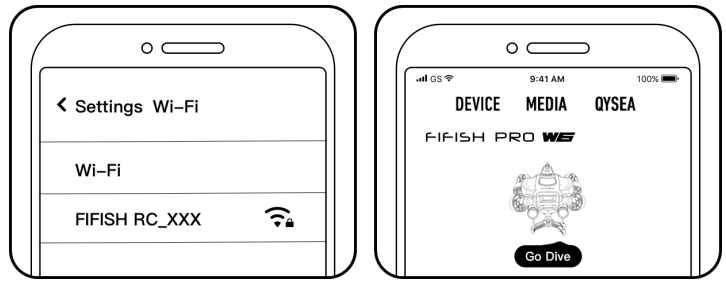
- Connect with the RC’s Wi-Fi (5 GHz)
- Find the Wi-Fi network name “FIFISHRC_xxxx.”
- The password is “123456789.0.”
- Select your ROV type (Swipe the model if necessary)
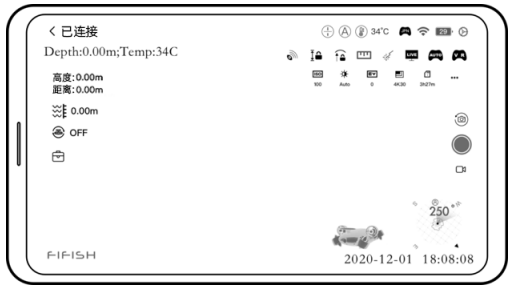
Operation interface
 Deploy the ROV
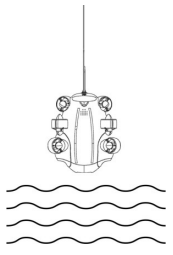
Pull ONLY on the tether to deploy the ROV into the water. Unlock the thrusters, then start to dive.
Retrieve
- Lock the thrusters
- Stop recording the video before closing the FIFISH App
- Pull ONLY on the tether to retrieve the ROV
Definition of Controlling
The FIFISH PRO W6 uses the patented Smart Thruster Array™ to ensure the ultimate maneuverability and delivers
the 6 DOF (degree of freedom).
- W6 can move in descent & ascent, left and right, forward and backward.
- W6 can rotate in 360 yaw (z-axis), 360 pitch (y-axis), and 360 roll (x-axis).
We have simplified the Left Joystick, Right Joystick, Left Wheel, and Right Wheel into the following symbol. The arrows on RC indicate the command,d and the arrows on ROV indicate the actual movements. For more information, please check the FIFISH App, Go Dive/General Settings/Second Column.
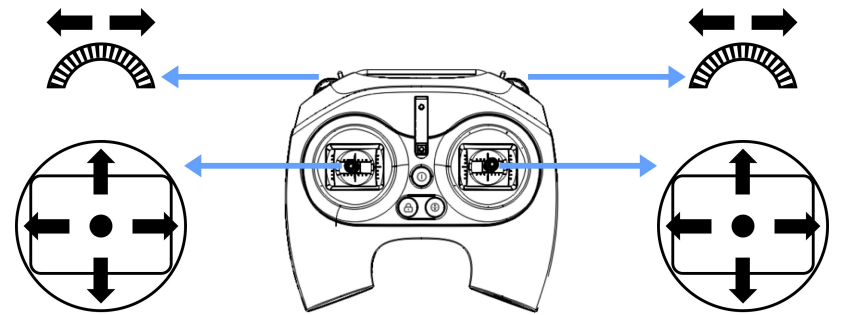
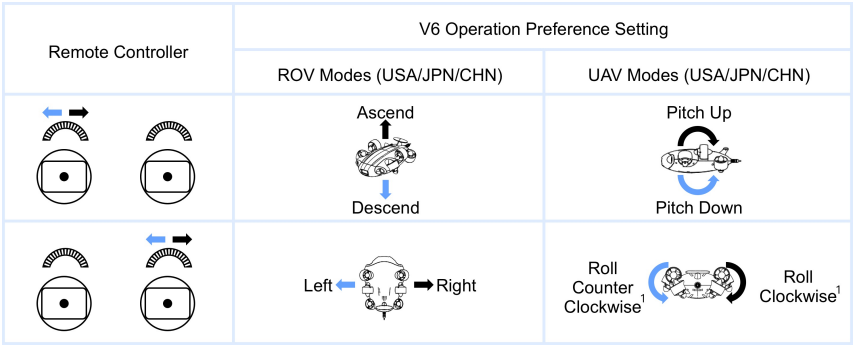
Introduction to Controlling
Controlling Modes
FIFISH PRO V6 PLUS supports 3 modes for control: A, S, and C. A is Attitude Auto mode, S is Sport mode, and C is the Combination mode.
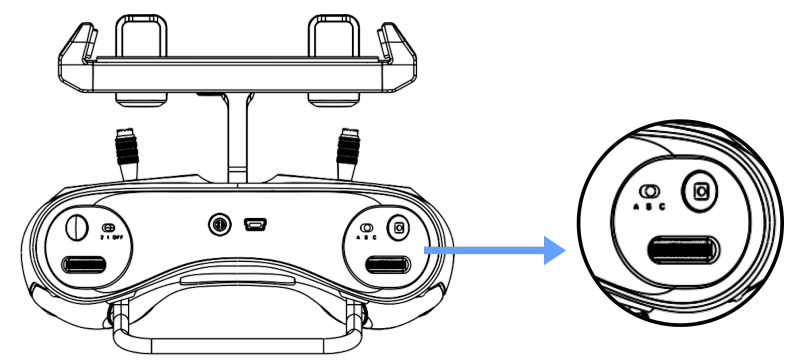
- Attitude Mode Attitude mode is designed for beginners. The ROV will not roll in Attitude mode.
- Sport Mode Sport mode is designed for skillful pilots.
- Sport mode will enable the rolling freedom, so you will access all 6 degrees of freedom of V6 PLUS.
- Controlling and moving based on the FPV (First Person View), do not operate in third-person view.
- The ROV will only stay in the same depth with no command input when depth holding Ois N.
- Combination mode delivers the intuitive control an immersiveexperiences.
- Combination mode supports head tracking and the remote controller working together.
- Robotic Arm: The robotic arm can be activated ONLY in Attitude mode. Use the right wheel to open and close the robotic claws.
ROV Charging
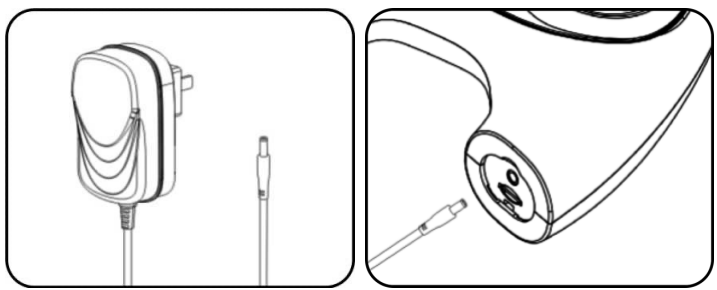
Pull out the battery and charge it separately. The red LED indicator illuminates while charging, and the green LED indicator illuminates while fully charged.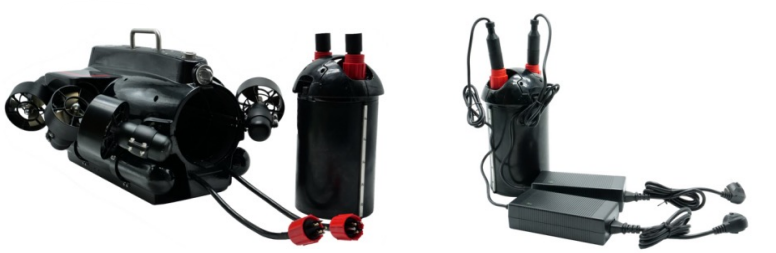
RC Charging
Flashing ON/OFF button, RC is charging. White steady ON/OFF button, RC is fully charged.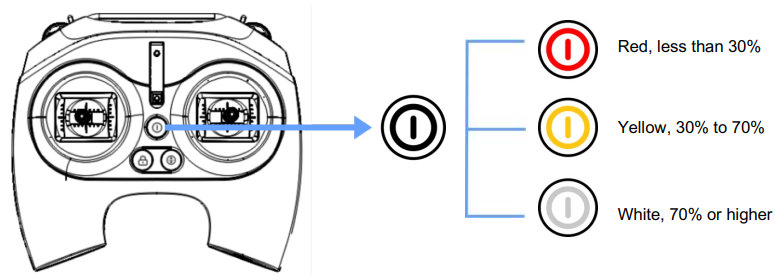
Operation Interface
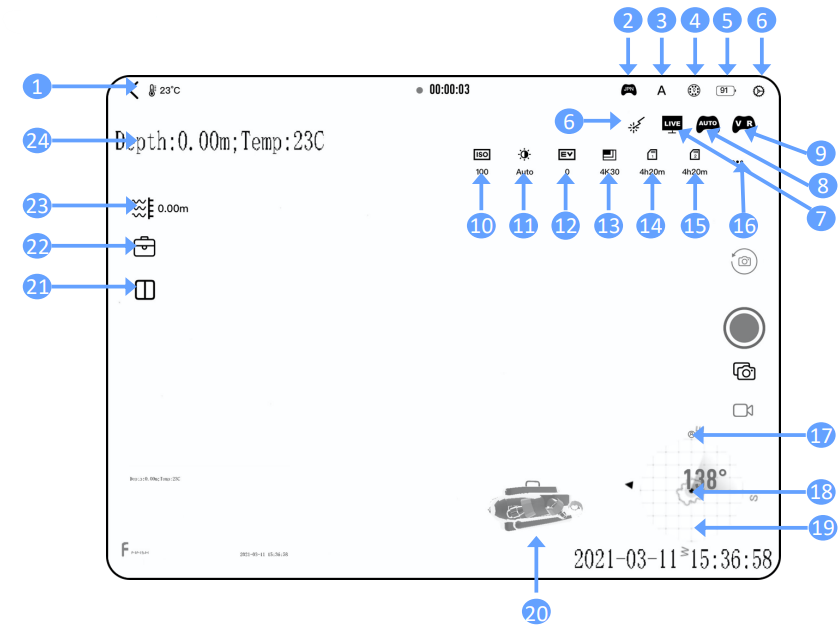
- ROV Status
- Controlling Preferences
- Control Mode
- LED Brightness
- ROV Battery
- General Settings
- LIVE Board Casting
- Auto Pilot 20d Gen
- VR Mode
- ISO
- White Balance
- Exposure Value
- Resolution Frame Rate
- Camera #1 Remaining Time/Pics
- Camera #2 Remaining Time/Pics
- Camera Settings
- Pilot’s Heading
- ROV’s Heading in Degrees
- Compass
- Posture Indicator
- Display Arrangement
- Tool Box
- Current Depth
- Watermark: Depth and Temp
FIFISH App
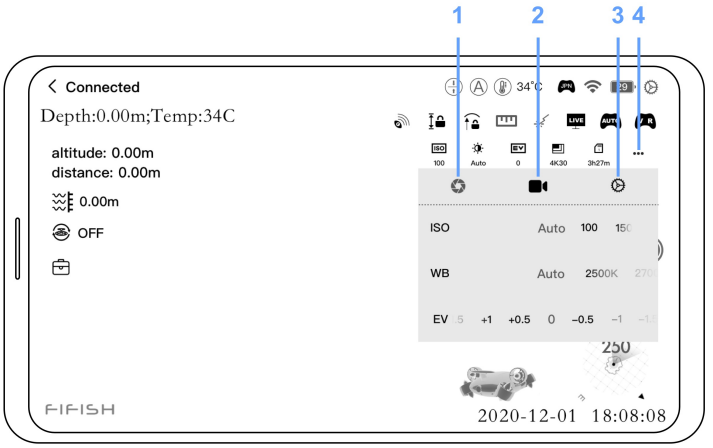
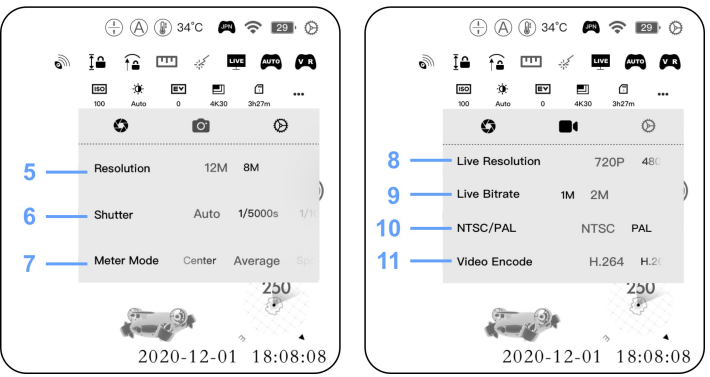
Image Settings
- Exposure and WB
- Video Setting
- System Preferences
- Image/Video Settings
- Image Resolution
- Shutter Speed
- Lighting Meter
- Resolution Live on FIFISH App
- Bitrate Live on FIFISH App
- Analog Color Television Standards
- Video Coding
Features
Laser Ruler
The Laser Dots could be the reference dots. It can work out the distance measure with a manual Image Processing software.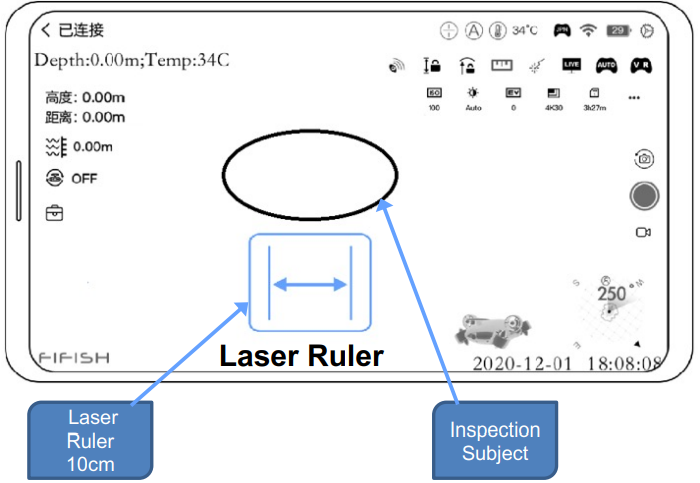
![]() Maintenance
Maintenance
- Soak ROV at least 1 hour after dive, then let the motors run in fresh water at least 10 minutes, then rinse ROV with fresh water. Air dry and avoid direct sunlight (for more information, please check the Motor Maintenances the Maintenance Guide on page 29)
- Keep every connector (port and plug) dry and clean at all times. Put on the protective caps when not connected. The salt and moisture may cause corrosion on the connectors. Clean the plug with running fresh water and dry with an air blow gun or dust blower.
- Check the propellers after every dive. Make sure NO entanglement, i.e., seaweed or fishing lines. Turn on the ROV (See the Preparation & Connection Sectionpagesge 6-9) and check the thruster and test movement and rotation.
- Use the integrated self-checking program (FIFISH App/Help/Machine self-check) if you have a spot malfunction part or parts after dives, contact your local services center for help. For more information about FIFISH Authorized Services Centers https://www.qysea.com/support/repair-center/
- Clean sand or mud if necessary. Soak the ROV inside the clean, fresh waterfor at least 1 hour. Shake the ROV tail down or head down position, let the sand wash out through the venting holes. Wash until the clean water drips out.
- Check the tether on a regular basis, replace the tether if break or shows any damage.
- Store ROV and RC in a dry and cool environment (Temperature range: 5°C to 25°C or 41°F to 77°F).
- For long-term storage, keep 50% to 60% of battery level. Charge and discharge every 90 days to keep the activation of the Lithium battery.
Specifications
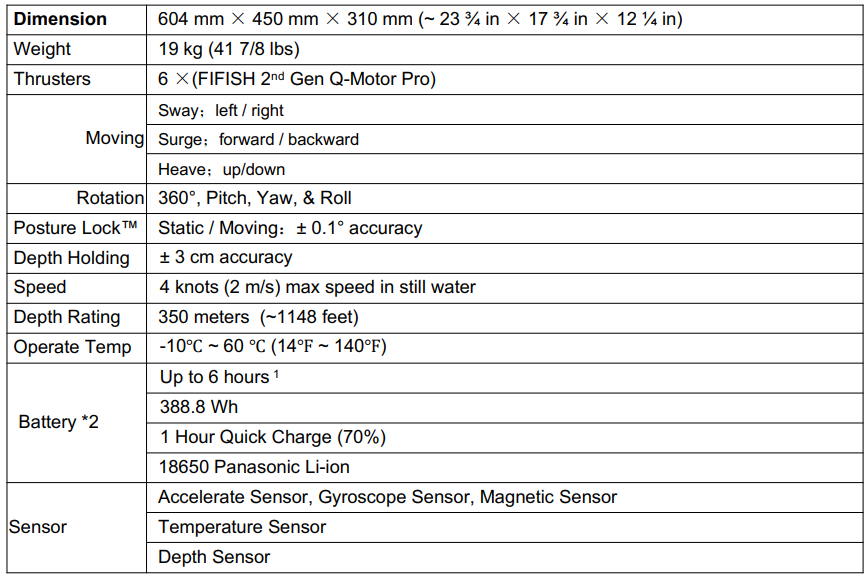
ROV
RC

APP

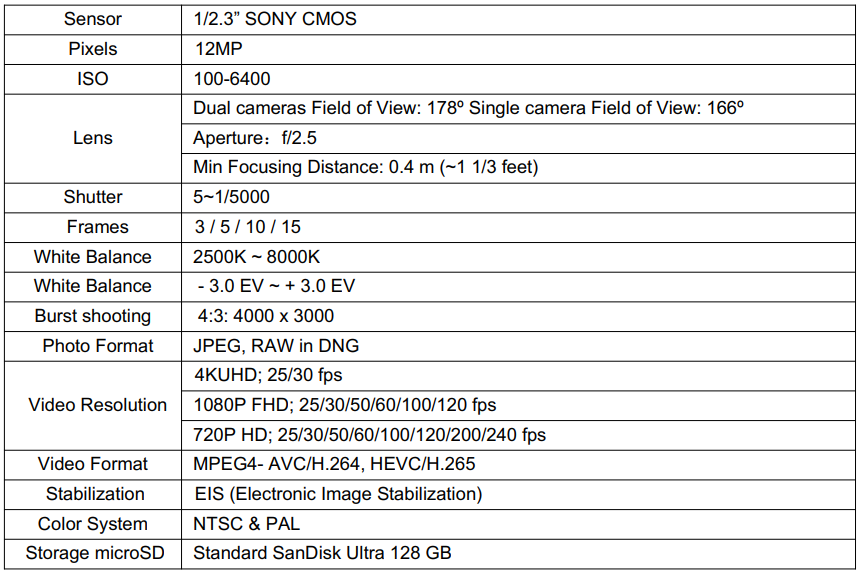
Camera
LED

Charger

Tether

FIFISH App download and Installations
- Option 1. Scan the above QR code to download the IFISH App.
- Option 2. Search the FIFISH on App Store (iOS) or Google Play (Android).
- Option 3. Go to QYSEA’s website at https://www.qysea.com/support/app-download/
Disclaimer
We provide customers with after-sales services, excluding the following circumstances-
- Damage caused by unauthorized modification, disassembly, or shell opening not in accordance with
official instructions or manuals. - Damage caused by improper installation, incorrect use, or operation not in accordance with official instructions or manuals.
- Damage caused by a non-authorized service provider.
- Damage caused by unauthorized modification of circuits, mismatch, or misuse of the battery and
charger. - Damis’ age is caused by those who do not follow instructions and manual recommendations.
- Damage caused by operation in bad water conditions (i.e, strong currents, huge waves, etc.)
- Damage caused by operating the product in an environment with electromagnetic interference (i.,e. in mining areas or close to radio transmission towers, caves, mudconditionsiradiationions, tunnels, etc.).
- Damage caused by operating the unit with a low-charged or defective battery.
- Uninterrupted or error-free operation of a product.
- Loss of, or damage to, your data by a product.
- Damage caused by operating the ROV in the sensitive zone (military, natural resource protection zoning, marine conservation, ocean conservation, etc.)
- Damage caused by unpredictable factors (current, cave collapse, swallow ban by an animal, etc.)
- Products or parts with an altered identification label or from which the identification label has been removed.
Customer Service
- Website: https://www.qysea.com/
- Ph: +86-755-2266-2313