



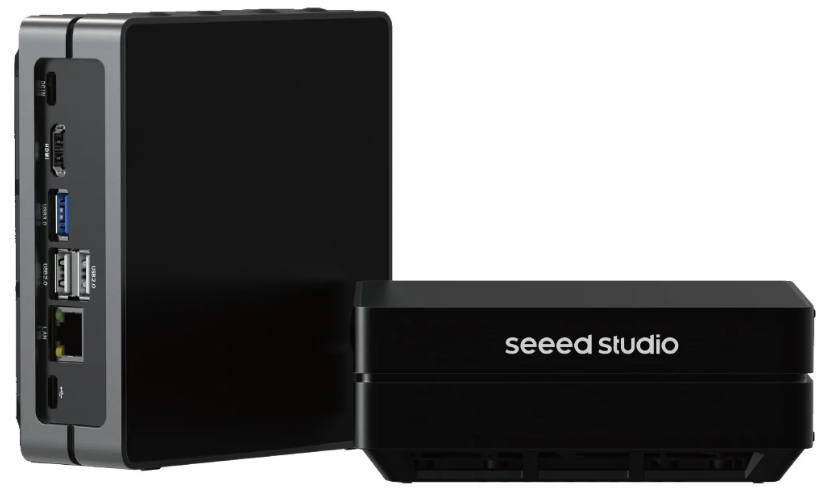
Seeed Studio J1010 3124595 4GB ReComputer
Safety instructions
Before using the Seeed Studio J1010 3124595 4GB ReComputer, carefully read this document and the accompanying operating instructions, and especially observe the safety information. If you do not follow the safety instructions and information on proper handling, we assume no liability for any resulting personal injury or damage to property. Such cases will invalidate the warranty/guarantee.
- The product is not a toy. Keep it out of the reach of children and pets.
- Do not leave packaging material lying around carelessly. This may become dangerous playing material for children.
- If you have questions that remain unanswered by this information product, contact our technical support service or other technical personnel.
- Maintenance, modifications, and repairs must only be completed by a technician or an authorised repair centre.
- Handle the product carefully. Jolts, impacts, acts, or a fall, even from a low height, can damage the product.
- Do not place the product under any mechanical stress.
- Protect the appliance from extreme temperatures, strong jolts, flammable gases, steam, and solvents.
- Protect the product from high humidity and moisture.
- Protect the product from direct sunlight.
Intended Use
The Seeed Studio J1010 3124595 4GB ReComputer is designed for safe and proper operation under the specified guidelines. Improper use can result in short circuits, fires, or other hazards. The product complies with the statutory national and European requirements.
For safety and approval purposes, you must not rebuild and/or modify the Seeed Studio J1010 3124595 4GB ReComputer. Read the safety instructions and any accompanying instructions carefully and store them in a safe place. Make this product available to third parties only together with the safety instructions and any accompanying instructions.
Operation
- Consult an expert when in doubt about the operation, safety, or connection of the
product. - If it is no longer possible to operate the product safely, take it out of operation and protect it from any accidental use. DO NOT attempt to repair the product yourself.
Connected devices
- Also, observe the safety and operating instructions of any other devices that are connected to the product.
Disposal
This symbol must appear on any electrical and electronic equipment placed on the EU market. This symbol indicates that this device should not be disposed of as unsorted municipal waste at the end of its service life. Owners of WEEE (Waste from Electrical and Electronic Equipment) shall dispose of it separately from unsorted municipal waste.
- inInur Conrad offices
- at the Conrad collection points
Technical data
Power supply
- Input V/DC, 3 A via USB-C®
Environment
- Usage environment Indoor
- Operating temperature 0 to +60 °C
- Operating humidity max. 95 % RH (non-condensing) (at 40 °C)
- Storage temperature -40 to +85 °C
- Storage humidity<80 % RH (non-condensing)
Others
- Dimensions (W x H x D) (approx. . 130 x 120 x 50 mm
- Weight (approx.) 0.4 kg
Customer Support
- Website: www.seeedstudio.com
- Ph: +86-0755-86095676
2008-2025 Seeed Technology Co., Ltd. All rights reserved.
FAQs
Q: What is the Seeed Studio J1010 3124595 4GB ReComputer?
A small, low-power single-board computer (SBC) for AI applications, embedded computing, and Internet of Things projects is the J1010 3124595. It supports Linux-based operating systems and has 4GB of RAM in addition to several connectivity choices.
Q: How do I power the ReComputer?
Depending on the model, the board needs a 5V/3A power source via USB-C or DC barrel input. To prevent data corruption or boot problems, always use a reliable, high-quality power adapter.
Q: Can I connect multiple peripherals?
Indeed. The board has Ethernet, HDMI output, several USB ports, and optional Wi-Fi and Bluetooth. Keyboards, mice, webcams, and external storage devices are among the supported peripherals.
Q: Is the board suitable for AI or edge computing?
Indeed, the board can manage edge computing, IoT data processing, and light AI inference tasks thanks to its 4GB RAM and J1010 CPU. For more demanding AI tasks, you can add an external USB accelerator, such as the Intel Neural Compute Stick or Google Coral. Additionally, you can explore the Seeed Studio J2021 ReComputer Edge AI Device for advanced AI applications and edge computing projects.
Q: Can the ReComputer run headless (without a monitor)?
Indeed. You can use VNC or SSH to control it. To install and control software, connect the board to your network, locate its IP address, and log in remotely.
Q: Can I use GPIO pins for sensors and modules?
Indeed. For sensor modules, actuators, and custom electronics, the board offers GPIO, I²C, SPI, and UART interfaces. For correct wiring, consult the user manual’s pinout diagram.
Q: Where can I find detailed documentation and troubleshooting guides?
Seeed Studio’s wiki and GitHub pages contain all of the official documentation, pinouts, firmware updates, and community projects. For the most up-to-date and secure instructions, always consult official sources.