

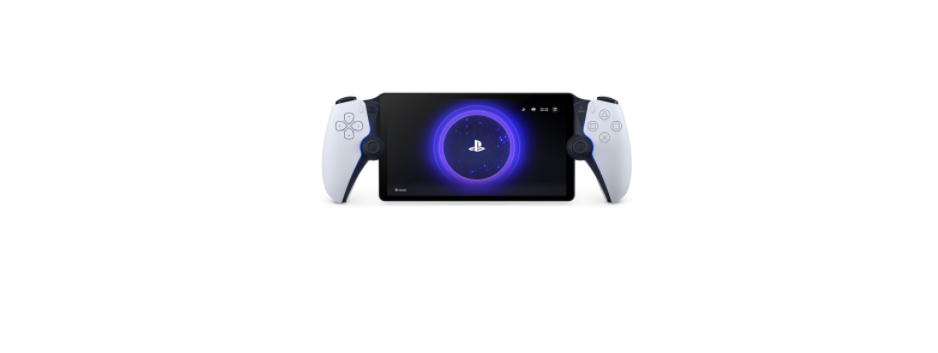

Sony CFI-Y1016 PlayStation Portal Remote Player
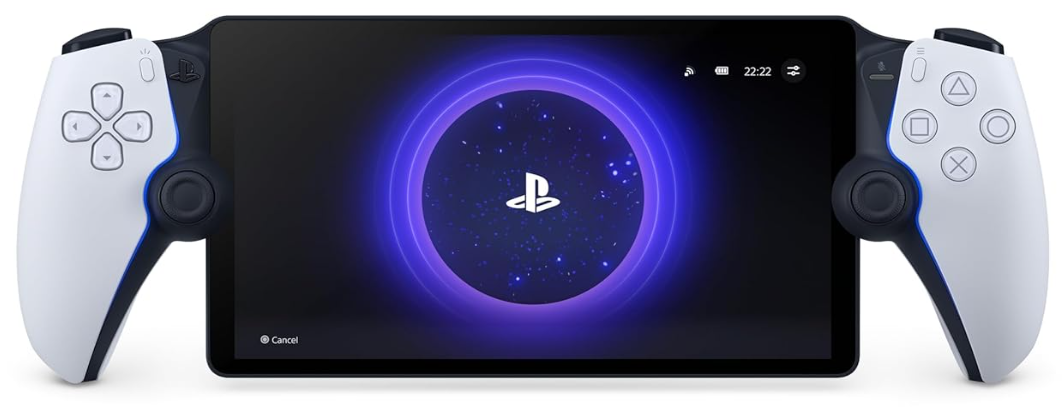
Safety Information
Before using the product, carefully read this manual and any manuals for compatible hardware. Retain instructions for future reference. Parents or guardians of children should read this manual for safe use. This product has been designed with the greatest safety concern. However, any electrical device, if used improperly, has the potential for causing fire, electrical shock or personal injury. Observe all warnings, precautions and instructions.
In addition to the above, DISCONTINUE USE IMMEDIATELY if you experience any of the following symptoms: headache, dizziness, nausea, fatigue, similar symptoms to motion sickness, or discomfort or pain in any body part, such as eyes, ears, hands, arms, or feet, whilst playing. If the condition persists, seek medical attention.
Radio Waves
Radio waves may affect electronic equipment or medical devices (for example, pacemakers), which may cause malfunctions and possible injuries.
- Keep the product at least 30 cm away from a pacemaker or other medical devices when using the network features.
- Turn off the product immediately if you have any reason to suspect that interference is occurring with your pacemaker.
- If you use a pacemaker or other medical device, consult your doctor or the manufacturer of your medical device before using the wireless networking feature (wireless LAN).
- Do not use the wireless networking feature in areas where wireless network use is prohibited, such as in hospitals. Abide by the medical institution’s regulations when using the product on their premises.
Magnets and Medical Devices
This product has magnets which may interfere with pacemakers, defibrillators and programmable shunt valves or other medical devices. Do not place this product close to such medical devices or persons who use such medical devices. Consult your doctor before using this product if you use such medical devices.
Volume Level
To prevent possible hearing damage, do not listen at high volume levels for long periods. Permanent hearing loss may occur if the headset or headphones are used at high volume. Set the volume to a safe level. Over time, increasingly loud audio may start to sound normal, but can actually be damaging to your hearing. If you experience ringing or any discomfort in your ears or muffled speech, stop listening and have your hearing checked. The louder the volume, the sooner your hearing could be affected. To protect your hearing:
- Limit the amount of time you use the headset or headphones at high volume.
- Avoid raising the volume to block out noisy surroundings.
- Lower the volume if you can’t hear people speaking near you.
Lithium-Ion Battery
Do not handle damaged or leaking lithium-ion batteries. If the material comes into contact with the skin, eyes or clothes, immediately rinse the affected area with clean water and consult your doctor. The battery used in this device may present a risk of fire or chemical burn if mistreated.
Vibration Function
- If the product is sitting on a flat surface, the vibration of the product during gameplay may cause it to fall, leading to injury or malfunction.
- Do not use the vibration or trigger effect function if you have any ailment or injury to body parts such as the bones, joints, or muscles of the hand or arm that may be affected by this vibration function. To enable or disable these features, from the home screen, select Quick Menu > Settings > Controller.
Static shock
When using a headset or headphones in particularly dry air conditions, you may sometimes experience a small and quick (static) shock in your ears. This is a result of static electricity accumulated in the body, and is not a malfunction of your headset or headphones.
Motion sensor
When using the motion sensor function of the product, be cautious of the following points. If the product hits a person or object, it may cause accidental injury or damage.
- Before using the motion sensor function, make sure you have enough space to move around.
- Firmly grip the product to prevent it from slipping out of your grasp and causing damage or injury.
- If using a product that is connected to the PlayStation®5 console with a USB cable, make sure there is enough space for the cable so that the cable will not hit a person or object.
Light Bar
Do not stare at the light bar on the product when it is blinking. Stop using the product immediately if you experience any discomfort or pain.
Set up and Handling
- Ensure the product, accessories, or their connectors are free of liquid, excess dust and small particles.
- Do not touch the connectors or insert anything into the product.
- Do not use the product, cables, or connectors if they are ww2wwsd damaged or modified.
- Do not place the product or accessories on surfaces that are unstable, tilted, or subject to vibration.
- Do not touch the product during an electrical storm when it is charging.
- Do not touch any other devices connected to the product with wet hands.
- Doing so may cause an electrical shock.
- Only use AC adaptors that meet the specifications provided.
- Using AC adaptors that do not meet these specifications or electric shock.
- Do not swing the product around by the cable.
- The screen (touch screen) is made of glass.
- If the screen is cracked or damaged, do not touch it as it may cause injury.
Use
Use the product and accessories according to the instructions in this manual. No authorisation for the analysis or modification of the product, or the analysis and use of its circuit configurations, is provided. Unauthorised modification of the product will void your manufacturer’s guarantee. Depending on the country or region, there are limitations on the use of certain types of radio signals. In some cases, use of the product’s network features may lead to a fine or other penal.ty.
Moisture condensation
If the product is brought directly from a colocation tonto a warm one, moisture may condense inside the console, causing the product to malfunction. Should this occur, turn off the product and leave it until the moisture evaporates (this may take several hours). If the console still does not operate properly, please contact customer support.
Wireless networking feature
Operation in the 5150-5350 MHz band is restricted to indoor use only. Installations in road vehicles, trains and aircraft are not permitted for the 5250-5350 MHz band. When using the scan function to select a wireless LAN access point, access points that are not intended for public use may be displayed. Only connect to an access point that you are authorised to use
Charging
- Charge in an environment where the temperature range is between 10 °C and 30 °C. Charging may not be as effective when performed in other environments.
- The battery has a limited lifespan. Battery duration will gradually decrease with repeated usage and age. Battery life also varies depending on the storage method, usage state, environment, and other factors.
- When the product is not used for an extended period of time, it is recommended that you fully charge it at least once a year in order to maintain battery functionality.
Screen
- Do not press your finger on the screen with excessive force.
- Any of these actions may damage or break the screen.
- Do not place the product screen-side down, as this may cause damage to the screen and sticks.
- Prolonged contact with water or dust may damage the screen and shorten its life.
- Direct exposure to sunlight may damage the product’s screen.
- Be careful when using the product outdoors or near a window.
- A small number of pixel display defects may be present and considered normal.
- When using the product in a cold environment, you may notice shadows on the graphics, or the screen may appear darker than usual. This is not a malfunction, and the screen will return to normal when the temperature goes up.
Care and Cleaning
Follow the precautions below to help prevent the product exterior from deteriorating or discolouring.
- Do not allow rubber or vinyl materials to be in prolonged contact with the product.
- Do not use thinner, benzine, or alcohol.
- Avoid using wipes, chemical cloths, and other products that contain such substances.s
- The product is made of many materials that may be recycled.
- Follow local regulations when disposing of the product.
Charge the Product
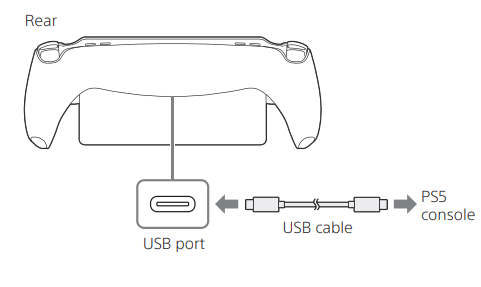
Connect to your PS5® console using the included USB cable when your console is turned on or in rest mode. Once charging begins, the product’s charging status momentarily displays on the screen.n
Specifications
Design and specifications are subject to change without notice. The operating instructions may vary depending on the system software version in use with your PS5 console and the product.
| Screen | 8-inch Full HD LCD touchscreen |
| Input/output | USB port, Headset jack |
| Sound | Built-in stereo speakers |
| Networking | IEEE 802.11 a/b/g/n/ac PlayStation LinkTM (2.4 GHz) |
| Charge time | Approx. 2 hours 30 minutes* |
| Electrical rating | 5 V 3 A |
| Battery type | Built-in lithium-ion battery |
| Battery voltage | 3.87 V |
| Battery capacity | 4 370 mAh |
| Mass | Approx. 529 g |
| Operating temperature | 5 °C to 35 °C |
System software
- The system software of the product is licensed to you under the terms of a separate end-user license agreement. For details, visit playstation.com/legal/product-ssla/.
- Always update the system software of your PS5 console and the product to the latest version.
Disposal
For the Customers in Europe
The recycling of materials will help to conserve natural resources. For more detailed information about the recycling of this product, please contact your local Civic Office, your household waste disposal service, or the shop where you purchased the product.
Notice for the customers in the countries applying EU Directives > Manufacturer: Sony Corporation, 1-7-1 Konan Minato-ku, Tokyo, 108-0075 Japan. For EU product compliance: Sony Belgium, bijkantoor van Sony Europe Limited, Da Vincilaan 7-D1, 1935
For the Customers ithe n the Republic of India
Reduction in the Use of Hazardous Substances in Electrical & Electronic Equipment. This product and its components, consumables, parts, or spares comply with the hazardous substances restriction of India’s E-Waste (Management) Rules. The maximum allowable concentrations of the restricted substances are 0.1% by weight in homogenous materials for Lead, Mercury, Hexavalent Chromium, Polybrominated Biphenyls (PBB) and Polybrominated Diphenyl Ethers (PBDE), and 0.01% by weight in homogenous materials for Cadmium, except for the exemptions specified in Schedule II of the aforesaid Rules.
Customer Service
- Website: https://www.sony.com/
- Ph: 800-326-9551
FAQs
Q: What exactly is the PlayStation Portal?
You don’t need a TV to stream and play games that are installed on your PS5, thanks to the Portal, a portable remote play device. It effectively allows you to transport your PS5 experience throughout the house or even outside (subject to network), thanks to its integrated 8″ screen and console-like controls.
Q: Can it play games on its own (without a PS5)?
No, Portal isn’t a stand-alone console. For games, a PS5 (or a compatible PS Plus cloud stream) is required. It can be streamed from your PS5 or, if supported, from cloud servers.
Q: What kind of screen and graphics does it offer?
Portal can stream at up to 60 frames per second and features an 8-inch LCD with Full HD (1080p) resolution.
Q: Does it support the same controller features as the regular PS5?
Yes, Portal supports adaptable triggers (such as the standard DualSense controller) and haptic feedback in games that use them.
Q: Can someone else use the TV while I’m playing on Portal?
Yes, the fact that Portal eliminates the need for a TV is one of its primary advantages. You can play regardless of who is using the main screen as long as the PS5 and WiFi are operational.
Q: Does it replace a full console or gaming PC/TV setup?
Not really. Although Portal is useful and adaptable, a direct PS5-to-TV (or PC/console) setup is still preferable for the best graphic fidelity, local processing, or VR/4K/120 fps gaming.
Q: Can I connect headphones or earbuds?
Yes, Portal has a 3.5 mm jack for normal wired audio and a proprietary PlayStation Link for wireless audio with compatible headsets and earbuds.
Q: Is latency a problem — will fast‑paced games like shooters be playable?
That is dependent. Many games function well on a fast local Wi-Fi network. However, compared to direct console to TV configurations, you can notice a delay for competitive online shooters, where response time is crucial. Network quality is crucial.
1 Comment
I don’t think the title of your article matches the content lol. Just kidding, mainly because I had some doubts after reading the article.