



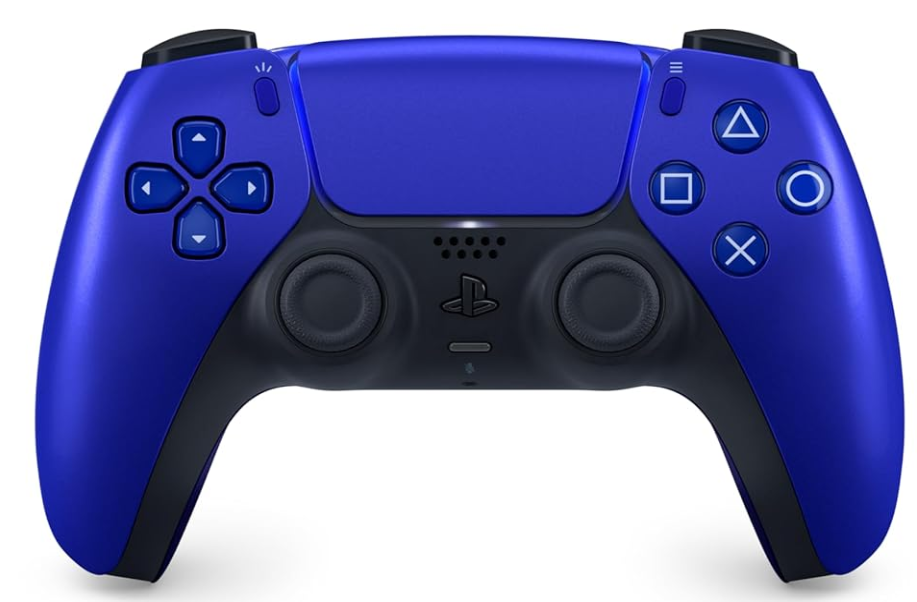
Sony CFI-ZCT1G DualSense Wireless Controller
Safety Instructions
This product has been designed with the greatest safety concern. However, any electrical device, if used improperly, has the potential for causing fire, electrical shock or personal injury. To help ensure free operation, follow these guidelines:
- Observe all warnings, precautions, and instructions.
- Do not handle damaged or leaking lithium-ion batteries.
- If a battery is leaking, do not touch the material from the leaking battery with your bare hands.
- If a battery is leaking, stop using the product immediately and contact Customer Support.
- Consult your doctor if inflammation or soreness develops.
- If a battery is leaking, immediately move the leaking battery away from fire.
- The material from the leaking battery or gas may ignite, causing fire or explosion.
- If you experience any of the following health problems, discontinue use of the product immediately.
- If symptoms persist, consult with your doctor.
- Dizziness, nausea, fatigue or symptoms similar to motion sickness
- Discomfort or pain in a part of the body, such as the eyes, ears, hands or arms
- Avoid playing when you are tired or need sleep.
- Avoid prolonged use of this product. Take a break at about 30-minute intervals.
- Permanent hearing loss may occur if the headsets or headphones are used at high volume.
- The louder the volume, the sooner your hearing could be affected. To protect your hearing:
- Limit the amount of time you use a headset or headphones at high volume.
- Avoid raising the volume to block out noisy surroundings.
- Lower the volume if you can’t hear people speaking near you.
- Avoid looking into the light bar of the controller when it is flashing.
- Stop using the controller immediately if you experience any discomfort or pain in any body parts.
Use and Handling
- Never disassemble or modify the product.
- Do not allow liquid, small particles or other foreign objects to get into the product.
- Do not place the product on surfaces that are unstable, tilted or subject to vibration.
- Do not use the product near water.
- Do not touch the product during an electrical storm.
- Do not stand on or put objects on the product.
- Do not throw or drop the product or subject it to strong physical shock.
- Do not place the product on the floor or in a place where it may cause someone to trip or stumble.
- Do not touch the ports or insert any foreign objects into the product.
- If you see dust or foreign objects on the connectors, wipe them with a dry cloth before connecting.
- Do not touch the product with wet hands.
- When using the motion sensor function, be cautious of the following points.
- If the controller hits a person or object, this may cause an accident, injury or damage.
- Before using the motion sensor function, make sure you have enough space to move around.
- Also, take care to avoid pulling out the cable from the PS5 console.
- The product and its parts are made from metal and plastic materials.
- When disposing of the product, follow local regulations for the proper disposal of such materials.
Battery Life and Duration
- The battery has a limited lifespan.
- Battery duration will gradually decrease with repeated usage and age.
- Battery life also varies depending on the storage method, conditions of use and environmental factors.
- Charge in an environment where the temperature range is between 10 °C and 30 °C.
- Charging may not be as effective when performed in other environments.
When not in use
When the wireless controller is not used for an extended period of time, it is recommended that you fully charge it at least once a year to help maintain battery functionality.
Parts
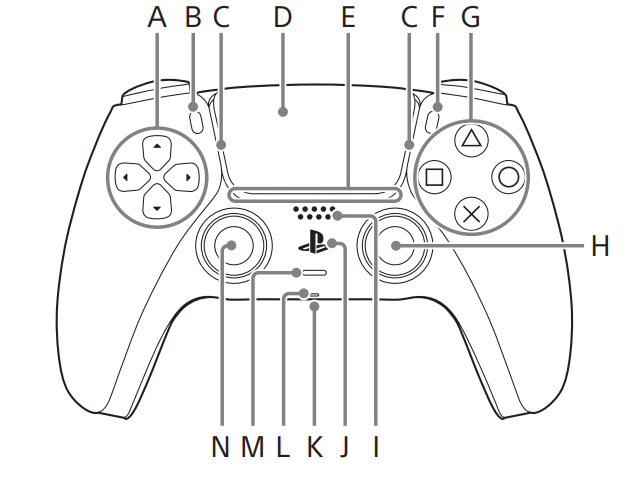
Front
- A ) Directional buttons
- B ) (create) button
- C ) Light bar
- D ) Touch pad/touch pad button
- E ) Player indicator
- F ) (options) button
- G ) Action buttons button/ button/ button/ button
- H ) Right stick/R3 button
- I ) Speaker
- J ) (PS) button
- K ) Headset jack
- L ) Microphone
- M ) (MUTE) button
- N ) Left stick/L3 button
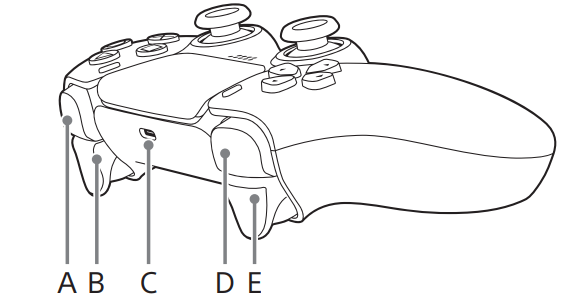
- A ) R1 button
- B ) R2 button
- C ) USB port
- D ) L1 button
- E ) L2 button
Pair the Controller
The first time you use the controller, you’ll need to pair it with your PS5 console.
- Turn on your console.
- Connect the controller to your console using the USB cable included with your console.
- Press the (PS) button. The controller powers on.
- After the light bar blinks, the player indicator lights up.
Charge the Controller
Use the USB cable included with your console to connect the controller to your PS5 console when your console is turned on or in rest mode. While in rest mode, the light bar on the controller slowly blinks orange. When charging is complete, the light bar turns off. Hints
- To charge the controller while your console is in rest mode, you have to first enable this feature.
- For details, refer to the User’s Guide on your PS5 console.
- You can also charge the controller by connecting the USB cable to a computer or other USB device.
- Use a USB cable that complies with the USB standard.
- You might not be able to charge the controller on some devices.
Disposing
The lithium-ion battery of the wireless controller is recyclable. When disposing of the wireless controller, remove the battery and follow local regulations regarding disposing of batteries.
- Disconnect the USB cable from the wireless controller.
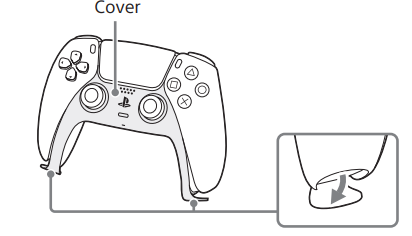
- Remove the cover on the front of the controller.
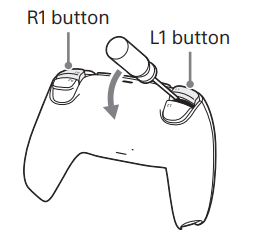
- Using a tool such as a screwdriver, remove the L1 and R1 buttons.
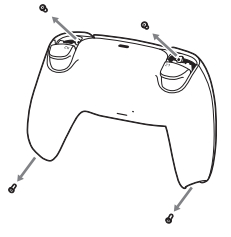
- Using a crosshead screwdriver, remove the screws (4 places).
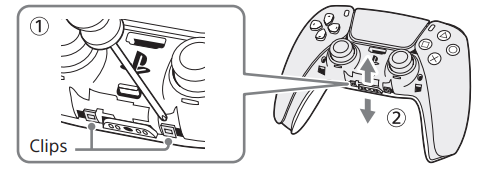
- Using a tool such as a screwdriver, remove the cover clips, and then remove the co.
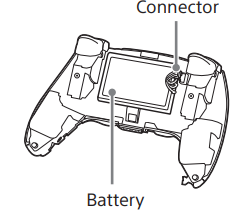
- After disconnecting the connector, remove the battery.
Cleaning
Follow the instructions below to help prevent the product exterior from deteriorating or becoming discoloured.
- Wipe with a soft, dry cloth.
- Do not apply insecticides or other volatile substances.
- Do not place any rubber or vinyl materials on the product exterior for an extended period of time.
- Do not use solvents or other chemicals. Do not wipe with a chemically-treated cleaning cloth.
Storage Conditions
- Do not expose the product to high temperatures, high humidity or direct sunlight during operation, transportation and storage.
- Do not leave the product in a car with the windows closed, particularly in hot weather.
- Do not expose the product to dust, smoke or steam.
Specifications
Design and specifications are subject to change without notice. Depending on the software version in use, the PS5 console may operate differently than described in this manual.
- Input power rating: 5 V 1,500 mA
- Battery type: Built-in lithium-ion battery
- Battery voltage:3.65 V
- Battery capacity: 1,560 mAh
- Operating temperature: 5 °C to 35 °C
- Mass Approx:. 280 g
Disposal
For the Customers in Europe
Disposal of Old Electrical & Electronic Equipment (Applicable in the European Union and other European countries with separate collection systems)This symbol on the product or on its packaging indicates that this product shall not be treated as household waste. Instead, it shall be handed over to the applicable collection point for the recycling of electrical and electronic equipment. By ensuring this product is disposed of correctly, you will help prevent potential negative consequences for the environment and human health, which could otherwise be caused by inappropriate waste handling of this product. The recycling of materials will help to conserve natural resources. For more detailed information about the recycling of this product, please contact your local Civic Office, your household waste disposal service, or the shop where you purchased the product.
Notice for the customers in the countries applying EU Directives > Manufacturer: Sony Corporation, 1-7-1 Konan Minato-ku, Tokyo, 108-0075 Japan. For EU product compliance: Sony Belgium, bijkantoor van Sony Europe Limited, Da Vincilaan 7-D1, 1935
For the Customers ithe n the Republic of India
Reduction in the Use of Hazardous Substances in Electrical & Electronic Equipment. This product and its components, consumables, parts, or spares comply with the hazardous substances restriction of India’s E-Waste (Management) Rules. The maximum allowable concentrations of the restricted substances are 0.1% by weight in homogenous materials for Lead, Mercury, Hexavalent Chromium, Polybrominated Biphenyls (PBB) and Polybrominated Diphenyl Ethers (PBDE), and 0.01% by weight in homogenous materials for Cadmium, except for the exemptions specified in Schedule II of the aforesaid Rules.
Customer Service
- Website: https://www.sony.com/
- Ph: 800-326-9551
FAQs
Q: What is the DualSense CFI‑ZCT1G controller?
It is the standard wireless controller for the PlayStation 5 (PS5) and has more sophisticated features than controllers from earlier generations, including motion sensing, adaptive triggers, sophisticated haptic feedback, and an integrated microphone and speaker, all of which are intended to provide a more responsive and immersive gaming experience.
Q: What platforms does it support?
Primarily PS5 consoles. As long as the game or system accepts conventional controller input, it is also compatible with PC, Mac, and some mobile or cloud gaming setups.
Q: How do I pair it with PS5 or another device for the first time?
Use the USB-C connector that comes with the PS5 to connect it to the console (or other device). After turning on the console and pressing the PS button, the light bar will blink and, once paired, the player indication will light up.
Q: How do I charge the controller?
Use a USB-C cable to connect it to the console, either in rest mode or on. The light bar blinks orange while it is charging, then it turns off when it is finished.
Q: Can I use it wired instead of wireless?
Yes, you can play with a wired controller by connecting the USB-C connector. This can be helpful if the battery is low or for a reliable connection.
Q: Which kinds of games benefit most from DualSense features?
Action, shooter, racing, simulation, and adventure games are examples of games with adaptable triggers and haptic feedback that enhance realism through trigger resistance and tactile input. The motion sensors are very helpful in VR or motion-controlled games.
3 Comments
Thank you for your sharing. I am worried that I lack creative ideas. It is your article that makes me full of hope. Thank you. But, I have a question, can you help me?
Your article helped me a lot, is there any more related content? Thanks! https://accounts.binance.info/register-person?ref=IHJUI7TF
I don’t think the title of your article matches the content lol. Just kidding, mainly because I had some doubts after reading the article.