



Sony UP-D898MD Digital Black And White Printer
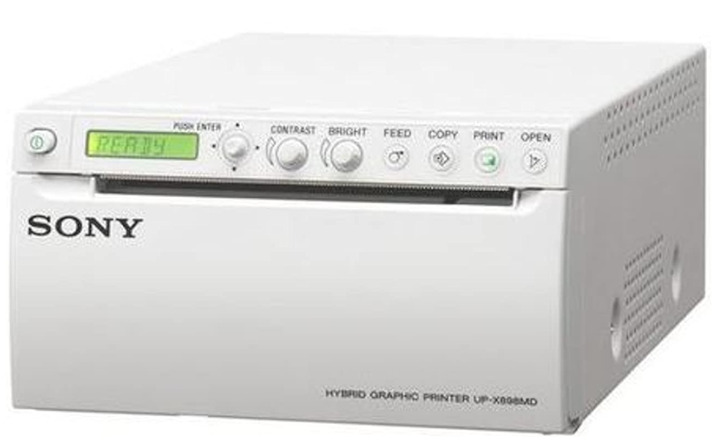
Overview
- The UP-D898MD is a compact A6 medical-grade black-and-white digital printer.
- The high-quality thermal print engine can produce hard copy prints of still images captured by these systems for use in patient records and referrals.
- The UP-D898MD is a successor to the popular Sony UP-897 series of medical printers.
- Redesigned and upgraded, it offers several operational and ergonomic enhancements while retaining the same space-saving footprint and easy integration into medical carts.
- Usability is further enhanced by an enlarged LCD and joystick for intuitive menu navigation.
- Capable of delivering high-quality black & white prints in under two seconds.
- This enables flexible printer installation in almost any location as well as smooth printing operations.
- Unique Sony technology allows paper to be cut in two directions, both up and down, as a lower cutter is newly included, along with the conventional upper cutter.
Features
High print quality
Advanced thermal printing technology enables photo-quality black & white prints with resolutions up to approximately 325 dpi and grey levels up to 256 steps.
Dual cutter configuration
This increased flexibility in cutting direction expands location choices for printer installation.
For example, even if the printer is installed immediately below the operation console of an ultrasound system, paper can easily be cut from the front. Furthermore, a safety mechanism automatically hides the lower cutter when opening the front panel to change the printing paper.
A6 prints in less than two seconds
While operating in high-speed mode, the UP-D898MD can produce A6-size prints in approximately 1.9 seconds (when used with UPP-110HG or UPP-110S print media).
Compact, space-saving design
Measuring 88mm (H) x 154 mm (W) x 240 mm (D), the UPD898MD has the same space-saving design as the UP-D897MD for easy, flexible integration into medical carts.
Enhanced Operability
Building on the success of the popular UP-D897, the UP-D898MD features an enlarged LCD panel that displays printer settings, selected paper type, and advisory messages. An intuitive joystick control allows speedy menu navigation, while the new Auto Lock mode prevents unintentional changes to print settings.
Hard copy reference of print settings
For convenient reference, selected settings (Brightness, Contrast, Ga, and Sharpness) can optionally be printed in a blank space on the print paper.
Uses widely available print media
Sony offers a choice of three high-quality, widely available A6 thermal print media types to meet the needs of different applications. Choose from the UPP-110HD, UPP-110S, or the UPP-110HG High Glossy Printing Paper that produces glossy, long-lasting, near-photo quality prints.
Wide PC compatibility
For maximum flexibility, a wide range of PC drivers is provided for Windows XP, Vista, 7, and 8 (364-bitit).
Compliance with medical standards
This product is distributed to the US and EU as a medical device and satisfies product safety standards (e,.g. IEC 60601-1). For more details, please contact your nearest Sony sales office or an authorized dealer.
Disposal
For the Customers in Europe
The recycling of materials will help to conserve natural resources. For more detailed information about the recycling of this product, please contact your local Civic Office, your household waste disposal service, or the shop where you purchased the product.
Notice for the customers in the countries applying EU Directives > Manufacturer: Sony Corporation, 1-7-1 Konan Minato-ku, Tokyo, 108-0075 Japan. For EU product compliance: Sony Belgium, bijkantoor van Sony Europe Limited, Da Vincilaan 7-D1, 1935
For the Customers in the Republic of India
Reduction in the Use of Hazardous Substances in Electrical & Electronic Equipment. This product and its components, consumables, parts, or spares comply with the hazardous substances restriction of India’s E-Waste (Management) Rules.
Customer Service
- Website: https://www.sony.com/
- Ph: 800-326-9551
FAQs
Q: What type of printer is the UP‑D898MD?
It is a digital black and white thermal printer (direct thermal printing) that produces high-quality monochrome printouts.
Q: What paper/media does it use?
It makes use of unique Sony thermal print media, usually from the UPP 110 series (UPP 110S, UPP 110HD, UPP 110HG, etc.).
Q: How fast can it print?
It takes about 3.3 seconds per image in normal mode (for a 960×1,280 dot image).
Q: What size prints does it support?
For normal print media, the printer can handle picture widths up to 110 mm (paper width 110 mm) and supports A6 format output.
Q: How does the printer connect to a system?
It is compatible with a variety of imaging equipment or PCs for output because it employs a Hi-Speed USB 2.0 interface for digital input.
Q: Does it need a special environment (power, temperature, space)?
With dimensions of about 154 x 88 x 240 mm and a weight of about 2.5 kg, the printer is small and light, making it ideal for situations with limited space, like medical carts or small workstations.
3 Comments
Thanks for sharing. I read many of your blog posts, cool, your blog is very good. https://www.binance.info/register?ref=IHJUI7TF
Can you be more specific about the content of your article? After reading it, I still have some doubts. Hope you can help me.
Can you be more specific about the content of your article? After reading it, I still have some doubts. Hope you can help me.