



Soundcore Boom 3i Compact Outdoor Speaker
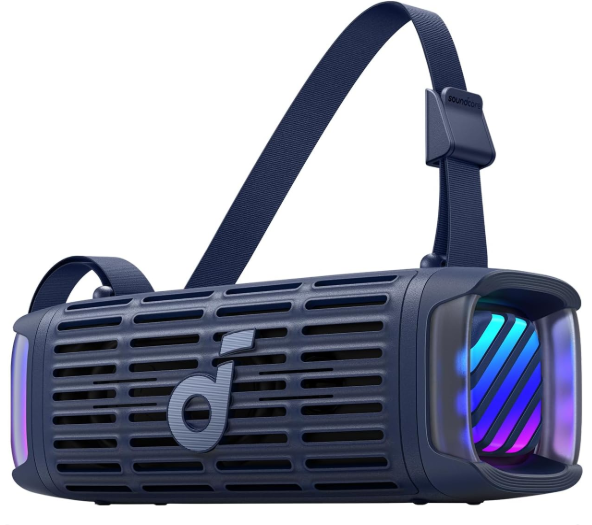
Description
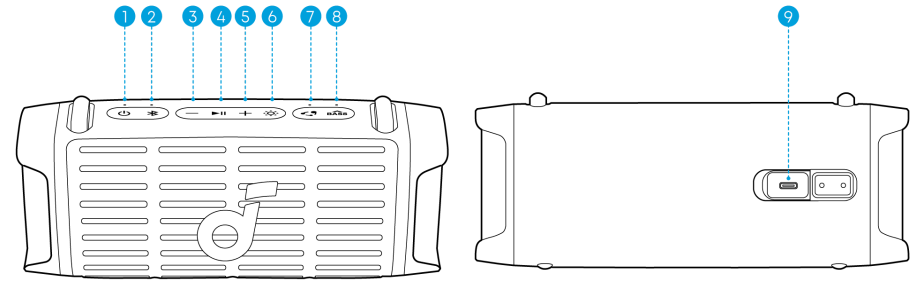
| 1 | Power Button | 7 | PartyCast Button |
| 2 | Bluetooth Button | 8 | BassUp Button |
| 3 | Volume Down Button | 9 | USB-C Charging Port |
| 4 | Play / Pause Button | ||
| 5 | Volume Up Button | ||
| 6 | Light Show Button |
Installing the Strap
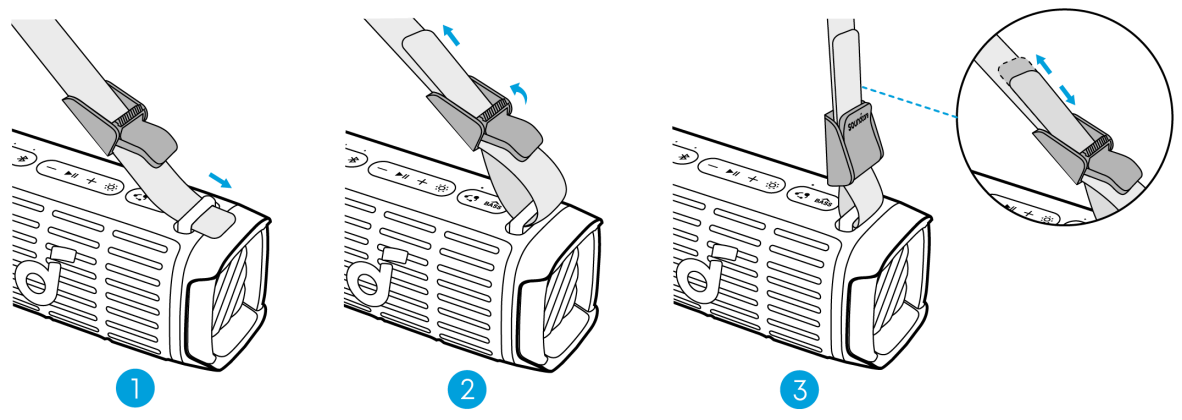
Attach the strap to both sides of the speaker. Adjust the strap length according to the illustration for optimal comfort.
Charging Your Speaker
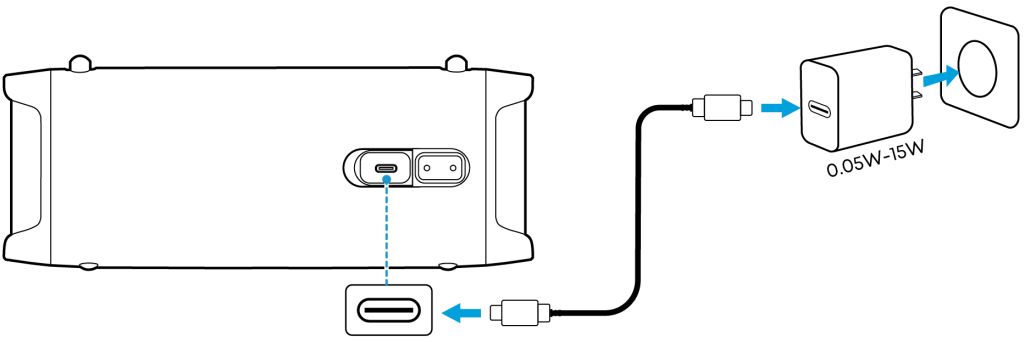
Use the provided USB-C to USB-C cable to connect the speaker and a certified charger to a power source.
| Flashing Red | Low Battery | ||
| Steady Red | Being Charged | ||
| Steady White | Fully Charged | ||
- Please use a charger with a power output of 0.05W to 15W to charge the speaker.
Powering On/Off
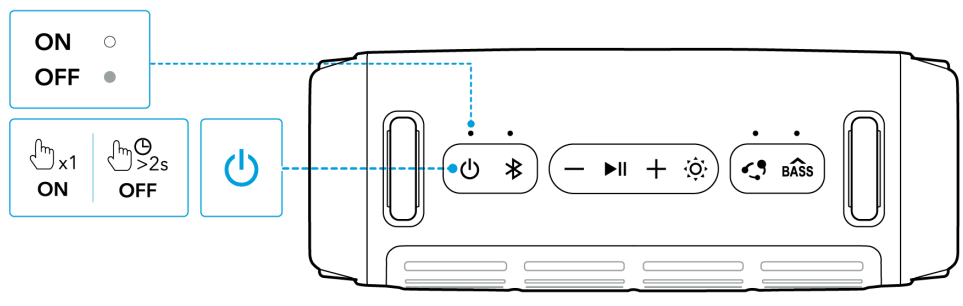
| Press Once | Power On | ||
| Steady White | |||
| Press and Hold for 2 Seconds | Power Off | ||
| Light Off | |||
- This speaker will power off automatically after 20 minutes if no device is connected.
- You can customize the auto power-on time in the Soundcore app.
Using the Device
Bluetooth Mode
Press the Bluetooth button to enter Bluetooth pairing mode, then select “Soundcore Boom 3i” from the Bluetooth list to connect.
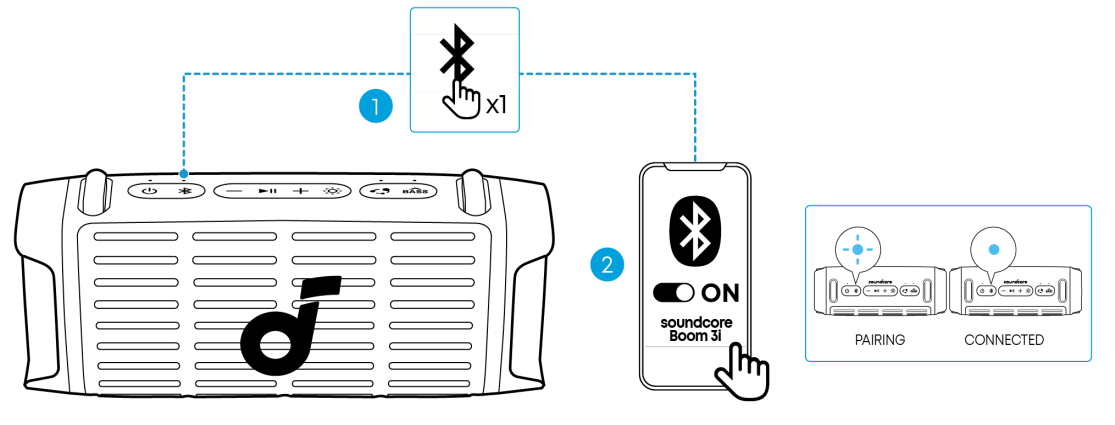
| Press | Enter / Exit Bluetooth Pairing Mode | |
| Flashing Blue | Bluetooth Pairing | |
| Steady Blue | Bluetooth Connected |
- If the speaker is not connected to a device within 3 minutes after being powered on, it will automatically exit Bluetooth pairing mode.
- To re-enter Bluetooth pairing mode, press the Bluetooth button once.
- This speaker can only play music on one mobile device at a time. If another connected device starts playing music, the speaker will automatically take over and interrupt the current playback without requiring the first device to pause.
- Each time you power on your speaker, it will automatically connect to your last connected device if available within the Bluetooth range. If not, press the Bluetooth button to enter Bluetooth pairing mode.
True Wireless Stereo (TWS) Mod:
Two identical Soundcore speakers can pair with each other for stereo sound. Both speakers can play the same audio (one as the left channel and the other as the right channel). With one speaker connected to a smartphone, press and hold the Bluetooth button for 2 seconds on two speakers to enter TWS pa
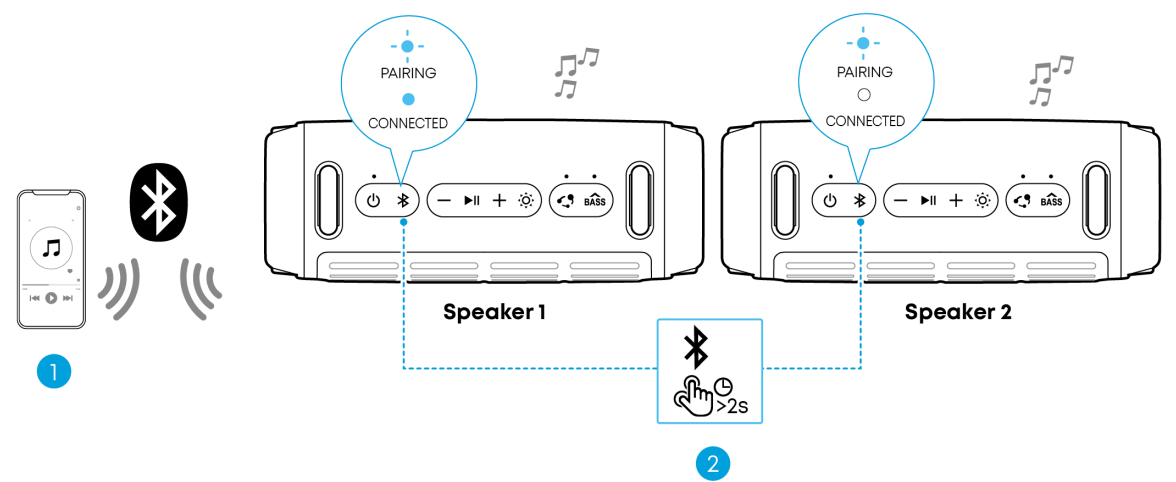
| Press and Hold for 2 Seconds | Enter TWS Pairing Mode | ||
| Flashing White | TWS Pairing | ||
| Steady Blue (Speaker 1) | TWS Connected | ||
| Steady White (Speaker 2) | |||
PartyCast Mode
With one speaker connected to a smartphone, simultaneously press the PartyCast button on multiple Soundcore speakers with the PartyCast function to synchronize audio and light. A prompt sound will play when you enable or disable PartyCast mode, or when multiple speakers are successfully linked together.
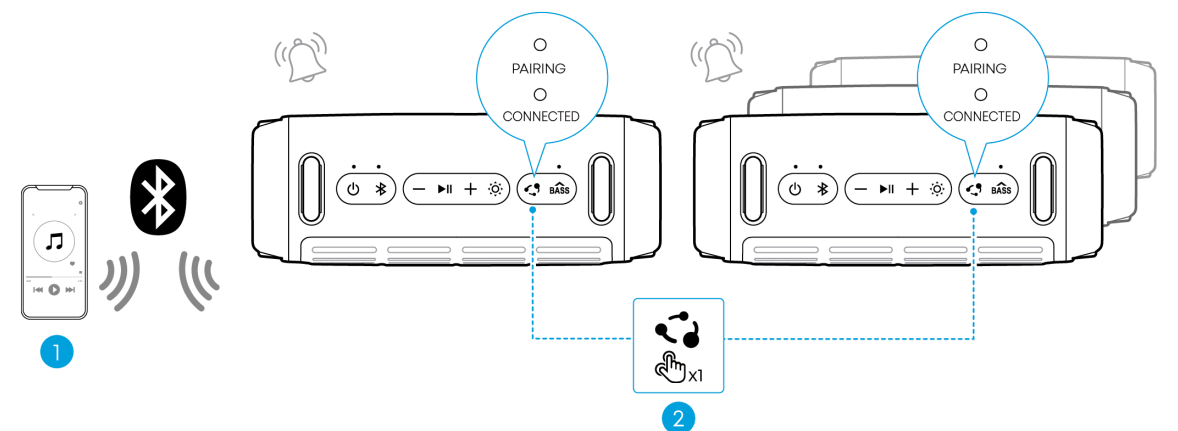
| Press | Enter / Exit PartyCast Pairing Mode | ||
| Steady White | PartyCast Pairing | ||
| Steady White | PartyCast Connected | ||
- With the PartyCast feature, you can link up to 100 Soundcore speakers at the same time.
Light Show
There are 6 dynamic light effects on both sides that move with the rhythm of the music, while 4 additional ambient light effects remain static to enhance the atmosphere. You can switch between different lighting effects to fit your mood or preference.
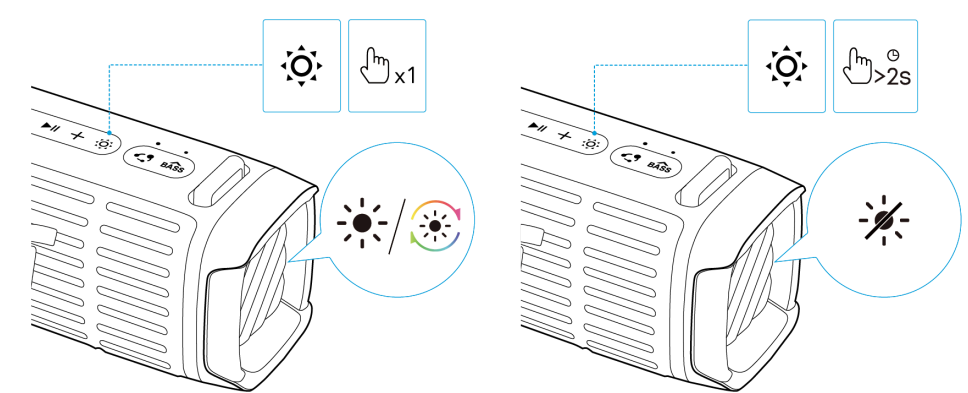
| Press Once or Press Again | Turn Light On / Switch Light Effects | |
| Press and Hold for 2 Seconds | Turn Off |
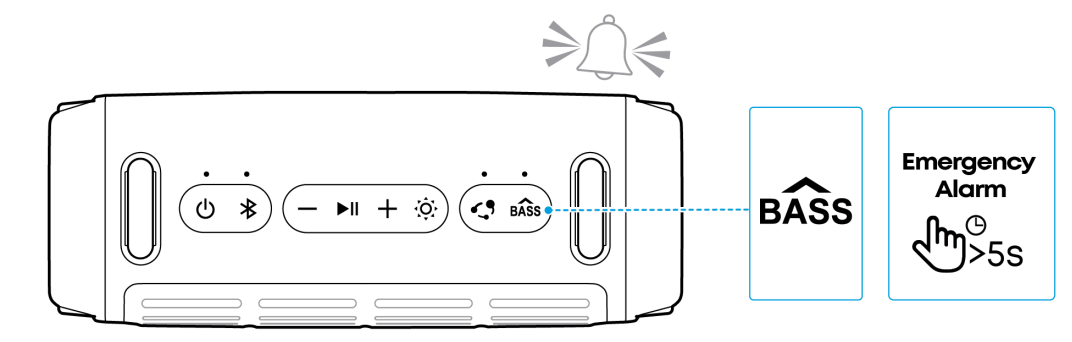
Press and hold the BassUp button for 5 seconds to activate the Emergency Alarm in case of danger. When the alarm is activated, you can press any button on the speaker once to turn it off
- The sound of the Emergency Alarm is very loud and piercing. Do not use this feature unless there is a real emergency, as it may disturb others nearby.
Button Controls
| Press Once | Power On | |
| Press and Hold for 2 Seconds | Power Off | |
| Press | Enter Bluetooth Pairing Mode | |
| Press and Hold for 2 Seconds | Enter / Exit TWS Pairing Mode | |
| Press | Volume Up / Down | |
| Press | Play / Pause | |
| Press Twice | Next Track | |
| Press Three Times | Previous Track | |
| Press Once or Press Again | Turn Light On / Switch Light Effects | |
| Press and Hold for 2 Seconds | Turn Off | |
| Press | Enter / Exit PartyCast Pairing Mode | |
| Press | Enable / Disable BassUp Feature | |
| Press and Hold for 5 Seconds | Activate Emergency Alarm. Press any button on the speaker to turn off the alarm. |
Soundcore App
Download the Soundcore app to enhance your experience.
- Product information: Check the product name and software version, or read the user manual.
- Firmware update: You will be informed once a new version of firmware is detected when you connect the speaker to the app.
- Battery status: Indicates the remaining battery level of your speaker.
- Volume control: Adjust the volume level via the app without pressing the buttons on the speaker.
- EQ settings: There are various preset EQ settings you can choose from in the app to optimize your experience while enjoying different music genres.
- Soundcore Signature: Standard EQ mode optimized for well-balanced sound.
- Treble Boost: High frequencies are enhanced.
- Voice: Voices stand out more clearly from other ambient sounds.
- Balanced: No enhancement for high-frequency and low-frequency sounds.
- Buzz Clean: Activate the Buzz Clean feature in the app, and the speaker will emit sound waves at specific frequencies to help shake off and clean out sand scattered on the speaker.
- Voice Amplifier: Use the app’s Voice Amplifier feature to speak directly through your phone, and your voice will be amplified and played through the speaker.
- White Noise: Use the recommended white noise in the app to create a soothing atmosphere for relaxation or falling asleep.
- Emergency Alarm: Quickly activates an alarm to draw attention in emergencies. You can also use the app to switch between different alarm sounds and adjust the duration of the alarm.
- Set Auto-power off time: The speaker will automatically power off when the time is up.
- Voice prompt: Mute or restore the voice prompt while powering on/o.
Reset
Press and hold the Bluetooth button and volume up button simultaneously for at least 4 seconds to reset the speaker.
Specifications
| Power Input | 5V 3A |
| Battery Capacity | 2400mAh / 10.95V |
| Audio Output Power | 50W |
| Speaker Driver | Woofer ×1 Tweeter ×1 |
| Charging Time | <4H |
| Playtime (varies by volume level and music content) | Up to 16 Hours |
| Waterproof and Dustproof Rating | IP68 |
| Bluetooth Version | V5.3 |
| Bluetooth Range | 30m / 98ft |
| Variable ‘x’ | Range of variables | Content |
| Seventh | 0-9 or A-F | Denotes the hardware version, which does not affect the safety compliance. |
| Eighth | 8,9, A, B, C… | Denotes the year, 8 means 2018, 9 means 2019, A means 2020, B means 2021, C means 2022, and so on. |
| Ninth and tenth | 01,02,03… | Denotes weeks, 01 means the first week in this year, 02 means the second week in this year, and so on. |
| Eleventh | 1-7 | Denotes date, 1 means Monday, 2 means Tuesday…, 7 means Sunday, and so on. |
Customer Support
- Website: https://www.soundcore.com/
- Tel: +1 (800) 988-7973
FAQs
Q: What is the Boom 3i — and what kind of use is it designed for?
The Boom 3i is a sturdy, portable, outdoor Bluetooth speaker designed for activities, such as beach days, visits by the pool, boating, camping, picnics, or any situation where robust sound, water and dust resistance, and durability are crucial.
Q: Is it waterproof/dustproof/rugged enough for outdoor adventures?
Yes, the Boom 3i is completely waterproof and dustproof thanks to its IP68 designation.
Q: How long does the battery last, and how do I charge it?
On a full charge, the Boom 3i can play music for up to 16 hours (usually moderate level, no strong bass/light effects).
Q: Can the speaker float or survive water immersion for pool/beach use?
Yes, its floating playback concept is one of its most unique aspects.
Q: Is the Boom 3i portable and travel‑friendly?
Indeed. It is compact (relative to its power and ruggedness), light enough for easy carry, and includes a detachable strap for portability — you can sling it on a backpack, hang it on a hook, or carry it by hand.
Q: Does it need any special maintenance after outdoor use (water, sand, dust)?
It can withstand water, sand, and dust without suffering rapid harm thanks to its IP68 rating and saltwater-resistant covering.
Q: Can I pair the Boom 3i with multiple devices?
Indeed. You can connect two devices at once because the speaker enables multi-device pairing.