



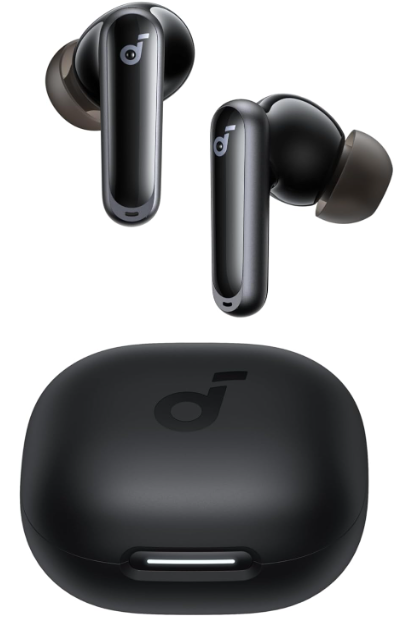
Soundcore P40i Noise Cancelling Wireless Earbuds Overview
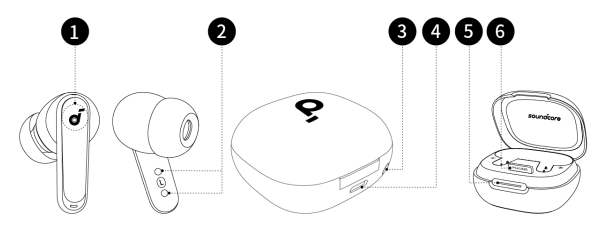
- Touch Control Area
- Charging Contactors
- Reset Button
- USB-C Charging Port
- LED Light Strip
- Phone Stand
Wearing
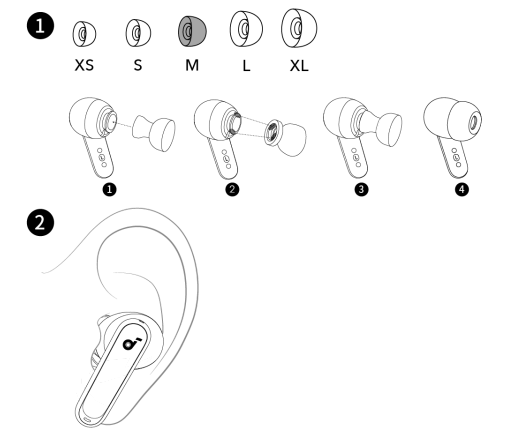 Choose the ear tips that fit your ears best and take a fit test in the Soundcore app to ensure you get the best ANC performance.
Power On & Off
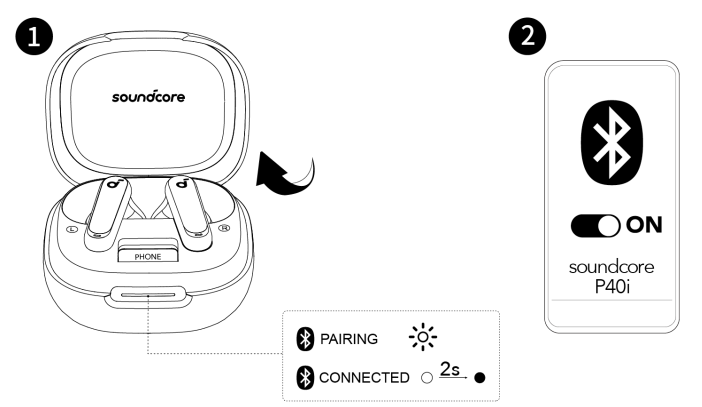
Open the charging case, and the earbuds will automatically power on and enter Bluetooth pairing mode. Select “Soundcore P40i” from your device’s Bluetooth. List when connecting for the first time.
When pairing, the LED light strip will start flashing white slowly. After the pairing is successful, the LED light strip will stay on for 2 seconds and then go off.
Charging

- Place the earbuds in the charging case and close it.
- Fully dry off the earbuds and the USB-C charging port before charging.
- Connect the charging case to a power supply by using a certified USB-C charging cable. Alternatively, position the charging case at the centre of your wireless charger for wireless charging.
Dual Connections
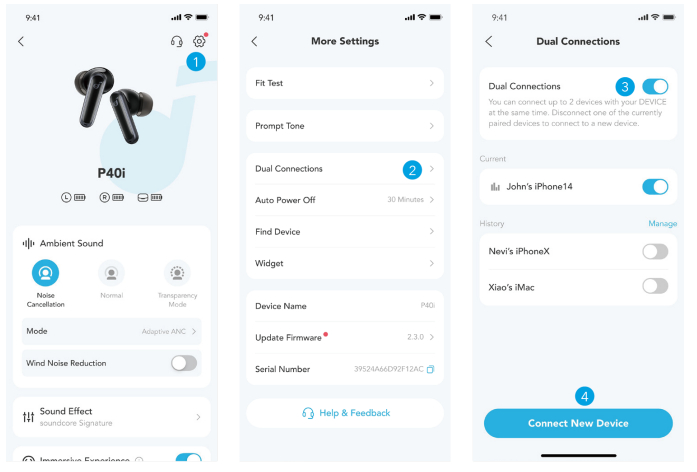 To connect the earbuds with two Bluetooth devices at the same time, first open the Soundcore app, go to settings and select Dual Connections > Enable Dual Connections > Connect New Device. After completing the app configuration, wear the earbuds, then press and hold the touchpad on both earbuds for 3 seconds simultaneously.

Manual Pairing
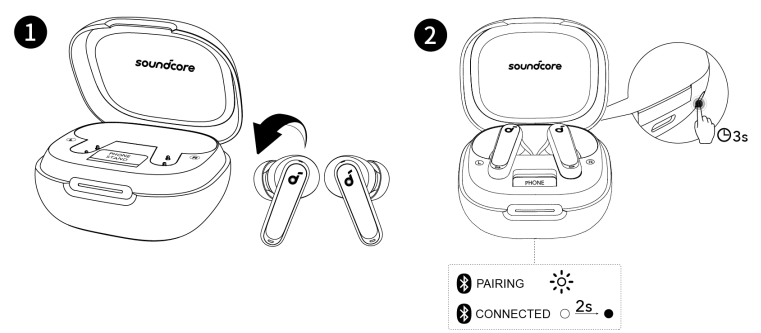
To manually enter Bluetooth pairing mode, place the earbuds in the charging case and leave the case open. Press and hold the reset button behind the charging case for 3 seconds until the LED light strip flashes white rapidly.
Controls
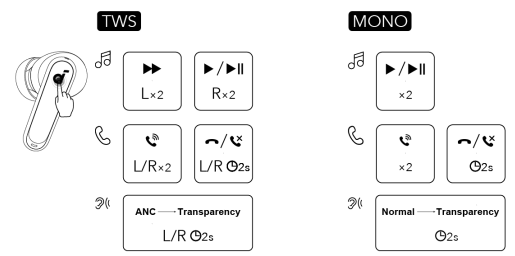
×1: Tap once ×2: Tap twice 2s: Tap and hold for 2 seconds\ You can also customize controls in the soundcor app
Ambient Sound
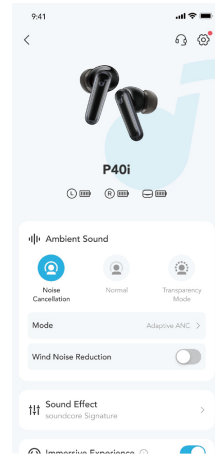
You can select noise cancellation, normal, or transparency mode in the Soundcore app.
- Adaptive ANC: Optimise noise cancellation by adapting to your ears and environment.
- Transparency: Stay aware of your surroundings while listening to music.
Power Off

To power off, return the earbuds to the charging case and close it.
Reset

Place the earbuds in the charging case and leave the case open. Press and hold the reset button behind the charging case for 10 seconds until the LED light strip flashes white rapidly three times.
LED Light


Firmware Update
 You will be informed once a new firmware version is detected when you connect the earbuds to the app. Ensure the earbuds are placed in the charging case, and the case remains open until the firmware update is complete. During the update, ensure the earbuds are being charged and avoid
Specifications
are subject to change without notice
| Input | 5V 0.8A |
| Output | 5V 0.34A |
| Battery capacity | 60mAh*2 (earbuds) +800mAh (charging case) |
| Playtime (with ANC off) | 12 hours / 60 hours |
| Playtime (with ANC on) | 10 hours / 50 hours |
| Charging time | Full Charging Time (charging case) for earbuds: 1 hour, Full Charging Time (type C) for charging case: 3 hours |
| Driver unit | 11 mm dynamic driver |
| Frequency response | 20Hz – 20kHz |
| Impedance | 14Ω |
| Waterproof rating (earbuds) | IPX5 |
| Bluetooth version | 5.3 |
| Bluetooth range | 10m |
Customer Support
- Website: https://www.soundcore.com/
- Tel: +1 (800) 988-7973
FAQs
Q: What kind of noise-cancelling does P40i offer?
The P40i’s adaptive ANC (Active Noise Cancelling) reduces background noise by automatically detecting ambient noise and adjusting the cancellation intensity. This feature makes it ideal for noisy situations, workplaces, and commutes.
Q: How long is the battery life — both earbuds and case?
The earphones have a battery life of roughly 12 hours on a single charge. They are ideal for long listening sessions or prolonged trips because they have a 60-hour total playtime when the charging case is included.
Q: What kind of sound and audio drivers does P40i have?
The P40i has 11 mm composite drivers and the brand’s BassUpTM technology, which produces an immersive sound profile and rich, strong bass that is particularly useful for music with a lot of bass.
Q: Can I use P40i for phone calls or video chats?
Yes, the P40i’s six built-in microphones and AI-based processing enhance call quality and lower background noise, making it easier for you to speak clearly during meetings or calls.
Q: Are the earbuds water- or sweat-resistant?
Although you shouldn’t submerge them, they can withstand light rain or an exercise session because to their IPX5 water-resistance classification, which makes them sweat and splash-resistant.
Q: Do they support multipoint or quick pairing?
Yes, you can pair the P40i with two devices at once because it supports multipoint connections. Additionally, they facilitate normal Bluetooth fast pairing.
Q: Can I customise the sound or adjust EQ?
Yes, you may utilise personalised sound tuning (HearID) or custom EQ to mould the sound to your tastes using the companion software (such as the Soundcore app).
2 Comments
Your article helped me a lot, is there any more related content? Thanks! https://accounts.binance.info/register-person?ref=IXBIAFVY
I don’t think the title of your article matches the content lol. Just kidding, mainly because I had some doubts after reading the article. https://www.binance.info/register?ref=IXBIAFVY