



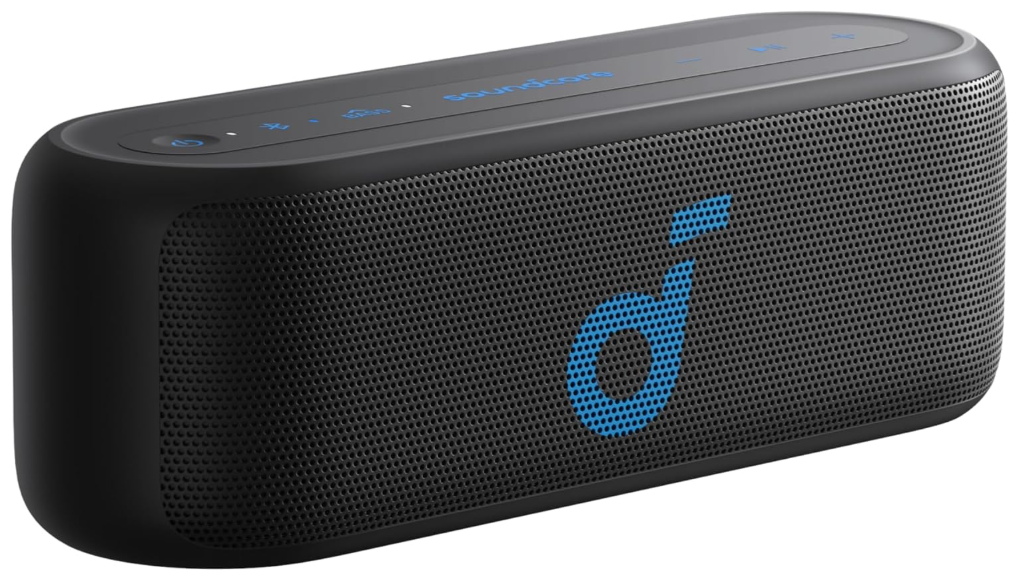
Soundcore Select 2S Portable Bluetooth Speaker Description
Front & Back 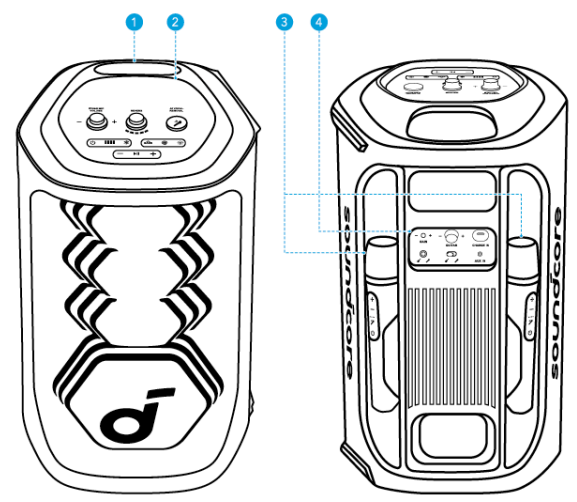
| 1 | Handle | 3 | Wireless Microphones (×2) |
| 2 | Top Panel | 4 | Back Panel |
Top Panel 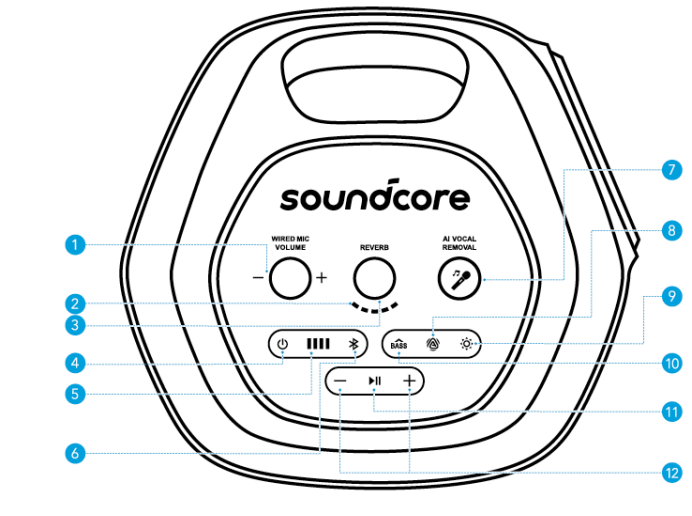
- Wired Mic Volume Control: Adjust the volume of your wired microphone.
- Reverb Control: Rotate clockwise / counterclockwise to increase/decrease the amount of reverb applied to your microphone or audio source.
- Reverb Level Indication: Display the current reverb applied to your microphone or audio source.
- Power Button: Turn the device on or off.
- Battery Indicator: Display the battery level of the device.
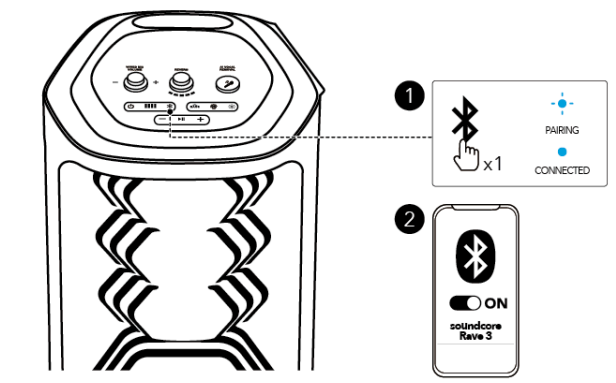
- Bluetooth Button: Press to enter Bluetooth pairing mode.
- AI Vocal Removal: Press to remove the original vocals from the song, leaving only the accompaniment. Press again to restore the vocals.
- AuraCast Button: Press to enable the AuraCast feature.
- LightShow Button: Press to turn the light effect on or off.
- BassUp Button: Press to enhance the low frequency of the audio source.
- Play/Pause Button: Press once to play/pause the audio source. Press twice to skip to the next track. Press three times to skip to the previous track.
- Volume Up and Volume Down Buttons: Press to turn up or down the volume of the audio source.
Back Panel
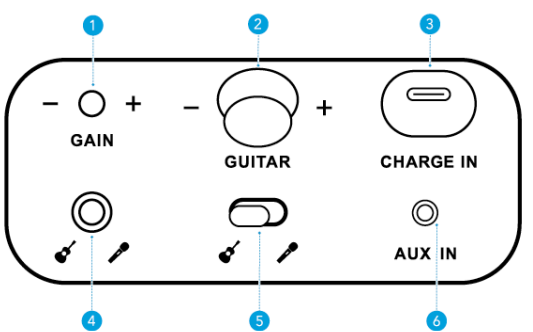
- Gain (Guitar): Adjust the gain of the connected guitar.
- Guitar Volume Control: Rotate clockwise / counterclockwise to increase/decrease the volume of the connected guitar.
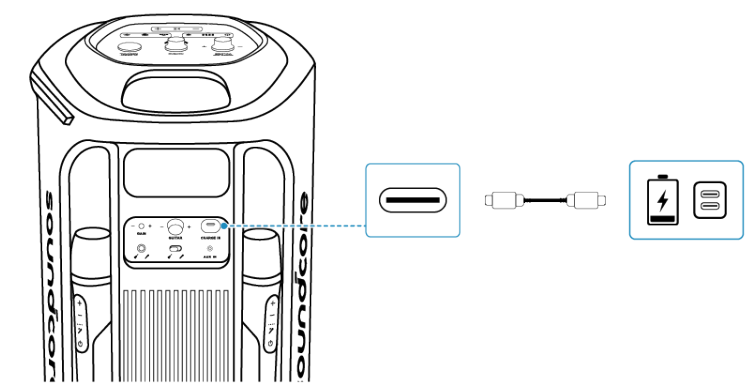
- USB-C Charging Port: Plug in the provided USB-C cable to charge the device.
- Guitar / Microphone Socket (6.5mm): Connect to a guitar or wired microphone.
- Input Switch Toggle: Switch to the connected guitar or microphone input.
- AUX IN: Connect to an external audio device through a 3.5 mm audio cable (not supplied).
Charging
Charging Your Speaker
Use a certified C-C cable and charger to prevent any damage.
| Press | Enter Bluetooth Pairing Mode | |
| Flashing Blue | Bluetooth Pairing | |
| Steady Blue | Bluetooth Connected |
Powering On/Off 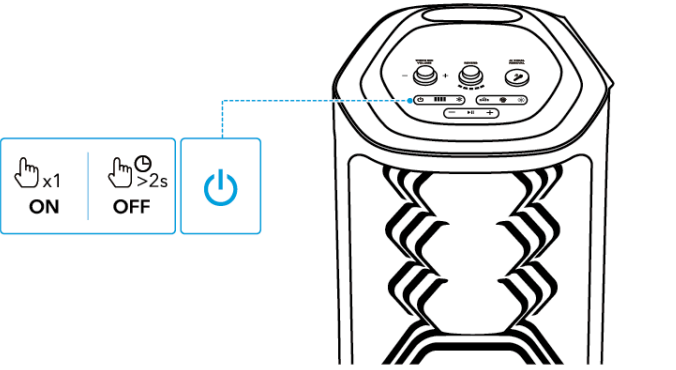
| Press Once | Enter / Exit TWS Pairing Mode | |
| Steady White | TWS Pairing | |
| Steady White (Speaker 1) | TWS Connected | |
| Steady White (Speaker 2) |
- This speaker will power off automatically after 20 minutes of no audio input.
- You can also set an auto-power-off time in the Soundcore app.
Using Your Speaker
Bluetooth Mode
Press the Bluetooth button to enter Bluetooth pairing mode, then select “Soundcore Rave 3” from your device’s Bluetooth list to connect.
| Press Once | Power On | |
| Press and Hold for 2 Seconds | Power Off | |
| Press | Mic Volume Up / Down | |
| Press | Adjust Vocal Removal Level |
- To re-enter Bluetooth pairing mode, press the Bluetooth button once.
- This speaker can only play music on one mobile device at a time. To play from another connected device, pause the device that’s currently active first.
- Each time you power on your speaker, it will automatically connect to your last connected device if available within the Bluetooth range. If not, press the Bluetooth button to enter Bluetooth pairing mode.
TWS (True Wireless Stereo) Mode
- Two identical Soundcore speakers can pair with each other for stereo sound. Both speakers can play the same audio (one as the left channel and the other as the right channel).
- With one speaker connected to a smartphone or tablet, press the AuraCast button simultaneously on both speakers to enter TWS pairing mode, powered by
- AuraCast technology.
- Upon successful pairing, you will hear a sound prompt. Then, Thendouble-presss the AuraCast button on either speaker to assign the left and right audio channels.
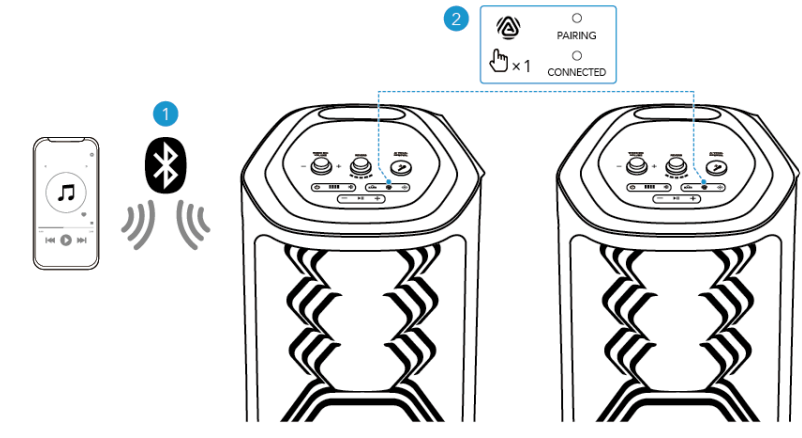
| Press Once | Enter / Exit AuraCast Pairing Mode | |
| Steady White | AuraCast Pairing | |
| Steady White | AuraCast Connected |
AuraCast
With one speaker connected to a smartphone, press the AuraCast button on up to 10 Soundcore speakers with AuraCast function to synchronise audio and light.
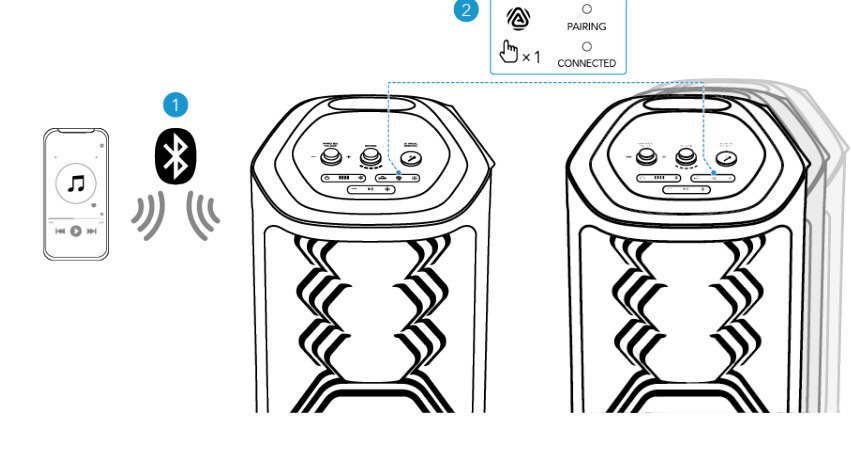
- When you enable or disable the AuraCast feature, you will hear a notification sound.
Using the Wireless Microphones 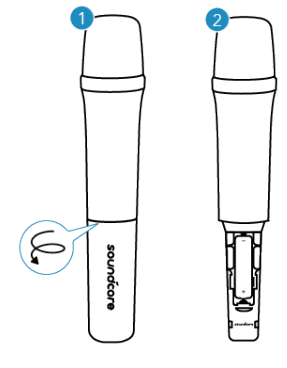
- Unscrew the battery cover.
- Install two AA batteries.
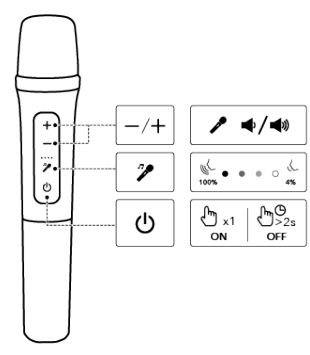
| Press Once | Power On | |
| Press and Hold for 2 Seconds | Power Off | |
| Press | Mic Volume Up / Down | |
| Press | Adjust Vocal Removal Level |
- Once you power on the wireless microphones, they will automatically connect to the speaker.
- The AI VOCAL REMOVAL button on the speaker can remove the original vocal from a song with just one press. While the AI Vocal Rembutton, the wireless microphone allows for adjustable vocal retention, ranging from 4% to 100%.
- Once the vocal removal level is set on the microphone, the speaker will remember this setting even after restarting. This ensures that when you activate the vocal removal feature on the speaker, the vocal removal effect will match the level set on the microphone.
Guitar / Wired Microphone Connection 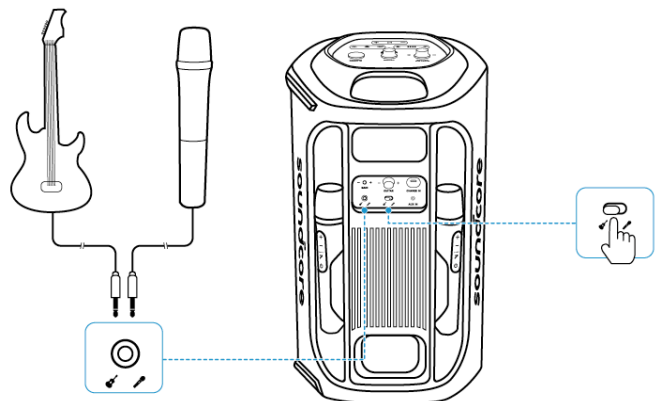
Connect a microphone or guitar to the speaker through 6.5mm audio cables (not supplied).
- After connecting a microphone or guitar to the speaker, make sure to set the toggle switch to the correct sound input.
LightShow
The LED lights change with the rhythm of the music.
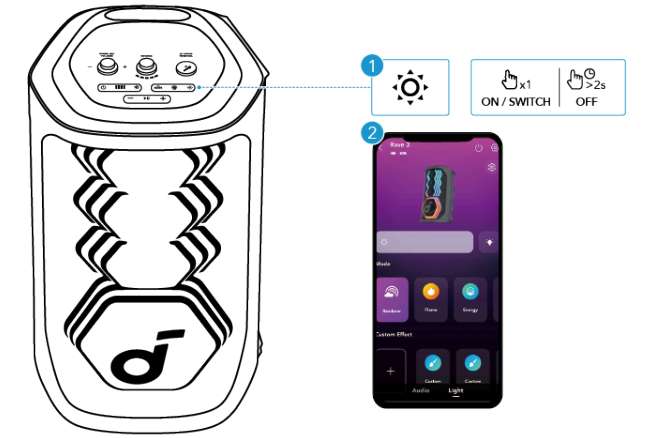
| Press Once or Press Again | Turn Light On / Switch Light Effect | |
| Press and Hold for 2 Seconds | Turn Off |
- You can also select your preferred light effect, or customise the pattern and brightness in the Soundcore app.
Soundcore App
Download the Soundcore app to enhance your experience.
- Product Information: Verify the product name and software version, or refer to the user manual for details.
- Firmware update: You will be informed once a new version of firmware is detected when you connect the speaker to the app.
- Battery status: Indicates the remaining battery level of your speaker.
- Volume control: Adjust the volume level via the app without pressing the buttons on the speaker.
- EQ settings: There are various preset EQ settings you can choose from in the app to optimise your experience while enjoying different music genres
- Soundcore Signature: Standard EQ mode optimised for well-balanced sound.
- Voice: Voices stand out more clearly from other ambient sounds.
- Treble Boost: High frequencies are enhanced.
- Balanced: No enhancement for high-frequency and low-frequency sounds.
- Set auto-power-off time: Set an auto-power-off time. The speaker will automatically power off when the time is up.
- Voice prompt: Mute or restore the voice prompt while powering on/off.
Reset
Press and hold the Bluetooth button and volume up button simultaneously for 8 seconds to reset the speaker.
Specifications
| Charge Input | 5V⎓3A |
| Battery Capacity | 4900mAH/7.3V |
| Audio Output Power | 160W |
| Speaker Driver | 6.5″ Woofer 2.5″ Full-Range ×3 |
| Frequency Response | 45Hz-20kHz |
| Charging Time | 6H |
| Play Time (varies by volume level and music content) | Up to 12H |
| Bluetooth Version | 5.3 |
| Bluetooth Range | 50m |
Customer Support
- Website: https://www.soundcore.com
- Tel: +1 (800) 988-7973
FAQs
Q: Is the Soundcore Select 2S waterproof?
Indeed. Because of its IPX7 waterproof classification, the Select 2S can survive being submerged in water up to one metre deep for up to thirty minutes.
Q: How long does the battery last on a full charge?
Depending on usage and volume level, the speaker can play for up to 20 hours on a single charge.
Q: Does the Select 2S support stereo or multi-speaker pairing?
Indeed. You can use PartyCast to connect several compatible Soundcore speakers or couple two Select 2S speakers for real stereo sound.
Q: What Bluetooth version does it use?
It takes advantage of Bluetooth 5.0, which offers a more reliable connection and a greater streaming range.
Q: Can I use it as a speakerphone for calls?
Indeed. You can make clear audio hands-free calls thanks to the integrated microphone.
Q: How long does it take to fully charge the speaker?
Using a USB-C cable, a full charge usually takes three hours.
Q: Does it support USB-C charging?
Indeed. A contemporary and practical USB-C port is used to charge the Select 2S.
Q: Can the Soundcore Select 2S be used while charging?
Absolutely. As long as the speaker is plugged in, you can keep playing music.