


 Soundcore Sleep A20 Wireless Sleeping Earbuds

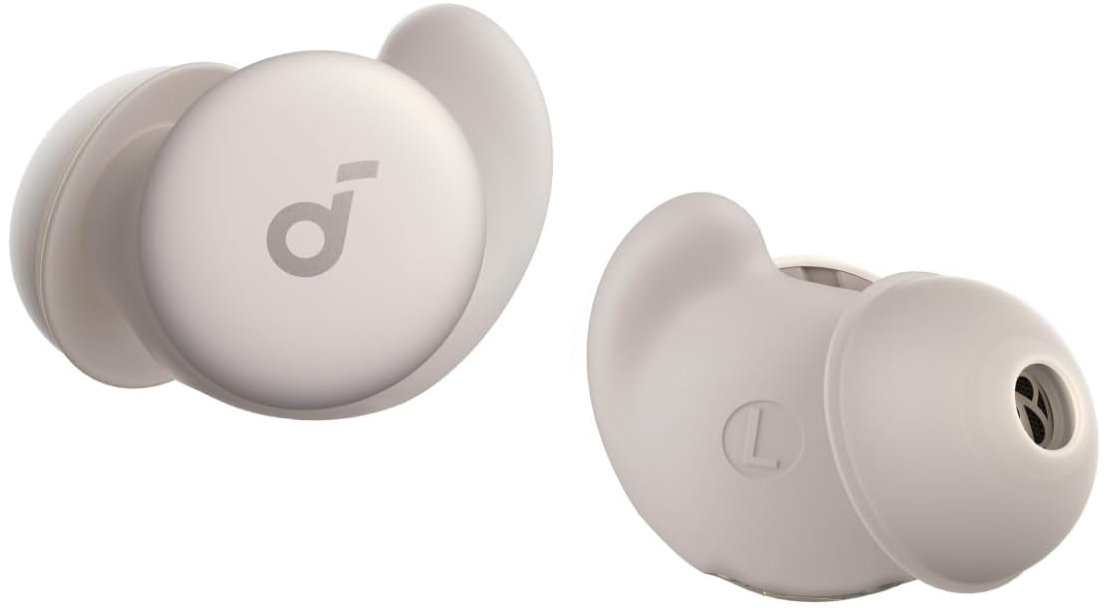
Wearing

- Choose the ear tips and ear wings that fit your ears best.
- The earbuds come with the M sizes of ear tips and ear wings pre-installed.
- Please note that the Sealed Eartips are for noise blocking, while the Breathable Eartips allow for more airflow (no noise blocking effect).
- To better block out noises, insert the earbuds into your ear canals and turn gently until the ear wings are wedged against your ear ridges.
Charging
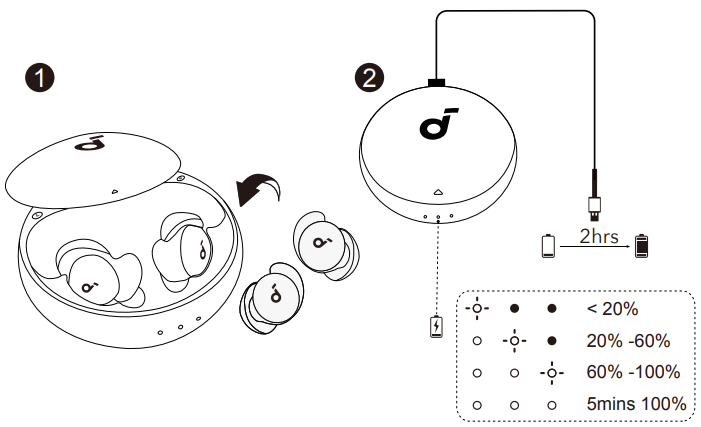
- Place the earbuds in the charging case and close it.
- Fully dry off the earbuds and the USB charging port before charging.
- Connect the charging case to the power supply by using the provided USB-C charging cable.
- It is recommended that you charge the earbuds with a 5V charger (not included).
- Fully charge both the earbuds and the charging case before first use.
Power On
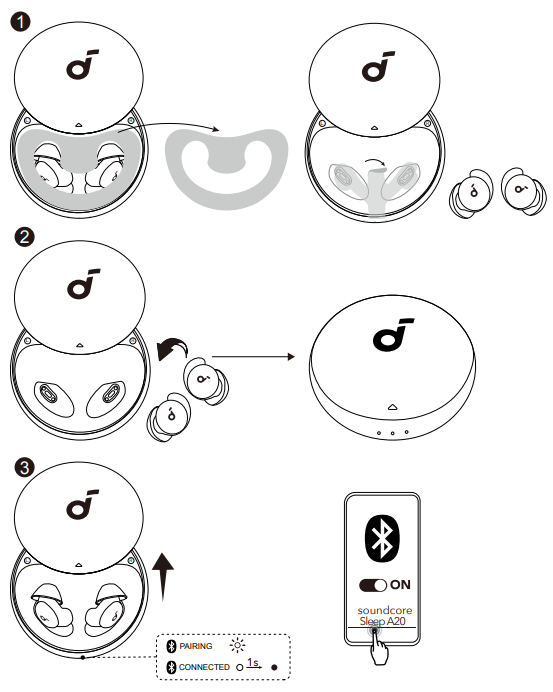
After removing the insulation stickers on the earbuds, return the earbuds to the charging case, then activate Bluetooth pairing by closing and reopening the case lid. Subsequently, the earbuds will automatically power on and enter Bluetooth pairing mode. Select “Soundcore Sleep A20” on your device’s Bluetooth list to connect. When pairing, the second LED indicator on the charging case will start flashing. After the pairing is successful, the second LED indicator will stay on for 1 second and then go off.
Other Devices
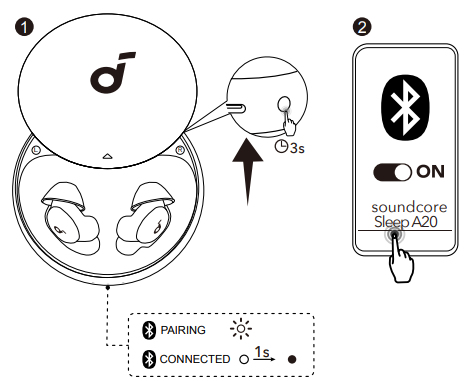
Place the earbuds in the charging case and leave the case open. Press and hold the button on the charging case for 3 seconds to enter pairing mode.
Selecting a Listening Mode

Switch between Bluetooth mode and Sleep mode by double-tapping the left earbud, or toggle Sleep mode on or off in the app. Tap controls can also be customized via the app.
- Bluetooth Mode: Connect to other apps to stream your favourite audio content.
- Sleep Mode: Listen to the soothing sounds downloaded onto your earbuds, and enjoy your rest without interruptions from phone notifications.
Sleep Timer and Smart Switch
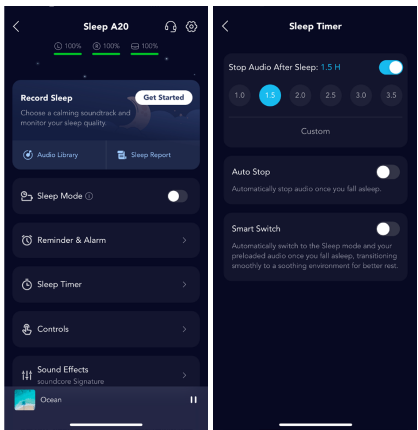
- Sleep Timer
- Customize the playback duration.
- Stop Audio After Sleep (Bluetooth and Sleep Modes)
- Set the audio to automatically stop after 1 to 8 hours, in 30-minute intervals.
- Auto-Stop (Bluetooth and Sleep Modes)
- Automatically stops audio once it detects that you are asleep.
- Smart Switch (Sleep Mode)
- Enable this feature to automatically switch from Bluetooth mode to Sleep mode when you fall asleep.
Audio Library

In Audio Library, you can listen to brainwave audio or create and stream white noise mixes for noise masking, sleep, or meditation in Bluetooth mode. You can also transfer selected audio to your earbuds for instant playback when powered on.
How to Transfer White Noise
- Go to Audio Library on the home page.
- Tap White Noise.
- Select your preferred sounds and mix up to 3 tracks.
- Adjust the volume of each track in the player settings.
- Confirm the mix and transfer it to your earbuds.
Supported Audio Types
- Built-in white noise tracks
- Custom white noise mixes
- Audio downloads are only available in Bluetooth mode. The downloaded audio files can be used offline in Sleep mode.
Sleep Monitoring

- Sleep Monitoring
- The earbuds track your sleep, including stages, positions, and movements, delivering a detailed report on your sleep patterns.
Two Ways to Track Your Sleep
- Manual Tracking via App (Bluetooth Mode)
- Use Record Sleep to track sleep during specific periods. Set your wake-up time and alarm for an immersive experience.
- Automatic Tracking via Earbuds (Bluetooth and Sleep Modes)
- The earbuds use built-in sensors and algorithms to detect when you fall asleep and automatically track your data.
How to Track Your Sleep with the App

- Tap Record Sleep to begin the setup.
- Set Alarm and Sleep Audio.
- To start, tap Done and keep the app running to play sleep audio.
- To stop, press and hold the button for 10 seconds. You can then view your detailed sleep report.
Smart Volume
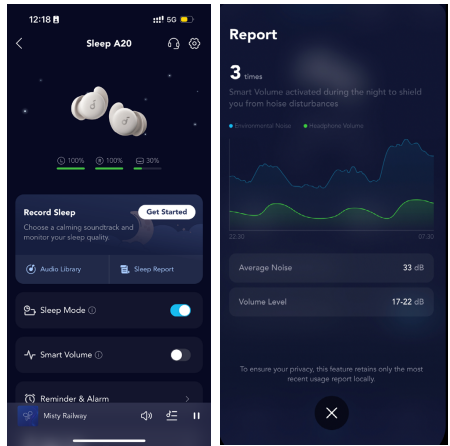
In Sleep mode, your phone’s microphone detects changes in ambient noise. When there’s a persistent increase or decrease in noise levels, the audio volume adjusts automatically, providing a noise-masking effect that adapts to your environment.
Controls
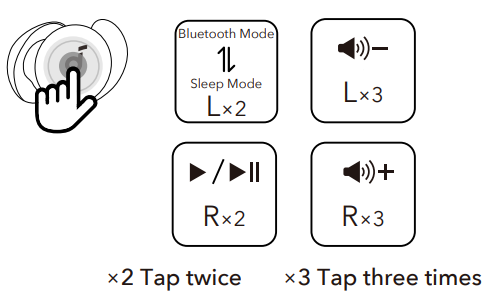
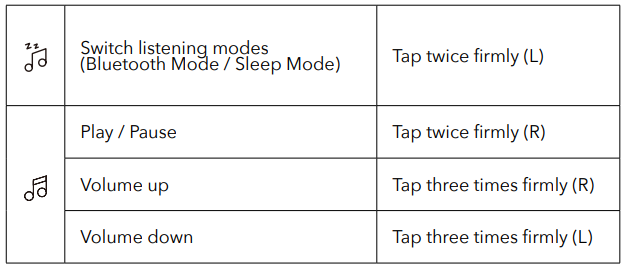
- Please note that you need to tap with a bit of force for the earbuds to recognize the command.
- You can customize more controls in the Soundcore app. When using dual earbuds, if you modify UI, it will also be effective when using a single earbud. Vice versa.
Power Off
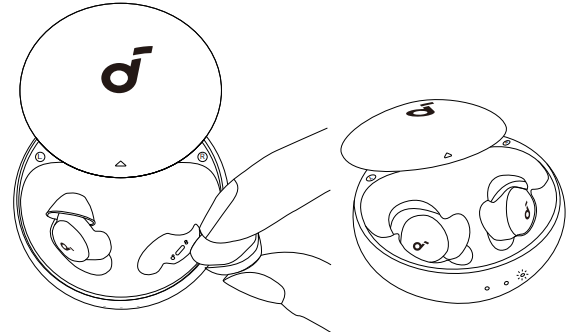
To power off, place the earbuds in the charging case by aligning the charging contacts of both the earbuds and the charging case, and then close the lid. Once the corresponding earbud is back into the case, the first (left earbud) or the third LED indicator (right earbud) will stay on for three seconds and then go off.
Reset
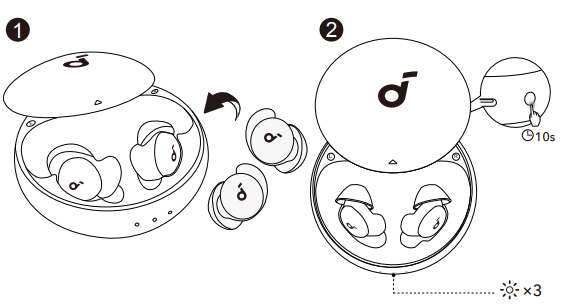
Reset if the earbuds have issues pairing with each other or with other devices. Delete the pairing history from your Bluetooth device first. Place the earbuds in the charging case and leave the case open. Press and hold the button on the charging case for 10 seconds until the LED indicators rapidly flash white 3 times.
LED Light
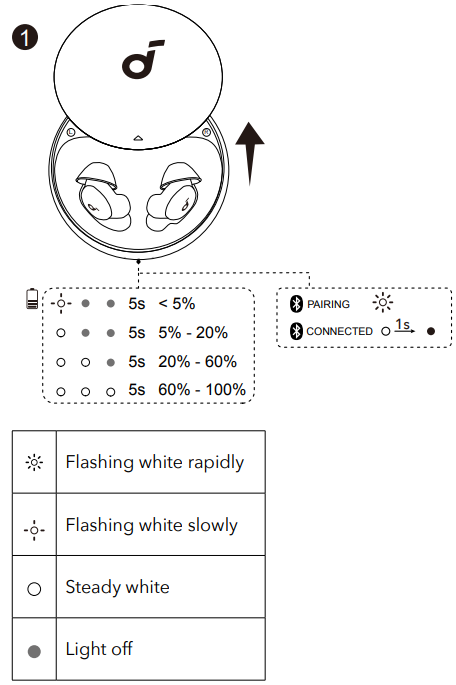
Firmware Update
You will be informed once the new version of firmware is detected when you connect the earbuds to the app. Ensure the earbuds are placed in the charging case, and the case remains open until the firmware update is completed. During the update, ensure the earbuds are being charged and avoid any usage.
Cleaning
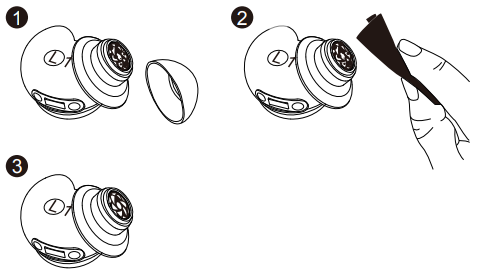
Dust, earwax, or other debris can accumulate in the earbuds. To maintain optimal sound quality, regularly clean your earbuds by using a cotton swab slightly moistened with rubbing alcohol to gently wipe the metal mesh filter under the rubber ear tips.
Specifications
Specifications are subject to change without notice.
| Input | 5V/0.45A |
| Rated output power | 5V/0.088A (0.044A) |
| Battery capacity | 580mAh/2.158Wh |
| Charging time | 2h |
| Playtime (Bluetooth Mode) | 10h |
| Playtime (Sleep Mode) | 14h |
| Frequency response | 20~20000Hz |
| Impedance | 16ohm |
| Waterproof level (Earbuds) | IPX4 |
| Bluetooth version | BT5.3 |
| Bluetooth range | 10m |
Phone call function is not supported on Soundcore Sleep A20. Please use your mobile phone to answer a
call.
Customer Support
- Website: https://www.soundcore.com/
- Tel: +1 (800) 988-7973
FAQs
Q: What are Sleep A20 earbuds, and who are they for?
The Sleep A20 are true wireless earbuds with a sleep focus that are mainly intended for usage before bed. They cater to those who wish to track their sleep, listen to white noise or calming sounds, or block out noise (such as snoring, city noises, roommates, or family) without using heavy headphones or over-ear devices.
Q: Do they have active noise cancelling (ANC)?
No, active noise cancellation is not used by the Sleep A20. Rather, they rely on a passive “noise-masking” design with unique ear tips (known as Twin-Seal ear tips) designed to enhance comfort by passively blocking some background noise.
Q: Are they comfortable to wear while sleeping — even for side sleepers?
Yes, the A20S’s low profile, soft materials, and 3D ergonomic shape prevent them from pressing against your ear or becoming uncomfortable when you’re resting on your side. Because of this, they are far more appropriate for use overnight than regular earphones.
Q: What kind of sounds can they play to help me sleep?
They come with an integrated library of sounds that are conducive to sleep, like as ambient noises, rain, and white noise, which can be accessed via the companion app. If you like music, audiobooks, or other audio, you may also use Bluetooth to stream your own content.
Q: What if I want to stream music or podcasts instead of sleep sounds — is that possible?
Yes, the Sleep A20 work similarly to standard wireless earbuds in Bluetooth mode, allowing you to stream music from your phone or other device.
Q: Can I set an alarm through them?
Yes, you can use the app to set an alarm that will use the earbuds to wake you up. In this manner, you can use your sleep soundtrack without bothering other people.
Q: Are the Sleep A20 suitable for daily listening (music, podcasts) or calls?
They don’t have a microphone or call-optimized technology because they are meant to be used for sleep and relaxation, but they may be used for music and podcasts over Bluetooth.
2 Comments
Your point of view caught my eye and was very interesting. Thanks. I have a question for you.
Thanks for sharing. I read many of your blog posts, cool, your blog is very good. https://www.binance.info/si-LK/register?ref=LBF8F65G