


 Soundcore Sport x10 True Wireless Headphones


Charging
- Fully dry off the earbuds and the USB port before charging.
- Use a certified USB-C charging cable and charger to prevent any damage.
- Fully charge both the earbuds and the charging case before first use.

- Place the earbuds in the charging case and close it.
- Connect the charging case to the power supply by using a USB-C charging cable.
- The LED indicator on the charging case indicates the charging status.
Wearing
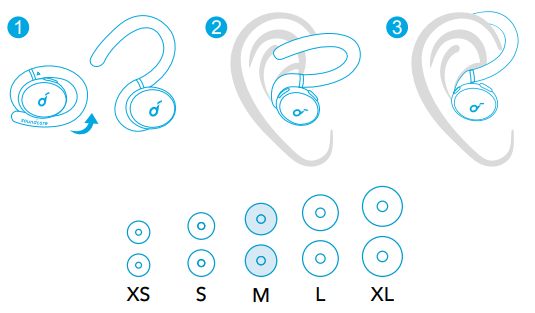
- Choose the Ear Tips that fit your ears best.
- Insert the earbuds into the inner canal of your ears and turn gently until you find the most comfortable and secure position.
Your earbuds come with 5 pairs of Ear Tips, among which the Medium-sized are pre-installed.
Powering On/Off
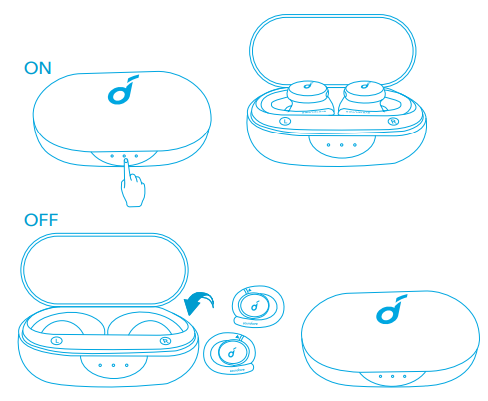
- Open the charging case, and the earbuds will automatically power on.
- To power off, place the earbuds into the charging case and close it.
- The earbuds will automatically power off after 10 minutes if no device is connected.
- To manually power on, press and hold the multi-function button on both earbuds for 3 seconds.
Bluetooth Pairing
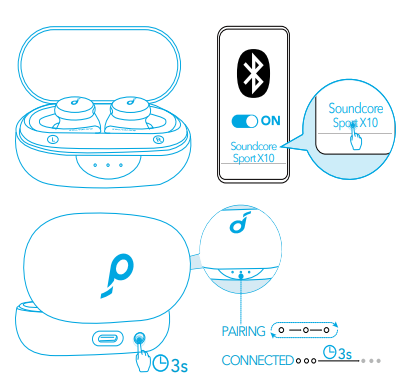
- Open the charging case, and press the button on the charging case for 3 seconds to enter Bluetooth pairing mode.
- The 3 LED indicators on the charging case will flash white in sequence continuously.
- Select “Soundcore Sport X10” on your device’s Bluetooth list to connect.
- When successfully connected, the 3 LED indicators will turn white for 3 seconds and then turn off.
Pairing with another device
- Place the earbuds in the charging case and leave the case open. To enter pairing mode, press and hold the button on the case for 3 seconds until the 3 LED indicators flash white in sequence continuously.
- Each time you power on your Soundcore earbuds, they will automatically connect to your last successfully connected device if available within the Bluetooth range.
Mono mode
- When Bluetooth is connected, you can use either one of the earbuds by placing the other one into the charging case.
- When powered on and connected, if either one of the earbuds is out of battery and powered off, you can keep using the other one.
- When you are on a call, place either one of the earbuds into the charging case, and the microphone in the other earbud will be activated.
Controls
Stereo Mode
| Play/Pause | Press twice (R) |
| Next track | Press twice (L) |
| Volume up | Press once (R) |
| Volume down | Press once (L) |
| ANC | Press and hold for 2 seconds(R/L) |
| Answer a call | Press once(R/L) |
| End a call/Reject a call | Press and hold for 2 seconds(R/L) |
Mono Mode
| Play/Pause | Press twice |
| Answer a call | Press once |
| End a call/Reject a call | Press and hold for 2 seconds |
| Activate Siri or other voice assistant software |
Reset
You might need to reset the earbuds if you experience any connectivity problems or function issues.

- Place the earbuds in the charging case and leave the case open.
- Press and hold the button on the charging case for 10 seconds until the LED indicators on the case flash white 3 times and then flash in sequence. This confirms that the reset was successful and your earbuds can be connected normally.
Soundcore App
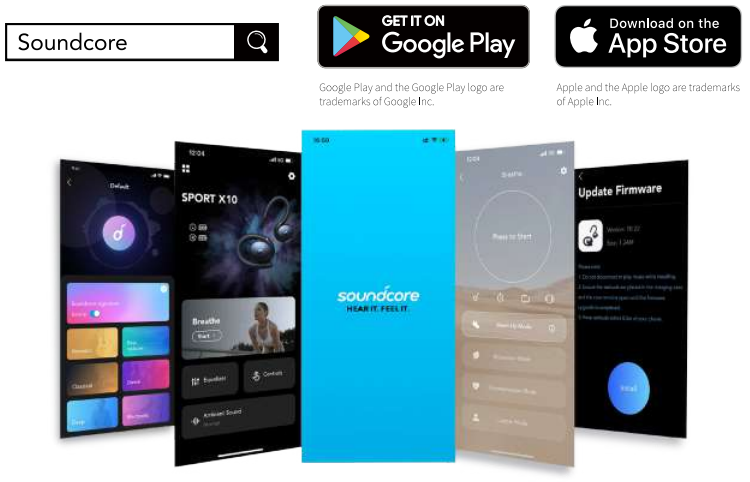
Download the Soundcore App to customise the user interface (e.g. adjust volume, control playback, activate Siri), adjust EQ, switch ANC modes, update firmware, and explore more.
Specifications
Specifications are subject to change without notice.
| Input | 5 V 0.5 A |
| Rated output power | 5 mW (@1% THD) |
| Battery capacity | 55 mAh x 2 (earbuds); 540 mAh (charging case) |
| Charging time | 2 hours |
| Playtime (varies by volume level and content) | Up to 8 hours (Total 32 hours with the charging case) |
| Driver size | 10 mm x 2 |
| Frequency response | 20 Hz – 20 kHz |
| Impedance | 32 Ω |
| Waterproof level | IPX7(earbuds) |
| Bluetooth version | 5.2 |
| Bluetooth range | 10 m / 33 ft |
Customer Support
- Website: https://www.soundcore.com/
- Tel: +1 (800) 988-7973
FAQs
Q: What makes the Soundcore Sport X10 suitable for sports and workouts?
The Sport X10 is made for people who lead active lives. Its IPX7 water-resistance grade guarantees defence against perspiration and precipitation. Its lightweight design reduces fatigue during extended exercises, and its ergonomic ear hooks hold the earbuds firmly in place throughout strenuous activity.
Q: How long does the battery last on a single charge?
The earbuds can play music continuously for up to 7 hours, and the charging case extends that time by 21 hours, for a total of 28 hours of listening. With just ten minutes in the case, quick charging allows for 1.5 hours of listening.
Q: Can I use just one earbud at a time?
Absolutely. While on calls or working out, you may remain aware of your surroundings because each earbud functions separately in mono mode.
Q: Are these headphones good for phone calls?
Indeed. The Sport X10 delivers clear and crisp voice calls even in busy surroundings, thanks to its twin microphones and AI-powered noise reduction.
Q: Can I customise the sound?
Indeed. For best results, you can upgrade the firmware, change between preset modes (such as Bass Boost or Treble Boost), and modify the EQ settings using the Soundcore app.
Q: Are they compatible with all devices?
Indeed. Smartphones, tablets, computers, smart TVs, and other devices that enable Bluetooth audio can all be used with the Sport X10.
Q: Do they support gaming mode?
Indeed. When playing games on a mobile device or watching videos, a low-latency gaming mode reduces audio lag and guarantees that sound is exactly timed to the action.