Close Menu
onyxguides.comonyxguides.com

    Subscribe to Updates

    Get the latest creative news from FooBar about art, design and business.

    What's Hot

    Harman Kardan OMNI BAR Plus Bluetooth Soundbar User Manual

    January 14, 2026

    Aurzen D1R Roku TV Bluetooth Smart Projector User Manual

    January 13, 2026

    Aurzen EAZZE D1 MAX 1000 ANSI Lumens Projector User Manual

    January 12, 2026
    Facebook X (Twitter) Instagram
    onyxguides.comonyxguides.com
    Facebook X (Twitter) Instagram Pinterest
    • Home
    • About us
    • Terms & Conditions
    • Privacy Policy
    • FAQs
    • Contact us
    onyxguides.comonyxguides.com
    Home » Tribit IC-BTS25 MAXSound Plus Wireless Speaker User Guide
    Other

    Tribit IC-BTS25 MAXSound Plus Wireless Speaker User Guide

    By Gabriel SmithDecember 26, 2025No Comments5 Mins Read
    Facebook Twitter Pinterest LinkedIn Tumblr WhatsApp Telegram Email
    Tribit-IC-BTS25-MAXSound-Plus-Wireless-Speaker-featured
    Share
    Facebook Twitter LinkedIn Pinterest Email

    tribit-logo

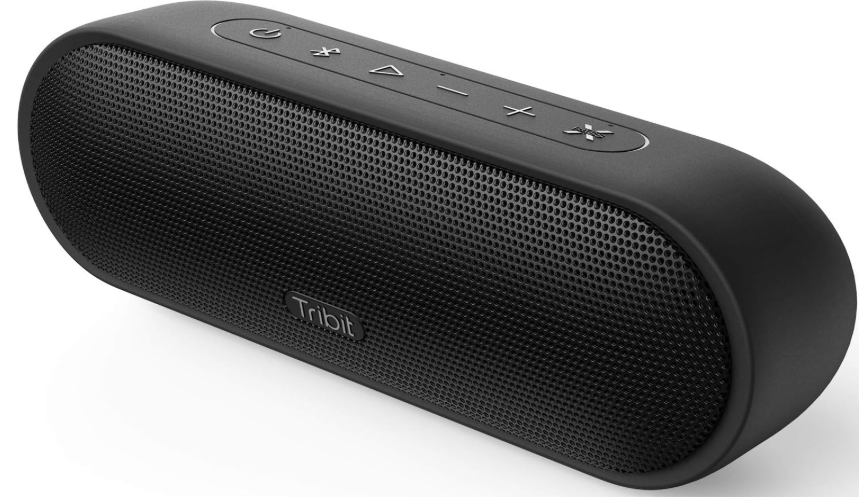
    Tribit IC-BTS25 MAXSound Plus Wireless SpeakerTribit-IC-BTS25-MAXSound-Plus-Wireless-Speaker-PRODUCT


    Safety Precautions

    •  Avoid dropping the speaker on the floor.
    • Do not try to disassemble or repair the speaker unless you are a technician.
    • Do not submerge the speaker in water.
    • Never expose the speaker to extreme high or low temperatures.
    • Stop use immediately if a thunderstorm happens.
    • Do not clean its surface with any corrosive cleanser or other chemical solutions.

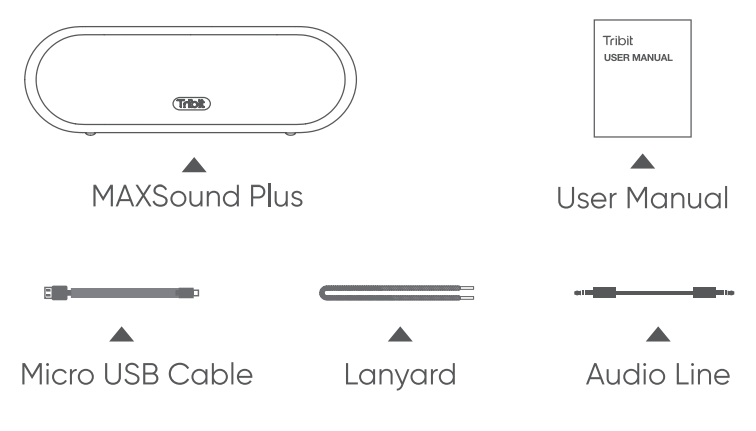
    What’s in the BoxTribit-IC-BTS25-MAXSound-Plus-Wireless-Speaker-FIGURE-1

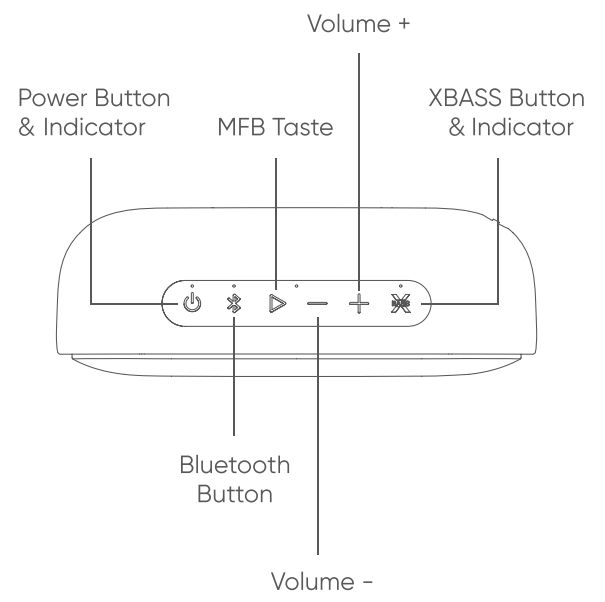
    Overview Buttons & Indicators

    Tribit-IC-BTS25-MAXSound-Plus-Wireless-Speaker-FIGURE-2

    Tribit-IC-BTS25-MAXSound-Plus-Wireless-Speaker-FIGURE-3

    ConnectionsTribit-IC-BTS25-MAXSound-Plus-Wireless-Speaker-FIGURE-4

    Bluetooth PairingTribit-IC-BTS25-MAXSound-Plus-Wireless-Speaker-FIGURE-5

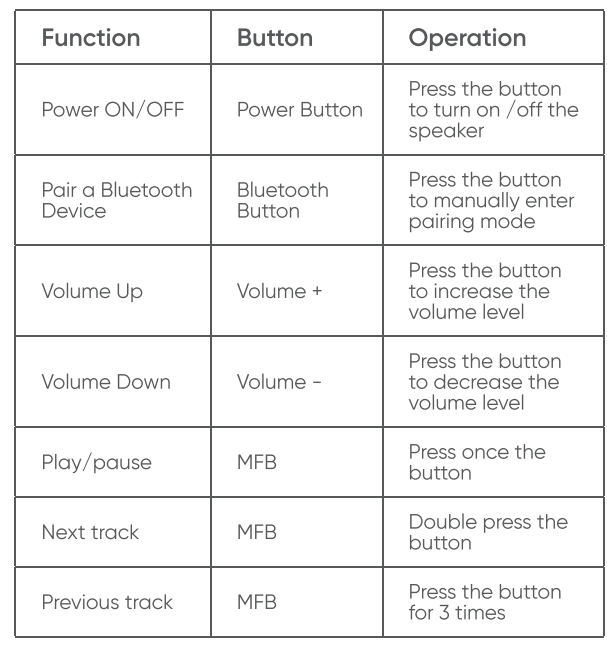
    ButtonsTribit-IC-BTS25-MAXSound-Plus-Wireless-Speaker-FIGURE-6 Tribit-IC-BTS25-MAXSound-Plus-Wireless-Speaker-FIGURE-7

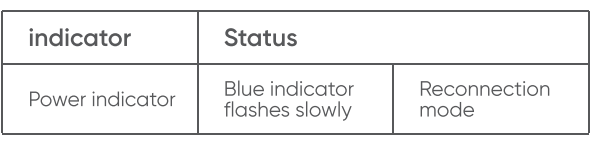
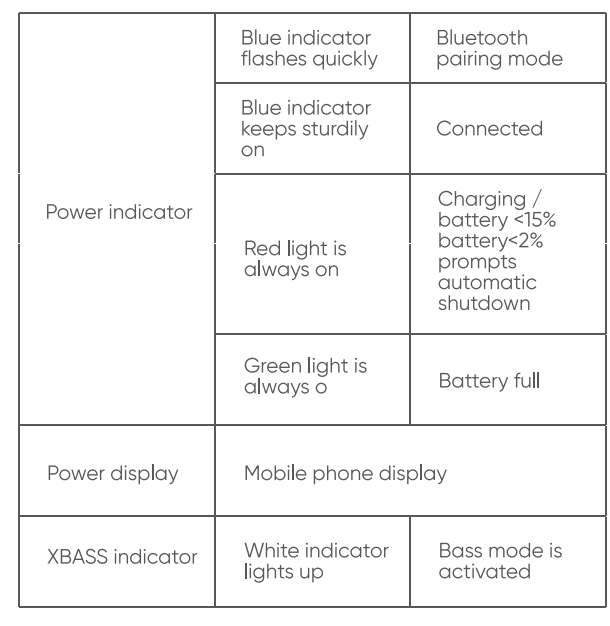
    Indicators

    Tribit-IC-BTS25-MAXSound-Plus-Wireless-Speaker-FIGURE-8 Tribit-IC-BTS25-MAXSound-Plus-Wireless-Speaker-FIGURE-9

    Specifications

    • Bluetooth version: V4.2
    • Bluetooth profile: A2DP, AVRCP, HFP, HSP
    • Driver: 2 × Ф45 Passive radiator
    • Output power: 2 × 12W
    • Signal-to-noise ratio ≥ 80dB
    • Frequency response: 80-20KHz
    • Battery: 7.4V / 2200mAh
    • Music play time: Up to 20 hours ( varies by
    • lume level and music files )
    • Charging time: 4 hours @ 5V/1.5A
    • Dimensions: 65x198x68 mm / 2.56×7.79×2.68 in
    •  Weight: 595g / 20.98oz

    Reset

    If this speaker has any problem, you can try to press and hold Volume + and Volume – buttons simultaneously for 5s to reset this speaker and remove the old pairing in your Bluetooth device, and then pair again.

    Customer Service

    • 18-month limited warranty
    • For FAQS and more information, please visit: Email: support@tribitaudio.com  www.tribitaudio.com (QR code ) facebook QR code.

    FCC Statement

    Changes or modifications not expressly approved by the party responsible for compliance could void the user’s authority to operate the equipment. This equipment has been tested and found to comply with the limits for a Class B digital device, pursuant to Part 15 of the FCC Rules. These limits are designed to provide reasonable protection against harmful interference in a residential installation. This equipment generates uses and can radiate radio frequency energy and, if not installed and used in accordance with the instructions, may cause harmful interference to radio communications. However, there is no guarantee that interference will not occur in a particular installation. If this equipment does cause harmful interference to radio or television reception, which can be determined by turning the equipment off and on, the user is encouraged to try to correct the interference by one or more of the following measures.

    • Reorient or relocate the receiving antenna.
    • Increase the separation between the equipment and receiver.
    • Connect the equipment into an outlet on a circuit different from that to which the receiver is connected.
    •  Consult the dealer or an experienced radio-TV technician for help.

    This device complies with part 15 of the FCC rules. Operation is subject to the following two conditions:

    1. This device may not cause harmful interference.
    2. This device must accept any interference received, including interference that may cause undesired operation.

    FAQs

    Q: What are the main features of the MaxSound Plus?

    Loud, clear, and balanced sound is produced by the MaxSound Plus’s 24 W total output (2 × 12 W drivers). It uses exclusive “XBass” technology to improve bass presence and provide more immersive sound. The speaker can play music for up to 20 hours on a single charge, is portable, waterproof with an IPX7 rating, and connects with ease using Bluetooth 4.2.

    Q: How long does the battery last and how long does charging take?

    Expect about 20 hours of playback on a full charge, depending on the type of audio, bass usage, and volume level. Using the provided USB (or USB-C) connector, charging the speaker from empty usually takes three to four hours.

    Q: Is it suitable for outdoor use? Can I use it near water or at a beach/pool?

    Yes, the MaxSound Plus can withstand splashes, rain, and even brief submersion (e.g., near a pool or on a wet day) thanks to its IPX7 waterproof rating. Because of this, it’s a great option for outdoor gatherings, beach excursions, or listening by the pool.

    Q: What devices are compatible with the speaker?

    Smartphones, tablets, laptops, and other Bluetooth-capable devices are supported. The Bluetooth 4.2 connection is wireless. If you would rather have a connected connection, some models might also have an auxiliary (3.5 mm AUX) input.

    Q: Does the speaker support stereo pairing or “dual-speaker” mode?

    Indeed, the TWS (True Wireless Stereo) feature allows you to combine two MaxSound Plus devices for stereo sound, which is ideal for bigger spaces or gatherings that require a wider soundstage.

    Q: Can I use it to take calls or use voice assistants?

    When linked to a compatible smartphone, the speaker’s integrated microphone allows you to use it for hands-free calls or to access voice assistants like Siri or Google Assistant.

    Q: How does the “XBass” feature work, and when should I use it?

    A dedicated button activates the “XBass” function, which increases low-end frequencies to provide music a fuller sound and deeper bass. It’s particularly fun for outdoor parties, bass-heavy genres (EDM, hip-hop, etc.), and when you want a deeper audio experience. Turning off XBass may help prevent distortion at very high volumes.

    Q: What’s included in the box when I buy it?

    The speaker unit itself, a USB or USB-C charging cable, a lanyard (in certain bundles), and a user manual are typically included. Depending on the vendor, some dealers might also provide an AUX cable.

    Share. Facebook Twitter Pinterest LinkedIn Tumblr Email
    Gabriel Smith

      Related Posts

      Aurzen D1R Roku TV Bluetooth Smart Projector User Manual

      January 13, 2026

      HAPPRUN KC7 Pro 2500 ANSI Lumens Projector User Manual

      January 11, 2026

      Kogan HSD01 8GB, 128GB Full HD Wi-Fi Speakers User Manual

      January 10, 2026

      Aurzen EAZZE D1R Cube Roku TV Smart Projector User Guide

      January 9, 2026

      Devialet Dione White Dolby Atmos Soundbar User Manual

      January 7, 2026

      Tribit BTH80 CallElite 81 Wireless Headset User Guide

      January 4, 2026
      Add A Comment
      Leave A Reply Cancel Reply

      Don't Miss
      Harman Kardon

      Harman Kardan OMNI BAR Plus Bluetooth Soundbar User Manual

      January 14, 2026

      Harman Kardon OMNI BAR Plus Bluetooth Soundbar Introduction We’ve created a system that harnesses the…

      Aurzen D1R Roku TV Bluetooth Smart Projector User Manual

      January 13, 2026

      Aurzen EAZZE D1 MAX 1000 ANSI Lumens Projector User Manual

      January 12, 2026

      HAPPRUN KC7 Pro 2500 ANSI Lumens Projector User Manual

      January 11, 2026
      Stay In Touch
      • Facebook
      • Twitter
      • Pinterest
      • Instagram
      • YouTube
      • Vimeo

      Subscribe to Updates

      Subscribe to Updates

      Follow us

      Facebook X-twitter Instagram Pinterest

      © 2025 All rights reserved Onyx Guide.