


 Tribit IC-BTS30 Wireless Speaker Stormbox

Safety Instructions
- Avoid dropping the speaker on the floor.
- Do not try to disassemble or repair the speaker unless you are a technician.
- Never expose the speaker to extreme high or low temperatures.
- Stop use immediately if a thunderstorm happens.
- Do not clean its surface with any corrosive cleanser or other chemical solutions.
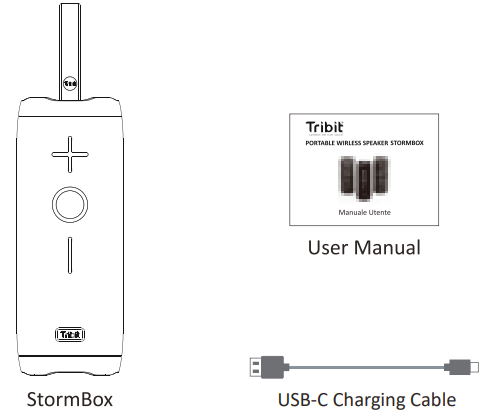
Package Content
Overview
Connection
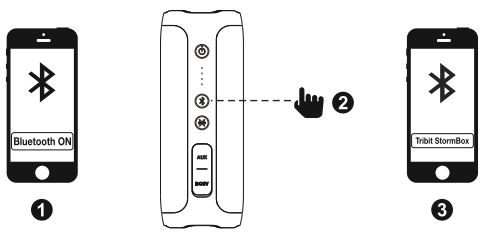
Bluetooth Pairing
Wireless Party Mode with Two StormBox
Connect the Speaker A and B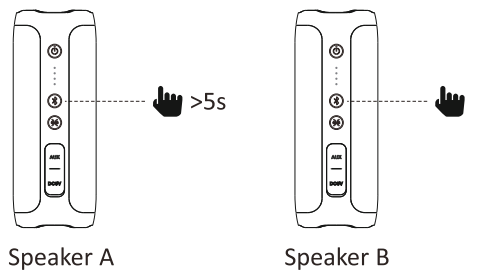
- Keep Speaker A and B powered on
- Press the Bluetooth button on Speaker A for at least 5s till the tone comes up
- Wait for the Speaker A and B connecting success with tone.
Pair the Speaker A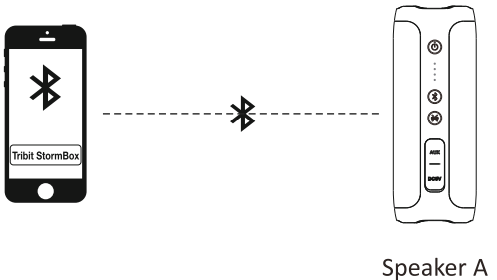
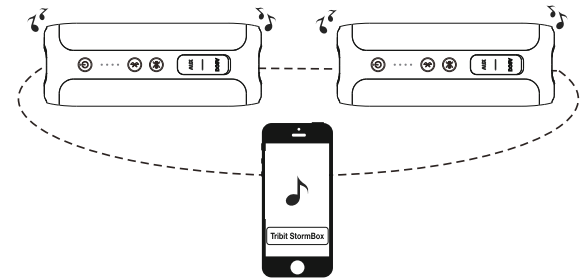
Enjoy music with two StormBox
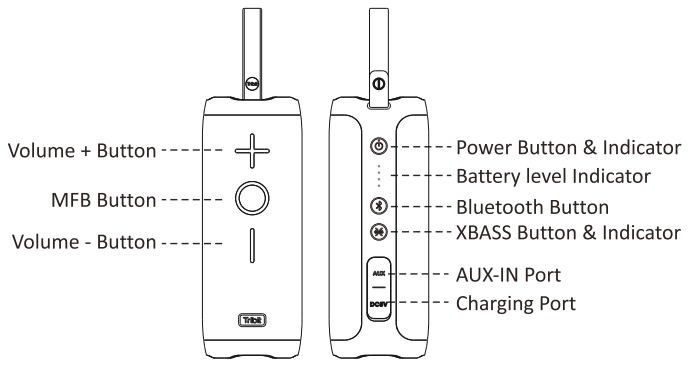
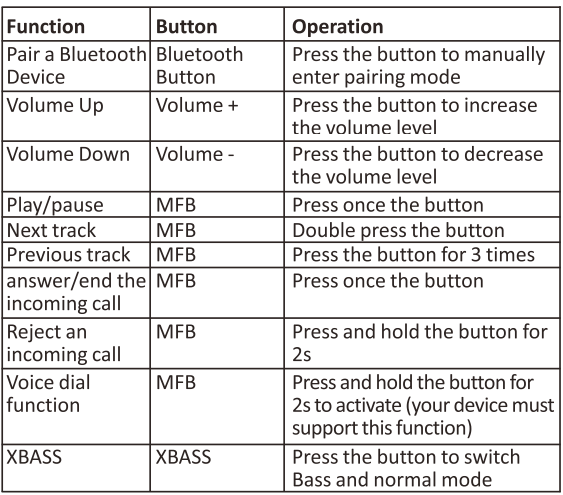
Buttons

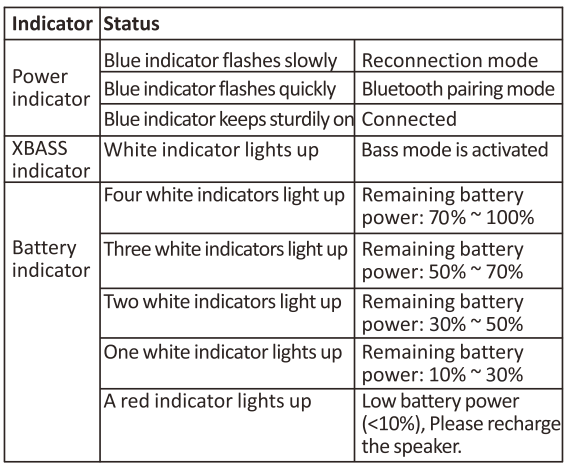
Indicators
Specitications
- Bluetooth version: V4.2
- Bluetooth profile: A2DP, AVRCP, HFP, HSP
- Driver: 2 x Q45mm, 2 x Passive radiator
- Output power: 2 x 12W
- Signal-to-noise ratio: ≥ 80dB
- Frequency response: 70-20KHz
- Frequency band: 2.402GHz~2.480GHz
- Maximum transmission power: ≤ 20dBm
- Battery: 7.4V,2600mAh,19.24Wh
- Music play time: Up to 20 hours (varies by volume level and music files)
- Charging time: 4 hours @ DC 5V/2A
- Dimensions: 68x180x68mm/2.68×7.09×2.68 in
- Weight: 580g/20.4oz
Reset
If this speaker has any problem, you can try to press and Hold Volume + and Volume _ buttons simultaneously for 5s to reset this speaker and remove the old pairing in your Bluetooth device, and then pair again.
FCC Statement
Changes or modifications not expressly approved by the party responsible for compliance could void the user’s authority to operate the equipment. This equipment has been tested and found to comply with the limits for a Class B digital device, pursuant to Part 15 of the FCC Rules. These limits are designed to provide reasonable protection against harmful interference in a residential installation.
This equipment generates uses and can radiate radio frequency energy and, if not installed and used in accordance with the instructions, may cause harmful interference to radio communications. However, there is no guarantee that interference will not occur in a particular installation.
- Reorient or relocate the receiving antenna.
- Increase the separation between the equipment and receiver.
- Consult the dealer or an experienced radio/TV technician for help.
This device complies with part 15 of the FCC rules. Operation is subject to the following two conditions. This device may not cause harmful interference. This device must accept interference received, including interference that may cause undesired operation.
IC Caution
This device complies with Industry Canada licence-exempt RSS standard(s). Operation is subject to the following two conditions
- This device may not cause interference, and
- This device must accept any interference, including interference that may cause undesired operation of the device.
EU Declaration of Conformity
Hereby, Thousandshores Deutschland GmbH declares that the radio equipment type Portable Wireless Speaker TS-BTS20 complies with Directive 2014/53/EU. To get the full text of the EU declaration of conformity, http://files.
Disposal
Valuable raw materials can be reused by recycling.
- Unplug the appliance from the mains.
- Cut through the power cord.
- Close the main gas tap.
- Dispose of the appliance in an environmentally friendly manner.
Information about current disposal methods is available from your specialist dealer or local authority. This appliance is labelled in accordance with European Directive 2012/19/EU concerning used electrical and electronic appliances (waste electrical and electronic equipment – WEEE). The guideline determines the framework for the return and recycling of used appliances as applicable throughout the EU.
Customer Service
- Website: https://tribit.com/
- Ph: +91 9810348155
FAQs
Q: What makes the Tribit IC-BTS30 StormBox different from other portable speakers?
The StormBox is renowned for producing excellent sound in a small, sturdy package with a well-balanced blend of bass, clarity, and loudness. Additionally, it has an outdoor-friendly build and improved wireless connectivity.
Q: Is the StormBox waterproof?
Indeed. The speaker can tolerate splashes, rain, and outdoor situations thanks to its water-resistant design. It is appropriate for beach vacations, camping, and poolside use.
Q: How long does the battery last on a full charge?
The StormBox is designed for extensive playback on a single charge, so you can enjoy extended listening without frequently recharging. Battery life can vary depending on volume settings and usage.
Q: Can I pair two StormBox speakers together?
Indeed. For a broader, more engaging audio experience, you can connect two compatible speakers using the speaker’s dual-pairing or stereo pairing capabilities.
Q: Does the StormBox support hands-free calling?
You may answer calls straight through the speaker without switching devices thanks to its integrated microphone.
Q: How strong is the Bluetooth connection?
For the majority of indoor and outdoor configurations, the StormBox provides dependable wireless communication with fast pairing and a dependable range.
Q: Can I use the speaker while it’s charging?
Indeed. Long listening sessions are made convenient by the speaker’s ability to be utilised while charging.
Q: What devices are compatible with the StormBox?
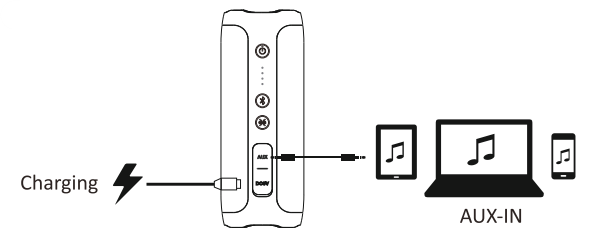
The speaker may be connected to any Bluetooth-capable device, including laptops, tablets, and smartphones. Depending on the model, wired connections might also be supported.