



WiiM WWL001 Smart Wake-up Light
Introduction
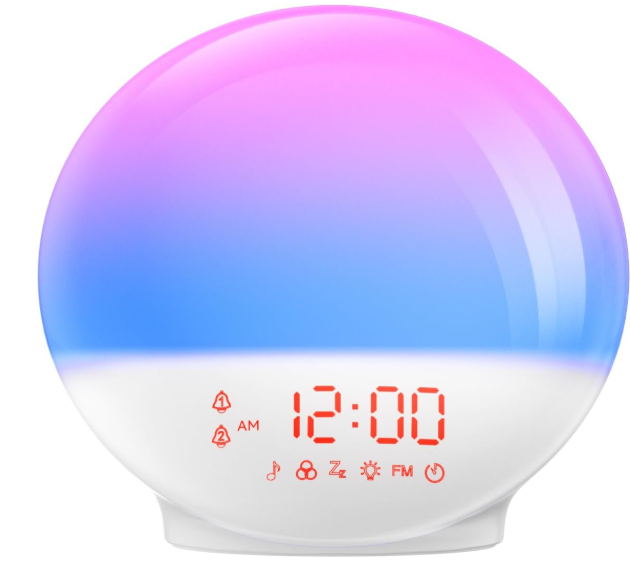
The WiiM sunrise alarm clock is a far-field Alexa speaker, alarm clock, and sleep light all in one device used in the bedroom. It has a round shape and will be easily put on the night table.
Safety Instructions
- Read these instructions. Keep these instructions.
- Heed all warnings. Follow all instructions.
- Do not use this apparatus near water. Clean only with a dry cloth.
- Do not block any ventilation openings. Install in accordance with the manufacturer’s instructions.
- Only use attachments/accessories specified by the manufacturer.
- Unplug this apparatus during lightning storms or when unused for long periods of time.
- To reduce the risk of fire or electrical shock, do NOT expose this product to rain, liquids, or moisture.
- Keep the product away from fire and heat sources.
- Do NOT place naked flame sources, such as lighted candles, on or near the product.
- Do NOT make unauthorized alterations to this product.
- Do NOT use in vehicles or boats. Use this product only with the power supply provided.
- Where the mains plug, or an appliance coupler, is used as the disconnect device, the disconnect device shall remain readily operable.
- Due to ventilation requirements, it is not recommended to place the product in a confined space, such as in a wall cavity or in an enclosed cabinet.
Functions
Function brief
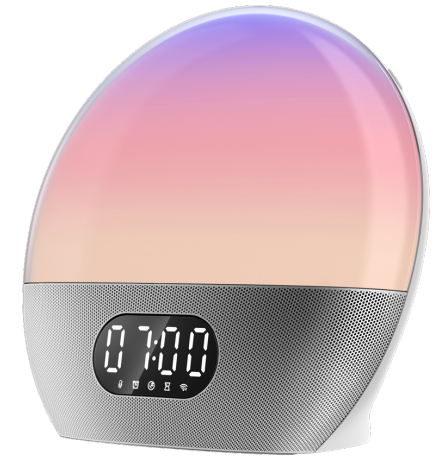
The product serves as a smart alarm clock, sleep-aided light, bedside light, and smart speaker.
Sunrise alarm clock – Wake you up with lights and music
The light will light up slowly 10-60 minutes before the alarm time, simulating the natural sunrise, which will wake you up gradually from deep sleep
Sleep AID – Lights and music accompany you to sleep
When the night comes, turn on sleep mode. The gradually dimmed light and white noise (of your preferred content) can let you sleep better. The light and sound will turn off automatically when the time comes.
Reading light – As a bedside light
You can use the wake-up light as a bedside reading light, and use the button, App, or Alexa to adjust the light to your preferred color and brightness.
Smart speaker – with good audio quality
The Wakeup light is an Alexa built-in device; it lets you instantly connect to Alexa to play music, control your smart home devices, get information, news, weather, and more, anytime using just your voice. It has good audio quality too.
More Features
- Simply plug and go – no assembly required
- Large, easy-to-read time display
- Tap the snooze function
- Pleasant, natural bird song, or your favourite sound or music alarm
- Customized personal routine to help fall asleep, stay asleep, and wake up refreshed
Specification
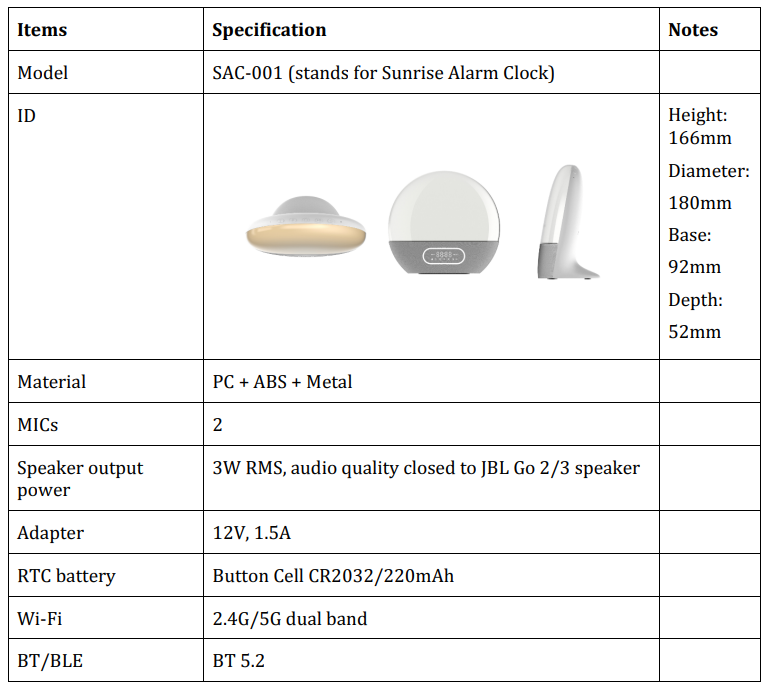
The hardware specification of the wake-up light is shown below.
Button Controls
There are seven button groups – five button groups, including snooze, light switch, brightness control, volume control, and setup control, are on the top edge. Among these, volume and brightness control have two buttons in each group. Two buttons – Sleep and light- are on. the back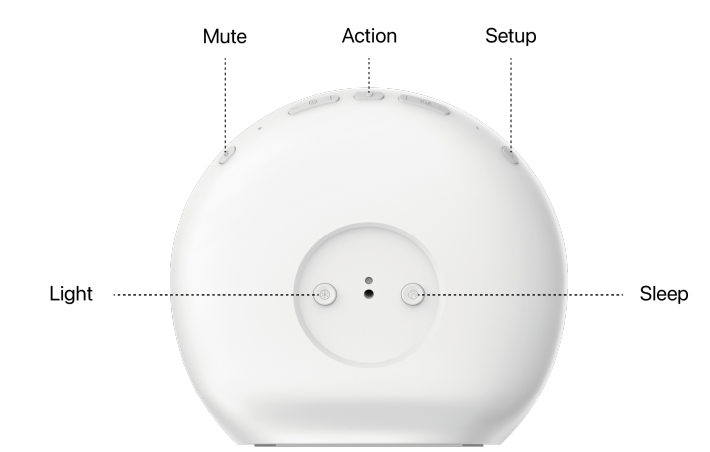
When the alarm goes off, press and hold for two seconds or more the button to enter the snooze state for two seconds or more.
Tap the button to serve as an Alexa Action button. i.e.,
- Click the button to start Alexa voice control.
- Click the button to stop the alarm, reminder, or timer when it occurs. Need to consider a touch button (with blind access) or a normal push button.
Light switch
Click this button to turn the light on and off. No matter which state the device is in, the light switch has the same behavior – toggle the light on or off. Press and hold the light switch for two seconds, and it changes among sunrise, sunset, reading, and colorful modes.
Brightness control
Press the brightness control buttons to increase or decrease the brightness. Press and hold the buttons to change the brightness continuously.
Volume control
Press the volume control buttons to increase or decrease volume. Press and hold the button to change the volume continuously.
Fall-asleep Control
Tap the fall-asleep control to enter sleep routine. During the fall-asleep routine, pressing and holding for 2 seconds cancels it.
Mute button (at the back of the device)
Long-press the button to mute or unmute the microphone. When muted, this button will physically disconnect the microphone.
Set up button (at the back of the device)
Press and hold this button for 3 seconds or more to enter setup mode. Long-press the button for 10 seconds to reset Wi-Fi and Alexa account (factory reset)
Display panel (need rewrite)
Besides the time display, the panel has the following icons to show the detailed status.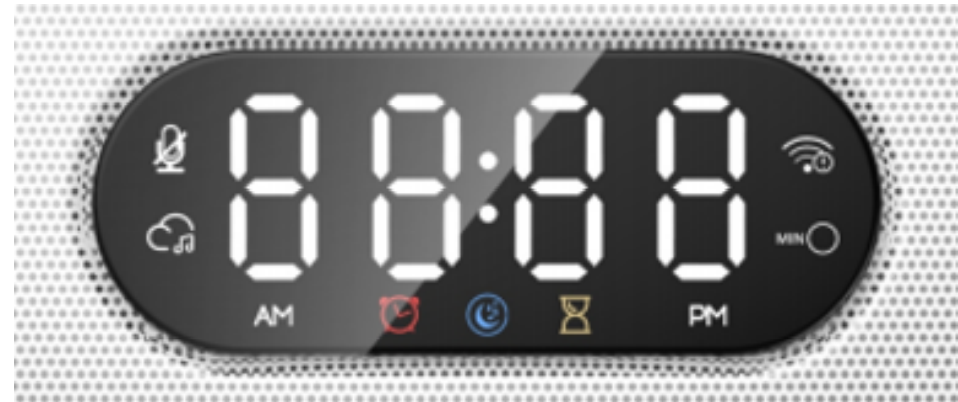
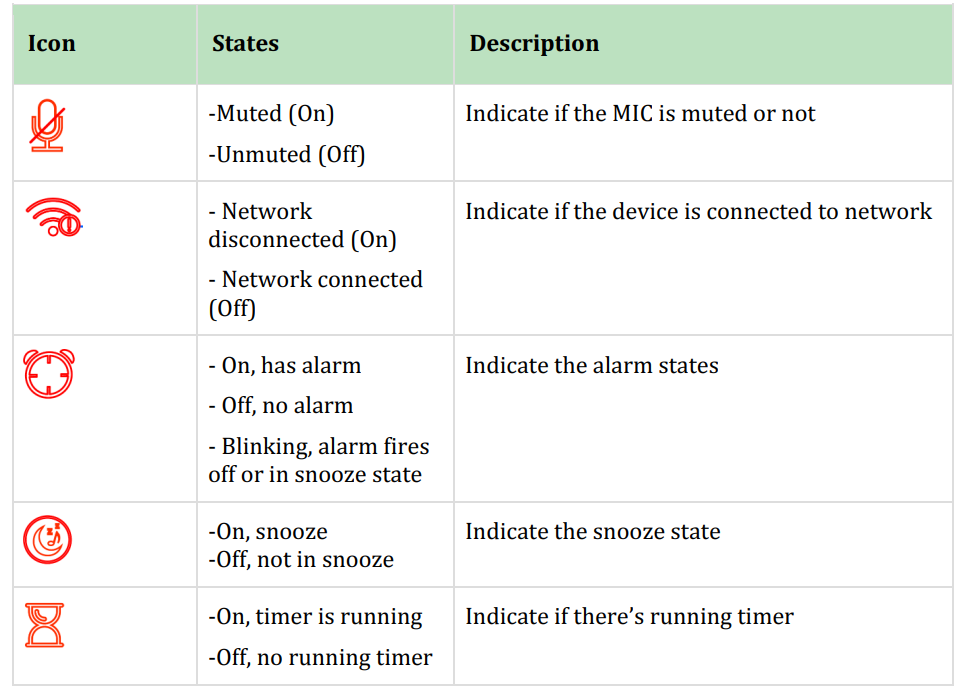
There is an Alexa status indicator that shows the device status and Alexa
Voice control
To use your voice to control this light, please follow these steps below to sign in to Amazon Alexa:
- Go to App Store and Google Play and download the WiiM Home app.
- Go to Browse -> Amazon Alexa to sign in to Amazon Alexa with your Amazon account.
Alarm
- Alexa, set an alarm at 6 am.
- Alexa, set an alarm for every day at 4 pm.
- Alexa, set a repeating alarm for weekdays at 4 pm.
- Alexa, set a repeating alarm for Monday at 4 pm.
- Alexa, wake me up to Katy Perry at 10 pm.
- Alexa, set a music alarm to ‘Lovely Day’ for 7 am.
- Alexa, cancel alarm.
- Alexa, cancel my alarm for 2 p.m.
- Alexa, stop or dismiss.
- Alexa, snooze.
- Alexa, snooze for 10 minutes.
Light
- Alexa, turn on.
- Alexa, turn off.
- Alexa, set/dim/brighten to 50%.
- Alexa, dim/brighten by 50%.
Sleep
- Alexa, turn on sleep mode
- Alexa, turn off sleep mode
Timer
- Alexa, set a timer for 15 minutes.
- Alexa, set a 15-minute timer to ‘My Heart will Go On.’
- Alexa, set a pizza timer for 20 minutes.
- Alexa, set a second timer for 5 minutes.
- Alexa, how much time is left on the pizza timer?
- Alexa, what are my timers?
- Alexa, cancel the pizza timer.
- Alexa, cancel the 15-minute timer.
Clock display
- Alexa, could you turn on the clock in my bedroom light?
- Alexa, could you turn off the clock on my bedroom light?
Name change
- The default name is ‘Wakeup light’, use this to control the alarm or the light.
- The name is changed by the companion WiiM home app or the Alexa app
- When the name is changed in the Alexa app, it should be synced to the WiiM home app
Discover
- After the name change, use the ‘Alexa, discover’ to rediscover the device
Spotify Connect
Use your phone, tablet, or computer as a remote control for Spotify. Go to spotify.com/connect to learn how. The Spotify Software is subject to third-party licenses found here: https://www.spotify.com/connect/third-party-licenses
CE/FCC Statements
RF Exposure Information
To maintain compliance with FCC RF exposure requirements, use the product that maintains a 20cm separation distance between the user’s body and the host. MPE limit for RF exposure at the prediction frequency, and satisfy RF exposure compliance.
FCC Statement
This device complies with part 15 of the FCC rules. Operation is subject to the following two conditions: This device may not cause harmful interference, and
- This device must accept any interference received, including interference that may cause undesired operation.
CE Statement
RF exposure information: The Maximum Permissible Exposure (MPE) level has been calculated based on a distance of d=20 cm between the device and the human body. To maintain compliance with RF exposure requirements, use a product that maintains a 20cmdistance between the device and the human body.
Do not use the device in environments atthat areoo hot or too cold. Never expose the device to strong sunshine or too wet environments. The suitable temperature for the product and accessories is 0℃-40℃.
Customer Support
- Website: wiimhome.com
- Email: support@Wiimhome.com
- Tel: 510-585-3943
FAQs
Q: Can it help me fall asleep, too?
In order to help you unwind and fall asleep, there is a “sleep-aid” mode where the light gradually dims to mimic sunset, and you may mix it with white noise, calming sounds, music, or other material. At a predetermined time, the audio and light will automatically turn off.
Q: Can I adjust the light color and brightness?
Absolutely. Through the device’s physical buttons, companion app, or voice commands (if using the built-in voice assistant), you can change the brightness (light intensity) and select from several light colours or mood settings. Thus, it can be used as an ambient lamp or bedtime reading light.
Q: Does it have music/speaker capabilities?
Yes, the gadget enables streaming services, internet radio, and music playback in addition to having built-in speakers. You can listen to music, birdsong, the radio, or any other type of audio when you wake up. It’s essentially a hybrid “sound machine + smart speaker + wake-up light.”
Q: Can I wake up to my own music or streaming service rather than a preset alarm tone?
Using the app or voice command, you can select your preferred music, a radio station, white noise, or personalised alarm material to wake up in place of a set, chime-style alarm.
Q: Will it work as a regular bedside or reading lamp too?
You may use it as an ambient lamp or bedside reading light, even when you’re not sleeping or waking, thanks to its changeable light colour and brightness.
Q: Does it support multiple alarms, or only one?
You can set different alarm timings for different days, routines, or tasks (not simply “wake up,” but also reminders, timers, etc.) because it allows an infinite number of alarms.
1 Comment
Thank you for your sharing. I am worried that I lack creative ideas. It is your article that makes me full of hope. Thank you. But, I have a question, can you help me?