

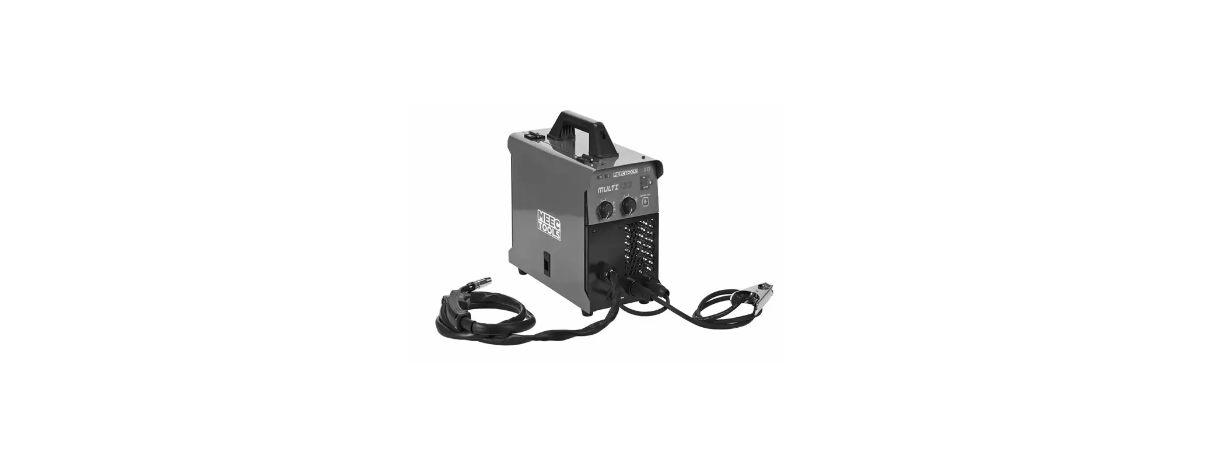

Meec Tools 016793 MIG-MAG Welder
Safety Instructions
- Failure to follow all the instructions and safety instructions can result in the risk of electric shock, fire, and/or serious personal injury.
- Leave enough free space around the product to ensure the circulation of cool air through the ventilation openings on the front and back.
- Metal particles are conductive and can result in malfunctioning and damage if they penetrate the product.
- Do not stack the product.
- Dropped equipment can cause personal injury. Never lift the product with the gas cylinder installed.
- Place the product on a smooth, level, and stable surface.
- Never touch live parts or welding electrodes, especially not with wet hands or parts of the body, or with wet clothes.
- Always wear dry, insulated gloves.
- Vapour and gas produced during welding can be dangerous or harmful to health.
- Avoid inhaling welding fumes/gas, use exhaust extraction, and ensure good ventilation of the workplace.
- Welding sparks can cause fires or explosions.
- Keep flammable material at a safe distance from the work area.
- Do not carry out welding on containers that have contained flammable material.
- UV radiation from arcs can cause burn injuries.
- Use welding goggles, ear protection, and protective clothing.
- Avoid using the product in damp conditions or rain.
Description
- Right cover
- Handle cover
- Handle
- Spool
- Support wall
- Wire feeder
- Hinge
- Left cover
- Lock
- Control panel
- Knob
- Panel guard
- Polarity conversion cable
- Cable deck seal
- Front cover
- Quick-coupling
- Foot
- Insulation paper
- Motherboard
- Bottom casing
- Cooling fin for rectifier diode
- Cooling fin holder
- Cooling fin for IGBT
- Cooling fin holder
- EMC
- Fan
- Cable deck seal
- Power cord
- Power switch
- Air nipple
- Fixed welding handle
- Earth cable and clip
Overload Protection
The product’s output spools and rectifier are provided with overheating protection that prevents exceeding the output data and maximum intermittence factor.
Electrical Installation
- Direct radiation from the source of welding current.
- Direct radiation from welding cables.
- Direct radiation as a result of mains interaction.
- Indirect radiation from non-earthed metal objects.
- Keep the leads between the mains outlet and product as short as possible, and if possible, provide the leads with metal shielding connected to earth.
- Keep the welding cables (electrode cable and return cable) as short as possible. Fasten, if possible, the welding cables together to form a pair with insulating tape or the equivalent.
- Check that the insulation on the electrode and non-return cables is free from nickscracksrks and other damage that can cause leakage current.
- Keep the return cable and its connections in good condition – clean the surface of the workbench where the return cable clips are connected at regular intervals.
Connections Of Main Voltages
- Check that the mains voltage corresponds to the rated voltage on the type plate.
- Allow an authorised electrician to install an earthed power point if the plug does not fit in the power point.
- Switch off the product with the power switch and pull out the plug before working on the product.
- Do not attempt to repair the product yourself. Take it to an authorised electrician or service centre.
- Wait 5 minutes after switching off and unplugging the product so that the capacitors have time to discharge before carrying out service or any other work on the product. Never touch live parts.
- The product is supplied with 1-phase 230 V 50/60 Hz.
Use
- Switch on the power source and set the MMA/MIG/TIG selector in MMA mode.
- Set the correct welding current for the welding electrode to be used, as per the table below.

- Connect the welding cables. The welding current source has two welding cable connections. For manual arc welding (MMA), the electrode holder should normally be connected to the positive connection and the workpiece, via the return cable, to the negative. Sometimes, however, the polarity can be the reverse – check and follow the instructions of the electrode manufacturer.
Configuration for Mig
- Switch on the power source and set the MMA/MIG/TIG selector in MIG mode.
- Put the MIG torch cable in the outlet connection on the front panel and tighten the connection.
- Put the return cable in the negative connection on the front panel and tighten the connection clockwise.
- Put the quick-coupling for the wire guide in the wire Meec Tools 016793 MIG-MAG Welder feed outlet on the front panel and tighten the quick-coupling clockwise.
- Press the selector for wire inching and hold it pressed in until the wire sticks out from the MIG torch.
- Connect the supplied brass nipple for the gas regulator to the gas hose on the back of the welding current source and set the regulator to the required flow of shielding gas.
- Set the welding current and wire feed according to the type of joint and thickness, etc.
- Move the torch up to the starting point, press the trigger, and start welding.
- Switch on the power source and set the MMA/MIG/TIG selector in TIG mode.
- Set the correct welding current for the welding electrode to be used, as per the table below.
- Connect the welding cables. The welding current source has two welding cable connections. For TIG welding, the TIG torch should normally be connected to the negative connection and the workpiece, via the return cable, to the positive.
- When welding with hollow wire, the polarity of the arc may need to be reversed. This is easily done by reversing the wires in the wire feeder.
- Solid wire (with shielding gas): positive torch, negative workpiece (standard setting)
- Hollow wire (without shielding gas): negative torch, positive workpiece.
Maintainance
- Switch off the product with the power switch and pull out the plug before working on the product.
- Do not attempt to repair the product yourself. Take it to an authorised electrician or service centre.
- Wait 5 minutes after switching off and unplugging Meec Tools 016793 MIG-MAG Welder the product so that the capacitors have time to discharge before carrying out service or any other work on the product.
- Never touch live parts.
- At intervals of 3 to 6 months, depending on frequency of use and working conditions, the side and top panels should be removed and the inside of the product blown clean with dry compressed air at low pressure.
- Circuit boards and electrical components, and cooling fans should be blown clean very carefully.
- Check the power cord, welding cables, and gas hoses for wear and cuts, and replace them if necessary.
- Keep MIG torches and return cables in good condition.
- Clean the ventilation openings to ensure an adequate flow of cool air.
Technical Data
- Voltage (VAC) 230,230,230
- Phases 1,1,1
- Frequency (Hz) 50Hz,50Hz,50Hz
- Working temperature 40°C,40°C,40°C
- Voltage with open circuit (V) 84,14,84
- Min output current (A) 10,10,30
- Max output current (A) 120,120,130
- Max input current (V) 24.8,14.9,20.5
- Power source efficiency (%) 83,82,83
- Standby consumption (W) 20,20,20
Customer Support
- Website: https://www.jula.se/varumarken/meec-tools/
- Tel: +39-0645652462
FAQs
What type of power supply does this welder require?
The normal 230V AC power source powers the Meec Tools 016793.
What welding processes are supported by this machine?
Mild steel and stainless steel are among the many metals that this device can handle because it supports both MIG (Metal Inert Gas) and MAG (Metal Active Gas) welding.
What wire types and diameters are compatible?
Solid and flux-cored wire, usually with diameters between 0.6 and 1.0 mm, can be used with the welder. Always match the type of wire to the material and welding method.
Can I run this welder from a generator?
Yes, but only if the generator satisfies the necessary wattage and voltage requirements and generates clean, steady electricity.
What do I do if the welder overheats or shuts down mid-use?
Turn on the fan and let it cool. After 10 to 15 minutes or when the machine automatically resets, resume welding.
Where can I get replacement parts like nozzles or liners?
To find authentic consumables and parts, visit your neighbourhood Meec Tools distributor or visit their official website online. To prevent damage, use only suitable parts.
Is the welder covered under warranty?
Yes, there is a limited manufacturer’s guarantee included with the 016793 welder. For warranty conditions and service instructions, keep your receipt and get in touch with Meec Tools support.