

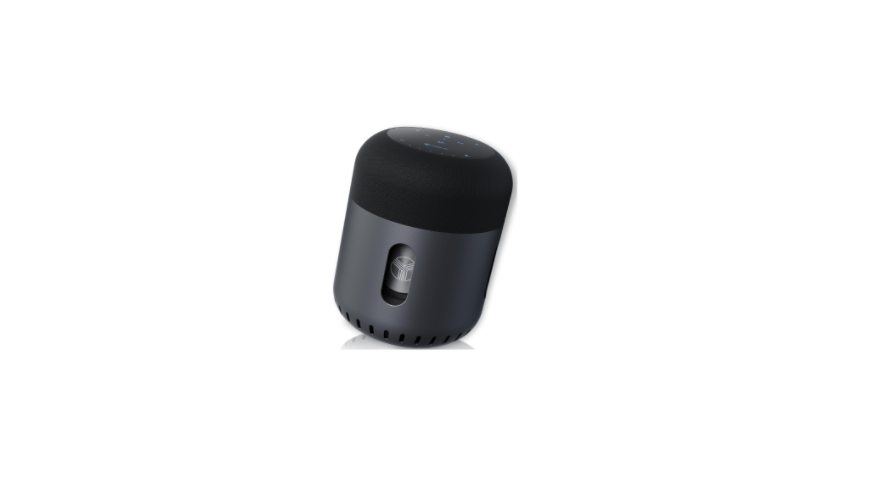

TREBLAB HD-FORCE Portable Wireless Speaker
 Introduction
This speaker provides superior sound quality and portability, combined with entertaining features and the convenience of hands-free wireless operation.
What’s In The Box
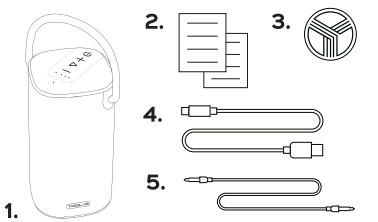
HD-Force
- TREBLAB HD-Force speaker
- User’s manual
- Round TREBLAB logo sticker
- Type-C charging cable
- 3.5mm audio cable
Buttons & Parts
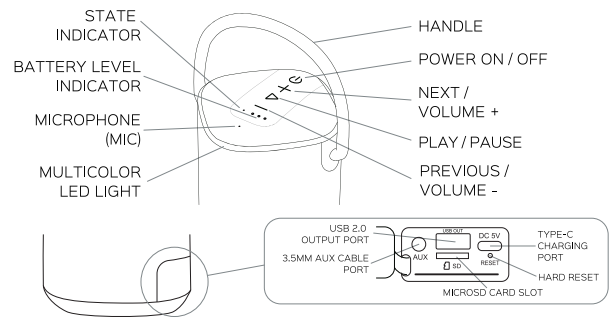
Function
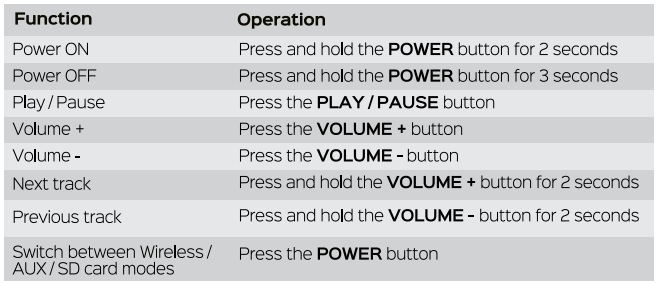
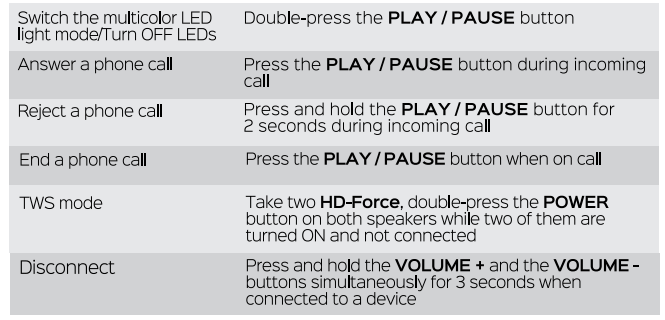
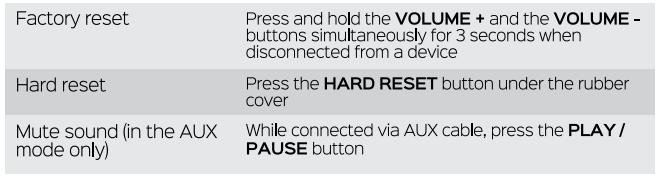
Setttings
Turn ON
Press and hold the POWER button for 2 seconds. You will hear the sound cue, the battery level indicators will light up, the multicolour LED light will start breathing white, and the BLUE state indicator will start flashing.
Turn OFF
Press and hold the POWER button for 3 seconds. You will hear the sound cue, and all the lights will go OFF.
Wireless Pairing
Make sure TREBLAB HD-Force is fully charged.
- Turn ON your speaker. You will see the BLUE state indicator flashing, meaning that the speaker is in pairing mode.
- Activate the Bluetooth mode on the source device (smartphone, tablet, laptop).
- Select TREBLAB HD-Force from the Bluetooth devices list.
- Keep the speaker within 3 feet / 1 meter from the source device while pairing.
- If prompted to connect by your device, select Yes.
- If requested a passcode, enter 0000.
- Once HD-Force is successfully paired and connected, the BLUE state indicator will stop flashing and stay BLUE.
Reconnecting
After the initial pairing, the speaker will automatically connect to the previously paired device when turned ON again. If reconnection does not happen automatically, the speaker will start looking for any other previously paired device within the effective distance range. TREBLAB HD-Force can remember up to 6 recently paired devices.
True Wireless Stereo (TWS)
The TWS technology allows you to use two speakers paired wirelessly to create a wireless dual-channel system, delivering a true stereo sound effect. While using this function, one speaker (Master, left channel) is paired with a source device, and the other (Slave, right channel) speaker is paired with the Master speaker.
- Make sure that both speakers are ON, in Wireless mode, and not connected to any source device.
- Double-press the POWER button on both speakers to enter the TWS mode. You will hear the sound prompt, and both speakers’ state indicators will start flashing BLUE and GREEN.
- Once the speakers are paired in TWS, you will hear the sound prompt, and one of the speakers’ state indicators will start flashing BLUE slowly. This will be the Master speaker.
- The other speaker’s state indicator will turn BLUE. This will be the Slave speaker.
- Enable Bluetooth on the source device and select TREBLAB HD-Force from the Bluetooth devices list.
- If prompted to connect by your device, select Yes.
- If requested a passcode, enter 0000. Now you can use the speakers in stereo mode.
- Kindly note that the maximum distance between speakers should not exceed 33 feet / 10 meters.
There are a few ways to disable the TWS function.
- When the speakers are connected to the source device, press the VOLUME + and the VOLUME – buttons simultaneously for 3 seconds on the Master speaker.r
- The connection with the source device will be interrupted, but the speakers will remain in the TWS mode. This way, you can connect another source device.
- When the speakers are connected to the source device, press the VOLUME + and the VOLUME – buttons simultaneously for 3 seconds on the Slave speaker – the Master speaker remains connected to the source device, but the Slave speaker will disconnect and enter the pairing mode.
- When the speakers are NOT connected to the source device, press the VOLUME + and the VOLUME – buttons simultaneously for 3 seconds on either speaker – the TWS connection between them will be interrupted.
AUX Mode
You can connect TREBLAB HD-Force to compatible devices using the supplied 3.5mm AUx cable.
- Turn the speaker ON. Plug one end of the supplied 3.5mm AUX cable into the 3.5mm AUX cable port on the back of the speaker (under the rubber cover).
- Plug the other end into the 3.5mm jack on your device. The state indicator will turn GREEN. Now you can play music and audio. To mute the audio, press the PLAY / PAUSE button.
SD Card Mode
The TREBLAB HD-Force speaker can play music from MicroSD cards up to 512GB. All you need to do is copy music to the memory card (in folders or just to the card root), insert it into the MicroSD card slot on the back of the speaker (under the rubber cover). You will hear the sound prompt, and the state indicator will turn green.
- To start playing from the MicroD card, press the PLAY / PAUSE button. The playlist is arranged according to song addition date (the older tracks play first).
- The HD-Force speaker supports the following formats: MP2, MP3, WMA, APE, FLAC, AAC, MP4, M4A, WAV, AIF, AIFC; and the following file systems: FAT16, FAT32, exFAT, FAT64.
Phone Calls
TREBLAB HD-Force can be used to make and receive phone calls when connected wirelessly. Audio playback will be paused during calls.
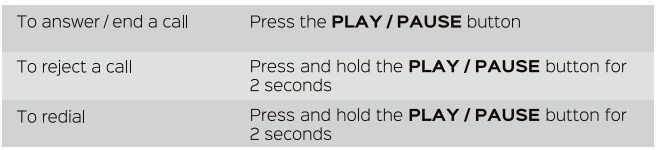
Charging
When the battery is running low, you will hear a sound signal. TREBLAB HD-Force may be used while charging in the Wireless, AUX, and SD card modes.
To charge the speaker, plug one end of the supplied cable into the TYPE-C charging port under the rubber cover on the back of the speaker. Plug the other end of the charging cable into a standard USB port. It takes up to 4-5 hours to fully charge.
Once plugged in, the battery level indicators will start flashing slowly, showing the current battery level (for more details, please check the BATTERY LEVEL INDICATION section). This means that the speaker is charging. When the speaker is fully charged, all three battery level indicators will stop flashing and become steady.
Battery Level Indication
The HD-Force speaker is equipped with the battery level indicators – LEDs. The current charge level is displayed when the speaker is ON and when the speaker is used as a power bank in the OFF state.
- Charge level is between 0% and 30%: one LED is ON (flashing during the speaker charging or in the power bank mode).
- Charge level is between 30% and 70%: two LEDs are ON (flashing during the speaker charging or in the power bank mode).
- Charge level is between 70% and 100%: three LEDs are ON (flashing during the speaker charging or in the power bank mode).
Power Bank Mode
TREBLAB HD-Force inbuilt battery can be used as a power bank to charge your smartphone or tablet.
- Connect your device to the speaker by plugging your device’s charging cable into the USB 2.0 output port under the rubber cover on the back of the speaker. If the speaker is in the other FF state, press the POWER button to start charging.
- In case the speaker is ON, it will start charging instantly after you connect the device to the USB 2.0 output port. There is no indication signal when the smart device is fully charged. Please pay attention to your device’s battery charge indicator during the charging time.
Specifications
- Battery: Input 5V/0.5A-2A Output 5V/2.1A
- Charging time: 4-5 hours
- Bluetooth version: 5.0
- Supported profiles: A2DP/AVRCP/HFP/HSP/OPP/HID/SPP/PBAP/GATT/SM
- Speaker size: 2 x 50mm, 1x 80mm
- Output power: 50W
- Water resistance: IPX6
- Charging port: TYPE-C
- Audio port: 3.5mm jack
- Micro SD card file systems: FAT 16, FAT 32, ex FAT, FAT 64. Micro SD card supported MP2MP3WMAVAPE / FLAC / AACMP4M4AWAV / AIF
- formats: AIFC
- Dimensions: 4.58 x 4.58 x 8.74 inches / 116.5 x 116.5 x 222 mm
- Weight: 3.2 lbs / 1455g
Troubleshooting
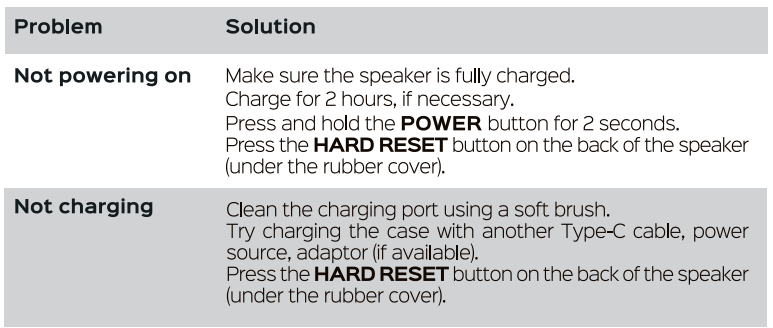
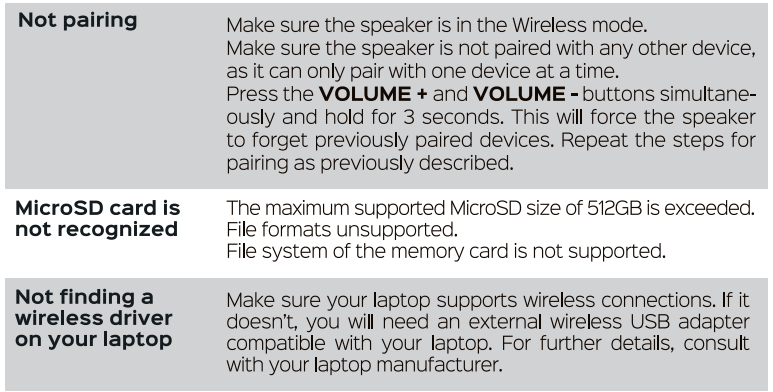
Frequent Disconnection and Noise
Ensure that nothing is blocking the signal between your device and the HD-Force. Check if the speaker is running out of power.
FCC Statements
This device complies with Part 15 of the FCC Rules. Operation is subject to the following two conditions:
- This device may not cause harmful interference, and this device must accept any interference received, including interference that may cause undesired operation.
Any changes or modifications not expressly approved by the party responsible for compliance could void the user’s authority to operate the equipment.
FCC Interference Statement
- This equipment generates, uses, and can radiate radio frequency energy and, if not installed and used in accordance with the instructions, may cause harmful interference to radio communications.
- However, there is no guarantee that interference will not occur in a particular installation.
- Reorient or relocate the receiving antenna.
- Increase the separation between the equipment and receiver.
- Consult the dealer or an experienced radio/TV technician for help.
RF Exposure Information
- The device has been evaluated to meet the general RF exposure requirements.
- The device can be used in portable exposure conditions without restriction.
Warranty
- 1 YEAR WARRANTY of Parts and Labour.
Customer Support
- Website: www.treblab.com
- Ph: +1-833-873-2522