



Clarke DL0524 2 Mini Chuk Set
Introduction
Thank you for purchasing this CLARKE product. The Chuck Kit is designed for use with the CLARKE CWL325V Mini Woodlathe. Ensure that all components are present. Should any loss or damage be apparent, please contact your CLARKE dealer immediately.
Safety Instructions
- Avoid accidental starting. Ensure the switch is in the off position before plugging in.
- Plugging in power tools that have the switch on invites accidents.
- Remove any adjusting key or wrench before turning the power tool on.
- A wrench or a key left attached to a rotating part of the power tool may result in personal injury.
- Do not overreach. Keep proper footing and balance at all times. This enables better control of the power tool in unexpected situations. Dress properly. DO NOT wear loose clothing or jewellery.
- Keep your hair, clothing, and gloves away from moving parts.
- Loose clothes, jewelry, or long hair can be caught in moving parts.
- Keep the work area clean and tidy.
- Regularly clean the power tool’s air vents.
- The motor fan will draw dust inside the housing,a nd the accumulation of material could cause electrical hazards.
- Avoid operator fatigue. Stop the power tool at regular intervals for a short break to rest hands and arms.
- Maintain your tools. Keep all handles and grips dry and clean.
- Make sure the chucks and adapter are fitted tightly on the lathe before turning on.
- Keep the lathe and all accessories out of reach of children.
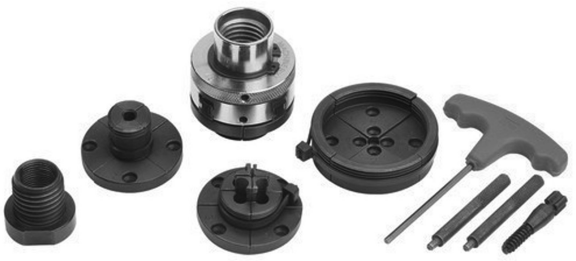
Description

- Mini Chuck
- Round Jaw Set
- Step Jaw Set
- Extended Pin Jaw Set
- Large Diameter Jaw Set
- Screw Chuck
- 3/4” UNF x 16TPI Adapter
- T-handle Hexagon Wrench
- Tightening Levers
- Carry Case (Not Shown)
Accesories
To attach the chuck, drill a single central shallow Clarke DL0524 2 Mini Chuk Set hole in the workpiece and screw the screw chuck in. Then mount the screw chuck into the main mini chuck.
Dimensions
Diameter: 6.5mm – 10mm
Length: 35mm
Attaching the Jaw Set
Each section of a jaw set is numbered 1 to 4. Each section should be attached to the corresponding number on the mini chuck.

Assembly
- Screw the 3/4” UNF x 16TPI adapter onto the headstock spindle of the lathe as shown, and tighten.

- Screw the mini chuck (with appropriate jaw set attached, see pages 4-5) onto the adapter as shown.

- Using the tightening levers, adjust the jaw set so it grips the workpiece.

Guarantee
This CLARKE product is guaranteed against faulty manufacture for 2 months from the date of purchase. Please keep your receipt as proof of purchase. This guarantee does not affect your statutory rights.
Environmental Protection
Recycle unwanted materials instead of disposing of them as waste. All unwanted accessories and packaging should be sorted and taken to a recycling centre for disposal in a manner that is compatible with the environment.
Customer Service
- Tel: 0208 988 7400
- Website: parts@clarkeinternational.com
- Visit: service@clarkeinternational.com
FAQs
What sizes of tool shanks can the 2” mini chucks accommodate?
The chucks are appropriate for micro drill bits, grinding stones, and other tiny rotating accessories since they normally take tool shanks between 0.3 mm and 3.2 mm (about 1/8 inch).
How do I install the mini chuck on my drill or rotary tool?
Thread or fit the tiny chuck onto the spindle tightly after unscrewing the current chuck or collet from your tool. Securely tighten by hand or, if provided, with a wrench.
Can I use the mini chuck set on cordless drills?
Yes, provided that the spindle of your drill fits the mounting requirements for the tiny chuck. Check the product description or handbook for compatibility.
How do I tighten and loosen the mini chuck?
To tighten or loosen the grip on your tool shank, turn the chuck collar clockwise or anticlockwise using the wrench or chuck key that comes with it.
Are these mini chucks compatible with all rotary tools?
The majority of rotary tools with a 2″ spindle or adapter can use them; however, for particular chuck compatibility, consult your tool’s handbook.
What maintenance is required for the mini chuck set?
Keep the chuck jaws and threads free of dust and debris regularly. To guarantee smooth operation and stop rust, lightly lubricate with machine oil.
Can the mini chuck hold accessories other than drill bits?
Indeed, it is capable of safely storing small burrs, polishing tools, grinding bits and other rotating accessories that fall within the chuck’s size range.