


Clarke CAG2350C Angle Grinder
INTRODUCTION
Thank you for purchasing this CLARKE Angle Grinder. Before attempting to use this product, please read this manual thoroughly and follow the instructions carefully. In doing so, you will ensure the safety of yourself and that of others around you, and you can look forward to your purchase giving you long and satisfactory service.
Your Angle Grinder has been designed to give long and trouble-free service. If, however, having followed the instructions in this booklet carefully, you encounter problems, take the unit to your local CLARKE dealer.
GENERAL SAFETY RULES
WORK ENVIRONMENT
- Keep the work area clean and well-lit. Cluttered and dark areas invite accidents.
- Do not operate power tools in explosive atmospheres, such as in the presence of flammable liquids, gases, or dust. Power tools create sparks, which may ignite the dust or fumes.
- Keep children and bystanders away while operating a power tool. Anyone entering the work area must wear personal protective equipment. Distractions can cause you to lose control, lose fragments of work, or a broken disc may fly away and cause injury.
- Store power tools properly when not in use. Abrasive products should be stored in a dry, secure place out of the reach of children.
ELECTRICAL SAFETY
- Power tool plugs must match the outlet. Never modify the plug in any way. Do not use adapter plugs with earthed (grounded) power tools. Unmodified plugs and matching outlets will reduce the risk of electric shock.
- Do not expose power tools to rain or wet conditions. Water entering a power tool will increase the risk of electric shock.
- Do not abuse the cord. Never use the cable for carrying, pulling, or unplugging the power tool. Keep the cable away from heat, oil, sharp edges, or moving parts. Damaged or entangled cables increase the risk of electric shock.
- When operating a power tool outdoors, use an extension cable suitable
for outdoor use. Use of a cable suitable for outdoor use reduces the risk of electric shock.
PERSONAL SAFETY
- Stay alert, watch what you are doing, and use common sense when operating a power tool. Do not use a power tool while you are tired or under the influence of drugs, alcohol, or medication. A moment of inattention while operating power tools may result in personal injury.
- Use personal protective equipment. Always wear eye protection. Safety equipment such as a dust mask, non-skid safety shoes, hearing protection, and a workshop apron capable of stopping small abrasive or workpiece fragments.
- Avoid accidental starting. Ensure the switch is in the off position before plugging in. Carrying power tools with your finger on the switch or plugging in power tools that have the switch on invites accidents.
- Remove any adjusting key or wrench before turning the power tool on. A wrench or a key left attached to a rotating part of the power tool may result in personal injury.
- Do not overreach. Keep proper footing and balance at all times. This enables better control of the power tool in unexpected situations. Dress properly. Do not wear loose clothing or jewellery.
- Keep your hair, clothing, and gloves away from moving parts. Loose clothes, jewellery, or long hair can be caught in moving parts. Keep the work area clean and tidy.
- This tool vibrates with use. Vibration may be harmful to your hands or arms. Stop using the tool if discomfort, a tingling feeling, or pain occurs. Seek medical advice before resuming use.
- Hold the power tool by insulated gripping surfaces only when performing an operation where the cutting tool could contact hidden wiring or its cable. Contacting a live wire may make exposed parts of the power tool live and give the operator an electric shock.
- Never lay a power tool down until it has come to a complete standstill. The rotating accessory may grab the surface and pull the tool out of your control.
- Do not run the power tool while carrying it at your side. Accidental contact with a spinning accessory could snag on clothing and pull the tool to your body.
- Regularly clean the power tool’s air vents. The motor fan will draw dust inside the housing, and the accumulation of material could cause electrical hazards.
- Avoid operator fatigue. Stop the power tool at regular intervals for a short break to rest hands and arms.
- Maintain your tools. Keep all handles and grips dry and clean.
ANGLE GRINDER SAFETY INSTRUCTIONS
- Before starting work, always consider the following: The use of handheld angle grinders for grinding and cutting operations can present risks to the user. Full observation of the safety instructions in this user guide is essential.
- Before undertaking grinding or cutting operations, always consider the following: Is the grinding/cutting work necessary? Could a different tool be used with less risk? (e.g., a fixed controlled cutting/grinding machine). Can the work be sensibly positioned, secured, and accessed so the operator can maintain adequate control of the tool, taking into account, for example, the possible hazards associated with potential snatch/jamming of a cutting die? Is the cutting task too large for a handheld tool? If in doubt, use an alternative lower-risk solution or refer to qualified trade personnel.
- Always use the correct tool for the job. Always assess the job. You should never force a small angle grinder to do the job of a heavy tool. Do not use tools for purposes not intended.
- Always position the power cable clear of the spinning disc. If you lose control, the cable may be cut or snagged, and you may be drawn onto the spinning disc.
- Start-upp speed. Always allow the angle grinder to run up to full operating speed before applying it to the job.
- Applying the disc to the workpiece. Never bump the angle grinder disc on the workpiece, or let the disc hit any other objects while grinding.
- Do not abuse the mains lead. Never carry the tool by the mains lead or pull it to disconnect it from the mains socket. Keep the mains lead away from heat, oil, and sharp edges.
- Secure the work. Use a clamp or vices to hold the workpiece. Failure to secure the workpiece could result in serious injury.
- Remove adjusting keys and wrenches. Form the habit of checking to see that keys and adjusting wrenches are removed from the tool before turning it on.
- Use outdoor extension leads. When the tool is used outdoors, only use extension leads intended for outdoor use. Always make sure that the extension lead is correctly rated.
- Check damaged parts. A guard or other parts that are damaged should be properly repaired or replaced by an authorized service center, unless otherwise indicated in this user guide. Have defective switches replaced by an authorized service facility
- Accessories. Only use the recommended accessories. Ensure that the wheels and discs are fitted according to the manufacturer’s instructions.
- Only use discs that comply with EN12413 or EN13236. Make sure that the disc used is suitable for the no-load speed of the angle grinder. See Specifications on page 16. Check that the speed marked on the wheel dimensions is compatible with the grinder. Check that discs are specifically for handheld angle grinder use.
- Sparks and particles. Ensure that sparks and particles resulting from use do not create a hazard. Use screens where appropriate.
DISC SAFETY INSTRUCTIONS
- Disc speed. Check the speed of the disc before fitting it to your angle grinder. Never use a disc with an rpm speed less than the rpm speed of your angle grinder. See specification on page 18.
- The outside diameter and thickness of your accessories must be within the capacity rating of the power tool. The correct size accessories can be correctly guarded and controlled.
- Inspect the disc before fitting. Never use a disc that is chipped, cracked, or damaged. Fragments from a broken or damaged disc can cause serious injury. Make sure that defective discs are destroyed and not used.
- Handling and mounting discs. Bonded abrasive products are breakable and shall therefore be handled with utmost care. The use of damaged or improperly mounted or used abrasive products is dangerous and can cause serious injuries.
- Disc usage. Always refer to the label for specified usage and observe the safety information. Do not use for purposes other than specified. Discs for wet cutting applications must not be used with this angle grinder.
- Use the correct disc. Always use the correct disc for its intended task. Using the incorrect disc can cause serious injury.
- Using the disc. Allow the disc and tool to do the work. Never force the disc onto the workpiece, as this could cause kickback and/or shatter the disc, causing serious injury. Kickback can occur in the event of a disc jam.
- Cutting discs. Do not use cutting discs for side grinding. Do not put sideways pressure on cutting discs.
- Do not use reducing bushes. Do not use separate reducing bushes or adapters to adapt large hole abrasive wheels. Do not force a disc onto a machine or alter the size of the arbor hole.
- Never use a damaged disc. Inspect each disc before each use for chips, cracks, and excess wear. If the tool or accessory is dropped, inspect for damage or install a new accessory. After fitting the accessory, position yourself away from the plane of the rotating accessory and run the tool at full speed. Damaged discs are likely to break apart during this test.
- Handling and storing discs. Abrasive products shall be handled and transported with care. Abrasive products shall be stored in such a manner that they are not subjected to mechanical damage and harmful environmental influences.
- Always use undamaged mounting flanges that are of the correct size and shape for your cutting or grinding disc. Proper flanges support the disc and reduce the possibility of breakage.
ELECTRICAL CONNECTIONS
WARNING: READ THESE ELECTRICAL SAFETY INSTRUCTIONS THOROUGHLY BEFORE CONNECTING THE PRODUCT TO THE MAINS SUPPLY.
- Before switching the product on, make sure that the voltage of your electricity supply is the same as that indicated on the rating plate. This product is designed to operate on 230VAC 50Hz. Connecting it to any other power source may cause damage.
- This product may be fitted with a non-rewireable plug. If it is necessary to change the fuse in the plug, the fuse cover must be refitted. If the fuse cover becomes lost or damaged, the plug must not be used until a suitable replacement is obtained.
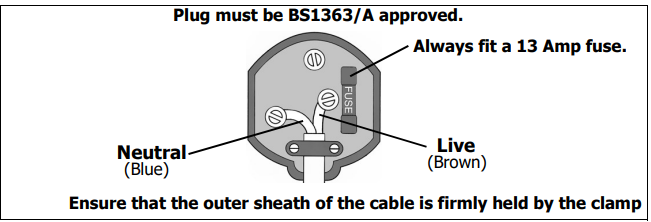
- If the plug has to be changed because it is not suitable for your socket, or due to damage, it should be cut off and a replacement fitted, following the wiring instructions shown below. The old plug must be disposed of safely, as insertion into a mains socket could cause an electrical hazard.
If the colours of the wires in the power cable of this product do not correspond with
The markings on the terminals of your plug proceed as follows.
- The Blue wire must be connected to the terminal that is marked N.
- The Brown wire must be connected to the terminal that is marked L.
We strongly recommend that this machine be connected to the mains supply via a Residual Current Device (RCD).
- If in any doubt, consult a qualified electrician. DO NOT attempt any repairs yourself.
- This symbol indicates that this is a Class II product, and does not require an earth connection.
OVERVIEW
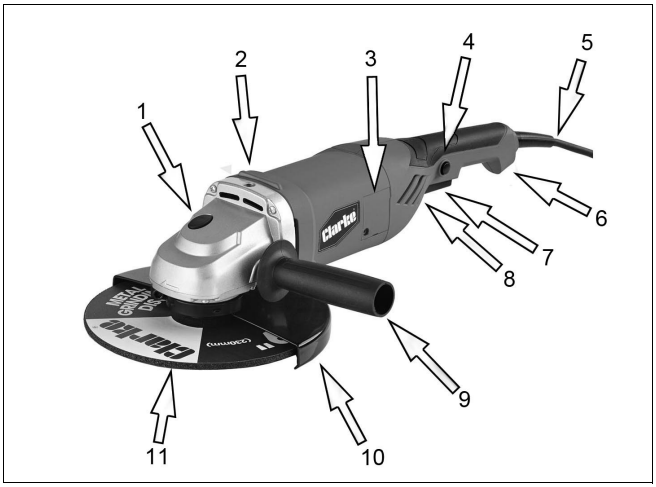
DESCRIPTION
- Spindle Lock Button
- Threaded hole (for handle)
- Motor Brush cover plate
- Safety Button
- Mains Lead
- Rear Handle
- On/Off Trigger Switch
- Air Vent
- Auxiliary Handle
- Disc Guard
- Grinding/Cutting Disc
BEFORE USE
FITTING / ADJUSTING THE DISC GUARD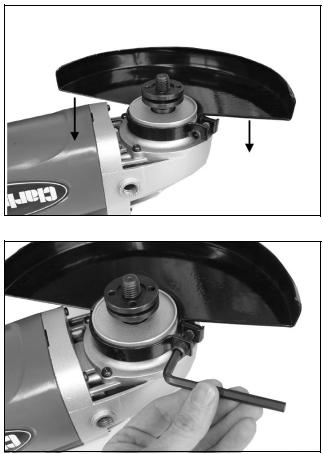
- Slide the disc guard into place as shown.
- Rotate the disc guard to the required position and secure it by tightening the cap head screw using the hexagonal key supplied.
- Ensure the disc guard is securely fitted before using the grinder.
FITTING AND REMOVING A DISC
- Make sure the correct disc guard is fitted before you fit any cutting/grinding disc.
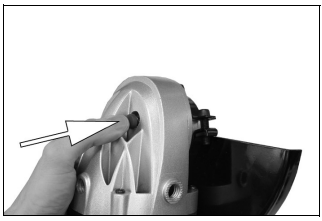
- Press and hold the spindle lock as shown on the right.
NOTE: You may need to turn the spindle by hand to fully engage the spindle lock. - Use the pin spanner supplied to remove the outer flange.
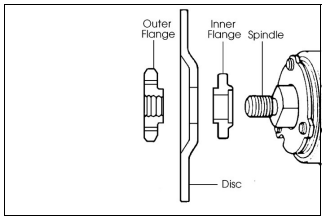
- Make sure that the inner flange is fitted correctly, with the raised circular section pointing outwards as shown, and the flat section on the opposite side engages with the flat section on the spindle.
- Place the grinding disc over the spindle and on top of the inner flange.
- Place the disc onto the spindle as shown.
- Make sure that the disc is properly located on the inner flange.
- Place the outer flange over the spindle.
- For standard discs, make sure that the raised section of the outer flange is pointing towards the disc.
- When using thin discs, the outer flange washer can be reversed so that the raised section is pointing away from the disc.
- Press and hold the spindle lock and use the pin spanner to tighten the outer flange.
FITTING THE AUXILIARY HANDLE
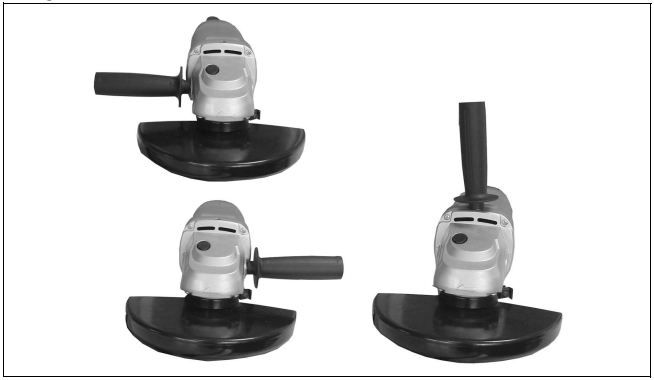
- Fit the side handle by screwing it into one of the 3 threaded holes on the angle grinder.
USING YOUR ANGLE GRINDER
- WARNING: FRAGMENTS FROM A BROKEN/DETACHED DISC CAN CAUSE SERIOUS INJURY.
- WARNING: WHEN USING CUTTING DISCS, DO NOT STAND DIRECTLY IN LINE WITH THE ROTATING DISC.
- WARNING: DO NOT PUT SIDEWALL PRESSURE ON CUTTING DISCS.
- WARNING: ENSURE THAT THE WORKING POSITION ADOPTED DOES NOT CAUSE OPERATOR FATIGUE, WHICH MAY LEAD TO LOSS OF CONTROL OF THE CUTTING DISC AND IMPACT/SNATCH WITH SURROUNDING OBJECTS/MATERIALS.
- WARNING: ENSURE THE INTENDED CUTTING PATH IS CLEAR AND WITH SUFFICIENT CLEARANCE BETWEEN SURROUNDING OBJECTS.
- WARNING: WHEN CUTTING, KEEP THE ANGLE GRINDER STRAIGHT TO PREVENT SNATCHING OR JAMMING.NG OBJECTS.
- WARNING: ALWAYS FIT THE CORRECT GUARD Clarke CAG2350C Angle Grinder ACCORDING Clarke CAG2350C Angle Grinder TO WHETHER A CUTTING OR GRINDING DISC IS BEING USED. REFER TO PAGE 14.
THE ON/OFF SWITCH
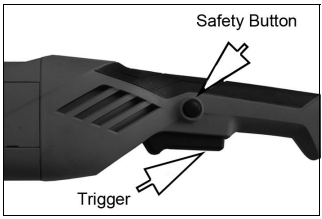
- To start the angle grinder, depress the safety button and squeeze the trigger upwards. NOTE: The angle grinder has a soft start feature and will take a moment to reach full speed.
- To stop the angle grinder, release the trigger.
CUTTING TIPS
- Do not force the disc through the material. Work with a feed rate that is suited to the material being cut.
- Do not subject the cutting disc to sideways pressure.
- The direction of the cutting motion is important. Always Clarke CAG2350C Angle Grinder feed the cutting disc into the work so that it cuts in an upward direction. If you do not do this, it can result in the disc climbing out of the cut in an uncontrolled manner and may lead to loss of control or serious injury.
GRINDING TIPS
- The key to efficient grinding is to control the pressure and surface contact between the grinding disc and the workpiece.
- Flat surfaces are ground at an acute angle, usually 15 to 30 degrees to the workpiece. Too great an angle causes concentration of pressure on a small area, which may gouge or burn the workpiece.
- Allow the disc to reach full speed before grinding.
- Avoid overloading the angle grinder. If it becomes hot when being used, allow it to run for a few minutes under no-load conditions.
SELECTING THE CORRECT GUARD
An open guard is supplied with the CAG2350C, suitable Clarke CAG2350C Angle Grinder for grinding, and a closed guard is suitable for cutting.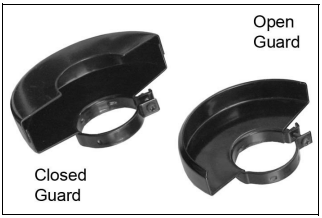
- The open guard should be used with type 27,28, and 29 discs as follows;
- Type 27 -Depressed centre grinding wheels.
- Type 28 -Depressed centre grinding wheels cone cone-shaped.
- Type 29 -Depressed centre semi-flexible wheels.
- The closed guard should be used with type 1, 41 & 42 discs as follows;
- Type 1 – Straight grinding wheels.
- Type 41 – Flat cutting off wheels.
- Type 42 – Depressed centre cutting off wheels.
SUITABLE ABRASIVE AND CUTTING DISCS
The following Clarke discs are suitable for use with the Clarke CAG2350C Angle Grinder CAG2350C. Always use the correct disc and guard type for its intended task.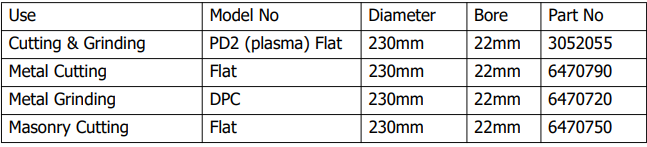
MAINTENANCE
GENERAL MAINTENANCE
- Always have your angle grinder inspected and maintained by qualified service personnel. Do not attempt to repair the angle grinder unless you are qualified to do so.
- Make sure that all nuts, bolts, and screws are tight and secure.
- Check the auxiliary handle and the guard for damage.
- Always have any damaged or worn parts repaired or replaced.
CLEANING
- To maintain the best possible performance from your angle grinder, it must be kept clean.
- To reduce fire hazard, keep the cooling vents free of debris.
- Clean the area around the spindle and mounting Clarke CAG2350C Angle Grinder washer, and keep the threaded locking washer clean.
CHANGING THE CARBON BRUSHES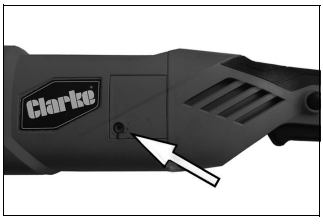
- Remove the screw holding the brush cover in place.
- Remove the worn brush and replace it with the new one.
- Repeat on the other side of the body.
- Both brushes should be replaced at the same time.
SPECIFICATIONS
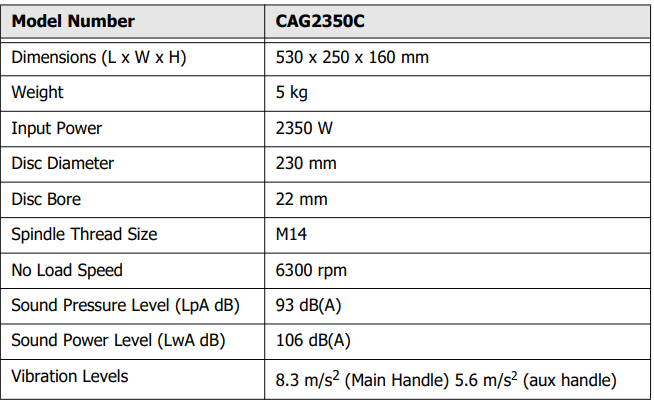
PARTS LIST & DIAGRAM
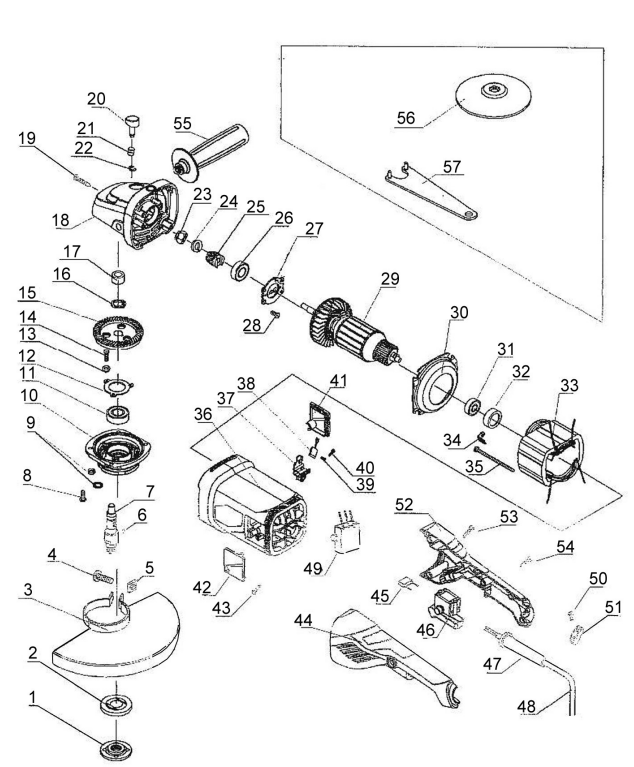
| No | Description | No | Description | |
| 1 | Upper Securing Flange | 29 | Rotor | |
| 2 | Lower Securing Flange | 30 | Air Baffle | |
| 3 | Guard | 31 | Bearing | |
| 4 | Hex Screw | 32 | Bearing Leather Ring | |
| 5 | Square Nut | 33 | Stator | |
| 6 | Woodruff Key | 34 | Stator Pressure Board | |
| 7 | Output Shaft | 35 | Screw | |
| 8 | Screw | 36 | Housing | |
| 9 | Washer | 37 | Brush Holder | |
| 10 | Front Cover | 38 | Brush | |
| 11 | Bearing | 39 | Screw & Washer | |
| 12 | Bearing Spacer | 40 | Screw | |
| 13 | Washer | 41 | Right Brush Cover | |
| 14 | Screw | 42 | Left Brush Cover | |
| 15 | Primary Gear | 43 | Screw | |
| 16 | Spring | 44 | Left Handle | |
| 17 | Needle Bearing | 45 | Capacitor | |
| 18 | Head Cover | 46 | Switch | |
| 19 | Screw | 47 | Cable Sleeve | |
| 20 | Locking Button | 48 | Power Cable | |
| 21 | Self Locking Spring | 49 | Soft Start | |
| 22 | Open Circlip | 50 | Screw | |
| 23 | Jam Nut | 51 | Cable Clamp |
CONTENTS
| 1 x Angle Grinder | 1 x Closed Disc Guard |
| 1 x Auxiliary Handle | 1 x Open Disc Guard |
| 1 x Pin Spanner | 1 x Pair of Disc Retaining Flanges (Fitted) |
| Spare Carbon Brushes | 1 x Metal Grinding Disc |
| 230 mm Grinding Disc | 1 x 6 mm Hex Key |
ENVIRONMENTAL RECYCLING POLICY
Through the purchase of this product, the customer is taking Clarke CAG2350C Angle Grinder on the obligation to deal with the WEEE following the WEEE regulations in relation to the treatment, recycling & recovery, and environmentally sound disposal of the WEEE.
In effect, this means that this product must not be disposed of with general household waste. It must be disposed of according to the laws governing Waste Electrical and Electronic Equipment (WEEE) at a recognised disposal facility.
GUARANTEE
This product is guaranteed against faulty manufacture for 12 months from the date of purchase. Please keep your receipt, which will be required as proof of purchase.
This guarantee is invalid if the product is found to have been abused or tampered with in any way, or not used for the purpose for which it was intended.
Faulty goods should be returned to their place of purchase; no product can be returned to us without prior permission. This guarantee does not affect your statutory rights.
FAQs
What is the power rating of the Clarke CAG2350C angle grinder?
A strong 2350-watt angle grinder, the CAG2350C is made for demanding cutting, grinding, and polishing jobs.
Is the side handle adjustable?
Indeed, for improved control and user comfort, the side handle can be installed on either the left or right side.
What safety features does the CAG2350C include?
It has a spindle lock for simple disc swaps, a safety guard, and a restart protection system to stop unintentional start-up during power outages.
How do I change the grinding or cutting disc?
Press the spindle lock button, loosen the disc flange nut with the included wrench, take out the old disc, insert the new one, and tighten it firmly.
Can I use this grinder for cutting metal and stone?
Yes, the CAG2350C can cut and grind concrete, stone, masonry, and metals when the right disc is used.
What personal protective equipment (PPE) should I wear?
When using the grinder, always use a dust mask, gloves, safety goggles, and hearing protection.
How do I maintain the angle grinder?
To avoid overheating, clean the air vents on a regular basis, replace any worn brushes and check the discs before using them.
Is the grinder suitable for continuous use?
Although the CAG2350C is intended for professional use, it is best to use it with the proper breaks to avoid overheating.