

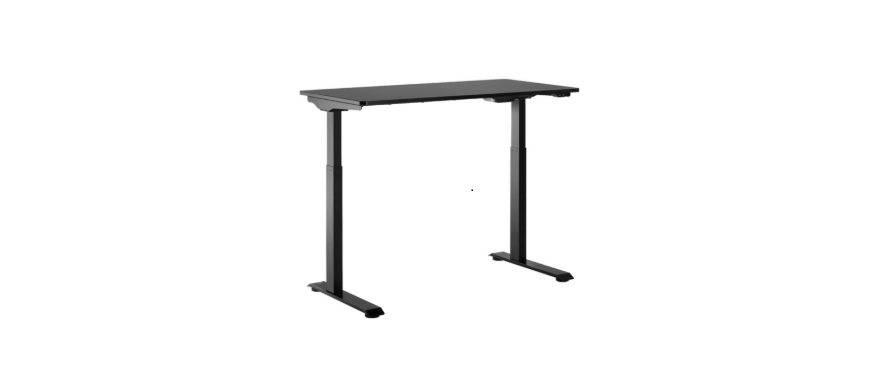

INSIGNIA NS-SDSK-BL Standing Desk
Safety Instructions
- You should only use your table when the temperature is between 32° ~ 104° F (0° ~ 40° C).
- The power adapter requires 100-240VAC ~ 50/60Hz.
- Do not expose the power adapter to moisture or excessive dust. It may cause shock hazards.
- Operate the adapter in a well-ventilated area. The maximum ambient temperature around the power adapter must not exceed 104° F (40° C).
- Do not open the power adapter under any circumstances. The power adapter is not intended to be
repaired in case of failure or component defect. There are no internal serviceable parts. - Discontinue use if any of the following occur:
- The adapter shuts down when it connects to the switch’s port. (LED turns off)
- The adapter’s LED light blinks when the adapter is plugged into an AC power outlet.
- A cord or plug is damaged or frayed.
- Make sure to connect the adapter’s plug and the switch’s port correctly.
- The socket shall be installed near the adapter and shall be easily accessible.
- Make sure that your table is correctly and completely assembled before you use it.
Package Content
- Standing desk
- Small parts list
- Quick Setup Guide

Features
- Easily adjusts to a comfortable height with a hand switch.
- 19.7 in (50 cm) of height adjustment lets you use the desk while standing or sitting
- The desktop holds up to 110 lbs. (50 kg) and is suitable for a computer, printer, or
- sewing machine (within the weight limit)
- Cable management for a clean look
- Choice of two colors, black or mahogany (both witha black frame)
- The electric adjustment switch easily raises or lowers the desk height
- Steel frame with particleboard tabletop provides a stable work surface
Part List


Installation
- Place the desktop upside down on a carpet or protective cloth.

- Insert the hexagonal shaft in the first leg into the corresponding hole in the desktop leg mount, then turn the leg until the screw holes line up and the connecting cable on the top of the leg faces in toward the motor

- Attach the leg to the desktop with four M6 × 16 screws, tightening them firmly with the 4 × 4 Allen key.

- Repeat the steps to attach the other leg 2.
About the Feet
Attach the feet to the bottoms of the legs with four 6 × 16 screws each. Make sure that the adjustable pads on the bottom of the feet face down and the long portion of each foot faces forward
About the Switch
Attach the switch to the bottom of the desktop with two ST4.2*19 screws. Tighten the screws with the 5 × 5 Allen key. Make sure that the flat side of the switch is against the desktop and the UP and DOWN buttons are facing forward.

Connecting the Table
- Slide the adapter into the slot on the bottom INSIGNIA NS-SDSK-BL Standing Desk of the desktop so that the female connector is on the left (as shown) and the adapter cable is on the right

- Connect the cable from the switch to the adapter cable, then lock them together

- Plug the small connector on the power cord into the female connector on the adapter

- Connect the adapter cable to the DC port. Connect the motor cable to the M1 port

- Attach the cables to the bottom of the desktop with the cable ties provided

Use
- With another person to assist you, lift the desk from the floor and turn it upright.
- Place the desk where you want it, on a firm, level floor.
- Plug your desk into a power outlet.
- Press the button to raise the desktop and press the button to lower the table top.
Anti-collision function
- Press and hold the and buttons together (longer than 5 seconds) to turn off or turn on the anti-collision function.

Specifications
- Maximum weight: 110 lbs. (50 kg)
- Input voltage required: 100-240V ~ 50/60Hz
- Lowest position: 28.7 in. (73 cm)
- Highest position: 48.4 in. (123 cm)
- Dimensions (desktop size) (H×W×D): 47.2 × 23.6 × 0.7 in. (120 × 60 × 1.8 cm)
Troubleshooting
- Make sure that all cables are securely connected.
- Make sure that the tabletop is not overloaded. The maximum weight should not exceed 110 lbs. (50 kg).
- Try again after 30 minutes.
- Contact your supplier or dealer.
One Year Warranty
Definitions
The Distributor* of Insignia-branded products warrants to you, the original purchaser of this new Insignia-branded product (“Product”), that the Product shall be free of defects in the original manufacturer of the material or workmanship for one (1) year from the date of your purchase of the Product (“Warranty Period”).
How to obtain warranty service?
Make sure that you place the Product in its original packaging or packaging that provides the same amount of protection as the original packaging. To obtain warranty service, in the United States and Canada, call 1-877-467-4289. Call agents may diagnose and correct the issue over the phone.
Where is the warranty valid?
This warranty is valid only in the United States and Canada at Best Buy branded retail stores or websites to the original purchaser of the product in the country where the original purchase was made.
Customer Service
- Tel: 1-877-467-4289
- Visit: http://www.insigniaproducts.com
INSIGNIA is a trademark of Best Buy and its affiliated companies. Registered in some countries. Distributed by Best Buy Purchasing, LLC 7601 Penn Ave South, Richfield, MN 55423 U.S.A.