

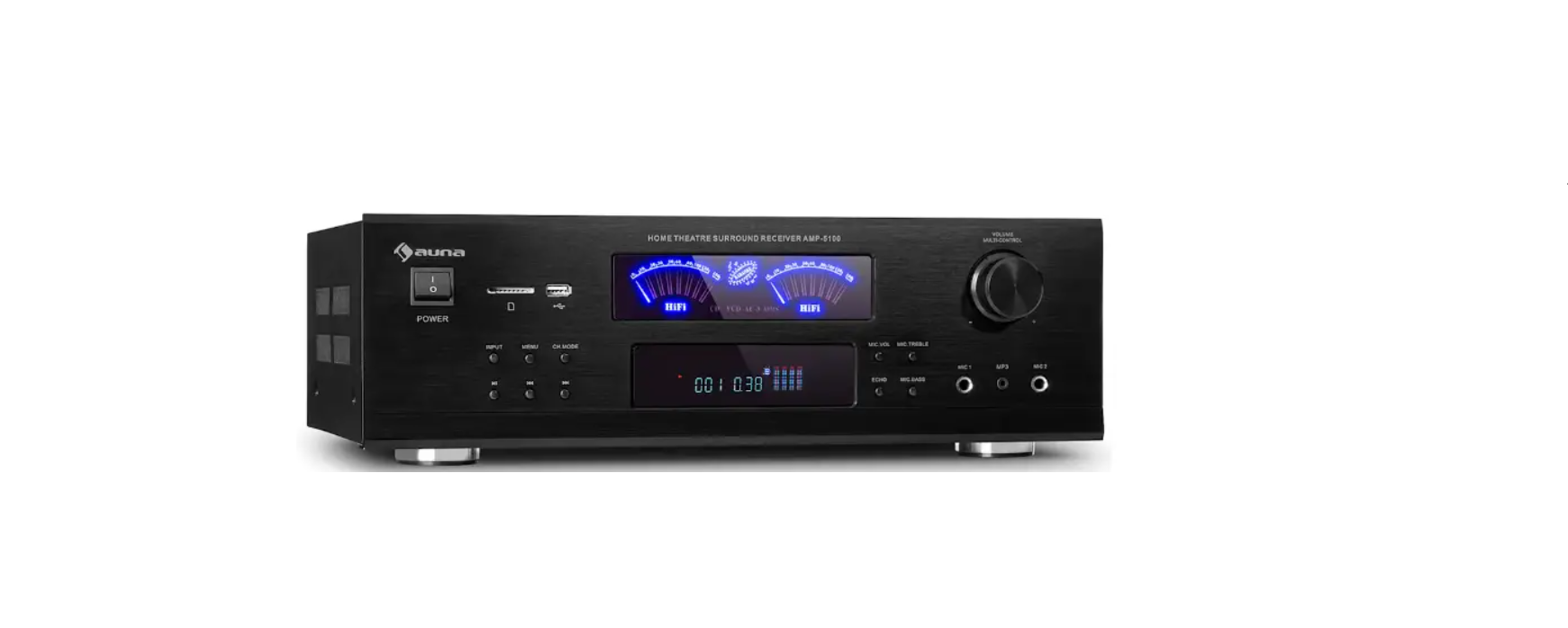

AUNA Amp-5100 BT 5.1 HiFi Amplifier
Safety Instructions
Children over the age of 8 and persons with reduced physical, sensory, or mental capabilities, or those with a lack of experience and knowledge, may only use the device if they are instructed on how to do so by a person responsible for their safety, or if they are supervised and understand the hazards associated with the use of the device.
- Keep the amplifier dry. If it gets wet, wipe immediately.
- Use the amplifier only in well-ventilated installations.
- Handle the amplifier away from dust and dirt.
- Wipe occasionally with a damp cloth to keep it looking new.
- Do not use harsh chemicals, solvents, or detergents
Features & Controls
Front
- POWER Press this switch to turn on/off the unit.
- SD CARD Connect your SD card here.
- USB Connect your USB here.
- Input: Press this button to switch among all input modes
- MENU Press this button first and use the volume knob to adjust bass. treble, balance, and main volume.
- CH.MODE Press this button to switch among preset audio outputs. Modes.
- Play/Pause Press this button to play. Press again to pause.
- Press this button to go back to the previous track.
- NEXT, press this button to go to the ext track.
- MUSIC VOLUME Use this knob to adjust the volume of the main output.
- OK VOL Use this knob to adjust the volume of the microphone.
- OK TREBLE Use this knob to adjust the treble of the microphone.
- ECHO Use this knob to adjust the echo of the microphone.
- OK BASS Use this knob to adjust the bass of the microphone.
- MIC1 Connect your microphone here.
- MP3 INPUT Connect your MP3 player here.
- MIC2 Connect your microphone here.
Back
- DVD Input: Connect your DVD player or other RCA signal source here.
- AC-3 Input: Connect your stereo signal source here.
- Sub Output: Connect this output to the passive input of the subwoofer.
- Speaker Outputs: Connect your speakers here.
Remote Control
- Play/Pause In USB/SD/Bluetooth mode, press this key to play. Press again to pause.
- Press this key to stop the playing.
- INPUT Press this key to switch among all input modes.
- Press this key to go back to the previous track or station.
- Next, press this key to go to the next track or station.
- Repeat/Random Press this key to repeat the current track.
- Press again to repeat all tracks. Press the third time to play random tracks.
- Display No function
- Master Volume Controls: Press either of these keys to increase or decrease the master volume level.
- Press either of these keys to adjust the balance of output.
- Mute Press this key to mute the output.
- Press either of these keys to increase or decrease the bass of the microphone.
- EQ MODE Press this key to switch among all preset equalization modes.
- LOUDNESS Press this key to enable loudness. Press again to disable.
- CHANNEL MODE Press this key to switch among preset audio output modes.
- SL & SR Volume Controls Press either of these keys AUNA 10034620 Bluetooth HiFi Amplifier to increase or decrease the volume of the surrounding left and right channels.
- CEN Volume Controls Press either of these keys to increase or decrease the volume of the surrounding center channel.
- SW Volume Controls Press either of these keys to increase or decrease the volume of the sub output.
- Press either of these keys to increase or decrease the treble of the microphone.
- MIC Bass Press either these keys to increase or decrease the bass of the microphone.
- MIC VOLUME Press either of these keys to increase or decrease the volume of the microphone.
- ECHO Press either these keys to increase or decrease the echo of the microphone.
- Delay Control: Press either of these keys to set the delay to the corresponding setup
BT Operation
- Press the INPUT button on the device or the remote control until the BT mode is set.
- Turn on BT on the external device.
- Search for available BT devices. Make sure that you are within the reception range. Select “Amp-5100 BT” from the list of available devices.
- If BT pairing is successful, you have established a BT connection.
- You can now play music on the external device.
Technical Data
| Item number | 10034620, 10036140 |
| Power supply | 230 V~ 50 Hz |
| RMS power | 2 x 120 W RMS + 3 x 50 W RMS |
| Storage media | USB, SD |
| BT specifications Frequency band
Maximum radio-frequency power |
2402–2480 MHz
2.3 dBm |
| Microphone inputs | 2 |
Troubleshooting
| Problem | Possible Reason | Solution |
| No sound | The sound source or speakers may not be connected properly. | Check all connections. |
| Master volume control may be set to a minimum. | Adjust the volume control to a higher setting. | |
| The speaker’s wire might be the wrong impedance. | Make sure that the speakers that you have connected to the amp are matched in impedance. | |
| The amplifier is shutting down or powering off. | Turn the amplifier off and let it cool, make sure that the amplifier is properly ventilated, and then turn it back on.. | |
| Feedback | The microphone and speakers are too close together | Reposition the microphone and speakers |
Disposal
If there is a legal regulation for the disposal of electrical and AUNA 10034620 Bluetooth HiFi Amplifier electronic devices in your country, this symbol on the AUNA Amp-5100 BT 5.1 HiFi Amplifier product or the packaging indicates that this product must not be disposed of with household waste. Instead, it must be taken to a collection point for the recycling of electrical and electronic equipment.
By disposing of it according to the rules, you are protecting the environment and the health of your fellow human beings from negative consequences. For information about the recycling and disposal of this product, please contact your local authority or your household waste disposal service.
This product contains batteries. If there is a legal regulation for the disposal of batteries in your country, the batteries must not be disposed of with household waste. Find out about local regulations for disposing of batteries. By disposing of them according to the rules, you are protecting the environment and the health of your fellow human beings from negative consequences.
Deceleration of Confirmty
- Manufacturer: Chal-Tec GmbH, Wallstrasse 16, 10179 Berlin, Germany.
- Importer for Great Britain: Berlin Brands Group UK Limited PO Box 42 272 Kensington High Street London, W8 6ND United Kingdom
- Website: use.berlin/10034620
- Tel: (01) 320-0700
Dear Customer,
Congratulations on purchasing this device. Please read the following instructions carefully and follow them to prevent possible damage. We assume no liability for damage caused by disregard of the instructions and improper use. Scan the QR code to get access to the latest user manual and more product information.