

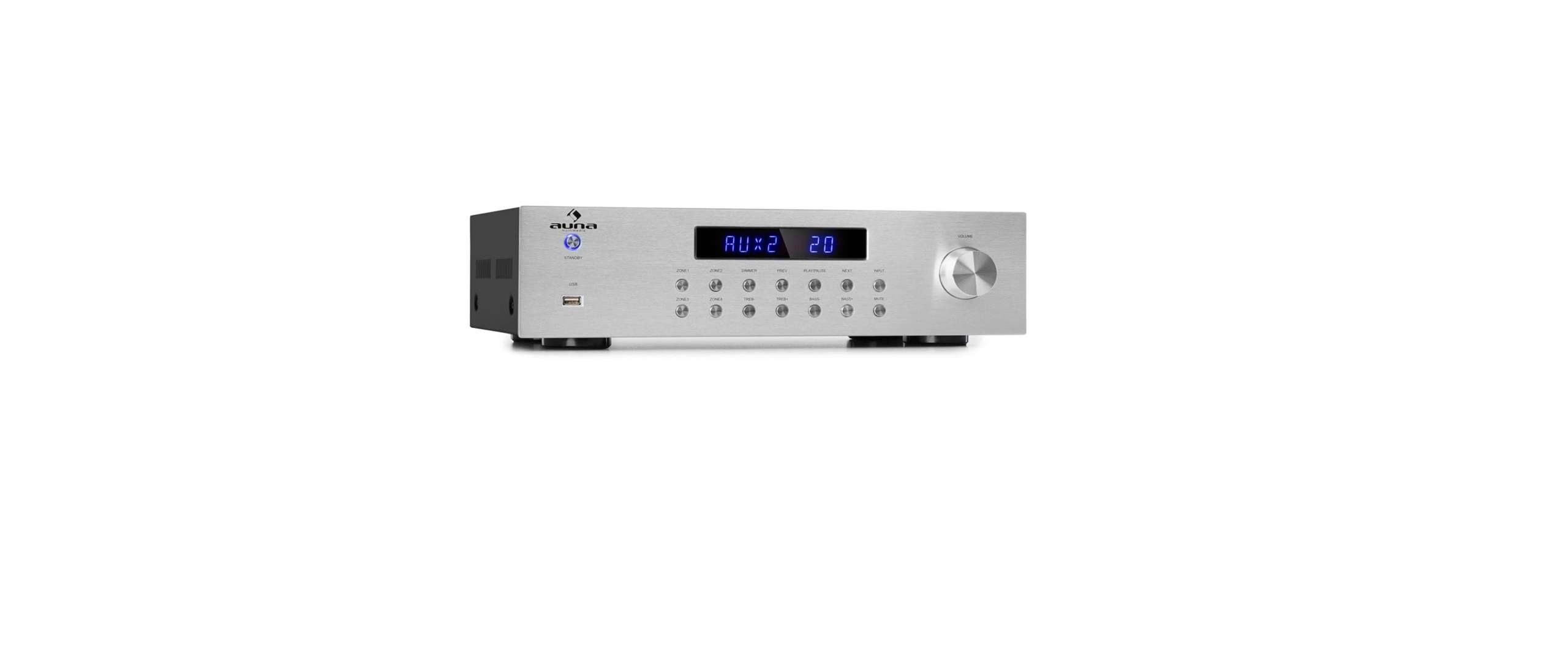

AUNA 10031404 AV2-CD850BT Avmplifier

Safety Instructions
- Observe all the instructions given in the operating instructions.
- Take care not to spill any liquid over the appliance and the appliance openings.
- Move the unit carefully so as not to damage it.
- Do not block the unit outputs.
- Do not place the unit near heat sources (e.g. heating). Do not expose the device to direct sunlight.
- Plug the power plug of the device into the mains socket.
- Insert the mains plug of the device into the socket in the intended way.
- Under no circumstances should you attempt to service or repair the device yourself.
- In this case, the warranty becomes void.
Overview & Key Function

| 1 | STANDBY | 10 | Track back – Press to go to the previous track in USB mode. If you are in BT mode, this also works for some apps. With other apps, however, it may be the case that a different playlist or music genre is displayed. |
| 2 | USB input | ||
| 3 | LED – Indicates the modes for BT, USB and AUX. Point the remote control in this direction to make the settings. | ||
| 4 | ZONE 1 – Press here to adjust the volume of the speakers for zone 1. | 11 | Treble + |
| 5 | ZONE 3 – Press here to adjust the volume of the speakers for zone 3. | 12 | PLAY/PAUSE – Plays or pauses the USB or BT source. |
| 6 | ZONE 2 – Press here to adjust the volume of the speakers for zone 2. | 14 | Title forward – Press to move to the next USB title. |
| 7 | ZONE 4 – Press here to adjust the volume of the speakers for zone 4. | 15 | BASS – |
| 8 | DIMMER | 16 | INPUT |
| 9 | Treble – | 17 | MUTE |
| 18 | Volume |
Back side

| 1. | ZONE 4: Speaker terminal (RIGHT) | 9. | REC AUDIO OUTPUT |
| 2. | ZONE 4: Speaker terminal (LEFT) | 10. | AUX3 AUDIO INPUT |
| 3. | ZONE 3: Speaker terminal (RIGHT) | 11. | AUX2 AUDIO INPUT |
| 4. | ZONE 3: Speaker terminal (LEFT) | 12. | AUX1 AUDIO INPUT |
| 5. | ZONE 2: Speaker terminal (RIGHT) | 13. | RF ANTENNA INPUT |
| 6. | ZONE 2: Speaker terminal (LEFT) | 14. | AC INPUT (230 V~,50 Hz) |
| 7. | ZONE 1: Speaker terminal (RIGHT) | 15. | ON/OFF switch |
| 8. | ZONE 1: Speaker terminal (LEFT) |
Remote control
- STANDBY
- BT BT mode
- AUX1 AUX1 select
- Number key Title selection in USB title mode
- Fast forward
- Jump back title
- Rewind
- Decrease volume
- Volume level
- TREBLE +
- Repeat (in the USB playback)
- TREBLE –
- Volume + for ZONE 1
- Volume – for ZONE 1
- Volume + for ZONE 2
- Volume – for ZONE 2
- Volume + for ZONE 3
- Volume – for ZONE 3
- Volume + for ZONE 4
- Volume – for ZONE 4
- BASS –
- DIMMER Setting the display brightness
- BASS +
- Main volume +
- Title jump forward
- PLAY/PAUSE
- DISCONNECT, press to disconnect from
- BT source.
- Select AUX3
- Select AUX2
- Switch on USB operation
- Switch on mute
- SLEEP Setting the time for standby mode. The RF remote control can control the unit from any angle and up to 25 m away.
Setup
Speaker system
- A 5-speaker system gives you a good sound field effect. The rear speakers deliver a broadly dispersed sound while the middle speakers create the feeling of being the person being addressed during a dialogue.
- Should you use only the main speakers and the rear speakers, a live feel can be created through these four speakers.
- By using the centre speakers, dialogue and voice effects can be precisely localised.
- If you want to feel low frequencies and vibrations, a subwoofer is essential.
Speaker placement
The centre speaker in the central position should AUNA 10031404 AV2-CD850BT Avmplifier be positioned higher or lower than the TV speaker to avoid interference from the magnetic field. You can also use magnet-resistant speakers.
The subwoofer can be placed anywhere, as low frequencies are not very directional. The rear speakers should be placed behind your seating position, about 2 metres above the floor.

Speaker selection
The speakers should be powerful enough. The impedance of the front speakers should be 4 Ω – 8 Ω. The impedance of the centre and rear speakers should also be 4 Ω – 8 Ω for all.
Establishing a connection
- Switch the device off immediately and pull the power plug out of the socket. Do not switch the unit on again until the connection has been successfully established.
- Make sure that all plugs are properly inserted into the connector; otherwise, the speakers may produce noise.

Connecting audio and video devices
- Connect the audio equipment with an RCA cable.
- The signal for the right speaker is connected to the input for the right speaker, and the signal for the left speaker is connected to the input for AUNA 10031404 AV2-CD850BT Avmplifier the left speaker.

Connecting the speakers
- The speakers must have the correct impedance (read “Choosing Speakers”); otherwise, they may be damaged.
- Do not let the bare speaker wires touch each other or other metal parts, as this could damage the unit or the speakers.
- Make sure that the polarity of the speaker wires is correct, “+-” to +-” and “–” to “–“. If this wiring is not followed, the sound will be unnatural and hollow.

Connection to the speaker system
Connect the speaker terminals to wires of a suitable AUNA 10031404 AV2-CD850BT Avmplifier gauge. Clamp the insulation approximately x. 10 mm above the wire. If the bare wire is loose, clamp it tight.

Operation
- Select an audio source by pressing the AUNA 10031404 AV2-CD850BT Amplifier INPUT button on the unit or the remote control. USB, BT, AUX1, AUX2, and AUX3 are set one after the other.
- Adjust the main volume on the volume control (VOLUME) (VOL +/-).
- Press the ZONE1, ZONE2, ZONE3 or ZONE4 buttons on the unit or on the remote control to adjust the volume for the respective zone.
- Press the BASS +/-, TREB +/- buttons to adjust the bass and treble.
- With MUTE on, you can mute the audio output.
Playback via USB
- Press the INPUT button until you switch to USB mode
- Use the and buttons to jump to a title. Press the button to pause or resume playback.
Pairing with BT
- Go to the BT settings of your mobile device and activate BT.
- Switch on the amplifier and set it to BT mode. The blue lettering “BT” flashes in the display to indicate that the amplifier is ready for pairing.
- Start the search for BT devices with your mobile device.
- Select the unit with the BT name “AUNA10031404” from the search results.
- Depending on the menu, select “OK” or “YES” to perform the pairing.
Technical Data
| Product code | 10031404, 10032758 |
| Power supply | 220-240 V ~ 50/60 Hz |
| Output power | 8 x 50 W RMS |
| Connections | 3 x stereo RCA AUX input
1 x REC audio output 1 x USB port 1 x RF antenna input 4 x 2 speaker terminals |
| Playable formats | MP3, WMA |
| Speaker impedance | 4 – 80 Ohm |
| BT frequency | 2402-2480 MHz |
| BT transmission power (max.) | < 20 dBm |
Troubleshooting
| Problem | Potential cause | Possible solution |
| The unit will not turn on, or there is no sound. | The mains cable is damaged, or the mains plug is not inserted in the socket. | Check the mains cable for damage or insert the mains plug into the socket. |
| The device can be switched on, but no sound can be heard. | No speakers connected. | Connect with the speaker cable. |
| The unit is muted, or the volume is at the minimum setting | Press the MUTE button or adjust the volume. | |
| The sound comes exclusively from one channel. | The connectors are not inserted correctly. | Insert the connector plugs correctly. |
| There is no sound from some zones. | The connectors are not inserted correctly. | Insert the connector plugs correctly. |
| In some zones, the volume setting is on Minimum. | Adjust the volume setting of those zones. | |
| The unit does not work properly with the remote control. | The batteries are dead. | Replace the batteries. |
| The remote control is too far away from the unit. | Move the remote control closer to the unit. | |
| There is an obstacle between the unit and the remote control. | Remove the obstacle. | |
Disposal
By disposing of it according to the rules, you are protecting the environment and the health of your fellow human beings from negative consequences. For information about the recycling and disposal of this product, please contact your local authority or your AUNA 10031404 AV2-CD850BT Avmplifier household waste disposal service.
This product contains batteries. Find AUNA 10031404 AV2-CD850BT Amplifier out about local regulations for disposing of batteries. By disposing of them according to the rules, you are protecting the environment and the health of your fellow human beings from negative consequences.
Deceleration of Confirmty
- Manufacturer: Chal-Tec GmbH, Wallstrasse 16, 10179 Berlin, Germany.
- Importer for Great Britain: Berlin Brands Group UK Limited PO Box 42 272 Kensington High Street London, W8 6ND United Kingdom
- Website: use.berlin/10034620
- Tel: (01) 320-0700