

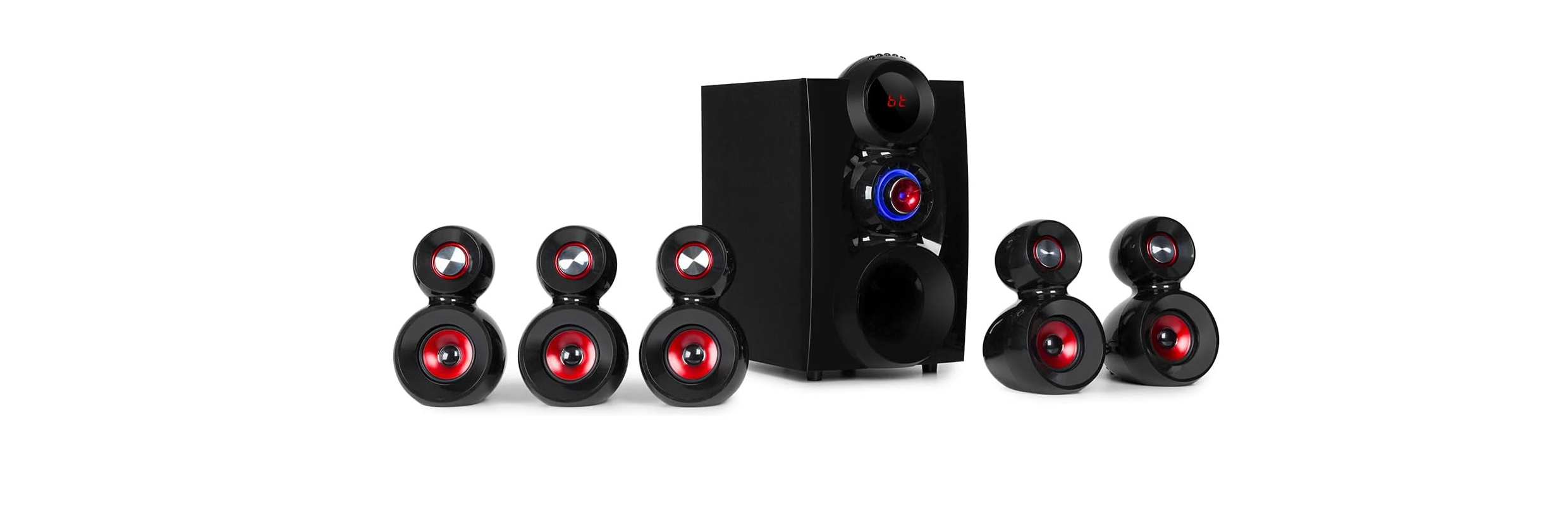

AUNA 10033070 X-Gaming 5.1 Speaker System

Safety Instructions
- Lightning – If you are not going to use the device for a long time or if there is a storm, disconnect the plug from the electrical outlet and disconnect the device from the antenna connector. This will avoid damage to the product that may be caused by lightning or overvoltage.
- Overload – Do not overload power outlets, extension cords, or built-in power outlets, as this may result in a fire or electric shock.
- Foreign objects and liquid – Never push objects of any kind through openings in the device, as they may touch dangerous voltage points or short out parts, which could result in a fire or electric shock. Never spill liquids of any kind on the device.
- Repairs and maintenance – Do not attempt to service this product yourself, as opening or removing covers will expose you to dangerous voltages or other hazards. Leave all maintenance to qualified service personnel.
- Damage requiring service – Disconnect the power plug from the outlet and consult a qualified specialist if any of the following conditions occur:
- If the power cord or plug is damaged.
- If liquid has been spilled or objects have fallen onto the product.
- If the product has been exposed to rain or water.
- If the product has been dropped or damaged.
- If the product has a markedly reduced performance.
- Replacement parts – When replacement parts are required, make sure that the service professional who replaces the parts only uses replacement parts that have been approved by the manufacturer or that have the same characteristics as the original part. Unauthorized replacement may result in fire, electric shock, or other hazards.
- Heat – Do not place the unit near heat sources such as radiators, heaters, stoves, or other products (including amplifiers).
Control Panel & Key Control

- VOLUME Turn the volume control (1) to adjust the volume.
- ST.BY/INPUT
- Standby: In AUX / USB / SD, press the button for 3 seconds to switch to standby mode. Input: Press the button to select the mode
- 5.2/2.1 Switching between 5.1 and 2.1
- Play/Pause in USB/SD mode.
- Reduce volume. Previous track in USB/SD mode.
- Increase volume. Next title in USB/SD mode.
- SD/MMC Card SD/MMC slot
- U DISK USB port
Remote Control

- Power button: Switch the device on and off
- SD SD mode
- 5.2/2.1 Switching between 5.1 and 2.1
- USB USB mode
- AUX AUX mode
- DVD DVD mode
- BT BT mode
- TUNE +/- Previous/Next station
- Play/Pause track
- Previous track (USB/SD)
- Next Title (USB/SD)
- SLEEP Setting the sleep timer
- FL +/- Adjusting the sound front left
- FR +/- Adjusting the sound front right
- SW +/- Adjusting the subwoofer
- CEN +/- Setting the center speaker
- VOL +/- Master volume
- SL +/- Left surround setting
- SR +/- Right Surround setting
- REPEAT Replay
- RESET Reset
- EQ -/+ Adjust equalizer
- DISP +/- Adjusting the display brightness
System Connection diagram
Speaker Terminals

Connect front speakers, a center speaker, and surround speakers to the 5.1 speaker output terminals:
- The front speaker cords to the FRONT SPEAKERS terminals
- The center speaker cords to the CENTER SPEAKERS terminals
- The surround speaker cords to the SURROUND SPEAKERS terminals
Connecting Equipment

- Insert the plugs fully into the jacks. Loose connections may produce a humming sound or other noise interference.
- Connect the speakers and all other external equipment, and finally connect the AC power cord.
BT Function
- Activate BT on your smart device.
- Search for the device name „X-Gaming“.
- Connect Suie to the speakers.
- If your device uses Bluetooth 0 or below, you may need to enter „0000“ as the password.
Positioning The Speaker

- Sub-woofer: Place the sub-woofer anywhere on the floor. There is no directional requirement for the Bass effect.
- Front Speakers
- Surround Speakers: Place the surround speakers directly to the side or slightly behind the listening area. Align them horizontally, about 1 meter above ear height.
- Center Speaker: Position in the center of the two front speakers or Position on or below the TV set (if connecting a TV set to the unit).
Technical Data
- Item number 10033070
- Frequency range 40Hz-20kHz
- S/N Ratio ≥75 dB
- Separation ≥50 dB
- Dimensions 8“ + 3“ x 5
- Power supply 220-240 V ~ 50/60 Hz
- BT frequency 2402-2480 MHz
- BT radio-frequency power (max.) 2.31 dBm
Disposal
By disposing of it according to the rules, you are protecting the environment and the health of your fellow human beings from negative consequences. For information on AUNA 10006791 388-BT HiFi Stereo System about the recycling and disposal of this product, please contact your local authority or your household waste disposal service.
This product contains batteries. Find out about local regulations for disposing of batteries. By disposing of them according to the rules, you are protecting the environment and the health of your fellow human beings from negative consequences.
Deceleration of Confirmty
- Manufacturer: Chal-Tec GmbH, Wallstrasse 16, 10179 Berlin, Germany.
- Importer for Great Britain: Berlin Brands Group UK AUNA 10006791 388-BT HiFi Stereo System Limited PO Box 42 272 Kensington High Street London, W8 6ND United Kingdom
- Website: use.berlin/10034620
- Tel: (01) 320-0700
FAQs
What is the AUNA 10033070 X-Gaming 5.1 Speaker System designed for?
The purpose of the X-Gaming 5.1 system is to provide gamers, moviegoers, and music lovers with immersive surround sound. It works perfectly with home theatre systems, PCs, TVs, and game consoles.
What does “5.1” mean in this speaker system?
Five satellite speakers (front left, front right, centre, rear left, rear right) and one subwoofer are referred to as “5.1.” Deep bass and directional sound cues combine to produce an immersive audio experience.
Can I connect this system directly to my PlayStation, Xbox, or PC?
Yes, the system uses a 3.5mm jack or RCA inputs to connect to the majority of PCs and game consoles. An HDMI or optical-to-RCA adapter can be necessary for more recent consoles.
Does the speaker system support Bluetooth?
No, Bluetooth connectivity is not available with the 10033070 model. This connected speaker set is perfect for gaming because it produces steady, low-latency sound.
What types of devices can I connect to the system?
Computers, gaming consoles, TVs, DVD/Blu-ray players, and any other device with RCA or 3.5mm audio output can all be connected.
Does the AUNA 10033070 come with a warranty?
Indeed, AUNA usually provides a limited warranty that covers flaws in the manufacturer. For specifics, check your user manual or merchant, since warranty terms differ by area.
Where can I find replacement cables or accessories?
Third-party audio supply stores, electronics retailers, and the official AUNA website all carry compatible cables and accessories.
Does the system support virtual surround sound or digital decoding?
No, Dolby/DTS decoding is not a feature of this system because it employs analogue surround sound. If there are just two channels available, utilise the stereo mix or make sure your source provides analogue 5.1 audio.