

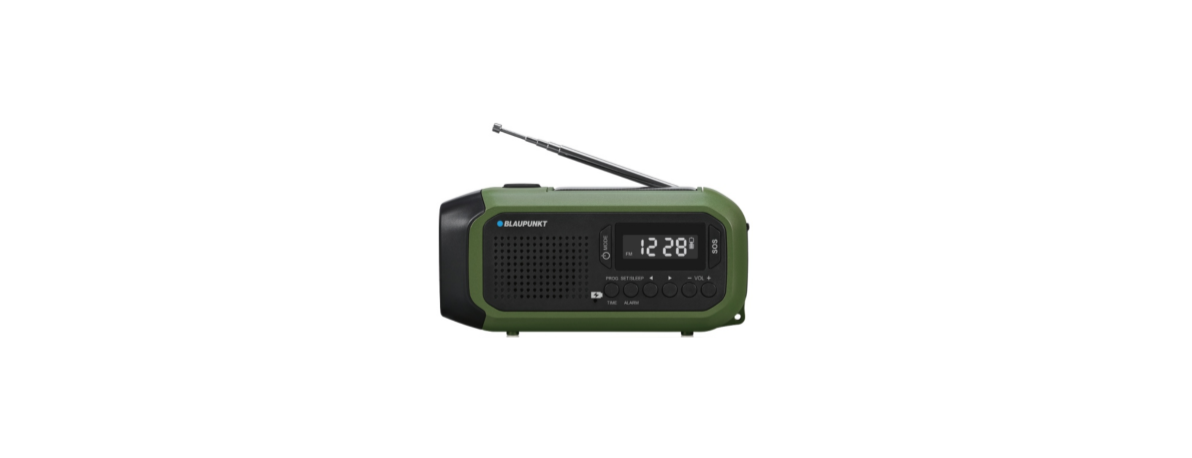

Blaupunkt ER20 Multi-functional emergency radio
Safety Instructions
- Heed warnings – All warnings on the product and in the operating instructions should be adhered to.
- Follow instructions – All operating and users’ instructions should be followed.
- Installation – Install in accordance with the manufacturer’s instructions.
- Power sources – This product should be operated only from the type of power source indicated by the marking adjacent to the power cord entry. If you are not sure of the type of power supply to your home, consult your product dealer or local power company.
- Object and Liquid Entry – Never push objects of any kind into this product through openings, as they may touch dangerous voltage points or short-circuit parts that could result in a fire or electric shock. Never spill liquid of any kind on the product. Do not place any object containing liquid on top of the product.
- Servicing – Do not attempt to service this product yourself, as opening or removing covers may expose you to dangerous voltage or other hazards. Refer all servicing to qualified service personnel.
- Replacement parts – When replacement parts are required, ensure that the service technician has used replacement parts specified by the manufacturer or have the same characteristics as the original part. Unauthorized substitutions may result in fire, electric shock, or other hazards.
- The highest environmental temperature suitable for this product is 35°C.
- ESD hints – If the product may be reset or not reset to operation of control due to electrostatic discharge, just switch off and reconnect again, or move the product to another location.
- Battery
- The batteries must not be exposed to excessive heat, such as sunshine, fire, or the like.
- The batteries should be drawn to the environmental aspects of battery disposal.
ERP2 (Energy Related Products)
This product with ecodesign complies with the stage 2 requirements of Commission Regulation (EC) NO. 1275/2008 implementing Directive 2009/125/EC regarding standby and off-mode electric power consumption of electronic household and office equipment.
Control locations
- Flashlight window
- Speaker
- Power on/off, mode button
- Program, time button
- Battery charging indicator
- Set, sleep, alarm button
- SOS alarm button
- Display
- Previous button
- Flashlight button
- Solar panel
- Reading light open up button
- Radio antenna
- Hand crank
- Battery compartment
- 5V/1A USB charge-out port
- DC IN 5V Type C port
- Rubber cap
- Next button
- Volume – button
- Volume + button
Battery power and charge the radio
The unit built-in rechargeable lithium battery. Before operating the radio, you can choose to charge the battery first.
USB power charging(DC IN 5V/1A)
Open up the rubber cap on the right side of the radio, use the supplied USB to type C power cable, connect the type C port of the unit with USB charger(USB adaptor or USB output port like on PC, USB rating output: DC5V, max 2A, other USB charger with current between 1-2A).
Then plug your USB charger into the household AC power. The battery charging LED indicator will flash in blue color, and turn to solid blue color after being fully charged. The battery charging time is about 4~5 hours based on 5V/1A input.
Hand crank charging
Pull out the crank, shake and rotate the hand joystick in a clockwise or counterclockwise direction can generate electricity and charge the battery. The battery charging LED indicator will light up in blue during charging.
Continue to shake the hand crank for 3~5 minutes (total equal or above 360 rounds), the generated power can support around 30 minutes for radio playback at a middle volume level, or 30~40 minutes for flashlight illumination.
The illuminated brightness may become weak slowly due to battery power close to drain. You can choose to do hand crank charging and illumination at the same time. Solar panel charging: the built-in battery can be charged from the solar panel when you place the unit under the direct sunlight; the battery charging LED will light up in blue color during charging.
Please remember to peel off the protective film from the solar panel before charging. Depending on the weather, the battery will be full after around 60 hours of continuous charging based on solar atmospheric mass AM1.5, light intensity 1000W/m2, and temperature 25℃.
Battery power level
You can reference the battery icon in the top right corner of the display to understand the battery power level status. The icon probably cannot provide feedback on the power status with accuracy due to the virtual power property of the battery. And it is approximate data only.
Radio operation
Before listening to the radio, please fully extend the antenna and try to move the unit next to the window in order to receive the signal better. Long-press (3seconds)the power button to power on or off the unit. Press the mode button to switch between the FM and AM radio modes. Press the volume +/- button to adjust the output volume.
Tune the radio
Long-press the program button can scan and save the available stations automatically (max. 50 preset stations for FM, and 20 preset stations for AM). Press the previous and next buttons to switch the preset station, long-press it to scan the available stations in an upward or downward frequency. Press the set button till the frequency flashes on the display first, then press the previous or next button to subsequently adjust and tune the radio step by step by MHz.
Keep it a while, the unit will exit the manual tuning mode. When you tune a favorite station, sshort-pressthe the program button first, press the previous or next button to select the desirable preset station number, short-press the program button again, then the current station will be manually saved. The radio shows a preset station only. The operation of AM radio is similar to FM.
Flashlight and reading light
Long-press the flashlight button to turn on the light, short-press it repeatedly to switch the mode between high beam/low beam/ far and low beam/ flashing light, and off. Push the reading light open up button to unfold the solar panel can turn on the LED light automatically. Fully folding the solar panel can turn off the reading light. The illuminated brightness may become weak slowly when the battery power is close to drained.
SOS alarm
Long-press (3seconds) the SOS button can turn on the alarm voice and flashing light at the same time for emergency, short-press it again to turn off.
Clock time
Long-press (3seconds) the power button to power off and enter to clock time interface. Long-press the time button to start the clock settings. Press the previous and next buttons to adjust the hour, press the time button again to skip to the minute setting.
Press the previous and next buttons to adjust the minute, and press the time button to confirm and exit the settings. The clock display will auto off after 2 minutes. Pressing the power button briefly can check the clock time again, and light up for another 2 minutes.
Alarm setting
In clock time mode, long-press (3seconds) the alarm button to activate the alarm settings. Press the previous and next buttons to adjust the hour, press the time button again to skip to the minute setting. Use the same method to set up rest settings for alarm source(buzz and radio) and alarm volume(5~30 level). Press the alarm button to finish and exit the settings.
Pressing the alarm button can turn the alarm on or off. The radio will wake up and increase the alarm’s volume gradually when the alarm time is approaching. Press the power button to cancel the alarm voice, and the unit will wake up again the coming of next day.
Pressing any other button(except the power/SOS button) on the front panel can activate the snooze function. The alarm will wake up again after 9 minutes till you press the power button to exit the snooze. The alarm duration time is 30 minutes, and off automatically.
Specification
- Power source: DC IN 5V/1A, type C.
- FM frequency: 87.5~108.0MHz.
- AM frequency: 522~1620KHz.
- USB charge output: 5V/1A
- Rechargeable battery: 3.7V/2000mA.
- Battery charge time: 4~5 hours(approx.)
- Battery power playback time: 10~15hours, depending on volume level.
- Output power: 0.8W, RMS
- Solar panel size: 68 * 26mm.
- Water poof: IPX4
- SOS alarm: 110dB
- Reading light: 0.8W
- Flashlight: 0.8W
- Power consumption: 8W
- Standby power consumption: <0.5W (above spec may update without prior notice.)
Troubleshooting
- The radio cannot turn on
- Please check and try to turn the volume knob on in order to power on the unit.
- Please recharge the unit in case of low battery power.
- 2. Background noise on the radio station.
- Please try to adjust the direction of the antenna for better reception.
- Please try to adjust and tune the radio frequency Blaupunkt ER20 Multi-functional emergency radio slowly
Environmental information
All unnecessary packaging has been omitted. We have tried to make the packaging easy to separate into three materials: cardboard (box), polystyrene foam(buffer), and polyethylene (bags, protective foam sheet). Your system consists of materials that can be recycled and reused if disassembled by a specialized company.
Please observe the local regulations regarding the disposal of packaging materials, exhausted batteries, and old equipment. Recording and playback of material might require consent. See Copyright Act 1956 and The Performer’s Protection Acts 1958 to 1972.
Many thanks for selecting our model. Please read and reference this manual carefully before operating the unit. Please keep the manual for future operation reference. This Blaupunkt ER20 Multi-functional emergency radio product includes below main features.
- PLL AM/FM radio to get the real-time emergency broadcasting news.An An
- SOS alarm provides a distress signal to get help in a dangerous situation.
- Built-in flashlight and reading light provide Blaupunkt ER20 Multi-functional emergency radio illumination in the dark.
- Solar panel and a hand crank to generate power for charging the battery.
- USB charging out supports (power bank) for other devices.
- IPX4waterprooff.
- DC 5V type C charging-in port.
- Clock time and alarm/snooze function.
Customer Support
- WhatsApp: 9156910994
- Toll Free: 1800 209 6820
- Email: support@blaupunktcar.in
FAQs
Can I leave the ER20 in the sunlight for charging all the time?
Yes, but extended exposure to intense heat or sunlight might shorten battery life. When not in use, store in a cool, dry location and use sun charging when necessary.
Can I use the ER20 while it’s charging?
Yes, but if the battery is too low, performance can suffer. Before using the torch or radio, let it charge for a few minutes for optimal performance.
Is the ER20 waterproof?
Depending on the model, the ER20 may be splash-resistant but not waterproof. Avoid being in the rain or the water.
Can I replace the battery?
In the majority of devices, the built-in lithium-ion battery cannot be replaced. If battery performance noticeably declines, get assistance from Blaupunkt or a qualified technician.
Does the ER20 remember radio stations?
No. The ER20 does not save stations because it employs analogue tuning. Every time you turn it on, you’ll have to manually tune it.
Can I play music from my phone using the ER20?
No. The ER20 is not an audio receiver or Bluetooth speaker. Its USB port isn’t for audio input; it’s just for charging.
Is the flashlight adjustable or focusable?
Although the built-in torch is fixed-focus, depending on the model, it may have several brightness settings, including low, high, and strobe.
How long will the ER20 hold its charge in storage?
A full charge can last three to six months while not in use; however, in order to maintain battery health, it is advised to recharge it every ninety days.