



Hayward Pool Rx LT Intelligent Regulator
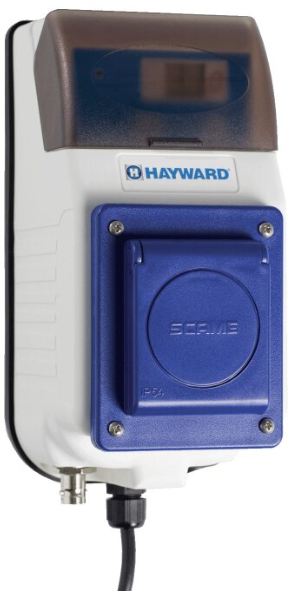
Safety Instructions
- Ensure that children cannot play with the device. Keep your hands and any foreign objects away from openings and moving parts.
- Check that the supply voltage required by the product corresponds to the voltage of the distribution network and that the power supply cables are suitable for the product’s power supply.
- Chemicals can cause internal and external burns. To avoid death, serious injury, and/or damage to equipment, wear personal protective equipment (gloves, goggles, mask, etc.) when servicing or maintaining this device. This device must be installed in an adequately ventilated place.
- To reduce the risk of electric shock, do not use an extension cable to connect the device to the mains. Use a wall socket.
- Carefully read the instructions that appear in this manual and on the device. Failure to comply with the instructions can cause injuries.
Features
- Power Supply 220-240 Vac
- Display 4 digits with 7 segments
- BNCnc connection for probe Redox/ORP
- Switch 3 position Priming, ON, Stand by
- Dry contact relay, please look at the label on the product
- Measure Range Redox/ORP: 400÷999 mV (resolution: 10 mV)
- Dosage method ON-OFF ( Set Point adjustable)
- Calibration method Redox/ORP 1 Point (465 mV)
SWITCH POSITION
- Normal position: the instrument measures Redox and dosing. (Switch position ON)
Press and hold the CAL key for 5 seconds to run the calibration menu: - Redox probe: the pump displays C465 press CAL key and wait 60 seconds. Displays quality probe ex: C100 Press the button SET to stop the calibration. Press pressed SET key until the flashing Setpoint value and press again to increase the value.
- Stand by position “The pump is stopped” (Switch position OFF)
Press the CAL key for 3 seconds to run the Setup menu: Redox setup menu: Adjust dosage method High (“Hi”) or Low (“Lo”).
Customer Service
- Ph: 1-800-657-2287
- Website: www.haywardcommercialpool.com
FAQs
What is the Hayward Pool Rx LT Intelligent Regulator?
With little assistance from a human, the Pool Rx LT is an autonomous water chemistry regulator that keeps track of and maintains pool sanitiser levels, guaranteeing balanced water quality.
Which chemicals does the Pool Rx LT regulate?
In order to maintain the ideal sanitiser concentration, the system usually controls chemical feed pumps or other devices to manage the quantities of chlorine or bromine.
How does the Pool Rx LT monitor pool chemistry?
In order to maintain water balance, it automatically modifies chemical feed rates and uses in-line sensors to continuously measure sanitiser levels.
How do I calibrate the sensors?
Comply with the calibration instructions in the handbook, which usually call for reference solutions and control panel adjustments.
. How often should sensors be cleaned?
The frequency of sensor cleaning varies depending on the water conditions, but it usually happens every two to four weeks or whenever the system signals sensor fouling.
Can the Pool Rx LT work with all pool types?
It works with the majority of pools, including conventional chlorine and saltwater pools. Verify compatibility with the chemistry configuration of your pool.